


















Sim
What is Sim?
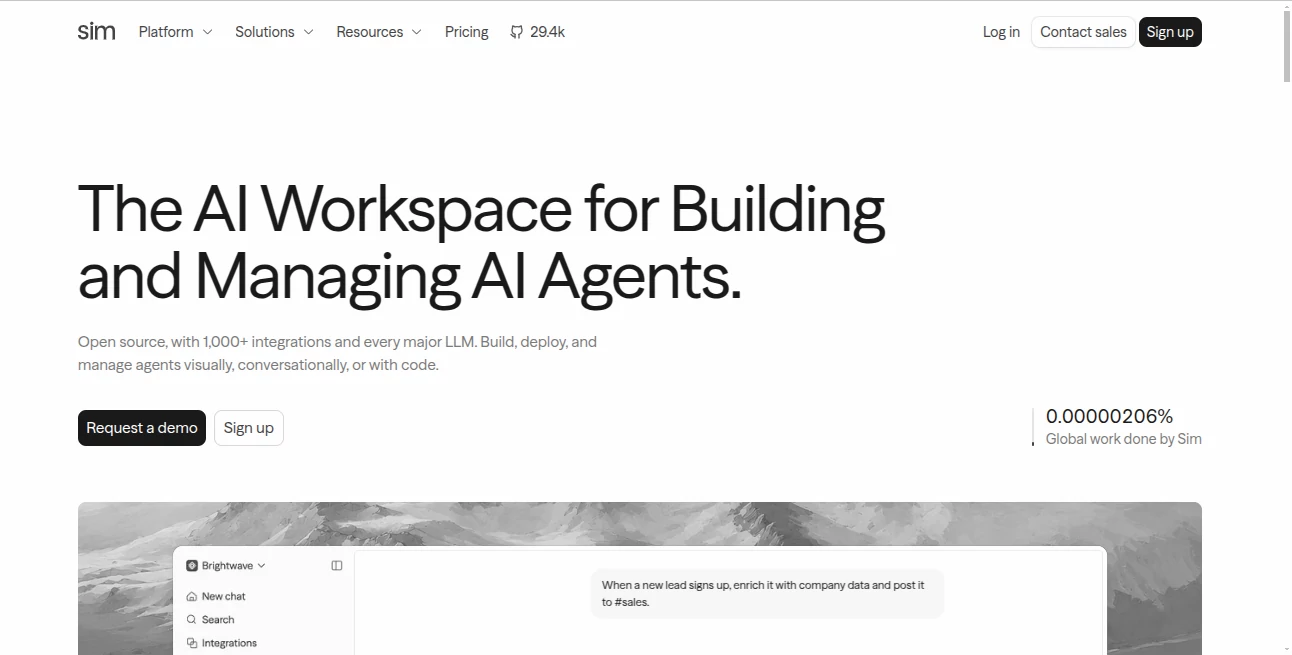
Sim is an open-source AI workspace designed for teams that want to build, deploy, and manage AI agents without stitching together a collection of separate platforms. It brings visual workflows, AI models, integrations, data, automation, deployment, and monitoring into one environment.
What makes the platform particularly interesting is the flexibility in how a workflow can be created. Users can describe an automation in plain language, build it visually by connecting blocks, or use code when more precise control is needed. This makes it useful for both technical teams and people who prefer a more visual approach to automation.
Instead of treating an AI agent as nothing more than a chatbot, the platform approaches it as part of a larger workflow. An agent can receive information, reason about it, use connected tools, access company data, perform actions, and pass its results to the next step. That opens the door to practical automations such as lead enrichment, customer support, document processing, research, reporting, and internal operations.
Key Features
- Visual AI workflow builder for connecting models, tools, triggers, and actions.
- Natural-language workflow creation that can turn a plain-English description into a working workflow.
- AI agent blocks that can reason, use tools, and work with information supplied by the workflow.
- More than 1,000 integrations covering productivity, communication, development, databases, search, and business services.
- Support for major AI model providers as well as local models through supported infrastructure.
- Knowledge bases, tables, and files that provide agents with structured and searchable context.
- API, chat, scheduled-job, and other deployment options for putting workflows into real applications.
- Detailed execution logs and traces that make it possible to inspect what happened during a workflow run.
- Open-source architecture with self-hosting available for teams that want greater control over their infrastructure.
User Interface
The interface is built around a workspace rather than a single chat window. Users can work with workflows, tables, knowledge bases, files, integrations, and other resources from the same environment. The visual workflow builder provides a clear representation of how information moves from one step to another, which is especially helpful when an automation becomes more complicated.
The conversational approach is another useful part of the experience. Instead of manually creating every component from scratch, a user can describe what should happen and then inspect and refine the resulting workflow. For someone building an automation for the first time, that can make the initial setup considerably less intimidating.
Accuracy & Performance
Performance depends partly on the AI models, integrations, and workflow design being used, but the platform provides useful visibility into execution. Each workflow run can be traced block by block, allowing teams to see what ran, what data was passed between steps, and where a problem occurred.
The workflow engine can also execute independent blocks concurrently rather than forcing every operation to happen sequentially. Branching, loops, parallel execution, and workflow-to-workflow calls provide additional control for more advanced automations.
For production workflows, this level of observability is important. If an automated process handles customer requests or business data, simply receiving an answer is not enough; being able to understand how that answer was produced can make troubleshooting much easier.
Capabilities
The platform can be used to create AI assistants, research systems, customer-support automations, data-processing pipelines, API-driven services, and internal business workflows. An agent can search information, communicate through connected services, work with files, query structured data, and trigger actions.
For example, a sales workflow could receive a new lead, enrich the company's information, evaluate its suitability, prepare a personalized message, and send the result to a sales channel. A document workflow could accept a PDF, extract relevant information, process it with an AI model, and store the structured output in a table.
Developers are not restricted to visual blocks either. Code blocks, an API, and an SDK provide a path to more customized implementations when a visual workflow is not enough.
Security & Privacy
Security requirements become especially important when AI agents interact with business systems and private information. The platform provides workspace-based resources, credentials, execution logs, and enterprise-oriented controls. Its website also states that the service is SOC 2 compliant.
Self-hosting is another important option. Teams can deploy the open-source version on their own infrastructure, giving them additional control over where the application and associated data operate. Local AI models can also be connected through supported tools, which can be useful for organizations with stricter infrastructure requirements.
Use Cases
Customer Support: Build agents that receive customer questions, search internal knowledge, check connected systems, and prepare or send appropriate responses.
Lead Enrichment: Automatically collect company information, score potential customers, prepare personalized outreach, and pass qualified leads to a CRM or sales channel.
Document Processing: Extract information from invoices, reports, forms, and other files before storing the results in structured tables or business systems.
Research: Create workflows that search the web, gather information, analyze sources, and produce structured research reports.
Business Automation: Connect email, communication platforms, databases, CRM systems, and other services so repetitive tasks can happen automatically.
Internal AI Assistants: Combine company documents, knowledge bases, tables, and AI agents to create assistants that work with organization-specific information.
Developer Workflows: Expose workflows through APIs, connect external services, use code where required, and build AI-powered functionality into existing applications.
Pros and Cons
- Pros: Open-source foundation, visual workflow builder, natural-language workflow creation, extensive integrations, support for major AI providers, API and SDK access, self-hosting, knowledge bases, structured data tools, and detailed execution monitoring.
- Pros: The combination of visual building and coding makes it suitable for teams with different technical backgrounds.
- Pros: Agents can do more than generate text because they can use tools and interact with external systems.
- Cons: Complex workflows can still require an understanding of automation logic, data flow, APIs, and AI behavior.
- Cons: Usage-based credits and model costs should be considered when running workflows at significant scale.
- Cons: Some advanced enterprise capabilities are reserved for higher-tier plans.
Pricing Plans
A free plan is available for getting started, with paid plans aimed at teams that need higher usage and additional capacity. The current Pro plan is listed at $25 per user per month when billed monthly, while the Max plan is listed at $100 per user per month. An Enterprise option is available with custom pricing for larger organizations.
The Free plan includes 1,000 monthly credits, while Pro includes 6,000 and Max includes 25,000. Storage, concurrency, API endpoints, workspaces, tables, and other limits increase as the plan level rises. Annual billing is also available with a stated discount.
Because workflow usage can vary significantly depending on the models and number of executions involved, teams should evaluate their expected workload rather than looking only at the subscription price.
How to Use It
Start by describing the automation you want to create in plain language. For example, you could ask for a workflow that receives a new customer inquiry, checks a knowledge base, prepares a response, and sends a notification to a team channel.
Review the generated workflow and open the visual builder to adjust its logic. Add or remove blocks, configure integrations, connect an AI agent, provide relevant data, and define the conditions that determine what happens next.
Once the workflow behaves as expected, run tests and inspect the execution logs. This is a good opportunity to identify missing information, incorrect branches, unexpected model responses, or integration problems.
When everything is ready, deploy the workflow according to your needs. Depending on the scenario, it can be exposed through an API, used through a chat interface, connected to an external service, or scheduled to run automatically.
Comparison with Similar Tools
Many AI automation products focus on one particular part of the process, such as prompt building, chatbot creation, or connecting conventional applications. This platform takes a broader approach by combining agent construction, workflow orchestration, data resources, integrations, deployment, and observability.
Compared with a traditional no-code automation tool, it places much more emphasis on AI agents and reasoning. Compared with a developer-only framework, it provides a visual workspace where the logic can be inspected and modified without writing every component manually.
That combination is its strongest differentiator. A technical user can move into code when necessary, while another team member can understand the same system through the visual workflow. For organizations building several AI-powered processes, having these approaches available in one workspace can reduce the need to maintain disconnected tools.
Conclusion
For teams looking beyond simple AI chatbots, this platform offers a practical environment for turning AI models into useful business processes. The visual workflow builder makes complex logic easier to understand, while natural-language creation lowers the barrier to getting started. Developers still have access to code, APIs, and an SDK when deeper customization is required.
The combination of 1,000+ integrations, AI agents, knowledge bases, tables, files, deployment options, monitoring, and self-hosting makes it particularly appealing for organizations experimenting with AI automation or moving existing agent projects toward production.
It is not a magic button that removes the need for workflow design, testing, or oversight. But for teams willing to invest a little time in understanding how their automations should work, it provides a strong foundation for building AI systems that can actually perform useful work.
Frequently Asked Questions (FAQ)
What is this platform used for?
It is used to build, deploy, and manage AI agents and automated workflows. These workflows can connect AI models with business tools, data sources, files, APIs, and other services.
Does it require coding experience?
No. Workflows can be created through natural-language instructions or a visual builder. Developers can also use code blocks, an API, and an SDK for advanced requirements.
How many integrations are available?
The platform advertises more than 1,000 integrations, including services for communication, productivity, development, databases, search, and business operations.
Can AI agents use company data?
Yes. Workflows can work with tables, files, and knowledge bases, allowing agents to retrieve relevant information and use it as context when completing tasks.
Can workflows be deployed as APIs?
Yes. Workflows can be deployed as API endpoints, making it possible for external applications and services to trigger AI-powered processes.
Is self-hosting available?
Yes. The open-source version can be self-hosted, giving teams more control over their deployment environment. Local AI models can also be connected through supported infrastructure.
Is there a free plan?
Yes. A free plan is available with a monthly credit allowance and limits on resources such as storage, concurrency, and workspaces.
Which AI models are supported?
The platform supports multiple major AI providers and also allows supported local models to be connected. Bring-your-own-key configurations are available for supported providers.
AI Workflow Management , AI No-Code & Low-Code , AI API Design , AI Developer Tools .
These classifications represent its core capabilities and areas of application. For related tools, explore the linked categories above.

Sim Alternatives Product

Miro

LocaFlow

Lovable APP

Mage Flow AI…

Ito AI

Tate-A-Tate

Scillus

Wplace Live
Website Clon…
