
Slidee
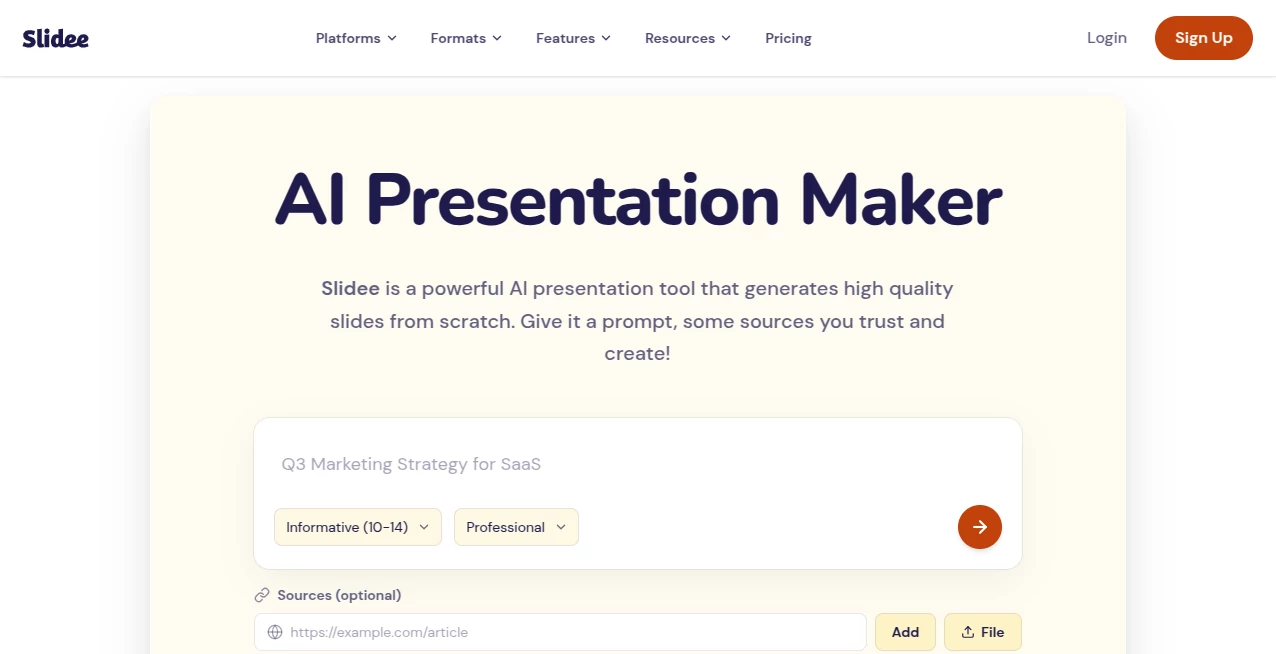
What is Slidee?
We’ve all been there—staring at a blank slide, trying to figure out how to structure our thoughts. It’s frustrating, time-consuming, and honestly, it kills creativity before it even gets a chance to breathe. That’s where this platform steps in to change the game entirely. Instead of wrestling with templates and formatting, you get to focus on what truly matters: your message. This tool takes the heavy lifting off your shoulders, turning rough notes or a simple prompt into a visually compelling deck within seconds. I recently used it for a quarterly business review, and what usually takes me half a day was wrapped up during my coffee break. The output was so clean that my team thought I’d hired a designer.
Key Features
What makes this platform stand out isn’t just automation—it’s how smart the automation actually feels. It doesn’t just dump text onto slides; it understands context, suggests layouts, and adapts to your brand style seamlessly.
User Interface
You don’t need a manual to figure this out. The dashboard is refreshingly minimal. Everything is drag-and-drop, but honestly, you’ll barely need to drag anything because the AI does the arranging for you. The color schemes are modern, the font pairings look professional, and switching between edit modes feels instant. No lag, no clutter—just a clean workspace that lets you move fast.
Accuracy & Performance
This is where the tool really earns its keep. When you feed it a block of text or a bullet-point list, it doesn’t just split it into three random slides. It identifies key themes, extracts action items, and even suggests where to put visuals. I threw in a messy meeting transcript once, and the platform correctly flagged the main decisions and action owners. Performance-wise, generating a 15-slide deck takes under a minute. No spinning wheels or timeout errors—just reliable speed when you’re in a rush.
Capabilities
Beyond basic slide generation, you get access to a library of dynamic charts, image matching from free stock sources, and even export options like PowerPoint, PDF, or Google Slides. It also supports team collaboration, so multiple people can tweak the deck in real time. The AI can rephrase clunky sentences, resize elements for different aspect ratios (handy for social snippets), and remember your brand colors for every new project.
Security & Privacy
Worried about uploading sensitive business data? They use enterprise-grade encryption for all files and presentations. Your content isn’t used to train public models unless you explicitly opt in. Plus, there are granular sharing permissions—you can let someone view a deck without giving them edit access, or allow comments without download rights.
Use Cases
This isn’t just for corporate folks. Teachers use it to build lesson plans with visual aids in minutes. Freelancers create client proposals that actually look like they hired an agency. Students turn research papers into presentation-ready formats without pulling all-nighters. Even marketers prepare pitch decks for campaigns—the AI suggests relevant charts and mockups that align with your text. One user mentioned building a 40-slide investor deck over the weekend and getting funded the next week. Coincidence? Probably. But the deck definitely didn't hold them back.
Pros and Cons
Pros:
- Saves hours of manual formatting and design work.
- Intuitive enough for beginners, powerful enough for pros.
- Output looks polished—no generic “template” vibes.
- Real-time collaboration features are smooth.
- Exports maintain high resolution and editability.
Cons:
- The free tier limits you to a handful of exports per month.
- Occasionally suggests images that are slightly off-topic (but you can swap them easily).
- Advanced chart customization requires a few extra clicks compared to desktop software.
Pricing Plans
There’s a free plan that lets you test the core generation engine with watermarked exports. The Pro tier unlocks unlimited exports, brand kit features, and priority support—it runs about $15 per month when billed annually. The Team plan adds centralized billing and advanced collaboration at $25 per user per month. For enterprises, custom pricing includes API access and SSO. Honestly, even the free version gives you enough to see if it fits your workflow.
How to Use Slidee.ai
Getting started takes under two minutes. First, sign up with an email or Google account. Next, click “New Presentation” and choose your starting point: you can paste a document, write a prompt like “pitch deck for a fitness app,” or upload an existing outline. The AI then asks a couple of quick questions about your audience and tone (formal, casual, persuasive). After that, hit generate—and watch the slides appear in real time. From there, you can tweak any slide manually, swap themes with one click, or add extra sections by typing “/” on your keyboard. When you’re done, export in your preferred format. The whole flow is so straightforward that my dad—who still prints emails—used it without help.
Comparison with Similar Tools
Most presentation tools either give you static templates or require you to build from scratch. A few AI alternatives exist, but they often feel robotic—sentences come out awkward, layouts break when you edit them, or the design options look dated. This platform feels different because it prioritizes readability and visual hierarchy. Compared to a well-known competitor like Tome, this one offers deeper export controls and better team features. Against Gamma, it provides more flexible editing after generation. It’s not trying to replace PowerPoint entirely; it’s trying to make you faster inside whatever ecosystem you already use. And in that regard, it wins.
Conclusion
If you still think making presentations has to be painful, try this once. It won’t just save you time—it’ll improve the quality of your communication. When the layout looks professional and the flow makes sense, your audience pays more attention. And isn’t that the whole point? Whether you’re closing a deal, teaching a class, or sharing a project update, this tool makes sure your ideas get the spotlight they deserve—not your struggles with alignment and bullet points.
Frequently Asked Questions (FAQ)
Does it work offline?
Currently, you need an internet connection because the AI processing happens on their servers.
Can I import my existing PowerPoint files?
Yes. You can upload PPTX files, and the AI can reformat them using your brand kit or suggest improvements.
Is there a mobile app?
Not yet—but the web version works perfectly on tablets and phone browsers for viewing and minor edits.
What happens to my data if I cancel my subscription?
You can export all your presentations before canceling. They keep your files for 30 days after cancellation, then delete them permanently.
Does it support languages other than English?
Yes. It works with Spanish, French, German, Chinese, Japanese, and about 15 other major languages. The design engine adjusts for text length variations automatically.
AI Design Assistant , AI Content Generator , AI Productivity Tools , AI Presentation Generator .
These classifications represent its core capabilities and areas of application. For related tools, explore the linked categories above.

Slidee Alternatives Product

Image2GPT

MikeSullyToo…

ReportMaker.…

Nova AI
Krea2 Edit

Slackactivity

Hairstyle An…

Caspian

SupaTraffic