
SlidesGo
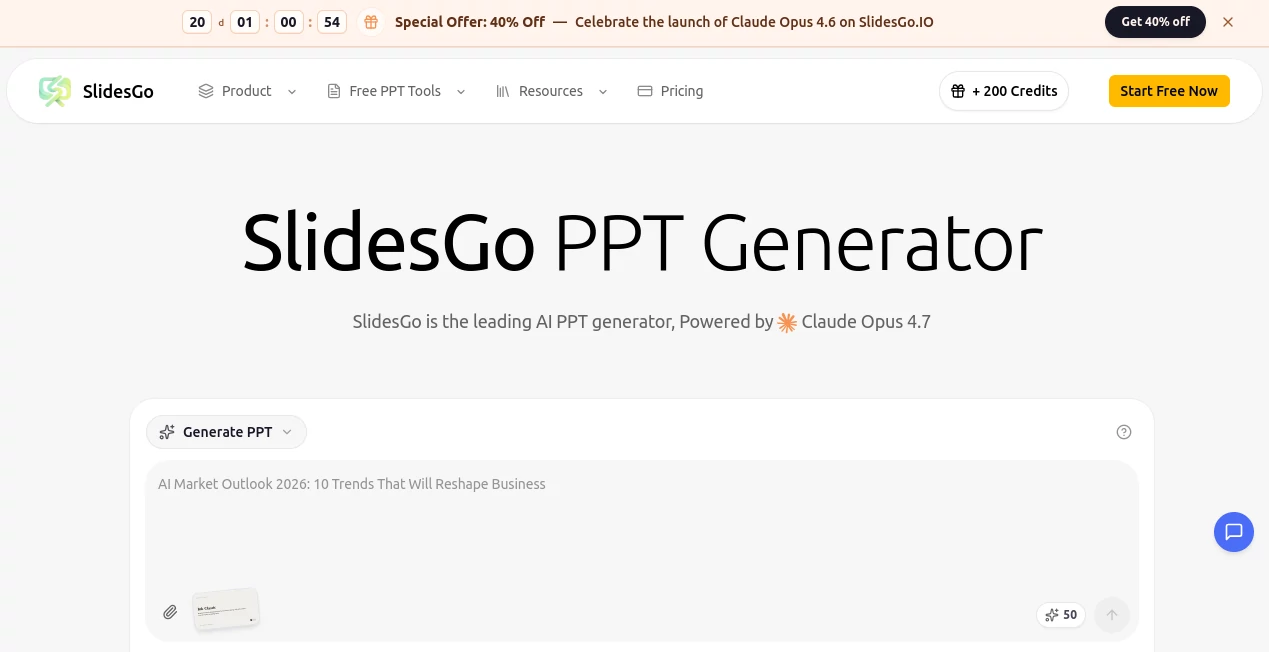
What is SlidesGo?
I still remember the first time I opened a presentation that actually looked good without me spending three hours tweaking fonts and colors. That moment of relief is what Slidesgo delivers consistently. Whether you're a student rushing a project, a teacher preparing a lesson, or a professional pitching to clients, this platform gives you polished, modern templates that look like they came from a design agency—but without the agency price tag or the learning curve. The best part? It feels like someone finally understood that not everyone wants to become a designer just to make a decent slide deck.
Introduction
Creating presentations used to mean fighting with clunky software, stealing layouts from old files, or settling for boring defaults. Slidesgo changes that story. It offers thousands of carefully designed templates for PowerPoint and Google Slides, plus growing AI features that help you generate entire presentations from a simple prompt. What started as a beautiful template library has evolved into a complete companion for anyone who needs to communicate ideas clearly and attractively. Teachers use it for engaging lessons, marketers for client pitches, and students for projects that actually impress. The quality is consistently high, and the selection is wide enough that you rarely walk away empty-handed.
Key Features
User Interface
The website is refreshingly clean and fast. You land on a homepage filled with gorgeous previews, search by topic or style, and click straight into a template. Editing feels natural whether you're in PowerPoint or Google Slides—everything is pre-organized with master slides, color palettes, and icons that match. No steep learning curve. Even if you're in a hurry, you can pick a template, swap the text, change a few colors, and be ready to present in minutes rather than hours.
Accuracy & Performance
The templates are thoughtfully built. Typography is balanced, spacing is professional, and visual hierarchy actually guides the eye where it should go. AI-generated presentations (when available) produce coherent structure instead of random bullet points. Loading is quick, downloads are reliable, and compatibility with both PowerPoint and Google Slides is solid. You rarely run into broken layouts or mismatched fonts—the attention to detail shows.
Capabilities
Beyond static templates, you get full editable decks with icons, infographics, maps, charts, and modern layouts for every occasion: business pitches, educational lessons, creative portfolios, medical reports, marketing plans, and more. Many templates include animated elements that work smoothly. The growing AI assistant can generate slide outlines or full decks from a topic description, saving even more time. Everything is royalty-free for personal and most commercial uses, with clear licensing that doesn't tie you in knots.
Security & Privacy
Your uploaded content stays yours. The platform doesn't claim ownership of what you create, and downloads are direct without forced accounts for basic use. It's built with respect for creators—whether you're a student protecting a thesis or a company preparing confidential pitches.
Use Cases
A university professor turns a dry research topic into an engaging lecture that keeps students awake. A startup founder creates a pitch deck that actually looks premium without hiring a designer. A marketing team builds consistent brand presentations in half the usual time. A high school student submits a history project that stands out from the usual bullet-point disasters. The common thread is confidence—walking into a room knowing your slides support you instead of embarrassing you.
Pros and Cons
Pros:
- Design quality is genuinely high—modern, clean, and professional.
- Huge variety across industries and use cases.
- Excellent Google Slides and PowerPoint compatibility.
- Time-saving AI features for faster creation.
- Generous free options that actually feel useful.
Cons:
- Some premium templates require a subscription for full access.
- AI generation is still growing and works better for certain topics.
- Very niche or highly specialized presentations may need manual tweaking.
Pricing Plans
The free tier is surprisingly generous—you get access to hundreds of quality templates without paying anything. Premium unlocks the full library, exclusive designs, AI generation credits, and commercial usage rights. Pricing is reasonable for individuals and teams, especially when you calculate the hours saved and the professional impression gained. Many users find the upgrade pays for itself after just a couple of important presentations.
How to Use Slidesgo
Browse or search for a template that matches your topic and style. Click to open it in Google Slides or download for PowerPoint. Replace the placeholder text and images with your own content. Tweak colors or fonts if needed using the built-in theme options. Add, remove, or reorder slides as your story requires. When it feels right, export or present directly. The whole process is intuitive enough that most people get comfortable after their first or second use.
Comparison with Similar Tools
While other template sites often feel dated or overly corporate, Slidesgo stands out with fresh, contemporary designs that don't look templated. Many competitors offer fewer options or lower quality. The combination of beautiful aesthetics, strong AI support, and ease of use across both major presentation platforms gives it a clear edge for everyday users who want results that look expensive without the hassle or cost.
Conclusion
Presentations don't have to be painful or ugly. Slidesgo makes them something you can actually feel good about sharing. It respects your time, elevates your ideas, and removes the biggest barriers between thinking of what to say and showing it beautifully. Whether you're a student, teacher, founder, or professional, having access to this kind of quality at your fingertips changes how you communicate. And in a world full of mediocre slides, that difference is worth celebrating.
Frequently Asked Questions (FAQ)
Are the templates free to use?
Many are completely free. Premium templates and advanced features require a subscription.
Do they work with Google Slides?
Yes—most templates are optimized for both Google Slides and PowerPoint.
Can I use them commercially?
Yes, with the appropriate plan. Always check the specific license for each template.
How good is the AI presentation generator?
It's very helpful for structure and starting points, especially for standard topics. You’ll still want to personalize the content.
Is there a limit on downloads?
Free users have generous daily limits. Premium removes restrictions for heavy users.
AI Content Generator , AI Design Generator , AI Presentation Generator .
These classifications represent its core capabilities and areas of application. For related tools, explore the linked categories above.

SlidesGo Alternatives Product

SnapVee Stud…

URL2Pin

SEOBlogger AI
Nano Banana …

Claude Desig…
Album Cover …

Top AI Writi…

GPTIMG2 AI
world