
Stampdy
What is Stampdy?
Creating a professional stamp used to mean opening a design program, finding the right dimensions, adjusting circular text by hand, and often sending the result to someone else for printing. Today, that process can be much simpler. Stampdy brings stamp creation directly into the browser, giving users a practical way to design custom stamps without installing software or having previous design experience.
The platform is built for both everyday users and professional workflows. A small business can create a company seal, a freelancer can prepare a signature stamp, a teacher can make a school stamp, and an office worker can prepare a received or approval mark in just a few minutes. The free online editor does not require registration for basic stamp creation, which makes it particularly convenient when a stamp is needed quickly.
What makes the service more interesting is the combination of traditional editing tools with AI-assisted generation. Instead of starting from an empty canvas, users can describe the stamp they want and let the AI produce a starting design. Those who prefer manual control can then fine-tune the shape, text, border, colors, spacing, and other details.
Key Features
- AI-assisted stamp generation from natural-language descriptions.
- Multiple stamp shapes including circles, squares, triangles, rectangles, and oval layouts.
- Editable templates for business, company, bank, medical, school, wedding, notary, government, and other stamp styles.
- Custom text placement for center content, outer rings, dates, names, addresses, and other information.
- Logo and image uploads for branded stamp designs.
- Adjustable fonts, spacing, alignment, rotation, borders, colors, and sizing.
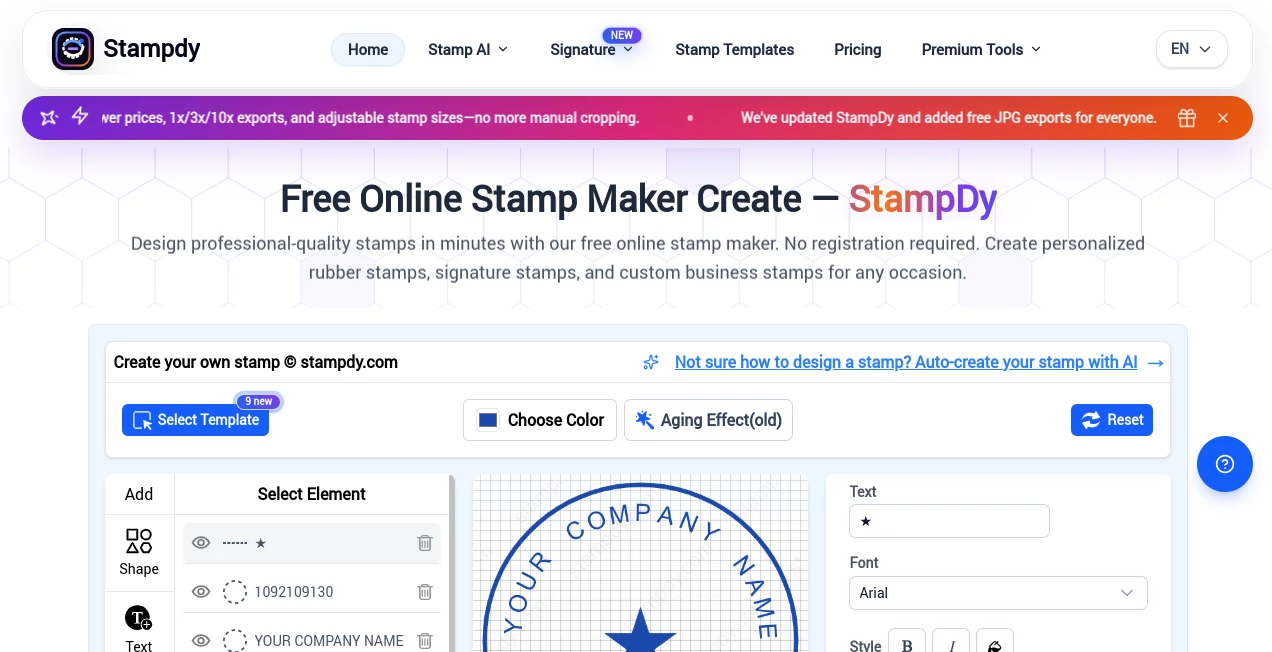
- Real-time previews while editing a design.
- Export options including PNG, JPG, SVG, EPS, PDF, and DOCX.
- Browser-based project saving for designs that need to be edited again later.
- Additional tools for cropping, rotating, resizing, extracting, and preparing existing stamp artwork.
User Interface
The editor is designed around a straightforward workflow rather than a complicated collection of design panels. Users can begin with a template or create a stamp from scratch, select the desired shape, enter their text, add an image or logo, and adjust the appearance while watching the result update.
The layout is especially useful for people who do not normally work with graphic design software. There is no need to understand layers, vector paths, or complicated document settings before getting started. The controls focus on the things that actually matter for a stamp: shape, text, borders, size, alignment, color, and visual balance.
The interface is also designed to work across desktop and mobile devices. A desktop screen is more comfortable when precise positioning is required, but the ability to make quick changes from a phone can be useful when a document or business asset needs attention away from the office.
Accuracy & Performance
For conventional stamp creation, the biggest advantage is the immediate visual feedback. Changes to text, dimensions, positioning, and other elements can be reviewed before exporting, reducing the chance of discovering a spacing problem after the file has already been downloaded.
The AI generator adds another layer of convenience. The platform reports a first-shot quality rate of 99.2% for common office stamp layouts and an average rendering time of around six seconds. These figures are presented by the service itself, so they should be viewed as product-reported performance rather than an independent benchmark.
The AI workflow is particularly useful for layouts involving circular text, balanced borders, symbols, and formal-looking arrangements. Instead of repeatedly rebuilding those elements manually, a user can start with a generated concept and make the final adjustments in the editor.
Capabilities
The platform goes beyond creating a simple image of a stamp. Users can work with company seals, signature stamps, address stamps, date stamps, logo stamps, notary-style designs, school stamps, medical layouts, corporate marks, and many other practical formats.
The AI generator allows users to describe the desired result and specify elements such as shape, stamp type, style, border, color, text, year, and symbols. A reference template can also be used as inspiration for a new design. This is helpful when the user already knows the general appearance they want but does not want to reconstruct it manually.
There is also a useful collection of supporting tools. Existing stamp artwork can be uploaded, cleaned, cropped, rotated, resized, or converted into a more suitable format. SVG artwork can be brought into the editor, while stamp colors and backgrounds can be adjusted for different applications.
For document workflows, the service also includes PDF editing and stamp placement. A finished stamp can be positioned, resized, and rotated inside a PDF before the document is exported. This creates a convenient bridge between designing the mark and actually using it.
Security & Privacy
For users handling business documents, privacy is an important consideration. The service provides browser-based stamp creation and does not require an account for its basic single-stamp purchase workflow. Subscription users can also access saved designs through the platform's library features.
Users should still avoid treating a stamp as a replacement for legally required authentication. A digital stamp can visually represent an organization, person, or workflow, but whether it has legal significance depends on the document, organization, and jurisdiction involved.
For electronic signing workflows, the platform provides additional features such as signing records, completion certificates, activity audit trails, and SHA-256 PDF hashes. These features are more relevant to document-signing workflows than ordinary stamp design, but they make the platform more useful for businesses handling documents from creation through approval.
Use Cases
Small businesses: Create company seals, approval stamps, invoice marks, address stamps, and branded packaging stamps without waiting for a designer.
Freelancers: Prepare a professional signature stamp or personal business mark for proposals, invoices, reports, and digital documents.
Offices: Create consistent received, approved, paid, dated, or department-specific stamps for recurring administrative work.
Notaries and legal workflows: Build formal-looking layouts with circular text, borders, names, and other structured information. Users should always verify local requirements before using a design for an official purpose.
Schools and teachers: Create stamps for certificates, student documents, classroom paperwork, library materials, or administrative forms.
Medical offices: Prepare practical stamp layouts for routine paperwork, office records, and document identification.
Branding and packaging: Create logo-based marks for envelopes, boxes, labels, packaging, and other physical materials.
Personal projects: Wedding monograms, bookplates, personal seals, creative labels, and decorative marks can also be created without professional design software.
Pros and Cons
- Pros: Free basic online stamp creation, no registration required for basic use, AI-assisted generation, editable templates, multiple export formats, real-time editing, mobile-friendly workflow, logo uploads, PDF integration, and a wide selection of practical stamp layouts.
- Pros: The combination of AI generation and manual editing is useful because users are not forced to accept the first generated result.
- Pros: Single-use purchasing makes the service practical for someone who only needs one professional stamp.
- Cons: The AI generator is more specialized for stamp layouts than for general-purpose graphic design.
- Cons: Users who need extremely detailed vector artwork may still prefer dedicated professional design software for the final stage.
- Cons: Official or legal stamps may require specific dimensions, wording, symbols, or registration requirements that no automatic generator can determine universally.
Pricing Plans
The pricing structure is designed to accommodate both occasional users and people who create stamps regularly. A single-use option starts at $2.50 for a PNG export. Higher single-use packages provide additional formats, with the full PNG, JPG, SVG, EPS, PDF, and DOCX package listed at $3.50.
The 30-day unlimited plan is listed at $19.90 per month, with a promotional price of $15.90 per month shown on the pricing page. It includes unlimited stamp creation and downloads, premium tools, multiple export formats, 100 AI credits per month, a personal library, PDF editing, and up to 30 signature requests per month.
For users who need long-term access, a lifetime stamp plan is listed at $299 as a one-time payment. It includes unlimited stamp creation and downloads, permanent editor access, the available export formats, library functionality, PDF editing, and priority technical support.
The pricing model is appealing for occasional work because users do not necessarily need to commit to a recurring subscription just to create one stamp. At the same time, frequent users can choose an unlimited plan when repeated stamp creation makes a subscription more practical.
How to Use It
Start by choosing whether you want to create a stamp manually or use the AI-assisted workflow. If you already have a clear idea, select a suitable shape or template and begin editing the design.
For AI generation, describe the stamp you need in simple terms. Include important details such as the shape, main text, desired style, color, and any symbol that should appear in the design. Keeping the description focused usually makes it easier to evaluate the first result.
After the initial design is created, review the typography, spacing, borders, symbol placement, and overall proportions. If the stamp will be physically manufactured, check everything at the intended print size rather than judging it only on a large screen.
When the design is ready, choose the appropriate export format. PNG or JPG can work well for everyday digital documents, while SVG, EPS, or PDF are more suitable when the artwork will be passed to a professional printer, engraver, or manufacturer.
If the stamp needs to appear on a PDF, open the PDF editor, place the design on the document, adjust its size and position, and export the finished file. This makes the process useful for both creating the stamp and preparing documents that contain it.
Comparison with Similar Tools
Many online stamp makers focus almost entirely on a basic template editor. That approach works when the user already knows exactly what to build, but it can feel limiting when the desired layout is less obvious.
This platform takes a broader approach by combining templates, manual editing, AI-assisted generation, image handling, multiple export formats, and PDF-related features. Someone who simply needs a basic round stamp can use the conventional editor, while someone who wants help developing a layout can begin with an AI-generated concept.
The strongest distinction is the workflow rather than any single feature. A user can generate an idea, refine it manually, export it for production, and then use the resulting mark inside a PDF. For small businesses and individuals who would otherwise switch between several applications, that can make the process considerably more convenient.
Conclusion
Stampdy is a strong choice for anyone who wants to create professional-looking digital stamp artwork without dealing with traditional graphic design software. Its combination of AI generation, editable templates, manual controls, multiple export formats, and PDF tools gives it a practical edge for everyday business and personal tasks.
The AI functionality is especially useful as a starting point. Instead of expecting artificial intelligence to solve every detail perfectly, users can treat the generated design as a first draft and then refine the important elements themselves. That balance between automation and control makes the workflow feel more useful than a simple one-click generator.
For an occasional user, the low-cost single export option is an attractive way to create one stamp without signing up for a long-term plan. For businesses and frequent users, the unlimited and lifetime options provide a broader workflow with additional tools. Overall, it is a convenient solution for turning a stamp idea into a usable digital asset with very little friction.
Frequently Asked Questions (FAQ)
Can I create a stamp without registering?
Yes. The basic stamp creation workflow can be used without registration, and the single-use export option does not require an account.
Can AI create my stamp design?
Yes. The AI generator can create a stamp from a written description. Users can specify the shape, type, style, border, color, and exact content before generating the design.
Can I upload my company logo?
Yes. Logos and images can be uploaded and incorporated into custom stamp designs. Keeping the logo simple and readable is recommended when the final stamp will be physically small.
What file formats are available?
Depending on the selected workflow and plan, exports include PNG, JPG, SVG, EPS, PDF, and DOCX. The AI-only generator produces transparent PNG artwork, while the standard editor provides the broader set of export formats.
Can I put the stamp on a PDF?
Yes. The integrated PDF editor allows users to place a stamp on a document, adjust its size and position, and export the completed PDF.
Can I use the generated design for physical stamps?
Yes. Files such as SVG, EPS, and PDF can be useful for professional printing, engraving, or stamp manufacturing. The final dimensions and technical requirements should always be confirmed with the manufacturer.
Is the AI generator suitable for company seals?
It can create company-seal-style layouts and other formal designs. However, organizations should verify their local rules and required information before using any generated design as an official seal.
Does it work on mobile devices?
Yes. The service is designed to work in a browser on mobile devices as well as desktop computers. A larger screen is generally more comfortable when precise alignment is required.
Can I edit a stamp after creating it?
Yes. The editor provides controls for changing text, fonts, spacing, borders, colors, dimensions, rotation, and other visual elements. Subscription users can also save designs in the library for later use.
AI Illustration Generator , AI Design Generator , AI Graphic Design , AI Logo Generator .
These classifications represent its core capabilities and areas of application. For related tools, explore the linked categories above.

Stampdy Alternatives Product

ai banana

AI Image Edi…

MakeMyOC

Ernie Image

grok images

Kynelio

claude image
AI Floor Pla…

LogoAI