
StudioEditor.io
What is StudioEditor.io?
StudioEditor is a free browser-based audio editor and recorder designed for podcasters, interviewers, creators, news teams, and educators who want to record, clean up, edit, and export audio without installing desktop software. Its biggest strength is the way traditional audio editing is combined with practical AI-powered processing, so users can spend less time dealing with technical details and more time preparing content for publication.
The platform supports recording directly in the browser, timeline-based editing, audio mixing, speech enhancement, automatic removal of long pauses, transcription, subtitles, and episode summaries. A free account is required to use the full editor, save projects, record, and export finished audio. New accounts also receive 60 processing credits that can be used for features such as speech enhancement, tightening, transcription, and subtitles.
Key Features
- Browser-based audio recording without installing software
- Timeline editing for cutting, arranging, and adjusting recordings
- Automatic speech enhancement for cleaner and more balanced voice recordings
- Auto Tighten Speech for reducing unnecessary dead air
- AutoDuck for balancing speech, music, and sound effects
- AI-assisted transcription and subtitle generation
- Editable transcripts directly in the browser
- Subtitle and transcript exports in SRT, VTT, PDF, Word, and plain text formats
- Automatic podcast episode summaries and descriptions
- Free recording, editing, and finished-audio exports
User Interface
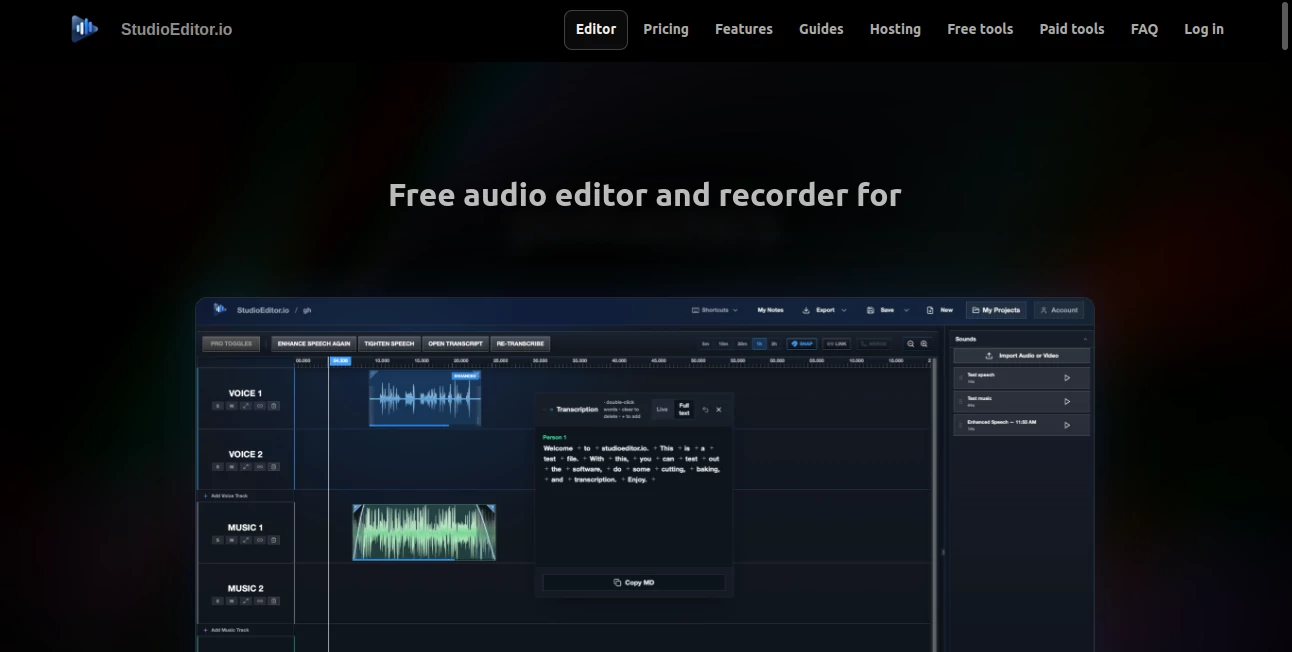
The interface is built around the timeline, which makes the editing process feel familiar even for users who are not professional audio engineers. Instead of forcing creators through a complicated production workflow, the editor keeps recording, cutting, arranging, and mixing close at hand.
That simplicity is particularly useful when working with interviews or podcast recordings. A creator can record in the browser, remove unwanted sections, tighten pauses, balance background audio, and prepare the final file without moving between several different applications.
Accuracy & Performance
The platform focuses on practical audio processing rather than loading the editor with unnecessary controls. Auto Tighten Speech is designed to shorten dead air while keeping conversations natural, which is useful for long interviews where pauses can otherwise make the final recording feel slow.
Speech enhancement is another useful part of the workflow. It is intended to make spoken recordings cleaner and more evenly leveled, helping creators turn an ordinary voice recording into something more suitable for publishing.
Transcription and subtitle generation are also available as processing features. The resulting text can be edited in the browser and exported in several common formats, giving users more flexibility when repurposing spoken content.
Capabilities
The platform covers much more than basic recording. Users can import audio, cut and rearrange sections on a timeline, mix speech with music and effects, and use AutoDuck to help manage the balance between different audio elements.
For podcast production, the workflow becomes even more useful because transcription, subtitles, and episode summaries are available alongside editing. Instead of treating the finished recording as the end of the process, creators can turn the same audio into supporting written content and publishing assets.
Security & Privacy
Because recording and editing take place through a browser-based service, users should review the platform's current privacy and data-handling policies before uploading sensitive recordings. This is particularly important for interviews, private meetings, client conversations, or educational material containing confidential information.
For ordinary podcast production, public interviews, voice recordings, and creator content, the browser workflow offers a convenient alternative to installing a traditional desktop audio application.
Use Cases
Podcasters can use the platform to record episodes, remove unnecessary pauses, improve spoken audio, mix background music, and prepare transcripts and subtitles. The automatic episode summary can also provide a useful starting point for an episode description.
Interviewers can benefit from the combination of browser recording, timeline editing, speech enhancement, and transcription. Long conversations can be cleaned up without manually searching through every silent section.
Content creators can use it to prepare voice recordings for videos, educational content, social media projects, and other digital media. Teachers and educators can also turn recorded lessons or discussions into editable transcripts and subtitle files.
News and media teams may find the workflow useful when speed matters. Recording, editing, transcription, and export can all happen within the same environment, reducing the need to move audio between several applications.
Pros and Cons
- Pros: Free recording and timeline editing, browser-based workflow, automatic speech enhancement, pause tightening, transcription, subtitle generation, AutoDuck mixing, and episode summaries.
- Pros: New accounts receive 60 processing credits, giving users an opportunity to test the AI-assisted processing features.
- Pros: Transcripts and subtitles can be exported in multiple useful formats.
- Cons: A free account is required for recording in the full editor, saving projects, and exporting finished audio.
- Cons: AI processing features use credits rather than being completely unlimited.
- Cons: Users looking for an advanced professional DAW may still want more specialized production controls.
Pricing Plans
The core editor is available for free, including recording, timeline editing, and finished-audio exports. Users need a free account to access the full editor, save projects, record, and export their work.
AI-assisted processing uses credits. New accounts currently receive 60 credits that can be used for speech enhancement, speech tightening, transcription, and subtitle generation. This model makes the basic editing workflow accessible while reserving credits for processing tasks that require additional analysis or transformation.
How to Use StudioEditor
Start by creating a free account and opening the browser-based editor. You can record directly through your browser or import an existing audio file. Once the recording is available on the timeline, cut unwanted sections, rearrange clips, and adjust the audio as needed.
For spoken recordings, use speech enhancement when the voice needs cleaning or leveling. Auto Tighten Speech can help reduce long pauses without making a conversation sound unnaturally chopped up. If your project includes music or effects, AutoDuck can help manage the relationship between speech and background audio.
When the recording is ready, generate a transcript or subtitles if needed. The text can be edited in the browser and exported as SRT, VTT, PDF, Word, or plain text. For podcast episodes, the summary feature can also create a starting point for an episode description.
Comparison with Similar Tools
Traditional desktop audio editors generally provide a deeper collection of manual production controls, making them attractive to experienced sound engineers. However, they can also require installation, configuration, and a longer learning curve.
Browser-based audio platforms tend to prioritize speed and accessibility. This solution stands out by combining a conventional timeline editor with automated speech processing, transcription, subtitles, and podcast-oriented summaries. For a creator who mainly works with spoken audio, that combination can be more convenient than switching between a recording application, audio editor, transcription service, and writing tool.
It is therefore best suited to users who value a streamlined workflow rather than an extensive studio environment filled with specialized audio-production controls.
Conclusion
For podcasters, interviewers, educators, and creators, this platform offers a remarkably practical way to handle spoken-audio production from a browser. Recording and editing are available without the cost and complexity normally associated with professional audio software, while automated processing adds useful shortcuts for cleaning recordings and preparing them for publication.
The combination of speech enhancement, automatic pause tightening, AutoDuck mixing, transcription, subtitles, and episode summaries makes it more than a simple recorder. It provides a compact workflow for turning raw conversations into polished, publishable content, with the added benefit of free core editing and 60 processing credits for new accounts.
Frequently Asked Questions (FAQ)
Is StudioEditor free to use?
Yes. Recording, timeline editing, and finished-audio exports are available as part of the free editor. A free account is required for the full editing workflow.
Can I record audio directly in my browser?
Yes. The platform allows users to record directly in the browser without installing additional software.
Does it support automatic transcription?
Yes. Transcription is available as a processing feature, and generated transcripts can be edited directly in the browser.
Can I create subtitles?
Yes. The platform can generate subtitles and supports exports including SRT and VTT, along with PDF, Word, and plain-text formats.
Can it improve voice recording quality?
Yes. The speech enhancement feature is designed to make voice recordings cleaner and more evenly leveled.
Can it remove long pauses automatically?
Yes. Auto Tighten Speech can automatically shorten dead air while aiming to preserve a natural conversational rhythm.
Can it create a podcast summary?
Yes. The platform can generate an episode summary and description that can serve as a starting point for publishing a podcast.
Does it require software installation?
No. The main editor works directly in the browser, making it possible to record and edit without installing a desktop application.
What are the 60 credits for?
New accounts receive 60 processing credits for features such as speech enhancement, automatic tightening, transcription, and subtitle generation. The basic editor itself is free.
Who is this tool best suited for?
It is particularly useful for podcasters, interviewers, content creators, educators, and media teams that work primarily with spoken audio and want recording, editing, enhancement, transcription, and publishing preparation in one workflow.
AI Transcription , AI Speech to Text , AI Voice & Audio Editing .
These classifications represent its core capabilities and areas of application. For related tools, explore the linked categories above.
StudioEditor.io details
Website unavailable — View Alternatives
Pricing
- Freemium
Apps
- Web App
Categories

StudioEditor.io Alternatives Product

Lyrics to So…
TranscribeYT

Chatterbox T…

YTVidHub-you…

Speech Text

Voice To Ins…
Transcribe A…
Voza Transcr…

Sourcetable