
SummarizeVideoToText
What is SummarizeVideoToText?
I used to open a two-hour lecture, drag the scrubber around for twenty minutes, and still miss the one definition I actually needed. Then I started pasting the link instead. Within seconds I had a clean summary, timestamped chapters, the full transcript, and a mind map that showed the whole argument at a glance. Suddenly the video stopped feeling like a time sink and started feeling like a source I could actually work with. That small shift changed how I study, research, and even prepare content.
Introduction
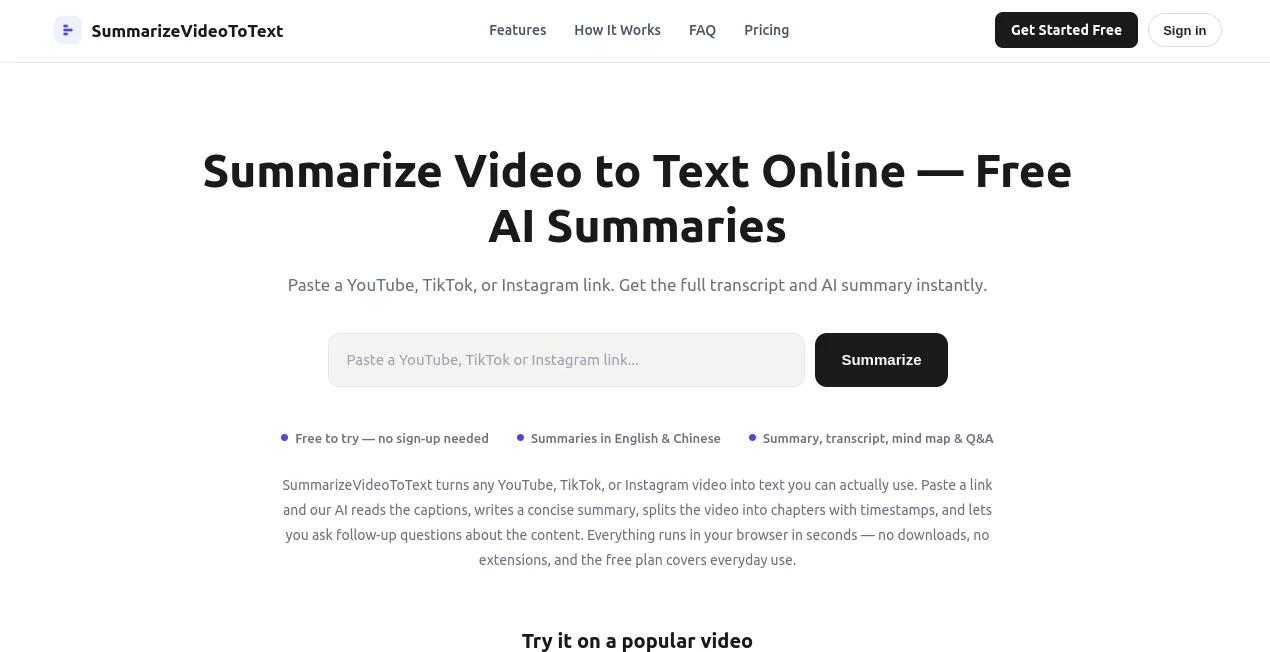
Videos hide information behind a play button. A long talk, a recorded meeting, or a podcast episode uploaded to YouTube can take an hour to watch, yet the useful parts often live in just a few minutes. This tool turns that problem around. Paste a YouTube, TikTok, or Instagram link and it pulls the captions, writes a clear AI summary, breaks the content into chapters with timestamps, builds an interactive mind map, and lets you ask follow-up questions about anything that was said. Everything happens in the browser. No downloads, no extensions, and a free tier that covers everyday use. It is the difference between rewatching and actually understanding.
Key Features
User Interface
The page stays refreshingly simple. One big input box sits at the top. Paste a link, hit summarize, and the workspace appears: summary streaming in on one side, transcript on the other, chapters listed with clickable timestamps, a collapsible mind map, and a Q&A panel. Nothing feels buried or over-designed. You can jump straight to a chapter, copy a section, or ask a question without hunting through menus. Even the first-time experience feels calm and obvious.
Accuracy & Performance
Summaries are built from the actual captions of the video, not from vague topic guesses. The full transcript sits right next to the summary, so you can verify any claim with one click on a timestamp. Most videos finish processing in well under a minute. Results are cached, which means revisiting a video you already summarized never costs extra quota and loads almost instantly. The combination of speed and grounding in real captions makes the output feel trustworthy rather than approximate.
Capabilities
You get a concise overview, key insights, chapter-by-chapter breakdowns, the complete transcript, an interactive mind map, and a built-in Q&A assistant that answers only from the transcript itself. Output language can be English, Chinese, or others, independent of the language spoken in the video. It handles regular YouTube uploads, Shorts, live-stream replays, TikTok videos, and Instagram content. Long lectures automatically receive more chapters; short talks get fewer. You can copy the summary, the chapter list, or the full transcript with one click.
Security & Privacy
The tool only uses a Google account (if you sign in) to track daily quota and watch history. It does not store the videos themselves and does not track you across other sites. Transcripts come from publicly available captions. That light footprint keeps the experience private while still giving you the convenience of saved results and higher daily limits.
Use Cases
Students turn a two-hour recorded lecture into a chapter list and summary before an exam, then search the transcript for the exact definition the professor used. Professionals skip rewatching the all-hands recording or conference keynote, skim the key points in a minute, and share the summarized link with teammates who missed it. Creators pull transcripts from competitor videos or their own past uploads to extract arguments worth responding to and outline new scripts from the chapter structure. Researchers mining long interviews find the one crucial exchange buried inside three hours of audio, cite it with a timestamp, and move on without listening at double speed. In each case the tool turns passive watching into active, searchable knowledge.
Pros and Cons
Pros:
- Works instantly from a simple link with no account required for basic use.
- Delivers summary, transcript, chapters, mind map, and Q&A in one workspace.
- Grounded in real captions, so the summary stays faithful to what was said.
- Supports multiple languages for output regardless of the video’s spoken language.
- Cached results mean you can reopen past summaries without using more quota.
Cons:
- Requires captions or auto-generated captions to work; pure audio without any captions cannot be processed yet.
- Free daily limits apply, though they are generous for most individual users.
- Very long videos (beyond free-tier limits) need a higher plan once Pro becomes available.
Pricing Plans
You can summarize two videos a day (up to fifteen minutes each) without creating an account. A free Google sign-in raises the limit to ten summaries a day, allows videos up to one hour, unlocks TikTok and Instagram support, saves watch history, and enables the Q&A panel. Revisiting any video you have already summarized never counts against the quota because results are cached. A Pro plan without daily limits is planned for heavier users who need longer videos or higher volume. The free tier already covers most everyday lecture, meeting, and research needs.
How to Use Summarize Video to Text
Copy a YouTube, TikTok, or Instagram link and paste it into the box at the top of the page. Choose your preferred output language if needed, then press Summarize. Within seconds the summary begins streaming, followed by key insights, timestamped chapters, the full transcript, a mind map, and the Q&A panel. Click any chapter timestamp to jump the player to that moment. Ask questions in the Q&A box about anything mentioned in the video. Copy the text you need or share the link so others can open the same cached result instantly. That is the entire workflow — three steps from link to usable text.
Comparison with Similar Tools
Many video summarizers either force you to upload files, limit you to YouTube only, or deliver a basic summary without chapters or interactive features. This one stands out by accepting multiple platforms, giving you a full workspace (summary plus transcript plus mind map plus Q&A), and keeping everything grounded in the actual captions. The free tier is more generous than most, and the caching system means you never pay twice for the same video. It feels less like a one-off converter and more like a practical research companion.
Conclusion
Video is everywhere, but time is not. Turning a long recording into searchable, structured text lets you decide quickly what deserves your full attention and what you can skip. This tool makes that conversion fast, accurate, and free for everyday use. Whether you are a student racing toward an exam, a professional catching up on meetings, a creator researching scripts, or a researcher mining interviews, it quietly removes the friction that used to come with video. Once you try pasting a link instead of pressing play, it is hard to go back.
Frequently Asked Questions (FAQ)
How do I summarize a YouTube video to text?
Paste the YouTube URL into the box at the top of the page and press Summarize. Within seconds you will see the AI summary, full transcript, timestamped chapters, mind map, and Q&A panel.
Is it free?
Yes. Two videos a day without an account, ten a day with a free Google sign-in. Cached videos never count against the quota.
Do I need an account?
No for basic use. A free sign-in unlocks higher limits, longer videos, TikTok and Instagram support, and the Q&A feature.
What if a video has no captions?
The tool tries several caption sources, including auto-generated ones. If none exist, it cannot process the video yet. Audio transcription is on the roadmap.
Can I download the transcript and summary?
Yes. You can copy the summary, chapter breakdown, or full transcript with one click. PDF export is coming soon.
Does it work with Shorts and live streams?
Yes. Regular videos, Shorts, live-stream replays, and youtu.be links all work.
AI Transcriber , AI Content Generator , AI Summarizer , AI Transcription .
These classifications represent its core capabilities and areas of application. For related tools, explore the linked categories above.
SummarizeVideoToText details
Website unavailable — View Alternatives
Pricing
- Freemium
Apps
- Web App
Categories

SummarizeVideoToText Alternatives Product

LinkedIn Spe…
Thinkesta

ekstrakt

VideoText

Humanio AI

Shufaf

Video Transl…

StudentAI De…

Adobe Podcast