


















TabStory
What is TabStory?
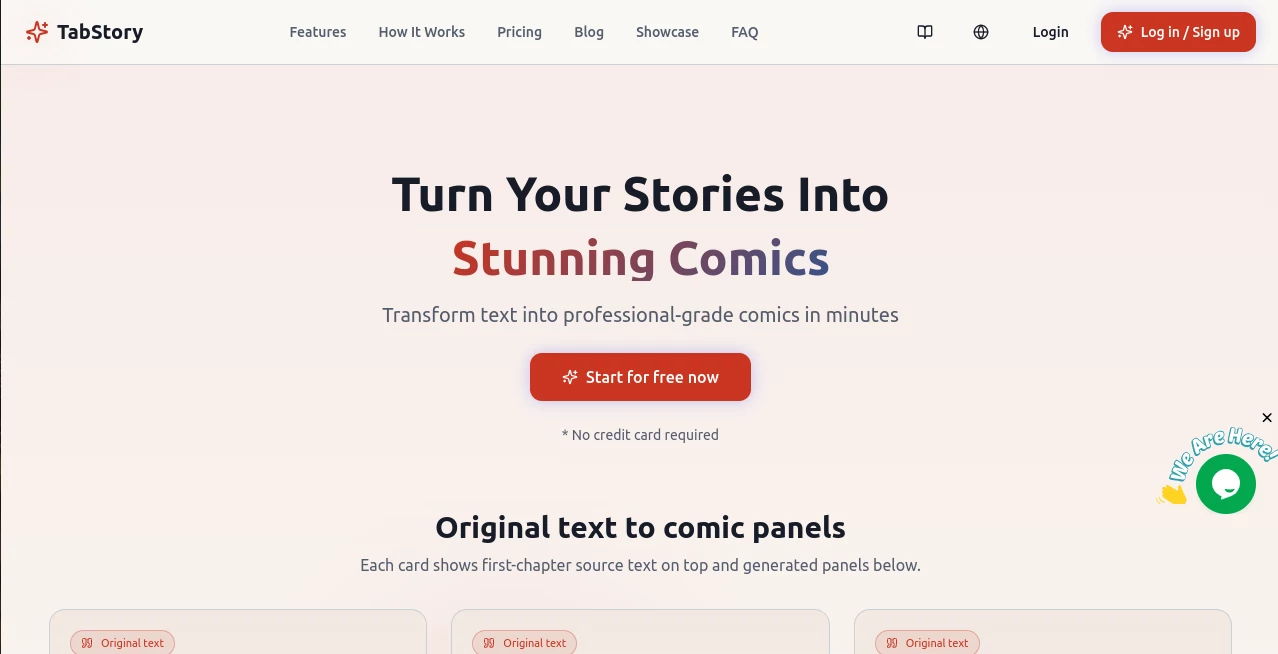
I’ve always loved stories, but turning a good idea into actual comic panels used to feel impossible without drawing skills or a big budget. Then I found this tool and everything changed. You paste your story or script, pick a style, and it creates beautiful, consistent comic pages with proper panel flow and character continuity. The first time I tried it with a short scene I wrote on my phone, the result looked professional enough to share. Friends thought I’d hired an artist. That moment — when your words suddenly become real visuals — is addictive.
Introduction
Creating comics has traditionally been a long, skill-heavy process. Tab Story removes most of those barriers while keeping the fun and creative control intact. It analyzes your text, breaks it into logical panels, designs layouts, maintains character consistency across pages, and generates artwork in various styles from manga to webtoon to American comics. Thousands of creators already use it to bring novels, scripts, and original ideas to life quickly. It respects the storytelling part you care about most and handles the heavy visual lifting so you can focus on what happens next in your story.
Key Features
User Interface
The interface is clean and welcoming. You paste your story text, choose art style and format (webtoon, traditional pages, storyboard), and hit generate. It shows clear progress and delivers results you can immediately preview, edit, or regenerate page by page. The editing tools let you adjust dialogue, composition, or camera angles without starting over. Everything feels designed for storytellers rather than technical users.
Accuracy & Performance
Character consistency is excellent — the same faces, outfits, and personalities carry through scenes naturally. Panel layouts respect story rhythm instead of feeling random. Generation is impressively fast, often delivering full pages in under a minute. The AI understands narrative flow, so important moments get proper dramatic weight while quieter scenes don’t feel rushed.
Capabilities
It supports multiple languages, various comic styles, and different formats. You can start from plain text, refine individual panels, add custom instructions, and export high-resolution images ready for sharing or printing. Character reference tools help keep protagonists looking consistent even across long stories. It’s powerful enough for serious creators yet simple enough for beginners or hobbyists testing their first comic ideas.
Security & Privacy
Your stories and generated comics stay private unless you choose to share them. The platform doesn’t claim ownership of your work — you retain full rights to what you create. That respect for creators makes it feel like a genuine partner rather than just another service.
Use Cases
A novelist turns chapters of their book into promotional comic teasers that hook new readers. A teacher creates visual stories to make history or literature more engaging for students. An indie creator builds a webtoon series without needing to draw every panel manually. A parent makes personalized bedtime comics featuring their kids as heroes. The tool opens comic creation to anyone with a story to tell, regardless of drawing ability.
Pros and Cons
Pros:
- Transforms text into coherent, visually appealing comics extremely quickly.
- Strong character consistency across multiple pages.
- Multiple art styles and formats to match your vision.
- Easy editing tools give you creative control after generation.
- Accessible for beginners while powerful enough for serious projects.
Cons:
- Very complex or highly specific artistic directions may need some manual refinement.
- Long-form stories work best when broken into manageable chapters.
Pricing Plans
It offers a generous free tier so you can test the quality with your own stories. Paid credit packs provide better value for regular creators, with bulk discounts and credits that never expire. The pay-as-you-go approach means you only spend when you create, making it flexible for both occasional hobbyists and dedicated comic makers.
How to Use Tab Story
Sign up (quick and free to start), paste your story text or upload a script, choose your preferred art style and comic format. Click generate and review the panels as they appear. Edit dialogue, adjust layouts, or regenerate specific pages until it feels right. Export high-resolution images or share directly. The whole process from text to finished comic pages can happen in minutes, letting you iterate fast and keep momentum on your story.
Comparison with Similar Tools
Many AI image tools create single pretty pictures but struggle with consistent characters and proper comic storytelling flow. This one excels at understanding narrative structure and maintaining visual continuity across pages. It feels purpose-built for comics and webtoons rather than a general image generator trying to do everything. The combination of speed, consistency, and storytelling awareness makes it stand out for creators who care about narrative flow.
Conclusion
Stories deserve to be seen, not just written. This tool makes that possible by turning your words into real comics without requiring years of drawing practice or a big team. It respects your creativity while handling the technical heavy lifting, opening comic creation to a much wider group of storytellers. Whether you’re building a webtoon series, making fan comics, or just visualizing a story for fun, it delivers results that feel exciting and professional. Your ideas deserve this kind of life.
Frequently Asked Questions (FAQ)
How long does it take to generate a comic?
Usually just a few minutes for multiple pages, depending on length and complexity.
Can I edit the generated comics?
Yes — you have full control to adjust dialogue, composition, and regenerate individual panels.
Do I keep the rights to my comics?
Yes, you own what you create.
What styles are available?
Manga, webtoon, American comics, ink wash, and custom style options.
Is it good for long stories?
Excellent for chapter-by-chapter creation with consistent characters across pages.
AI Creative Writing , AI Image to Image , AI Art Generator , AI Story Writing .
These classifications represent its core capabilities and areas of application. For related tools, explore the linked categories above.

TabStory Alternatives Product

SwapAnything
Wan 2.7 Image

Pixelied

UNi-1 AI

Z-Image
Automateed
Fuser Studio

Uni-1

Image to Ima…
