talat
What is talat?
Meetings are full of valuable ideas, decisions, and action points, but capturing everything manually can be difficult. talat is designed as a private AI meeting notes application that helps users record conversations, create accurate transcripts, and organize important information without sending sensitive audio data to external servers. The app focuses on privacy-first productivity by processing recordings directly on the user's own computer.
Unlike many cloud-based meeting assistants, this solution gives professionals more control over their conversations. It can capture live meetings, convert speech into searchable text, identify speakers, and generate useful summaries while keeping the workflow simple and secure. It is a practical choice for teams, researchers, consultants, developers, and anyone who wants smarter notes without sacrificing ownership of their data.
Key Features
User Interface
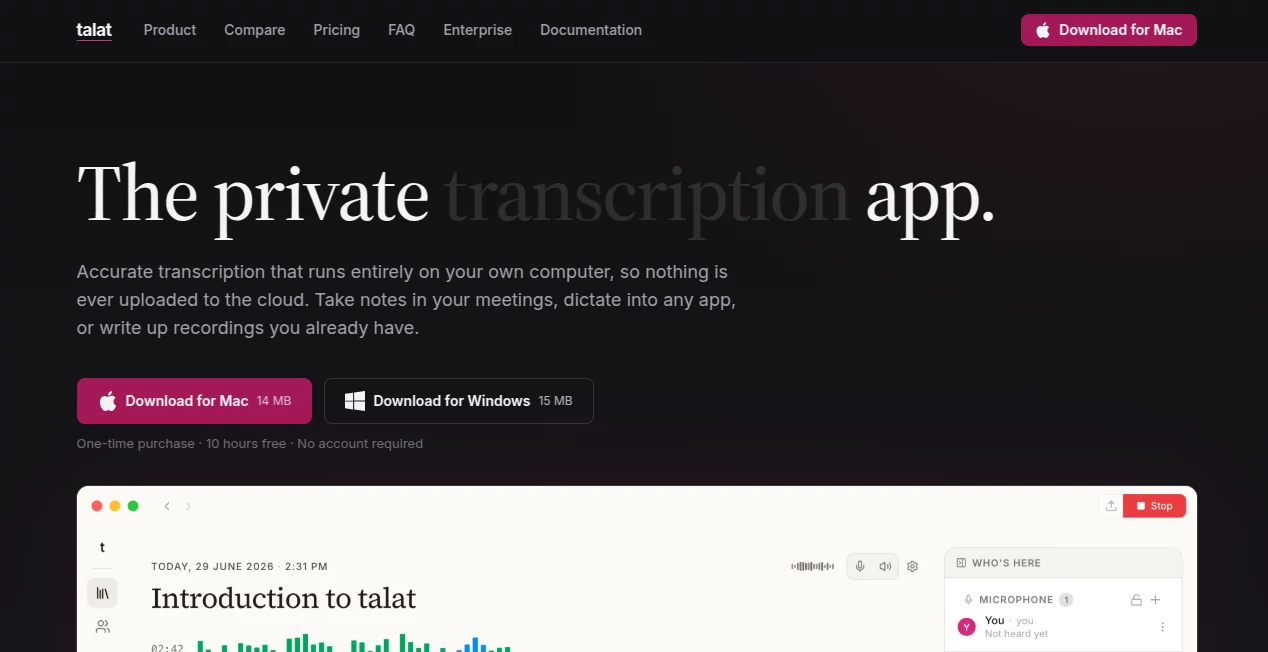
The application offers a clean desktop experience designed around everyday workflows. Users can quickly start a meeting recording, review live transcripts, browse previous conversations, and organize notes without complicated setup.
The interface keeps important information accessible, including transcripts, summaries, speaker details, and exported content. The simple design makes it suitable for both technical users and professionals who just want a reliable way to manage meeting information.
Accuracy & Performance
The platform uses on-device speech processing technology to deliver fast transcription while reducing dependence on internet connectivity. Conversations are converted into text in real time, helping users follow discussions while they happen.
Speaker identification improves readability by recognizing different voices and separating participants in conversations. The system can also process existing audio and video recordings, making it useful for interviews, research sessions, webinars, and archived meetings.
Capabilities
This AI-powered productivity assistant combines several useful functions in one workspace. Users can record meetings, transcribe conversations, create summaries, highlight action items, and transform discussions into organized notes.
- Real-time meeting transcription
- Speaker identification and voice recognition
- AI-generated summaries and action points
- Import support for existing audio and video files
- Voice dictation into other applications
- Searchable transcript history
- Export options for notes and workflows
- Calendar integration for scheduled meetings
Security & Privacy
Privacy is one of the strongest advantages of this tool. Audio recordings, transcripts, and notes are processed locally on the user's device instead of being uploaded to a company server by default.
This approach is especially valuable for professionals handling confidential discussions, internal business meetings, customer conversations, or sensitive research. Users can decide if they want to connect external AI models for advanced summaries while maintaining control over their information.
Use Cases
This tool can support many different professional and personal workflows. Business teams can use it to document meetings and track follow-up tasks. Managers can review discussions without spending hours writing notes. Freelancers and consultants can keep accurate records of client conversations.
Researchers and students can benefit from converting interviews, lectures, and recorded discussions into searchable text. Content creators can also use it to organize brainstorming sessions and extract ideas from long recordings.
- Business meetings and team discussions
- Client calls and consulting sessions
- Interviews and research projects
- Online conference recordings
- Personal voice notes and writing ideas
- Project planning sessions
Pros and Cons
Pros
- Privacy-focused local processing
- No requirement for a meeting bot to join calls
- Accurate speech-to-text capabilities
- Useful AI summaries and action tracking
- Supports both live meetings and imported recordings
- One-time purchase model instead of mandatory subscriptions
Cons
- Requires a compatible desktop computer
- Advanced cloud AI models may require additional setup
- Not designed as a fully browser-based solution
Pricing Plans
The product offers a free trial experience with access to core features and a limited amount of recording time. After testing the workflow, users can purchase a license through a one-time payment model instead of paying recurring monthly subscription fees.
The licensing approach is attractive for professionals who prefer owning their software and receiving future updates without continuous subscription costs.
How to Use talat
Getting started is straightforward. Users install the desktop application, select their preferred recording options, and begin capturing meetings or importing existing recordings.
- Install the desktop application on a supported computer
- Choose recording or dictation mode
- Allow microphone permissions
- Record a meeting or import an existing file
- Review the generated transcript and AI notes
- Edit, search, or export information when needed
Comparison with Similar Tools
Many AI meeting assistants rely heavily on cloud processing and require users to upload recordings before generating transcripts. This solution takes a different approach by prioritizing local processing and user ownership.
For users who value privacy, offline capabilities, and control over their meeting data, this approach can be a better fit than traditional cloud-based note-taking platforms. It combines the convenience of AI assistance with a more private workflow.
Conclusion
For anyone looking to improve productivity while keeping conversations private, this AI meeting assistant offers a thoughtful balance between automation and control. It removes the frustration of manual note-taking, helps users remember important details, and creates organized information from everyday conversations.
Its privacy-first design, flexible transcription features, and practical workflow make it a strong option for professionals who want smarter meeting management without giving away ownership of their data.
Frequently Asked Questions (FAQ)
Does this tool require an internet connection?
No. Most transcription and summarization features can run directly on the user's computer, allowing offline usage in many situations.
Can it transcribe existing recordings?
Yes. Users can import supported audio and video files and convert them into searchable transcripts with additional note features.
Is meeting data uploaded to the cloud?
By default, recordings and transcripts are processed locally on the device, helping users maintain control over private conversations.
Can it identify different speakers?
Yes. The application includes speaker identification features that help separate participants in recorded conversations.
What type of users benefit most from this tool?
Professionals, teams, consultants, researchers, students, and anyone who frequently works with meetings or recorded conversations can benefit from its features.
AI Meeting Assistant , AI Transcription , AI Speech to Text , AI Notes Assistant .
These classifications represent its core capabilities and areas of application. For related tools, explore the linked categories above.
talat details
Website unavailable — View Alternatives
Pricing
- Free
Apps
- Web App
- Windows App
- Mac App
Categories

talat Alternatives Product
CursiveKit

Zeemo AI

EasyVC

YTVidHub-you…

Caspian

David One

Speech Notes

Video Transl…

Maestra