
Tapvid
What is Tapvid?
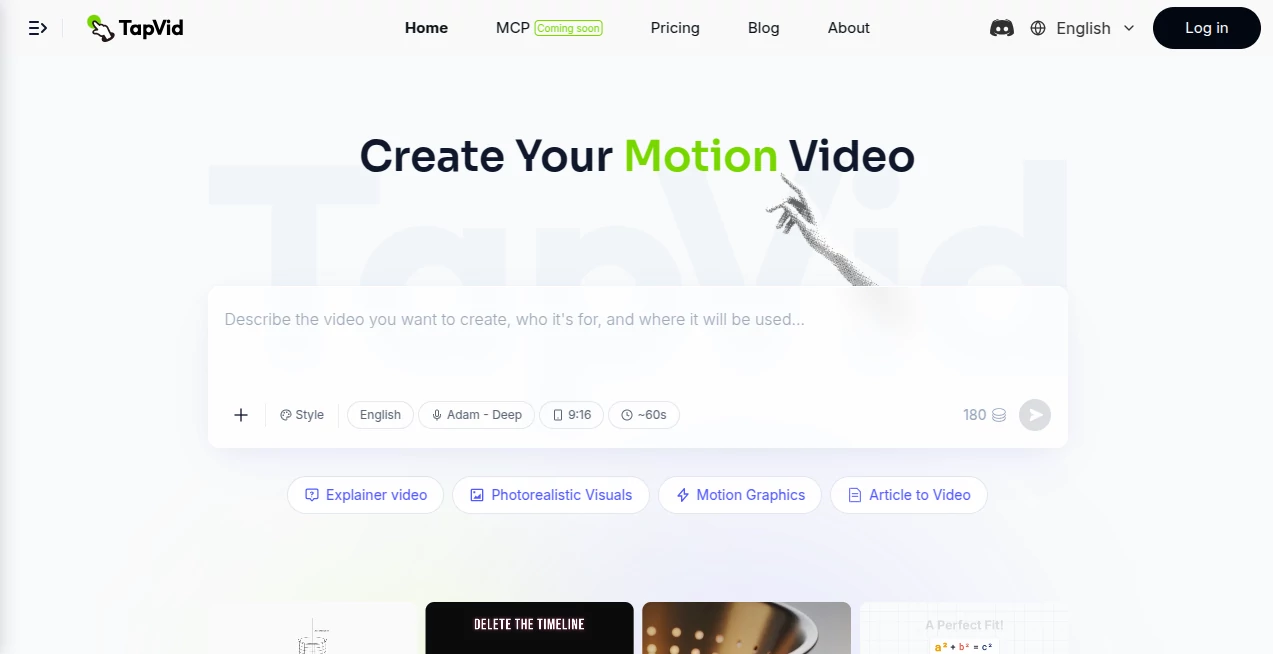
TapVid is an advanced AI-powered platform designed to transform ideas, documents, prompts, and scripts into professional motion graphics videos within minutes. Instead of spending hours editing timelines or learning complex animation software, users can simply upload their content and receive a polished explainer video complete with animated visuals, voice narration, and structured storytelling. It is an excellent solution for marketers, educators, startups, agencies, and businesses looking to communicate ideas in a visually engaging way.
The platform focuses on simplifying video production without sacrificing quality. Whether the goal is creating product demonstrations, educational lessons, onboarding videos, marketing campaigns, or social media explainers, the entire workflow remains straightforward. By automating scripting, scene creation, motion graphics, narration, and editing, it dramatically reduces production time while maintaining impressive visual quality. This makes it particularly valuable for teams that need to publish content consistently without hiring designers, editors, or animation specialists.
Key Features
User Interface
The dashboard is clean, modern, and designed for users with little or no video editing experience. Instead of overwhelming creators with complicated timelines and editing panels, the workflow revolves around uploading a document, entering a prompt, or pasting a URL. The platform automatically generates scenes and allows revisions through simple natural language instructions, making video creation feel intuitive from beginning to end.
Accuracy & Performance
The AI intelligently analyzes PDFs, scripts, articles, product documentation, and prompts to organize information into logical scenes. Motion graphics, subtitles, visual elements, and narration are synchronized automatically, creating videos that are easy to follow and visually appealing. Rendering is optimized for fast turnaround, allowing creators to move from concept to publish-ready content in a remarkably short time.
Capabilities
The platform supports a wide variety of production workflows, including explainer videos, product demos, educational lessons, API documentation videos, onboarding materials, webinar highlights, feature announcements, investor presentations, tutorial videos, marketing campaigns, newsletters, and landing page videos. It also enables users to edit completed videos through simple text instructions rather than manual timeline adjustments, making revisions significantly faster.
Security & Privacy
User content is processed within a secure cloud environment. Uploaded documents remain associated with individual accounts, while privacy policies and account management features help businesses maintain control over their creative assets. Organizations working with internal documentation can confidently generate professional videos without relying on complicated production pipelines.
Use Cases
Marketing teams can convert campaign briefs into engaging promotional videos for websites and social media. Product managers can transform release notes and feature documentation into customer-friendly demonstrations. Teachers and trainers can generate educational lessons from existing course materials. SaaS companies can build onboarding videos directly from help center articles, while agencies can produce multiple client explainers without expanding production costs. Even startups preparing investor presentations can quickly visualize complex ideas using animated storytelling.
Pros and Cons
Pros
Produces professional motion graphics automatically.
Supports prompts, PDFs, documents, URLs, and scripts.
No previous video editing experience is required.
Natural language editing makes revisions extremely simple.
Suitable for marketing, education, SaaS, documentation, and product demonstrations.
Fast rendering with multiple export options.
Cons
Advanced plans may be necessary for high-volume creators.
Maximum video length depends on the selected subscription.
Internet connectivity is required since the service operates entirely online.
Pricing Plans
The platform offers a trial option for new users, allowing them to experience the service before subscribing. Paid plans include Basic, Pro, Max, and Ultra tiers with increasing monthly AI credits, faster rendering, longer video durations, priority support, and additional premium capabilities suitable for professional creators and growing businesses.
How to Use TapVid
Sign up for an account and choose a suitable subscription plan.
Upload a PDF, script, article, prompt, product documentation, or webpage.
Allow the AI to automatically generate scenes, narration, visuals, and motion graphics.
Review the generated video and request changes using natural language.
Export the completed project in a high-quality format ready for publishing across websites, presentations, or social media platforms.
Comparison with Similar Tools
Unlike traditional AI avatar generators that primarily focus on virtual presenters, this platform specializes in animated explainer videos driven by motion graphics and structured storytelling. Compared with many video editors that still require manual timelines, keyframes, and scene adjustments, its text-driven editing workflow significantly reduces production complexity. It also supports direct conversion from PDFs, documentation, and written content, making it particularly attractive for businesses producing educational or technical material.
Conclusion
For anyone searching for an efficient way to transform written content into engaging animated videos, this platform delivers an outstanding balance between automation, visual quality, and ease of use. Its ability to convert documents, prompts, articles, and scripts into polished explainers eliminates much of the traditional production process while maintaining professional results. Businesses, educators, marketers, and content creators can all benefit from faster workflows, lower production costs, and consistently high-quality video content that captures audience attention.
Frequently Asked Questions (FAQ)
Can it generate videos from PDF files?
Yes. PDF documents can be uploaded and automatically converted into animated explainer videos.
Is video editing experience required?
No. The workflow is designed for beginners and professionals alike, with AI handling most production tasks.
Can generated videos be edited later?
Yes. Users can modify scenes, narration, pacing, and visual style using natural language instructions.
What types of videos can be created?
Explainer videos, marketing videos, tutorials, onboarding materials, educational content, product demos, webinar clips, API documentation videos, and many other formats.
Does it offer a free trial?
Yes. New users can start with a trial before upgrading to one of the paid subscription plans.
AI Animated Video , AI Video Generator , AI Video Editor , AI Text to Video .
These classifications represent its core capabilities and areas of application. For related tools, explore the linked categories above.

Tapvid Alternatives Product

FaceSwaply
SkyReels-V4

Seedance 2.0

Kapwing

renderpop

Faceless Ree…

FluxMov

Sora by Open…

Gemini Omni …