
Tessl
What is Tessl?
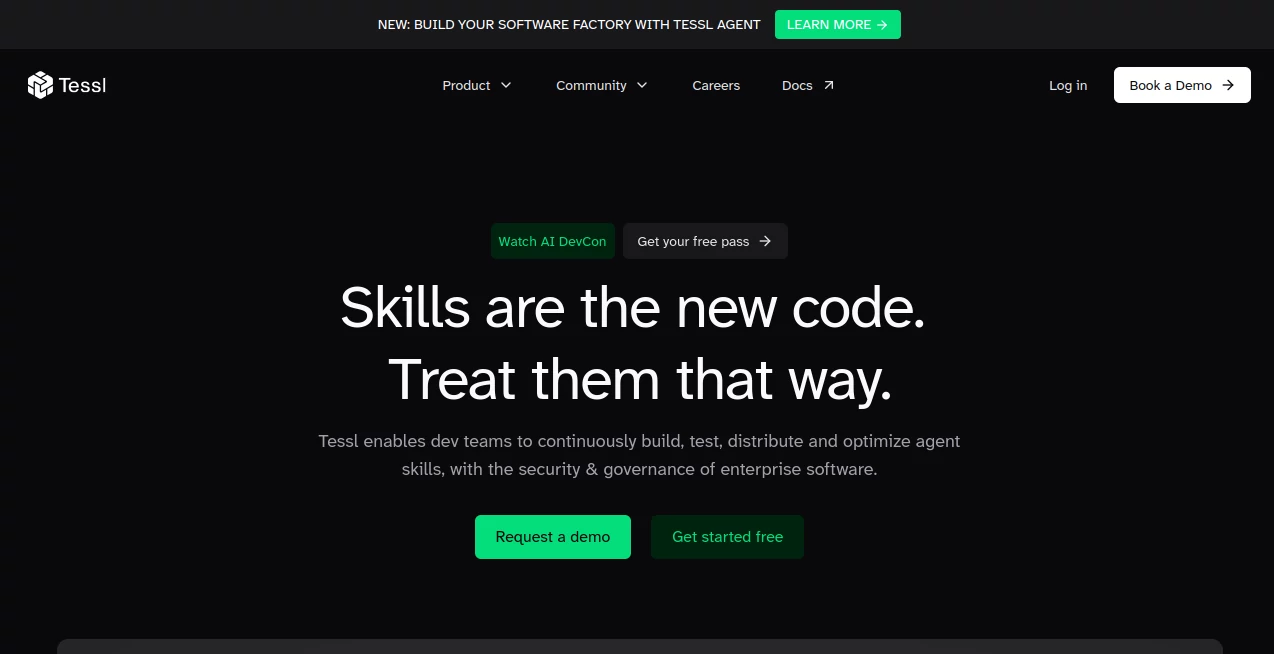
Tessl is an agent enablement platform designed for development teams that are building software with AI coding agents. Its central idea is straightforward: AI agents become far more useful when they have reliable, reusable context and skills, but those skills also need to be managed with the same discipline as software.
The platform brings together the tools needed to build, test, distribute, monitor, and improve agent skills. Instead of letting every developer create isolated instructions and workflows, teams can organize their skills in a shared environment, evaluate their quality, manage versions, and apply security and governance policies.
This approach is particularly useful for organizations moving from individual experimentation with AI coding tools toward a more structured engineering workflow. It helps turn scattered agent knowledge into reusable team infrastructure.
Key Features
- Agent skills can be built, evaluated, versioned, published, and reused across development teams.
- A searchable registry makes it easier to discover existing skills rather than recreating similar workflows.
- Security scanning and policy controls help teams assess skills before they are installed or used.
- Evaluation tools allow teams to test whether a skill actually improves an agent's performance.
- Usage visibility helps distinguish between skills that are merely installed and those that are actually being activated.
- Version management makes it easier to maintain reliable skills as projects, libraries, APIs, and development practices change.
- The platform integrates with popular coding agents including Claude Code, Cursor, GitHub Copilot, and Gemini.
User Interface
The interface is built around the practical needs of engineering teams rather than casual AI experimentation. Developers can work with skills through a centralized registry, while teams can use dashboards and management features to understand what has been created, installed, evaluated, and used.
For an individual developer, the benefit is having a more organized way to find and reuse useful agent skills. For a larger engineering organization, the centralized approach becomes more valuable because it reduces the confusion that can appear when dozens or hundreds of people create their own AI workflows.
Accuracy & Performance
The platform does not simply assume that an agent skill is effective because it produces an output. Its evaluation system is designed to test skills against defined scenarios and identify whether changes make performance better or worse.
This is an important distinction for production development. A workflow that works perfectly on one example may fail after a codebase, dependency, API, or model changes. Evaluation and before-and-after comparisons provide a practical way to catch those regressions instead of discovering them through developer frustration later.
The platform also provides visibility into skill activation, helping teams understand whether skills are genuinely being used by agents rather than simply sitting in a registry.
Capabilities
The strongest part of the platform is its focus on the complete lifecycle of agent skills. Developers can create reusable skills, publish them to a registry, evaluate their behavior, manage versions, and distribute them across projects.
Teams can also establish organizational standards around skills. This makes it possible to define which skills should be available, which ones require approval, and which standards should be applied consistently across development environments.
Another useful capability is the separation between discovery and governance. A team can benefit from a large collection of reusable skills while still maintaining control over what enters its development environment.
Security & Privacy
Security is treated as a core part of the skills lifecycle rather than something that happens after deployment. Skills can be security-scanned and scored before installation, while enterprise features provide policy controls and audit logs.
Organizations can maintain a full inventory of skills, establish installation and publishing policies, define ownership and access controls, and enforce required standards across teams. Enterprise deployments can also include SAML single sign-on, bring-your-own-key and model options, and self-hosted or single-tenant deployment arrangements.
These controls are especially relevant when AI agents have access to development environments and the same resources available to engineers. In that setting, knowing exactly which skills are running and who approved them becomes an important part of maintaining a secure engineering workflow.
Use Cases
- AI-assisted software development: Create reusable skills that give coding agents consistent project-specific instructions and context.
- Engineering teams: Share proven workflows instead of asking every developer to recreate similar agent instructions.
- Enterprise AI governance: Monitor skills, enforce organizational policies, and maintain an auditable inventory.
- Code review workflows: Build skills around development standards and use evaluations to check whether AI-generated work meets expectations.
- Developer onboarding: Give new engineers access to established agent workflows and team standards from the beginning.
- Large AI development rollouts: Reduce duplication and outdated skills as more developers begin using coding agents.
- Continuous improvement: Test changes to skills and compare results before deploying improved versions across a team.
Pros and Cons
- Pros: Centralized skill management, strong evaluation capabilities, version control, security scanning, governance features, reusable workflows, searchable skill registry, and support for multiple coding agents.
- Pros: The usage-based credit model provides a shared pool for reviews, evaluations, and agent sessions rather than forcing teams into separate usage allowances.
- Pros: Enterprise controls are well suited to organizations that need visibility and policy enforcement around AI-assisted development.
- Cons: The platform is primarily aimed at developers and engineering organizations, so it may be unnecessary for someone looking for a simple consumer-facing AI coding assistant.
- Cons: Teams may need time to establish useful skills, evaluation scenarios, and governance rules before they see the full benefit of a structured skills platform.
Pricing Plans
The service offers a free plan with 1,000 credits per month and no credit card requirement. The Free plan includes access to the agent, unlimited publishing and installation of plugins and skills, evaluations on default models, and free reviews for publicly published plugins.
The Team plan costs $100 per month and includes 5,000 monthly credits. It adds model and agent selection, role management, spending controls, and the ability to purchase additional credits when required.
Enterprise pricing is customized and combines a platform fee with credits. Enterprise customers can receive volume pricing, multiple workspaces, advanced role management, SAML SSO, organizational installation and publishing policies, audit logs, mandatory skills, bring-your-own-key and model options, self-hosted deployment, and dedicated support.
One useful aspect of the pricing structure is that reviews, evaluations, and agent sessions use a shared credit balance. Publishing and installing plugins and skills does not consume credits.
How to Use It
- Create an account and start with the free plan if you want to explore the platform before committing to a paid tier.
- Browse the available registry and look for skills that match your development workflow.
- Install useful skills or create your own for project-specific requirements.
- Evaluate skills against realistic scenarios to see how reliably they perform.
- Review the results and improve the skill when a scenario exposes weaknesses or inconsistent behavior.
- Publish and version successful skills so other developers can reuse them.
- For team environments, introduce governance policies, permissions, security checks, and organizational standards as adoption grows.
Comparison with Similar Tools
Traditional AI coding assistants generally concentrate on helping an individual developer generate, modify, or understand code. A skills-management platform takes a different approach. Instead of focusing only on the conversation between a developer and an AI model, it concentrates on the reusable context surrounding that interaction.
This makes the platform particularly interesting for teams that have moved beyond experimenting with coding agents and now need consistency. A developer can create a useful workflow once, test it, improve it, and make it available to others instead of keeping the knowledge inside a private prompt or local configuration.
For small personal projects, a conventional coding assistant may be all that is necessary. For larger teams using multiple agents and many reusable workflows, centralized skills, evaluations, security controls, and usage visibility can provide a much stronger foundation.
Conclusion
AI coding agents are becoming increasingly capable, but capability alone does not solve the organizational challenges that appear when an entire engineering team starts using them. Skills need to be reusable, maintainable, measurable, and safe.
This platform addresses that gap by treating agent skills as an engineering asset rather than disposable instructions. Its combination of a searchable registry, evaluations, version management, security scanning, governance, and usage visibility makes it a compelling option for teams serious about building a structured AI development environment.
For an individual developer, the free tier offers a practical way to explore the concept. For organizations, the real value comes from standardizing how AI agents are equipped, monitored, and improved across the development lifecycle.
Frequently Asked Questions (FAQ)
What is this platform designed for?
It is designed for managing AI agent skills and context used in software development. Teams can build, evaluate, distribute, govern, and improve reusable skills for coding agents.
Can I use it for free?
Yes. The Free plan includes 1,000 credits each month and provides access to the agent, skill and plugin publishing and installation, evaluations on default models, and other core features.
What are credits used for?
Credits are used for reviews, evaluations, and agent sessions. Publishing and installing plugins and skills is free.
Does it support different AI coding agents?
Yes. The platform is designed to work across multiple coding agents, including Claude Code, Cursor, GitHub Copilot, and Gemini.
Is it suitable for enterprise teams?
Yes. Enterprise features include security policies, audit logs, skill inventories, organizational standards, multiple workspaces, SAML SSO, advanced role management, and deployment options designed for larger organizations.
Why are evaluations important for AI agent skills?
Evaluations provide a repeatable way to check whether a skill actually works as intended. They can help teams detect regressions when a skill is changed or when the surrounding software environment evolves.
Can developers create their own skills?
Yes. Developers can create and publish reusable skills, evaluate them, manage versions, and share successful workflows with other members of their organization or the wider community.
AI Testing & QA , AI Code Assistant , AI Developer Docs , AI Developer Tools .
These classifications represent its core capabilities and areas of application. For related tools, explore the linked categories above.

Tessl Alternatives Product
JSON to TOON…

Velokey

git-lrc

CloudByte PMS

Project Genie

HostFinder

Ito AI

Devplan

Vibe Coding …