
Thumbs
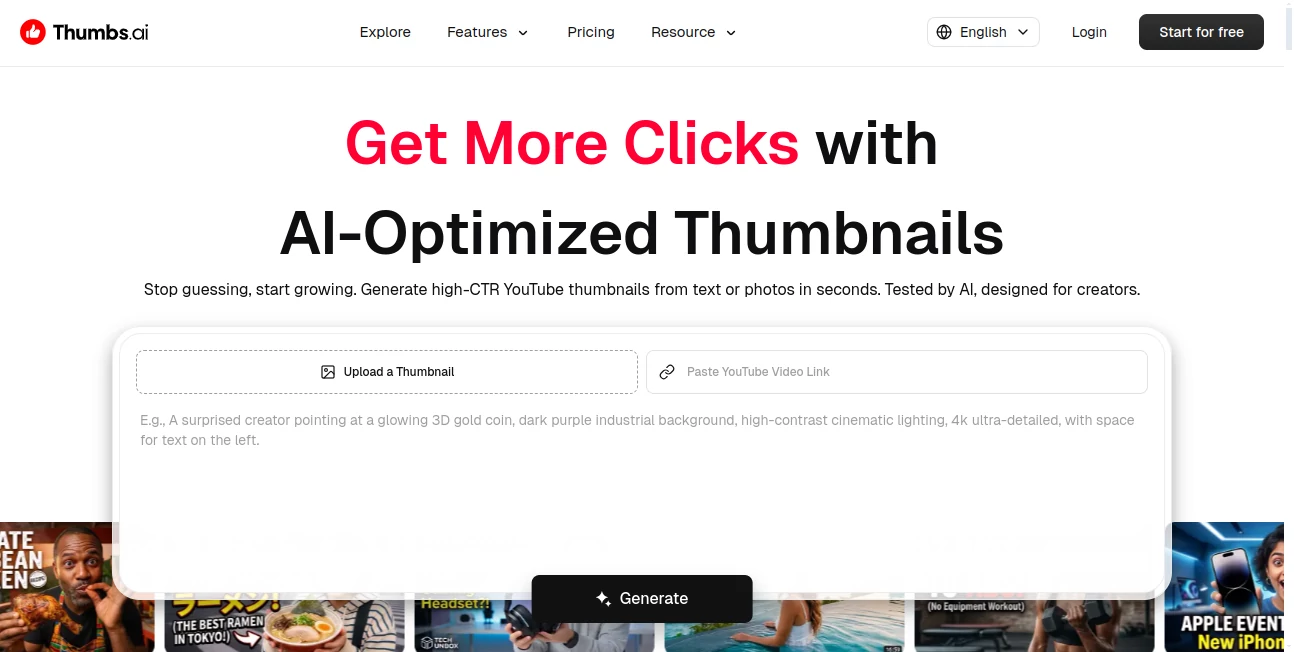
What is Thumbs?
I used to spend way too long in Photoshop trying to make thumbnails that would stop the scroll, only to watch the click-through rate stay flat. Then I started using this tool and everything changed. You drop in a video title, a screenshot, or even just a description, and it spits out thumbnails that look like they came from a pro designer who understands what actually makes people click. The first time I tried it, one of the variations jumped my CTR noticeably within a day. It’s not magic — it’s smart, trained on what works right now on YouTube, and it shows.
Introduction
Thumbnails are the first impression of your video, and in a sea of content, that impression needs to be strong. This platform takes the guesswork out of it by combining AI image generation with real performance intelligence. Whether you’re a solo creator posting daily or managing multiple channels, it lets you generate, test, and refine thumbnails faster than ever. The best part is how it learns from what’s currently performing well — it doesn’t just make pretty pictures, it aims for clicks. Many creators I’ve spoken with say it cut their thumbnail time from hours to minutes while actually improving results.
Key Features
User Interface
The dashboard is clean and focused — exactly what you want when you’re trying to move fast. Upload an image, paste a video title, or type a prompt, choose a style or let it analyze top creators, and you get multiple variations in seconds. The preview is big enough to judge properly, and you can regenerate specific elements or tweak prompts without starting over. It feels built by creators for creators: no clutter, no unnecessary steps, just a smooth path from idea to finished thumbnail.
Accuracy & Performance
It consistently produces thumbnails that look professional and on-brand. Faces stay recognizable, text is crisp and readable, and the composition follows proven click patterns. The built-in CTR rater gives you an honest score before you upload, helping you pick winners instead of guessing. In real use, creators report noticeable lifts in click-through rates after switching to these thumbnails, especially when using the style-cloning feature to match successful channels.
Capabilities
You can generate from text, existing images, or even analyze a YouTube channel to clone its successful style. There’s an expression lab for perfect shock, joy, or curiosity faces, face swapping, batch generation for A/B testing, and a library of pro effects like glow, 3D pop, and neon. It handles YouTube, Shorts, and even cross-platform needs like Instagram or TikTok. The combination of creative control and performance intelligence makes it far more than a simple image generator.
Security & Privacy
Your uploaded images and generated thumbnails stay private unless you choose to share them. The platform doesn’t train on user content without permission, and you keep full ownership of everything you create. For creators who work with brand material or personal branding, that peace of mind is important.
Use Cases
A gaming creator analyzes MrBeast-style thumbnails and generates similar high-energy ones for their own videos, boosting clicks dramatically. A lifestyle vlogger turns simple selfies into eye-catching thumbnails with perfect expressions and backgrounds. A faceless channel uses text prompts and stock-like elements to create consistent, branded thumbnails without showing their face. Teams use the batch feature to prepare an entire week’s worth of thumbnails in one sitting. It fits anywhere you need visuals that stop the scroll.
Pros and Cons
Pros:
- Fast, high-quality thumbnails that actually look designed, not generated.
- Style cloning and performance insights help you match what works.
- Built-in CTR rater removes a lot of the guesswork.
- Great for both beginners with zero design skills and experienced creators.
- Regular updates keep it ahead of changing YouTube trends.
Cons:
- Some very specific or unusual concepts may need a few regenerations.
- Heavy daily use benefits from a paid plan for unlimited generations.
Pricing Plans
It offers a solid free tier so you can test the quality and see real results before committing. Paid plans unlock unlimited generations, priority processing, advanced style cloning, and more variations per prompt. Many creators find the paid tier pays for itself quickly through time saved and improved performance on their videos.
How to Use Thumbs
Go to the generator, paste your video title or upload a screenshot/image, and choose a style or let it suggest one. Add any specific instructions (like “add shocked face” or “MrBeast style”). Hit generate and review the options. Use the CTR rater to see which ones are most likely to perform, tweak if needed, and download the winner. For consistent branding, save a style and reuse it across future videos. The whole process is fast enough to do right after editing your video.
Comparison with Similar Tools
Many AI image tools can make thumbnails, but few understand YouTube specifically like this one does. The combination of style cloning from real channels, performance prediction, and creator-focused workflow sets it apart. Where others feel generic, this one produces thumbnails that feel intentional and optimized for clicks. It’s less about making art and more about making thumbnails that work.
Conclusion
Your thumbnail is often the difference between someone clicking or scrolling past. This tool helps you win that first battle without spending hours in design software or guessing what will work. It’s fast, smart, and built specifically for creators who want better results with less effort. If you’re serious about growing your channel, giving your videos the best possible first impression is one of the highest-ROI things you can do — and this platform makes it easier than ever.
Frequently Asked Questions (FAQ)
How long does it take to generate thumbnails?
Usually just a few seconds per variation, so you can create and test many quickly.
Do I need design skills?
Not at all — the AI handles the heavy lifting while you guide the direction.
Can I use my own photos?
Yes — uploading images or screenshots often gives the best personalized results.
Is it only for YouTube?
Primarily optimized for YouTube, but many creators use it successfully for Shorts, TikTok, and Instagram as well.
Are the thumbnails royalty-free for commercial use?
Yes, you own the thumbnails you generate and can use them freely on your channels.
AI Photo & Image Generator , AI Graphic Design , AI Design Generator , AI Thumbnail Maker .
These classifications represent its core capabilities and areas of application. For related tools, explore the linked categories above.

Thumbs Alternatives Product

TimelessHome…

trellis 2

Nano Banana …

Nano Banana 2

AlpacaBag

Playyy AI

String Art

GPT Image Pr…

Gemini AI Ph…