Tight Studio
What is Tight Studio?
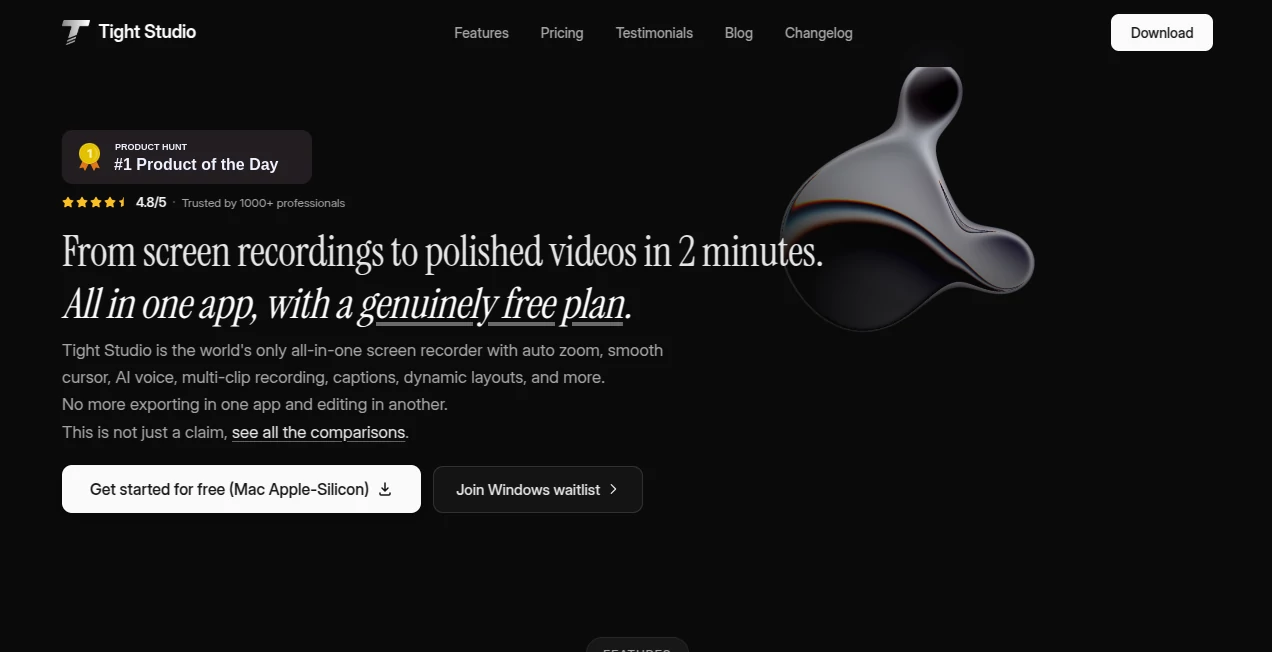
Tight Studio is an all-in-one screen recording and video creation platform designed to help creators, businesses, educators, and product teams transform simple recordings into professional-looking videos. Instead of relying on multiple applications for recording, editing, captions, voiceovers, and visual improvements, this tool brings the entire workflow into one streamlined experience.
Whether you are creating a product demo, software tutorial, customer support video, online course, or marketing presentation, the platform helps you produce engaging content faster. Its intelligent automation features reduce the need for complex editing skills while still giving users control over the final result.
Key Features
- Smart automatic zoom effects that highlight important actions on screen
- Smooth cursor animations for professional-looking demonstrations
- AI-powered voice narration and customizable voice options
- Automatic captions with modern visual styles
- Multi-clip recording and simple video arrangement
- Screen and mobile device recording support
- Dynamic layouts, annotations, and visual effects
- Background customization and music integration
- Shareable video links for easy collaboration
- Team workspace features for collaborative projects
User Interface
The interface focuses on simplicity and speed, making it easy for beginners and experienced creators alike. The clean workspace allows users to record, organize clips, adjust layouts, and improve videos without navigating through complicated editing panels. Every important feature is placed where users naturally expect it, creating a smooth production experience from start to finish.
Accuracy & Performance
The platform delivers reliable recording and editing performance with intelligent automation that detects key moments during screen activity. Features like automatic zoom, cursor smoothing, and caption synchronization help transform basic screen captures into polished presentations without requiring hours of manual adjustments.
Capabilities
The software goes beyond traditional screen recording by combining recording, editing, and AI-powered enhancements in one workflow. Users can add professional voiceovers, generate captions, include annotations, customize backgrounds, and create engaging videos suitable for different audiences.
It is especially useful for teams that frequently create product demonstrations, educational materials, onboarding videos, and customer-facing content where clarity and presentation quality matter.
Security & Privacy
Privacy controls are built into the sharing experience, allowing users to decide who can access their videos. Shared content can be managed with visibility settings and additional protection options, making it suitable for professional teams handling internal or client-related recordings.
Use Cases
- Product Demonstrations: Create impressive software walkthroughs and feature presentations.
- Education: Record lessons, tutorials, and training materials with captions and narration.
- Marketing: Produce engaging promotional videos for campaigns and launches.
- Customer Support: Build clear troubleshooting videos and guides.
- Content Creation: Prepare YouTube videos, social media clips, and explainer content.
- Team Communication: Share updates and visual explanations instead of long written messages.
Pros and Cons
Pros
- Complete recording and editing workflow in one place
- Professional visual effects without advanced editing knowledge
- Useful AI features for voice, captions, and automation
- Fast creation process for business and educational videos
- Free plan available without requiring a credit card
Cons
- Currently focused mainly on macOS with Apple Silicon devices
- Advanced professional editors may require additional specialized tools
- Some premium AI features require paid plans
Pricing Plans
The platform offers a free plan that allows users to explore core recording and editing features without watermarks on standard exports. Paid plans provide additional capabilities such as expanded recording options, AI-powered features, advanced sharing, and team collaboration tools.
The pricing structure is designed to support different types of users, from individuals creating their first videos to professional teams producing content regularly.
How to Use Tight Studio
Getting started is simple:
- Install the application on a compatible device.
- Create a new recording project.
- Capture your screen, camera, or connected mobile device.
- Adjust zoom effects, captions, voice, and visual elements.
- Add branding elements such as backgrounds, annotations, or music.
- Export or share the finished video with your audience.
Comparison with Similar Tools
Compared with traditional screen recorders, this solution focuses on reducing the editing workload by automatically improving recordings. While many video editors require users to manually add zoom effects, smooth cursor movements, captions, and voice enhancements, this platform combines these improvements into a faster workflow.
It is particularly attractive for users who mainly create software demonstrations and tutorial videos, where speed and clarity are more important than complex cinematic editing features.
Conclusion
Creating professional screen recordings often requires several different tools and significant editing time. This platform simplifies the process by combining recording, AI enhancements, and video polishing features into a single experience.
For creators, educators, marketers, and businesses that need high-quality videos without spending hours editing, it provides an efficient way to turn ideas into engaging visual content.
Frequently Asked Questions (FAQ)
What is Tight Studio used for?
It is used for creating professional screen recordings, tutorials, product demos, presentations, and marketing videos with automated editing features.
Does it include AI features?
Yes, it includes AI-powered capabilities such as voice narration, captions, and other intelligent video improvements.
Can beginners use this tool?
Yes, the simple workflow is designed for beginners while still providing useful features for professional creators.
Is there a free version available?
Yes, users can start with a free plan that includes essential recording and editing features.
What type of videos can be created?
Users can create tutorials, product demos, explainer videos, training content, support videos, and social media content.
AI Video Recording , AI Video Editor , AI Productivity Tools , AI Captions or Subtitle .
These classifications represent its core capabilities and areas of application. For related tools, explore the linked categories above.
Tight Studio details
Website unavailable — View Alternatives
Pricing
- Free
Apps
- Web App
- Mac App
Categories

Tight Studio Alternatives Product

Kapwing

Magpie

Youfiliate

Neurohelper
Zloth

VideoDubber
Viewra

SlideStorm AI

Slackactivity