
ToolJet AI App Builder
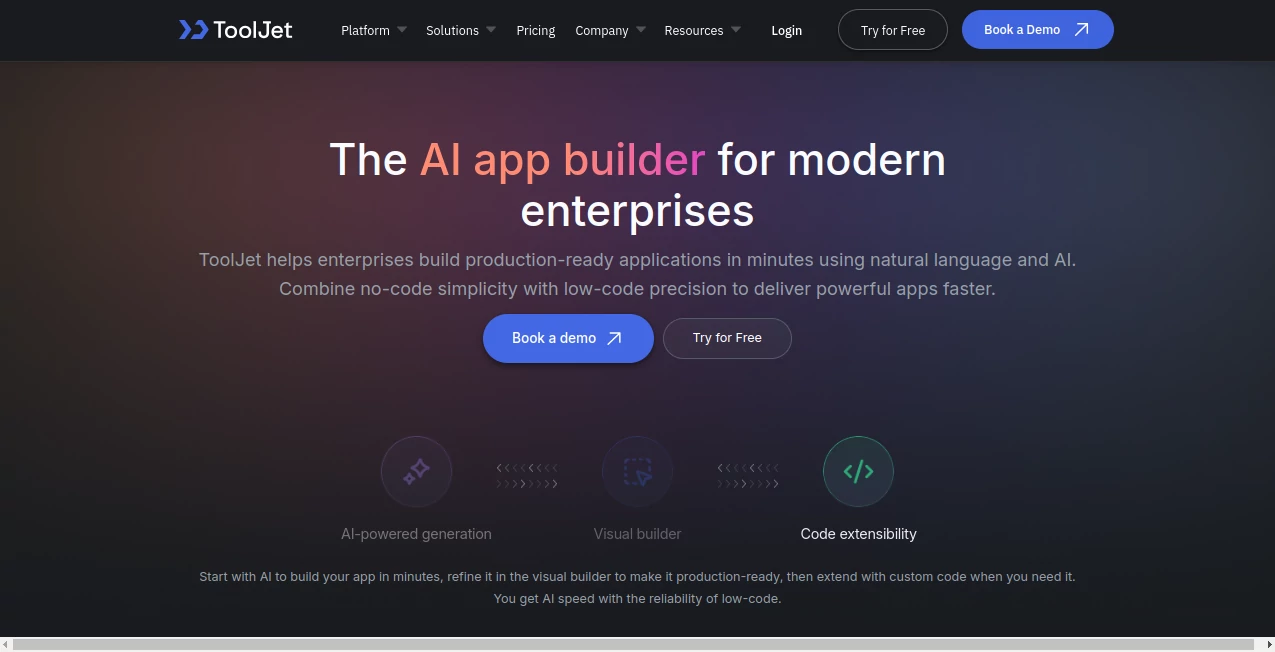
What is ToolJet AI App Builder?
Building internal business applications has traditionally required weeks of development, multiple engineering resources, and ongoing maintenance. This platform changes that experience by allowing teams to create production-ready applications using natural language, visual editing, and low-code customization. Whether the goal is to develop dashboards, approval systems, CRM tools, inventory management solutions, or workflow automation, the entire process becomes significantly faster and more accessible.
Instead of generating unpredictable code, the platform creates structured application configurations that remain easy to understand, customize, and maintain. Business teams can quickly transform ideas into functional software while developers retain complete control whenever advanced customization is required. The result is a practical balance between AI-powered speed and enterprise-grade reliability.
For organizations that want to reduce development costs without sacrificing scalability or security, this solution offers a refreshing approach. It combines AI-generated planning, interface creation, database configuration, and workflow automation inside a single development environment that is designed for real production use.
Key Features
User Interface
The interface is clean, modern, and designed to simplify application development for both technical and non-technical users. A drag-and-drop builder makes it easy to assemble responsive pages while AI assists with layouts, navigation, and component selection. Users can visually customize every element without feeling overwhelmed by unnecessary complexity.
Accuracy & Performance
Rather than producing raw source code that often requires extensive debugging, the platform generates structured application components that follow predictable patterns. AI assists throughout planning, design, data mapping, query creation, and debugging, resulting in reliable applications that can be refined before deployment. This workflow minimizes technical debt while accelerating development.
Capabilities
- Create full-stack internal applications from natural language prompts.
- Build responsive interfaces with a visual drag-and-drop editor.
- Connect to SQL databases, NoSQL databases, REST APIs, and cloud services.
- Generate application specifications before development begins.
- Customize applications using JavaScript, Python, and React components.
- Build dashboards, approval systems, CRM tools, bug trackers, and business portals.
- Create reusable modules for larger enterprise projects.
- Manage application events, workflows, and navigation visually.
- Integrate more than 80 business data sources.
- Deploy applications in cloud or self-hosted environments.
Security & Privacy
Enterprise security is one of the strongest aspects of the platform. Applications include role-based permissions, encryption, audit logs, and support for single sign-on. Organizations that require complete control over sensitive information can choose self-hosted deployment while maintaining compliance with recognized enterprise security standards. These capabilities make it suitable for organizations handling confidential operational data.
Use Cases
- Employee management portals.
- Customer onboarding systems.
- Accounts payable automation.
- Inventory management applications.
- Internal CRM platforms.
- Business dashboards and analytics.
- Approval workflows.
- Help desk management.
- Bug tracking systems.
- Project operations dashboards.
Pros and Cons
Pros
- Natural language application generation.
- Excellent balance between no-code and low-code development.
- Enterprise-ready security features.
- Visual builder simplifies customization.
- Supports JavaScript, Python, and React extensions.
- Large collection of integrations.
- Self-hosting option for maximum data control.
- Reduces development time significantly.
Cons
- Advanced customization still benefits from programming knowledge.
- Enterprise deployments may require planning for larger infrastructures.
- Some AI-generated layouts may need manual refinement for highly specialized workflows.
Pricing Plans
A free trial is available for new users to explore the platform before committing. Commercial plans provide additional collaboration features, enterprise deployment options, enhanced security controls, and larger-scale capabilities for growing organizations. Pricing varies depending on deployment requirements and business size.
How to Use ToolJet AI App Builder
Begin by describing the application you want to build using natural language. The AI prepares technical specifications, database suggestions, navigation, and interface layouts for review. After approving or modifying the proposed design, select your preferred data sources and allow the platform to generate the application automatically. From there, use the visual builder to customize pages, configure workflows, add integrations, or extend functionality with custom code before deployment.
Comparison with Similar Tools
Compared with many AI-powered app builders, this platform focuses heavily on enterprise deployment rather than simple prototypes. While some competitors primarily generate application code, this solution produces structured configurations that are easier to maintain over time. Its combination of AI-assisted planning, visual editing, extensive integrations, low-code flexibility, and enterprise security creates a practical environment for businesses that require dependable internal software instead of experimental projects.
Conclusion
Organizations are under constant pressure to deliver internal software faster while controlling development costs. This platform successfully bridges the gap between AI automation and professional application development by combining intelligent generation with visual customization and enterprise-grade governance. It enables business teams to move from an idea to a production-ready application in far less time than traditional development methods while still giving developers the flexibility they expect. For companies looking to modernize internal operations, it represents an impressive and highly capable solution.
Frequently Asked Questions (FAQ)
Can beginners build applications without coding?
Yes. Natural language prompts and visual editing allow non-developers to create functional business applications.
Can developers customize AI-generated applications?
Yes. Custom JavaScript, Python, React components, APIs, and advanced queries can all be added when needed.
Is it suitable for enterprise businesses?
Yes. Security, role-based access control, audit logs, encryption, and self-hosted deployment make it well suited for enterprise environments.
What kinds of applications can be created?
Users can build dashboards, CRM systems, approval workflows, onboarding platforms, inventory tools, bug trackers, reporting systems, and many other internal business applications.
Can existing databases be connected?
Yes. The platform supports numerous SQL databases, NoSQL databases, APIs, cloud services, and other enterprise data sources.
AI Workflow Management , AI App Builder , AI No-Code & Low-Code , AI Developer Tools .
These classifications represent its core capabilities and areas of application. For related tools, explore the linked categories above.
ToolJet AI App Builder details
Website unavailable — View Alternatives
Pricing
- Free
Apps
- Web App
Categories

ToolJet AI App Builder Alternatives Product

FormRoyale

Screenshot t…

Discord Time…
BootstrapKing

Emergent

vivgrid
KronoPrompt
Blackbox AI
Layven