Ardent
What is Ardent?
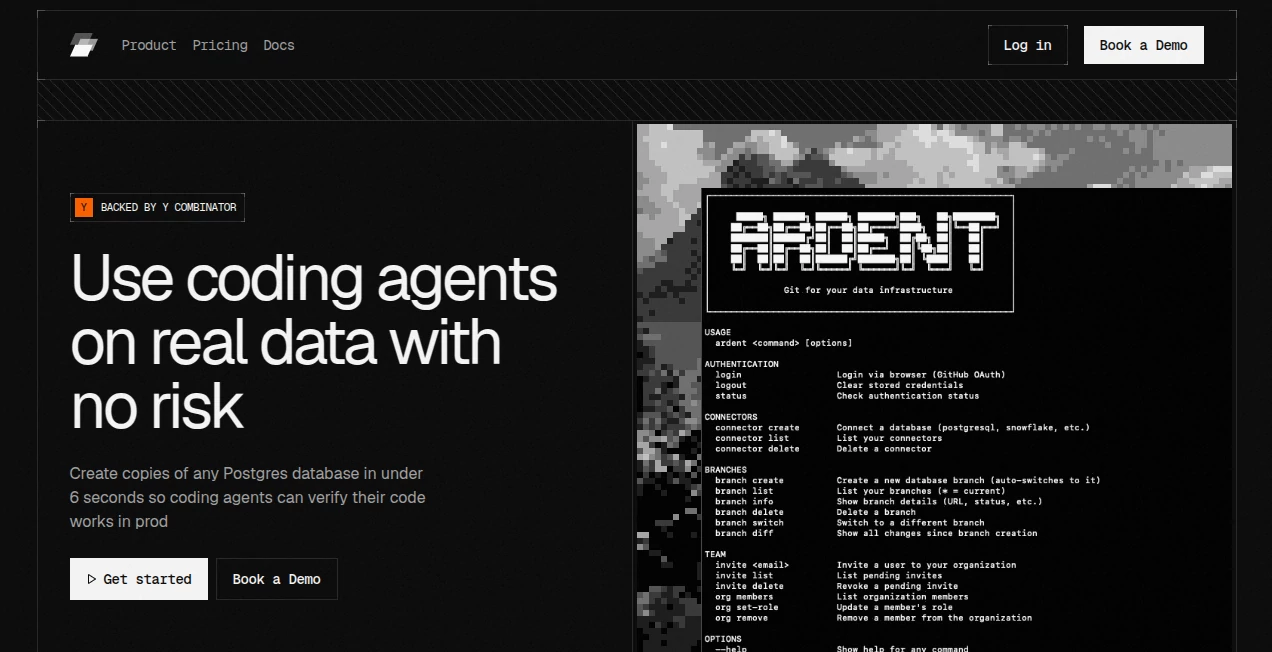
Ardent is a database branching platform built for developers and teams that rely on coding agents to work with production data. Its main idea is simple: instead of asking an AI coding agent to work against an outdated staging database or manually prepared test data, developers can give it an isolated copy of a real Postgres database.
Branches can be created in under six seconds, allowing teams to test migrations, schema changes, data cleanup, backfills, and other database operations without writing directly to production. This makes the development process considerably more practical when AI agents are handling increasingly complex engineering tasks.
The platform works with Postgres environments including Supabase, AWS RDS, PlanetScale, and self-hosted Postgres. For teams that want faster feedback without constantly maintaining duplicate databases, this approach can remove a surprisingly large amount of infrastructure work.
Key Features
- Creates isolated Postgres database branches in under six seconds.
- Allows coding agents to test changes against real production data.
- Uses copy-on-write storage so branches do not require a complete duplicate of the database.
- Automatically scales compute down to zero when branches are idle.
- Supports database workflows such as migration testing, backfills, data cleaning, and verification.
- Works with Supabase, AWS RDS, PlanetScale, and self-hosted Postgres environments.
- Provides a CLI workflow designed to fit naturally into developer tools and agent-based coding workflows.
- Branches can be created and discarded for individual development tasks without maintaining permanent staging environments.
User Interface
The experience is centered around a command-line workflow rather than a complicated visual dashboard. After connecting a Postgres database, developers can create a branch, retrieve its connection information, switch between branches, and remove branches when they are no longer needed.
This approach makes sense for technical teams because database operations can stay close to the existing development workflow. A developer can create an isolated environment for a feature and then hand its connection string to an application, ORM, or coding agent.
The documentation also provides a quick setup process, making the initial experience straightforward for developers who are already comfortable with PostgreSQL and command-line tools.
Accuracy & Performance
The strongest part of the platform is its speed. A new database branch can be created in under six seconds after the initial database replication has been completed, regardless of the database's size. That distinction is important because the first connection and replication process can take longer depending on the amount of data involved.
Because branches contain real database data rather than an artificially prepared dataset, developers can test changes in conditions that are much closer to production. This can expose problems that may remain invisible when applications are tested against empty tables, outdated fixtures, or simplified seed data.
The platform also uses copy-on-write techniques, meaning a branch does not need to duplicate the entire database storage. Only changes made within the branch consume additional storage, which is particularly useful when teams create many temporary environments.
Capabilities
The platform is particularly useful when database work is being performed by AI coding agents. Developers can create a branch and provide its connection information to tools such as Claude Code, Cursor, or another agent capable of interacting with a database.
This makes it possible to test schema migrations, new indexes, data transformations, cleanup operations, and backfills against a realistic dataset before changes reach production.
Its workflow is also designed around the familiar concept of Git-style branching. Instead of creating an entirely new staging infrastructure for every task, teams can create temporary database branches, use them for development or verification, and remove them afterward.
For larger databases, the combination of rapid branching, automatic compute scaling, and change-only storage can make this workflow considerably more manageable than repeatedly creating traditional database replicas.
Security & Privacy
The platform is designed around isolation between production and development branches. Its documentation states that production databases are synchronized through logical replication rather than being modified by branch operations. Each branch is isolated at the compute and storage level, helping prevent development activity from directly affecting the source database.
Database credentials are also not exposed to coding agents as the original production credentials. Instead, each branch receives its own connection information. This gives teams a more controlled way to let automated development tools interact with realistic data.
Teams should still evaluate their own data-handling requirements before connecting sensitive production databases to any external infrastructure. Appropriate permissions, access controls, and organizational policies remain important when working with real customer or business data.
Use Cases
AI-assisted development: Coding agents can work against isolated database branches instead of production, giving them room to execute and validate database-related tasks safely.
Migration testing: Developers can run schema migrations against a realistic database copy and identify failures before deployment.
Data cleaning: Cleanup, deduplication, and standardization jobs can be tested on a production-data copy without modifying the original database.
Backfills: Teams can evaluate large data updates and transformations in an isolated environment before running them against production.
Query and index testing: Developers can experiment with indexes and database changes using realistic data, making performance testing more meaningful.
Supabase development: Teams using Supabase can create database branches while retaining important database-level elements such as schemas, functions, triggers, and RLS policies.
Temporary development environments: Individual tasks can receive their own database branch, reducing the need for a shared staging database that constantly changes underneath multiple developers.
Pros and Cons
- Pros: Very fast database branching, real production data for testing, isolated environments, copy-on-write storage efficiency, automatic compute scaling, support for several Postgres providers, and a developer-friendly CLI workflow.
- Cons: The service is focused on Postgres rather than supporting a wide range of database engines, the initial replication can take time for large databases, and usage-based compute and storage costs are added to the base plan.
Pricing Plans
The pricing structure follows a base-plan-plus-usage model. The Starter plan is free and includes a $30 one-time credit, up to three projects, branches in under six seconds, and community support. Compute and storage are charged separately based on usage.
The Scale plan costs $250 per month and includes $100 per month in credits, unlimited projects, fast branching, and Slack support. After included usage, additional compute and storage charges apply.
For organizations requiring dedicated infrastructure, custom deployment, team-level access controls, unlimited compute and storage, VPC deployment, or custom service-level agreements, an Enterprise plan is available with custom pricing.
The published usage rates are $0.40 per compute unit-hour, where one compute unit represents one vCPU and 4 GB of RAM, and $0.70 per GB-month for storage.
How to Use It
Getting started requires Node.js and a Postgres connection string from a supported provider or a self-hosted PostgreSQL installation.
First, install the command-line interface and sign in. Then connect the PostgreSQL database so the initial replication can be prepared. Once the connector is ready, create a new branch for the task you want to test.
The resulting branch provides a connection string that can be used with PostgreSQL tools, applications, ORMs, or coding agents. Developers can create separate branches for different tasks and allow inactive branches to suspend automatically.
A practical workflow might look like this: create a branch for a migration, give the branch connection to your coding agent, let the agent run and test the migration, inspect the results, make adjustments, and only then apply the validated change to production.
Comparison with Similar Tools
Traditional database replicas and manual dump-and-restore workflows can work well, but they often require more time, storage, and administration. Creating a full database copy for every development task becomes particularly inconvenient as databases grow.
Database branching services integrated into specific database platforms can provide a similar concept, but they may require teams to use that particular hosting environment. The advantage of this approach is that it is designed to work with existing Postgres infrastructure, including Supabase, AWS RDS, PlanetScale, and self-hosted deployments.
For teams already comfortable with their current database provider and looking specifically for rapid, isolated environments for AI-assisted development, this model offers a compelling alternative to maintaining a large shared staging setup.
Conclusion
AI coding agents are becoming capable of handling increasingly sophisticated database tasks, but giving an automated system direct access to production remains a major concern. The solution presented here is to give those agents realistic data without giving them the ability to damage the production environment.
Fast branching, isolated environments, copy-on-write storage, and automatic compute scaling make the workflow attractive for development teams that need to test frequently. It is especially relevant for organizations experimenting with AI-powered engineering workflows where traditional staging environments can become a bottleneck.
For developers working heavily with Postgres and looking for a practical way to test database changes before production, this is a thoughtful piece of infrastructure that fits naturally into modern software development.
Frequently Asked Questions (FAQ)
What database systems are supported?
The platform currently supports Postgres, including Supabase, AWS RDS, PlanetScale, and self-hosted PostgreSQL environments.
How quickly can a database branch be created?
Once the initial database replication has been completed, new branches can be created in under six seconds regardless of database size.
Does creating a branch change the production database?
No. The service uses logical replication to synchronize data, while development branches remain isolated from the production database.
Can coding agents use the database branches?
Yes. A branch provides its own connection string that can be supplied to coding agents such as Claude Code, Cursor, or other compatible development agents.
What happens when a branch is inactive?
Branches automatically suspend after five minutes of inactivity and can start again when a connection is made.
Does every branch require a complete copy of the database?
No. The branching architecture uses copy-on-write storage, so branches only consume additional storage for changes made within them.
Is there a free plan?
Yes. The Starter plan has no base subscription fee and includes a $30 one-time credit, up to three projects, and community support. Compute and storage are billed according to usage.
Who is this platform best suited for?
It is particularly well suited to developers, startups, data teams, and organizations using AI coding agents that need to test database changes against realistic data without risking production.
Can it be used with Supabase?
Yes. It can create database branches from Supabase Postgres and supports database-level elements such as schemas, functions, triggers, and RLS policies.
Is an enterprise option available?
Yes. Enterprise customers can request custom infrastructure, custom compute and storage plans, VPC deployment, team-level access controls, custom SLAs, and dedicated support.
AI Data Mining , AI Testing & QA , AI Developer Tools , AI DevOps Assistant .
These classifications represent its core capabilities and areas of application. For related tools, explore the linked categories above.

Ardent Alternatives Product

DDS Gub

Claude and C…

AI Describe …

Schema Synth
FurWall
TutuoAI

WhatsMyName …

EasyRouterAI

Mage Flow AI…