TryCurvedText
What is TryCurvedText?
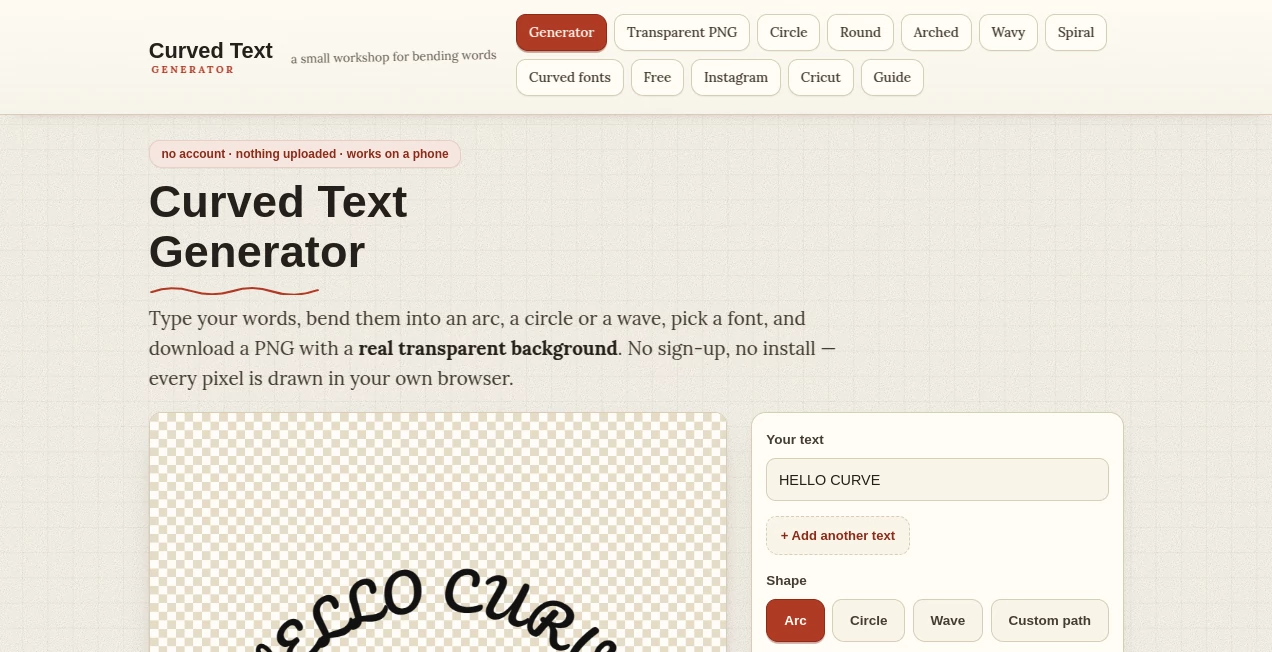
Curved Text Generator is a simple browser-based design tool for turning ordinary words into arches, circles, waves, and custom curved lettering. It is built around one practical idea: you should not need Photoshop, a design subscription, or a complicated editing workflow just to make text follow a shape.
The editor lets you type your wording, choose a shape, adjust the curve and letter spacing, select a font and colour, and export the finished result as a PNG. The transparent background option is particularly useful because the exported lettering can be placed directly over photographs, product mockups, coloured backgrounds, or other designs without carrying a white rectangle with it.
There is also no account or installation requirement. The site is designed to work directly in the browser, including on phones, which makes it a handy option when you need a quick piece of curved lettering rather than a complete graphic-design application.
Key Features
- Arc, circle, wave, and custom-path text shapes
- Adjustable curve and letter spacing
- Multiple built-in fonts covering script, handwriting, display, serif, slab, and sans-serif styles
- Transparent PNG export with a genuine alpha channel
- Optional text outline for better visibility on busy images
- Export sizes up to 3200 × 2000 pixels
- No account, login, installation, or email requirement
- Browser-based processing that keeps typed text on the user's device
User Interface
The interface keeps the editing process focused on the things that actually matter. Start with the text, select a shape, and then use the available controls to refine the result. Instead of navigating through a large collection of design panels, users can concentrate on the curve, diameter, wave settings, font, spacing, colour, and outline.
The mobile-first approach is another nice touch. The controls and download button are designed for touch interaction, so creating a curved title from a phone does not feel like an afterthought. For someone working on a quick Instagram graphic or a product idea while away from a desktop, that simplicity can save considerable time.
Accuracy & Performance
The tool takes a more precise approach than simply applying a generic warp effect to an entire text box. Individual letters are positioned along the selected curve and rotated to follow its direction. This helps the lettering feel naturally attached to the path rather than merely squeezed into a curved container.
The custom path option provides additional control by allowing users to manipulate the curve themselves. For waves, separate height and length controls make it possible to create anything from a gentle ripple to a much stronger zig-zag effect.
Exports are generated directly in the browser, and the service does not require a server-side upload step for the text or image being created. The result is therefore available without waiting for a remote design process to finish.
Capabilities
The range of shapes is where the tool becomes especially useful. Arc is a natural choice for team shirts, badges, headings, and signs. Circle is better suited to seals, stamps, labels, and round logos because it supports separate top and bottom wording. Wave works well for playful graphics, while Custom path gives designers more freedom when a standard preset is not quite right.
The font collection also covers a useful range of visual styles. Bold condensed fonts can work well for merchandise and lettering that needs to remain readable at a distance, while script and handwriting options can give invitations, stickers, journals, and social graphics a more personal appearance.
For users who need to place the lettering on a photograph, the outline feature is particularly practical. A subtle outline can prevent light text from disappearing against a bright image without requiring another graphics application.
Security & Privacy
Privacy is one of the stronger aspects of the workflow. According to the site, typed text is laid out and rendered by the user's own browser, while the resulting PNG is produced on the device. The service does not require an account, and the text is not uploaded as part of the normal generation process.
The same browser-based approach applies when working with an image as a background. The image can remain on the device while the lettering is created, which is useful when working with private photographs or unfinished commercial designs.
Use Cases
Curved lettering has a surprisingly wide range of applications. A small business could create a circular stamp for packaging, while a clothing designer might build an arched phrase for a sweatshirt or team shirt. A creator preparing social media content can make curved wording and place the transparent PNG directly over an existing photograph.
It can also be useful for stickers, mugs, tumblers, bottles, journal decorations, badges, shop signs, labels, event graphics, and simple promotional artwork. For Cricut users, a large transparent PNG can also be imported into Design Space and traced for cutting, although direct SVG export is not currently part of the workflow.
Pros and Cons
- Pros: Very simple workflow, no registration, works on phones, transparent PNG export, several useful curve styles, adjustable spacing, custom paths, and commercially usable bundled fonts.
- Pros: Text and image work can stay inside the browser, which is convenient for privacy-conscious projects.
- Pros: Large export options make the results suitable for both digital graphics and many print-oriented projects.
- Cons: It is focused specifically on curved lettering rather than full graphic design.
- Cons: Custom font uploads are not currently available.
- Cons: Direct SVG export is not available, which may matter to users who need a ready-made vector file.
- Cons: Circular designs use one font, colour, and size for the ring rather than allowing independent styling for the top and bottom lines.
Pricing Plans
The generator is available to use without a subscription or account. There is no sign-up wall before creating and downloading curved text, making the service particularly attractive for occasional users who do not want to commit to another design platform.
The bundled typefaces are openly licensed, with the site's font information indicating that the included fonts can be used commercially under their respective licenses. This is useful for people creating shop graphics, merchandise, stickers, labels, and other commercial artwork.
How to Use Curved Text Generator
- Enter the wording you want to turn into curved lettering.
- Select Arc, Circle, Wave, or Custom path depending on the design you need.
- Adjust the curve, diameter, or wave controls until the text follows the desired shape.
- Change letter spacing if the characters feel too crowded or too spread out.
- Select a suitable font, text colour, and optional outline.
- Choose an export size, with larger options available for print-oriented work.
- Keep Transparent background enabled when the lettering needs to be placed over another design.
- Download the finished PNG and use it in your preferred design, social media, printing, or cutting workflow.
Comparison with Similar Tools
Traditional design applications offer far more control, but that extra power often comes with a steeper learning curve. A user who only needs curved lettering may spend more time finding the right tool, creating a text layer, adjusting its path, and preparing the export than actually designing the lettering.
This approach is deliberately narrower. It focuses on the specific job of bending words and exporting them cleanly. Compared with basic screenshot-based solutions, the transparent PNG workflow is a meaningful advantage because the lettering can be placed directly onto another background without manually removing a white rectangle.
It also sits somewhere between simple online text generators and full design software. It is more flexible than a fixed-effect generator because the curve, spacing, font, outline, and shape can be adjusted, while remaining considerably easier to approach than a professional design suite.
Conclusion
For anyone who regularly searches for a quick way to bend words into an arch, circle, wave, or custom shape, this tool solves a very specific problem without adding unnecessary complexity. The combination of touch-friendly editing, transparent PNG export, useful typography choices, and no-registration access makes it especially convenient for quick creative jobs.
It is not intended to replace a complete graphics editor, and that is actually part of its appeal. When the job is simply to create clean curved lettering and move on to the rest of the design, a focused browser tool can be exactly what is needed.
Frequently Asked Questions (FAQ)
Do I need an account to create curved text?
No. The generator can be used without creating an account, logging in, or providing an email address.
Can I download curved text with a transparent background?
Yes. The transparent background option produces a PNG with a genuine alpha channel, allowing the lettering to be placed over different backgrounds without a white rectangle.
Can I create text in a circle?
Yes. The Circle shape supports text around the top of a ring and a separate bottom line. The bottom text is arranged to remain readable rather than appearing upside down.
Can I create wavy lettering?
Yes. The Wave shape includes controls for wave height and wave length, allowing you to create anything from a subtle ripple to a much stronger wave effect.
Can I use the generated designs commercially?
Yes, the site's bundled fonts are released under open licenses that permit commercial use. Users should still check the applicable font license information for the specific typeface they choose.
Can I upload my own font?
Not currently. The editor provides its bundled font collection along with commonly available fonts on the user's device.
Does it work on mobile phones?
Yes. The editor is designed with mobile use in mind, including touch-friendly controls and downloading from the browser.
Does it export SVG files?
No. The current workflow exports PNG files. For Cricut projects, the transparent PNG can be uploaded to Design Space and traced, but users who specifically require direct SVG output will need another step or another application.
AI Logo Generator , AI Fun Tools , AI Design Generator , AI Graphic Design .
These classifications represent its core capabilities and areas of application. For related tools, explore the linked categories above.
TryCurvedText details
Website unavailable — View Alternatives
Pricing
- Free
Apps
- Chrome Extensions
Categories

TryCurvedText Alternatives Product
imagetostl
SeeDream 4.5
Album Cover …
SciFig
DLSS 5 Meme …
Normal Map G…
RenderQuill

Connections …
AIGPTImage