Turbo AI
What is Turbo AI?
Picture this: you're sitting in a lecture, trying to keep up with the professor while scribbling notes that you'll barely understand later. Or you're staring at a dense PDF textbook the night before an exam, overwhelmed by how much you need to absorb. This tool quietly changes that experience. It listens, reads, or watches your material and turns it into clean, organized, actually useful notes—complete with flashcards, quizzes, and even podcasts you can listen to while walking to class. I've heard students say it's like having a super-smart study buddy who never gets tired and somehow always knows what matters most.
Introduction
Most students have tried the usual apps—voice recorders that create messy transcripts, note tools that just store text, or flashcard makers that feel like extra homework. Turbo AI brings everything together in one place that actually feels helpful. Formerly known as Turbolearn, it has grown into a full AI-powered study companion used by millions of students. You can record live lectures, upload PDFs or YouTube videos, and get beautifully formatted notes with diagrams, key concepts highlighted, and ready-to-use study materials. The best part? It doesn't just dump information on you—it helps you actually learn and retain it.
Key Features
User Interface
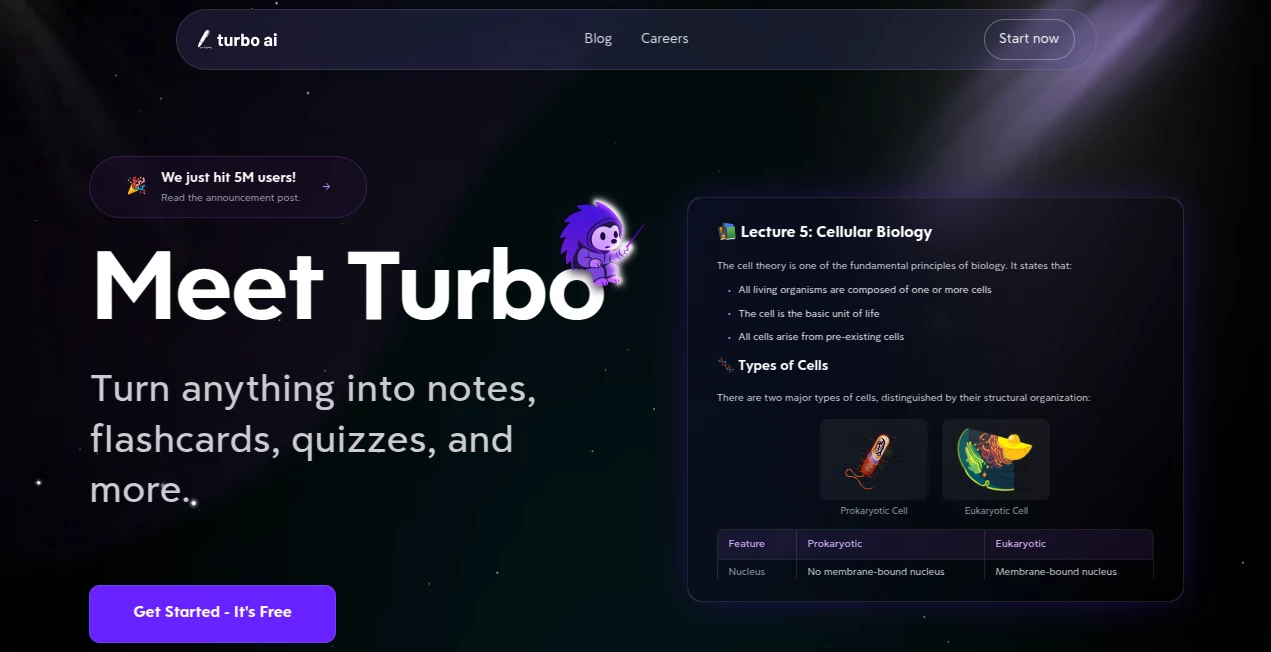
The interface is refreshingly straightforward. A big record button for live lectures, simple upload options for PDFs, videos, or audio, and clean folders to organize everything by class or semester. The notes open in an editable editor that feels familiar, like a smart Google Doc that suggests improvements as you go. Everything syncs across web and mobile, so you can start on your laptop during class and review on your phone during lunch. No steep learning curve—just open and start capturing.
Accuracy & Performance
It handles different accents, technical terms, and fast-speaking professors remarkably well. Transcriptions come back clean and structured, with key concepts pulled out intelligently. Students often mention how it catches details they missed while frantically writing. Processing is fast—most uploads turn into full notes within seconds to a minute—so you spend less time waiting and more time actually studying.
Capabilities
Beyond basic transcription, it generates rich notes with tables, emojis, diagrams, and equations preserved properly. From any content you feed it, it creates flashcards for spaced repetition, practice quizzes that adapt to what you need to focus on, and even podcasts you can listen to on the go. You can chat directly with your notes to ask questions, summarize chapters, or explain difficult parts. It works with live recordings, uploaded files, and YouTube links, making it incredibly versatile for different learning styles and subjects.
Security & Privacy
Your lectures and notes stay private. The platform is designed with student data in mind—no unnecessary sharing or selling of your content. Recordings and uploads are processed securely, and you control what gets saved or shared. For anyone recording sensitive class discussions or working with confidential material, that peace of mind makes a big difference.
Use Cases
A pre-med student records long biology lectures and gets back organized notes with diagrams and ready-made flashcards that helped them ace their exams. A business major uploads case study PDFs and instantly turns them into quizzes for group study sessions. A language learner pastes YouTube videos and creates listening comprehension materials with transcripts. Even working professionals use it to summarize meeting recordings and turn them into actionable notes. It's flexible enough for university life, self-study, or professional development.
Pros and Cons
Pros:
- Combines transcription, note formatting, flashcards, quizzes, and podcasts in one smooth experience.
- Excellent at handling technical content, equations, and different subjects.
- Cross-device sync and mobile support mean you can study anywhere.
- Generous free tier lets you test it thoroughly before upgrading.
- Feels like a real study partner rather than just another app.
Cons:
- Very heavy or low-quality audio can occasionally need manual cleanup.
- Advanced features and unlimited usage require a paid plan.
- Still building out some collaboration tools for group projects.
Pricing Plans
It starts with a solid free plan that includes core note generation, flashcards, and quizzes—enough for most students to get real value. Paid plans unlock unlimited generations, advanced AI features, priority processing, and full access to everything. The upgrade feels worth it once you're relying on it daily, especially during exam season when time savings matter most.
How to Use Turbo AI
Sign up (quick and free), then either hit record during a lecture, paste a YouTube link, or upload a PDF/audio file. The AI processes it and delivers structured notes within moments. Review and edit in the built-in editor, generate flashcards or a quiz with one click, and organize everything into subject folders. Chat with your notes if you need explanations or summaries. Everything syncs automatically so you can pick up right where you left off on any device.
Comparison with Similar Tools
Many note apps stop at transcription or basic flashcards. This one goes further by creating rich, formatted notes with diagrams and turning content into multiple study formats automatically. It feels more complete and student-focused than generic transcription tools or scattered study apps. The combination of accuracy, speed, and useful outputs puts it ahead for anyone serious about learning efficiently.
Conclusion
Studying doesn't have to be a constant battle against messy notes and forgotten details. This tool turns the chaos of lectures, textbooks, and videos into clear, actionable study materials that actually help you learn. It's the kind of companion that makes you feel more prepared and less stressed—exactly what every student needs. If you're tired of scrambling to keep up, this might just be the last notetaker you ever need.
Frequently Asked Questions (FAQ)
Can it handle technical subjects with formulas?
Yes—it preserves equations, diagrams, and technical terms very well across science, engineering, and math courses.
Does it work with YouTube lectures?
Absolutely—just paste the link and it generates notes, flashcards, and quizzes from the video content.
Is there a mobile app?
Yes, it works great on both web and mobile with full sync across devices.
How accurate is the transcription?
It performs strongly even with different accents and speeds, though very poor audio quality can affect results.
Is the free version actually useful?
Very—many students get by comfortably on the free tier, especially for lighter course loads.
AI Documents Assistant , AI Productivity Tools , Education , AI Notes Assistant .
These classifications represent its core capabilities and areas of application. For related tools, explore the linked categories above.

Turbo AI Alternatives Product

hd image con…

Kaamfu

Speech Text

gemini omni …

ApplyBtn

WhispriNote

Skygen AI
YT Video Sum…

Toolquix