Twenty
What is Twenty?
Twenty is an open-source CRM platform designed for teams that want more control over how their customer and business data is organized. Instead of forcing every company into the same rigid workflow, it provides the building blocks for creating a CRM that can adapt as the organization changes.
The platform combines familiar CRM functions such as companies, people, opportunities, tasks, notes, dashboards, and workflows with extensive customization and AI-assisted features. This makes it particularly interesting for technical teams that want a CRM they can shape around their own processes rather than constantly working around limitations.
One of its strongest advantages is the choice between managed cloud hosting and self-hosting. Teams can use a ready-to-go cloud environment when they want simplicity, or run the software on their own infrastructure when control and ownership are more important.
Key Features
- Open-source CRM with self-hosting support
- Custom objects and custom fields for building specialized data models
- Table, kanban, calendar, and other flexible record views
- No-code workflows and business process automation
- Custom dashboards and reporting based on live CRM data
- Companies, people, opportunities, tasks, notes, and relationship management
- Email and calendar synchronization
- AI-powered chat, automation, dashboards, and workspace assistance
- Native MCP support for connecting compatible AI assistants
- API access for integrations and large-scale data migration
- Apps framework for developers who need deeper customization
- CSV import for moving data from existing CRM systems
User Interface
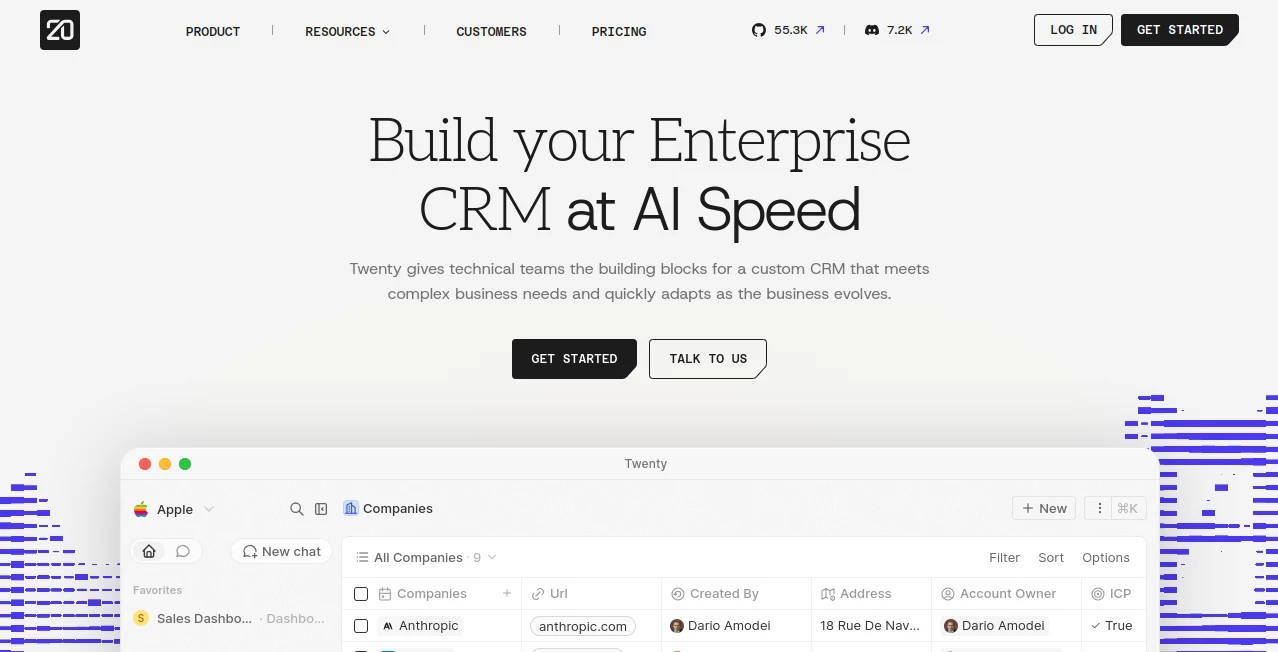
The interface is designed around speed and keeping important information close at hand. Records, dashboards, workflows, tasks, and other parts of the workspace can be accessed without constantly jumping between disconnected screens.
Table, kanban, and calendar views make it easier to work with different types of information. For example, a sales team can manage opportunities as a pipeline while another department can use tables or calendars for its own operational data.
Keyboard shortcuts and quick-access controls also make the workspace feel more like a modern productivity application than a traditional enterprise database.
Accuracy & Performance
For a CRM, accuracy is less about generating a single numerical answer and more about keeping business information organized, connected, and accessible. The platform works with live CRM data and allows teams to create dashboards that aggregate records into useful business metrics.
AI features can also work directly with workspace information. Users can ask questions about their data, generate tasks, create dashboards, or draft workflows using natural-language instructions. This can reduce the amount of repetitive manual work involved in maintaining a CRM.
Performance is also supported by an interface built around fast navigation, shortcuts, and side-panel access to important functionality. Recent releases have continued improving dashboards, record relationships, search previews, and AI-assisted workspace configuration.
Capabilities
The biggest strength is flexibility. Businesses can create custom objects, add fields, define relationships between records, design their own views, and automate processes without necessarily waiting for a developer.
For technical teams, the platform goes further through its Apps framework. Developers can build extensions, server-side logic, React components, custom AI skills, agents, views, and navigation using TypeScript.
AI is not treated simply as a separate chatbot sitting beside the CRM. It can interact with the underlying workspace and help users perform practical tasks. For example, a team could ask an AI assistant to build a dashboard from existing data, generate tasks for important accounts, or create a workflow for a sales process.
Security & Privacy
Self-hosting is an important option for organizations that want greater control over their infrastructure and data. Rather than being required to place the entire CRM environment with a third-party SaaS provider, teams can operate the open-source software on infrastructure they control.
For organizations using the managed cloud offering, higher-tier plans include features such as single sign-on and row-level permissions. The platform also provides APIs and an extensibility framework, giving technical teams more control over how CRM data connects with their wider software environment.
As with any self-hosted application, security ultimately depends on how the organization configures, updates, monitors, and protects its own infrastructure.
Use Cases
Sales teams: Manage companies, contacts, opportunities, pipelines, activities, and sales dashboards in one workspace.
Growing businesses: Start with standard CRM objects and gradually introduce custom fields, objects, and workflows as processes become more sophisticated.
Technical organizations: Build a CRM around internal data structures and extend the platform through its developer framework instead of accepting a fixed CRM architecture.
Operations teams: Automate recurring processes with no-code workflows triggered by records, schedules, manual actions, or incoming webhooks.
AI-assisted teams: Connect compatible AI assistants through MCP and use natural-language interactions to work with CRM information.
Organizations moving away from legacy CRM platforms: Existing information can be imported through CSV, while larger migrations can use the API or specialized migration support.
Pros and Cons
- Pros: Open-source architecture, self-hosting option, extensive customization, modern interface, AI capabilities, no-code automation, developer extensibility, flexible data modeling, and API support.
- Pros: Teams are not limited to a predefined collection of CRM objects and workflows. The data model can evolve with the business.
- Pros: The combination of AI features and traditional CRM functionality makes repetitive operational work easier to automate.
- Cons: Extensive customization can require more planning than using a simple plug-and-play CRM.
- Cons: Self-hosting gives organizations more responsibility for infrastructure, updates, backups, monitoring, and security.
- Cons: Smaller teams that only need basic contact management may not need the platform's deeper customization capabilities.
Pricing Plans
The cloud offering currently includes a Pro plan priced at $9 per user per month when billed yearly. The Organization plan is $19 per user per month and adds capabilities such as SSO and row-level permissions for teams with more advanced access-control requirements.
There is also a free self-hosted option, which is particularly attractive for organizations that have the technical resources to manage their own infrastructure. Premium functionality is available through higher-tier offerings, while the managed cloud option removes much of the operational work associated with running the CRM yourself.
How to Use It
- Create a cloud workspace or prepare a self-hosted installation.
- Set up the core CRM structure for companies, people, opportunities, tasks, and other records.
- Add custom objects and fields if the standard structure does not fully match your business.
- Create views that suit different workflows, such as tables, kanban boards, or calendars.
- Connect email and calendar services where required.
- Build workflows to automate repetitive processes and record updates.
- Create dashboards to monitor sales and operational performance.
- Use the built-in AI capabilities to work with CRM information and automate selected tasks.
- Connect compatible AI assistants through MCP when natural-language access to CRM data is useful.
- For advanced requirements, extend the workspace through the developer framework and API.
Comparison with Similar Tools
Compared with conventional proprietary CRM platforms, the main difference is the level of control offered over the underlying system. Instead of treating customization as a collection of optional add-ons, the platform puts the data model, layouts, workflows, and extensibility at the center of the product.
This approach is especially appealing to companies with technical teams. A business that has outgrown a basic CRM can continue modifying its workspace instead of immediately moving to an expensive enterprise setup or building an entirely new internal system.
The trade-off is that flexibility comes with responsibility. A highly customized CRM needs thoughtful data modeling and workflow design. For teams willing to invest that effort, however, the ability to shape the system around real business processes can be far more valuable than having hundreds of features that cannot be adapted.
Conclusion
For organizations looking for a CRM that can grow alongside their business, this platform offers a compelling combination of open-source flexibility, modern CRM functionality, AI assistance, automation, and developer extensibility.
Its strongest appeal is not simply the number of features available out of the box. It is the freedom to change the underlying CRM structure when the business changes. A sales team can build around opportunities and pipelines, an operations department can create its own workflows, and a technical team can extend the system with code when no-code customization is no longer enough.
The choice between cloud hosting and self-hosting also makes it suitable for different types of organizations. Businesses that want convenience can use the managed service, while technically capable teams can retain greater infrastructure control.
For companies that see their CRM as more than a contact database and want it to become an adaptable operating system for their go-to-market processes, this is a particularly strong option worth exploring.
Frequently Asked Questions (FAQ)
Is it an open-source CRM?
Yes. It is an open-source CRM and can be self-hosted. A managed cloud option is also available for teams that prefer not to maintain the infrastructure themselves.
Can I customize the CRM without coding?
Yes. Users can create custom objects and fields, modify layouts and views, and build no-code workflows directly from the workspace settings.
Does it support AI?
Yes. AI can be used for tasks such as asking questions about CRM data, generating tasks, building dashboards, and creating workflow drafts. Cloud workspaces also include a native MCP server for connecting compatible AI assistants.
Can I migrate data from another CRM?
Yes. Data can be imported through CSV, while the API can be used for larger migrations. The platform also supports migration from established CRM systems through specialized migration services.
Does it have an API?
Yes. The API can be used for integrations, data migration, and connecting the CRM with other applications.
Is self-hosting free?
A free self-hosted plan is available. Organizations should still consider their own infrastructure, maintenance, backup, monitoring, and security costs.
What is the main advantage over a traditional CRM?
The major advantage is flexibility. Instead of being restricted to a fixed CRM structure, teams can adapt the data model, views, workflows, and extensions to match the way their organization actually operates.
AI Workflow Management , AI CRM Assistant , AI Developer Tools , AI Productivity Tools .
These classifications represent its core capabilities and areas of application. For related tools, explore the linked categories above.

Twenty Alternatives Product

Online White…

GPT Image 2 …

Claude and C…

ChatFlowchart
KwaKwa Cours…

BootstrapKing

Somnio

Sales Prospe…

BetterAntisp…