UPSCALEVIDEO
What is UPSCALEVIDEO?
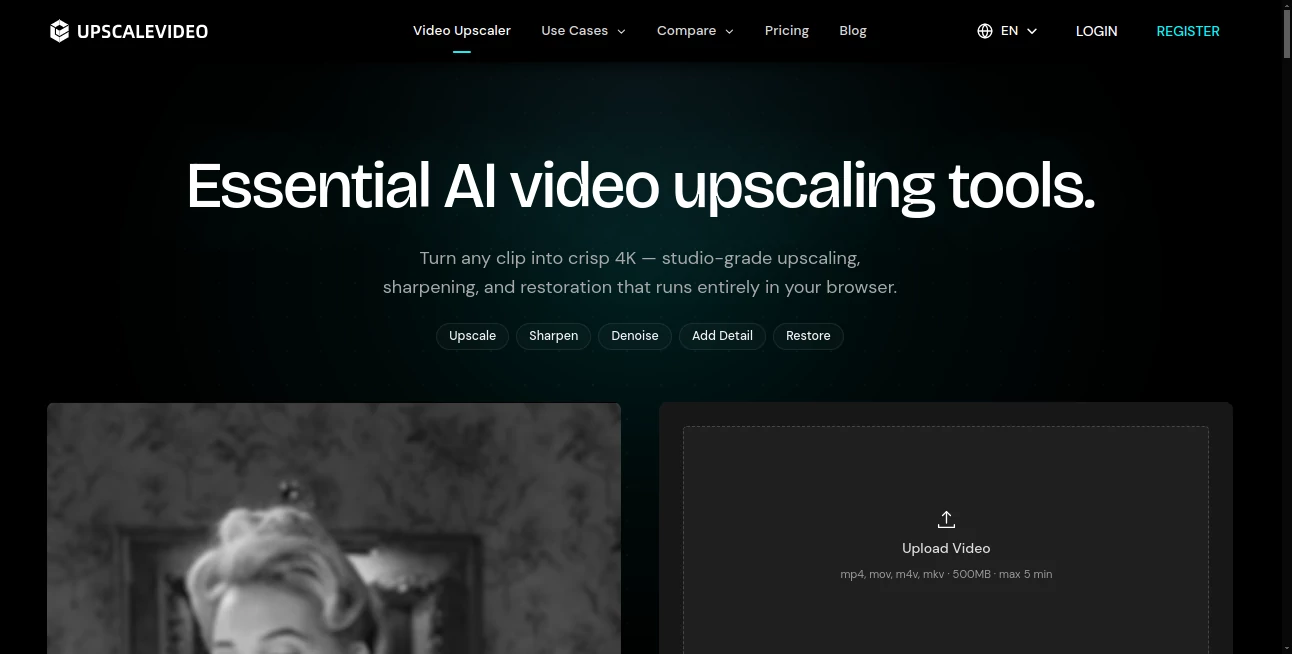
UPSCALEVIDEO is an online AI video enhancement platform designed for creators who want cleaner, sharper, higher-resolution footage without installing desktop software. It can upscale videos to 720p, 1080p, 2K, or 4K while also improving clarity through sharpening, denoising, and detail reconstruction.
The biggest advantage is simplicity. You upload a supported video directly from your browser, choose the resolution you want, preview the result, and download the enhanced MP4. There is no need for a powerful GPU on your computer, making the workflow particularly convenient for creators working across different devices.
Key Features
- AI-powered video upscaling up to 4K
- Smart sharpening for improved edge and texture definition
- Noise and compression artifact reduction
- AI detail reconstruction for older or soft footage
- Browser-based processing with no software installation
- Support for MP4, MOV, M4V, and MKV files
- Frame-rate interpolation for smoother motion
- Side-by-side preview before committing to the full result
- High-bitrate MP4 output
User Interface
The interface is intentionally straightforward. The upload area is immediately visible, so users do not have to navigate through a complicated editing workspace before getting started. After uploading a clip, you can select the desired output resolution and preview the enhancement.
This approach works well for someone who simply wants to improve a video rather than learn a full video-editing application. A creator preparing a short social media clip, for example, can move from an original file to an enhanced preview without dealing with timelines, effects panels, or technical export settings.
Accuracy & Performance
The enhancement process goes beyond simply stretching pixels. AI models analyze video frames and attempt to reconstruct fine visual information while reducing unwanted noise and compression artifacts. This can be particularly useful when the original footage looks soft, heavily compressed, or slightly blurry.
Results naturally depend on the source material. A clean 1080p recording has much more useful information to work with than a severely degraded 360p clip. For very low-quality footage, choosing a more moderate target such as 1080p can produce a more natural result than immediately forcing the video to 4K.
Processing is performed online, so your own computer does not need a dedicated graphics card. Short clips can typically move through the workflow in minutes, depending on the selected enhancement and current processing demand.
Capabilities
The platform combines several useful video-quality improvements in one workflow. AI upscaling can increase the output resolution, while sharpening helps restore edge definition around objects, text, architecture, hair, and other fine elements.
Denoising is another useful part of the process. Grain, high-ISO noise, and compression artifacts can make footage look messy, especially in dark scenes. Reducing these distractions before delivery can make the final video considerably easier to watch.
There is also an optional frame-rate boost based on frame interpolation. This can help footage with choppy movement, animation, sports scenes, screen recordings, and AI-generated clips that would benefit from smoother motion.
Security & Privacy
The service states that uploaded files are processed securely and are not shared with third parties. Processing takes place online rather than on the user's device, which removes the need to install additional software or download large AI models.
As with any online service that processes personal or commercially sensitive footage, users should still consider the nature of the material they upload and review the provider's current privacy and terms information before processing confidential content.
Use Cases
One of the strongest aspects of this type of workflow is its range of practical applications. YouTube creators can enhance a 1080p master before publishing it at a higher resolution, helping the footage retain more clarity after platform compression.
It is also useful for short-form content. Reels, Shorts, and TikTok videos can lose noticeable detail after being uploaded and compressed. Cleaning and sharpening the source before publication can give the final upload a stronger starting point.
For older footage, AI enhancement can make VHS transfers, early mobile recordings, and low-resolution clips more pleasant to watch. It can also be useful for anime and animation, gameplay, screen recordings, drone footage, travel videos, and AI-generated video that looks soft after generation.
For example, someone restoring an old family recording may benefit more from noise reduction and moderate upscaling than simply exporting the original footage at a larger resolution. Likewise, a content creator working with an AI-generated video can use sharpening and denoising to clean up compression before incorporating the clip into a larger project.
Pros and Cons
Pros
- Works directly in a web browser
- No desktop installation or local GPU required
- Supports output resolutions up to 4K
- Combines upscaling, sharpening, denoising, and detail reconstruction
- Supports several common video formats
- Useful for both new and older footage
- Offers a free way to test the workflow
- Includes frame-rate interpolation for smoother motion
Cons
- Free usage has limited credits and processing restrictions
- Very low-quality footage cannot be restored beyond the information available in the original
- Longer or higher-resolution projects require a paid plan
- Online processing may not be ideal for users who need completely local workflows
Pricing Plans
The pricing model is credit-based, with monthly, yearly, and one-time credit options. The Free plan costs $0 per month and includes 20 credits, although it comes with queue waiting, watermarked outputs, and non-commercial use.
The Pro plan is listed at $7.99 per month during the current offer, reduced from $19.99, and includes 300 credits each month. It adds faster processing, watermark-free output, commercial use, and priority support.
The Ultimate plan costs $39.99 per month and provides 800 credits with the same commercial-use and faster-processing benefits. Annual options are also available, with the Pro plan listed at $190.99 per year and Ultimate at $274.99 per year during the current pricing promotion.
For people who prefer not to maintain a subscription, one-time credit packs range from 160 credits for $8 to 10,000 credits for $250. Pricing and promotional discounts can change, so users should check the current pricing page before purchasing.
How to Use It
- Upload an MP4, MOV, M4V, or MKV video. The current upload limit is 500MB and 60 seconds for the initial workflow.
- Select the desired output resolution, with available options including 720p, 1080p, 2K, and 4K.
- Let the AI process the clip and examine the preview.
- Compare the enhanced result with the original to make sure sharpening and noise reduction look natural.
- Choose the appropriate plan or credits if you want to process the complete video or access higher-resolution output.
- Download the resulting high-resolution MP4 when processing is complete.
Comparison with Similar Tools
Traditional desktop video enhancers can offer extensive controls, but they often require installation and a capable computer. A browser-based approach is more convenient for users who occasionally need to improve footage and do not want another demanding application on their system.
Compared with general-purpose video editors, this workflow is much more focused. Instead of spending time adjusting multiple effects, users can concentrate on the quality problem itself: increasing resolution, reducing noise, sharpening details, or smoothing motion.
Professional desktop applications can still be preferable for filmmakers and post-production teams that require extensive manual control, advanced model selection, batch processing, or a completely local workflow. For everyday creators, social media publishers, and people working with individual clips, however, the browser-first approach is considerably easier to access.
Conclusion
For anyone who regularly receives low-resolution, compressed, noisy, or slightly soft footage, an AI-powered enhancement workflow can save considerable time. The combination of upscaling, sharpening, denoising, detail reconstruction, and frame interpolation makes this solution more versatile than a basic resolution converter.
Its browser-based design is perhaps the most appealing part. There is no need to install a large application or own an expensive GPU just to improve a short clip. Whether the goal is preparing a YouTube upload, cleaning an old recording, improving an AI-generated video, or making social content look sharper, it provides a practical route from an imperfect source to a more polished final file.
Frequently Asked Questions (FAQ)
What is an AI video upscaler?
An AI video upscaler uses trained models to analyze video frames and reconstruct visual detail while increasing resolution. Unlike basic resizing, it attempts to improve the perceived quality of edges, textures, and other fine elements.
Can I upscale a video to 4K online?
Yes. You can upload a supported video, select 4K as the target resolution when available, preview the enhancement, and process the clip online without installing desktop software.
Can old videos be restored with AI?
AI can reduce noise, improve edge definition, and make old or compressed footage look cleaner. However, it cannot perfectly recover information that was never captured in the original recording.
Does it support video frame-rate enhancement?
Yes. Frame interpolation can generate additional frames to make motion appear smoother, which can be helpful for animation, sports footage, choppy recordings, and AI-generated videos.
What video formats are supported?
The current workflow accepts MP4, MOV, M4V, and MKV files. The initial upload limit is up to 500MB and 60 seconds.
Is there a free plan?
Yes. The Free plan provides 20 credits, although it includes limitations such as watermarked outputs, queue waiting, and non-commercial use. Paid plans provide additional credits and commercial-use benefits.
Will AI enhancement make every low-quality video look like native 4K?
No. AI can reconstruct plausible detail and improve clarity, but it cannot magically recover information that was never present in the source. Starting with the highest-quality original available usually produces the best result.
AI Video Editor , AI Video Enhancer , Video .
These classifications represent its core capabilities and areas of application. For related tools, explore the linked categories above.

UPSCALEVIDEO Alternatives Product

Gemini Omni …

Banana 2 Edi…

ImageVids AI

Kling O1

LatentSync

Remove Water…

Quso AI

AI Motion Co…

Sora Waterma…