Dictate
What is Dictate?
Writing is not always the fastest way to get an idea out of your head. Sometimes it is much easier to simply say what you mean and let your device turn it into usable text. dictate. is built around exactly that idea, bringing speech-to-text directly into the places where people already write on iPhone and Mac.
Instead of recording a voice memo and cleaning up the transcript later, users can speak directly into messages, emails, notes, documents, forms, and other everyday apps. The service focuses on producing clean, formatted text rather than leaving users with a raw block of transcription.
For someone who regularly writes emails while walking, captures ideas during a busy workday, or simply finds speaking more natural than typing, this approach can make everyday writing noticeably easier.
Key Features
- Voice typing directly inside apps where users already write.
- Automatic punctuation, formatting, and structure cleanup.
- Fast speech-to-text for everyday writing and longer dictation sessions.
- Support for multiple languages, including English, Portuguese, Spanish, and French.
- Translation that allows users to speak in one language and produce text in another.
- Searchable transcription history for finding previous ideas, drafts, addresses, and snippets.
- Personal dictionary support for names, technical terms, slang, and specialized vocabulary.
- Synchronization of account access, history, and settings between iPhone and Mac.
User Interface
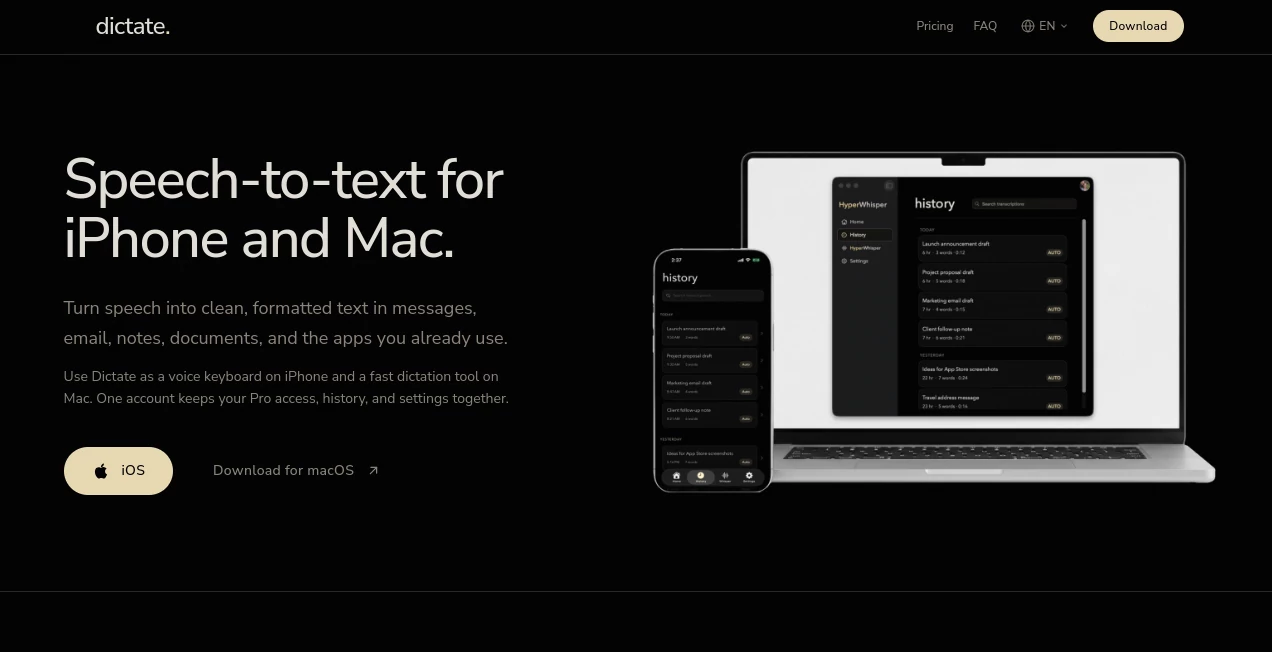
The interface is deliberately centered around the act of speaking rather than managing complicated transcription projects. On iPhone, the service works as a keyboard, so users can switch to it from the keyboard selector and dictate directly into the active text field. On Mac, it works as a dedicated dictation tool that can send spoken words into the application currently being used.
The surrounding experience includes areas for transcription history, languages, a personal dictionary, dictation controls, translation, and additional keyboard controls. This keeps frequently used functions close at hand without turning the product into an unnecessarily complicated workspace.
Accuracy & Performance
The main strength is not simply converting audio into words. The service is designed to turn natural speech into text that needs less editing afterward. Punctuation, paragraphs, formatting, and filler-word cleanup are handled as part of the transcription process.
This is particularly useful when dictating an email or a quick note. Instead of speaking in a rigid way to help a transcription engine understand every sentence, users can talk more naturally and then review the polished result.
Capabilities
The product covers more than basic voice typing. It can handle multilingual dictation, searchable history, translation, and a personal dictionary for words that may otherwise be difficult for a speech recognition system to recognize consistently.
The cross-device setup is another practical feature. A single account can connect the iPhone and Mac experience, allowing Pro access, supported settings, and history to remain associated with the same account.
It can also be useful for creating messages, emails, notes, social media drafts, search queries, form responses, and prompts for other AI applications. In these situations, the value comes from reducing the amount of time spent physically typing rather than replacing the user's own ideas.
Security & Privacy
Privacy matters more when a tool handles spoken conversations and personal messages. The service provides controls and documentation covering audio, transcriptions, account information, permissions, retention, and third-party services.
Its support documentation explains that microphone access is required for capturing speech, while Full Access on iPhone provides the network connection needed for user-initiated online transcription. The service also states that recordings are not stored. Users who need to remove their account can permanently delete their account record and associated server data from the account settings.
As with any voice-based application, users should still review the privacy policy and permissions before dictating confidential business, financial, or personal information.
Use Cases
One of the strongest use cases is email. Instead of typing a long response on a phone, a user can speak naturally and receive a formatted draft that can be reviewed before sending.
It is also useful for messaging in applications such as WhatsApp, Telegram, and iMessage. For people who frequently send longer messages, voice input can remove much of the friction associated with mobile keyboards.
Writers and professionals can use it to capture ideas while they are still fresh. A quick spoken thought can become a note, draft, outline, or prompt without requiring a laptop or a lengthy typing session.
There are also accessibility benefits. People who experience discomfort from repetitive typing or have difficulty using a physical keyboard may find voice-based writing a more comfortable way to interact with text.
For multilingual users, translation adds another useful layer. A person can speak naturally in one supported language and produce the final text in another, which can be convenient for international communication.
Pros and Cons
Pros:
- Works directly where users already type.
- Available across iPhone and Mac.
- Produces cleaner text instead of relying on raw transcription.
- Supports multiple languages.
- Includes translation capabilities.
- Searchable transcription history is useful for recovering previous ideas.
- Personal dictionary can improve handling of specialized vocabulary.
- One Pro account can cover both supported Apple platforms.
Cons:
- The iPhone experience requires enabling a third-party keyboard and granting the necessary permissions.
- Some protected fields, such as password fields, do not accept third-party keyboards.
- The free plan has a weekly transcription limit.
- The service is primarily focused on Apple devices, so users outside the iPhone and Mac ecosystem may not find it suitable.
- Online transcription requires an internet connection for the relevant features.
Pricing Plans
The service uses a free and Pro model. The Free plan provides 70 transcriptions per week, along with fast transcription, multilingual support, and transcription history. This gives new users a practical way to test voice-based writing before committing to a subscription.
The Pro plan removes the transcription limit and adds features such as AI-powered formatting, real-time translation, tone and style adjustment, and priority support. Pro access is designed to work across both iPhone and Mac through the same account.
Mac users can also start with a 7-day free trial before upgrading. Billing can be handled through the App Store on iPhone or Stripe on Mac.
How to Use It
Getting started is straightforward. On iPhone, install the application and follow the setup checklist to enable the keyboard. In iPhone Settings, the keyboard can be added under General and Keyboard settings, after which the required microphone and speech recognition permissions can be granted.
Once enabled, open any compatible text field and switch to the voice keyboard using the globe key. Tap the microphone button and speak naturally. When the session ends, the resulting text appears in the active field for review and editing.
On Mac, install the desktop application, sign in with the same account, and use the configured shortcut to begin dictating into the active application. This makes it possible to move between mobile and desktop writing without maintaining separate accounts.
Comparison with Similar Tools
Traditional built-in dictation features are convenient because they are already part of the operating system, but they can leave users doing more manual cleanup after speaking. This service takes a more writing-focused approach by combining transcription with formatting, punctuation cleanup, searchable history, personal vocabulary, and translation.
Dedicated transcription applications can be useful when the goal is to record meetings, interviews, or long audio files for later analysis. A voice keyboard takes a different approach. It is designed for moments when the user already knows what they want to write and simply wants to say it instead of typing it.
That distinction makes it particularly appealing for everyday communication. If the goal is turning spoken thoughts into ready-to-edit text inside an existing app, an integrated keyboard can be more convenient than switching to a separate transcription workspace.
Conclusion
For people who spend a significant part of their day typing on an iPhone or Mac, voice can be a much faster input method than a physical or touchscreen keyboard. The combination of speech recognition, formatting, multilingual support, translation, searchable history, and a personal dictionary makes this more than a basic microphone-to-text utility.
The free plan is a sensible starting point for occasional users, while the Pro option is better suited to people who regularly dictate messages, emails, notes, documents, or other written content. Its biggest advantage is simplicity: instead of changing the way you work, it brings voice input into the places where you already write.
Frequently Asked Questions (FAQ)
Does it work on iPhone?
Yes. On iPhone, it works as a third-party keyboard that can be selected from the keyboard switcher inside compatible text fields.
Does it work on Mac?
Yes. A dedicated Mac application is available, allowing users to start dictation with a keyboard shortcut and enter the resulting text into the active application.
Is there a free plan?
Yes. The Free plan includes 70 transcriptions per week, multilingual support, fast transcription, and transcription history.
Does the Pro plan work on both iPhone and Mac?
Yes. A single Pro account can be used across iPhone and Mac, with supported access, settings, and history connected to the same account.
Can it translate spoken text?
Yes. Users can speak in one language and translate the resulting text into another supported language while dictating.
Can I use it in messaging and email apps?
Yes. It is designed to work inside applications that accept text input, including messaging, email, notes, social media, forms, and search fields.
Does it keep my voice recordings?
The service states that recordings are not stored. Voice processing and data handling are also covered in its privacy documentation, so users should review the current privacy policy for the full details.
Can I add custom words?
Yes. A personal dictionary allows users to add names, slang, technical terminology, and other words or phrases that are important to their everyday writing.
What devices are supported?
The current product is designed for iPhone and Mac. The iPhone application requires iOS 18 or later.
Is an internet connection required?
Some online transcription functionality requires the device to be connected to the internet. On iPhone, Full Access provides the keyboard with the network connection needed for user-initiated online transcription.
AI Speech Recognition , AI Transcription , AI Speech to Text .
These classifications represent its core capabilities and areas of application. For related tools, explore the linked categories above.
Dictate details
Website unavailable — View Alternatives
Pricing
- Freemium
Apps
- Web App
- iOS App
- Mac App
Categories

Dictate Alternatives Product

AutoDub

Speech Text
Voza Transcr…

Gpt Realtime…

Whisper Web

Klyra AI

TurboScribe

EasyVC
MP3 to Text …