
Ordr
What is Ordr?
Productivity tools often promise organization, but many end up creating even more clutter. Endless lists, complicated systems, and constant reminders can turn task management into another task itself. This platform takes a different route. Instead of demanding structure from users, it builds structure around the way real people think.
Designed for people who juggle ideas, responsibilities, and scattered thoughts throughout the day, it transforms messy input into a clear and manageable action plan. Whether someone types a quick note, speaks an idea aloud, or captures a thought on the go, the system organizes everything into actionable steps with surprisingly little effort.
What makes it refreshing is how natural the experience feels. It doesn't push users toward rigid productivity rules. Instead, it reduces mental friction and creates a calmer workflow. For professionals, students, creators, and overthinkers alike, that shift can make a noticeable difference.
Key Features
User Interface
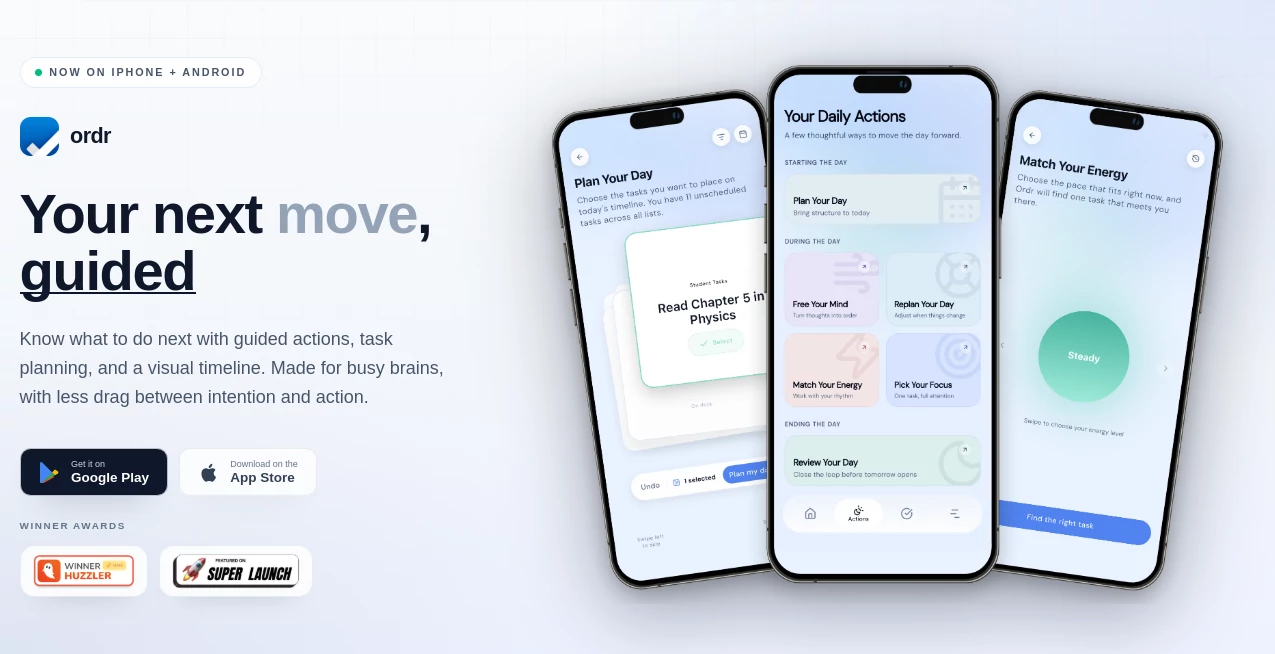
The interface feels lightweight and distraction-free. Rather than overwhelming users with dozens of panels and settings, it focuses attention on what matters next. Navigation feels smooth and intentional, making planning sessions less stressful and more productive.
Users can quickly capture ideas through typing, voice input, or images, creating an experience that feels almost conversational. The design encourages quick action rather than endless organization.
Accuracy & Performance
Turning random thoughts into useful plans is harder than it sounds, yet the system performs impressively well. Inputs become organized tasks and schedules within seconds. Instead of simply storing information, it identifies structure and priorities.
The speed matters. Productivity often disappears when tools require too many steps. Here, ideas move rapidly from thought to action.
Capabilities
- Convert spoken thoughts into organized tasks
- Create structured schedules automatically
- Generate smart reminders
- Provide focus timers for uninterrupted work sessions
- Adapt planning based on priorities and workflow patterns
- Reduce decision fatigue with clear next-step guidance
One practical example: imagine sitting down with twenty different things on your mind and no idea where to begin. Instead of spending fifteen minutes deciding what comes first, the system gives immediate direction.
Security & Privacy
Modern productivity platforms hold sensitive personal information, so privacy matters. The platform includes account-level protection and structured handling of user information. Users increasingly want planning tools they can trust, especially when tasks contain personal goals, projects, or work-related information.
Having a thoughtful approach to privacy builds confidence and helps create a more reliable daily experience.
Use Cases
- Students managing assignments, projects, and study sessions
- Remote workers balancing multiple priorities
- Entrepreneurs organizing scattered business ideas
- Creative professionals handling fast-moving concepts
- Individuals who struggle with traditional productivity systems
- People who want less mental overload and clearer direction
Pros and Cons
Pros:
- Simple and intuitive workflow
- Reduces mental load instead of adding complexity
- Supports multiple input methods
- Fast planning and organization
- Helpful focus tools and reminders
Cons:
- Advanced users may want deeper customization options
- Some users may prefer traditional manual planning systems
- Features can vary depending on platform updates
Pricing Plans
The platform offers free access with additional premium functionality available through in-app purchases or subscription options. Users can explore core planning features before deciding whether expanded capabilities fit their workflow needs.
How to Use Ordr
Getting started feels surprisingly easy.
- Create an account and open the workspace
- Add ideas through typing, speaking, or image capture
- Allow the system to organize information automatically
- Review the suggested plan and priorities
- Use reminders and focus sessions to stay on track
- Follow the next recommended action instead of overthinking
The process removes the common feeling of staring at a task list and wondering where to begin.
Comparison with Similar Tools
Traditional planners and task applications often require users to manually organize every detail. Many rely on folders, tags, labels, and constant maintenance.
In comparison, this experience feels more adaptive and human. Rather than forcing users into a system, it adjusts around user behavior. The emphasis on reducing cognitive load creates a different kind of productivity experience. Less administration, more action.
People who have felt overwhelmed by standard productivity apps may notice the difference almost immediately.
Conclusion
Great productivity software should remove barriers rather than create them. That philosophy is visible throughout this experience. Instead of demanding perfect organization, it supports the way real minds work: messy, fast, and constantly moving.
For anyone who has opened a planner and felt stressed before even starting, this approach feels refreshing. The experience is lighter, smarter, and focused on helping users move forward rather than simply stay organized.
Sometimes productivity isn't about doing more. Sometimes it's simply about making the next step easier.
Frequently Asked Questions (FAQ)
Who is this tool designed for?
It works well for students, professionals, entrepreneurs, and anyone who struggles with overloaded task lists.
Can users add tasks through voice input?
Yes. Voice capture is available alongside typing and image-based inputs.
Does it include focus features?
Yes. Focus timers and structured workflow assistance are part of the experience.
Is it suitable for people who feel overwhelmed by planning tools?
Absolutely. Reducing friction and mental overload is one of its strongest strengths.
Can beginners start using it quickly?
Yes. The interface is intentionally simple and requires minimal setup.
AI Life Assistant , AI Productivity Tools , AI Task Management , AI Notes Assistant .
These classifications represent its core capabilities and areas of application. For related tools, explore the linked categories above.

Ordr Alternatives Product

QuickPick

Ask Bishop

Smart Chicke…

ChatView-AI …

Audio Convert

Block Poster…

mainaro
Zamicus

Firefox