


















Porte
What is Porte?
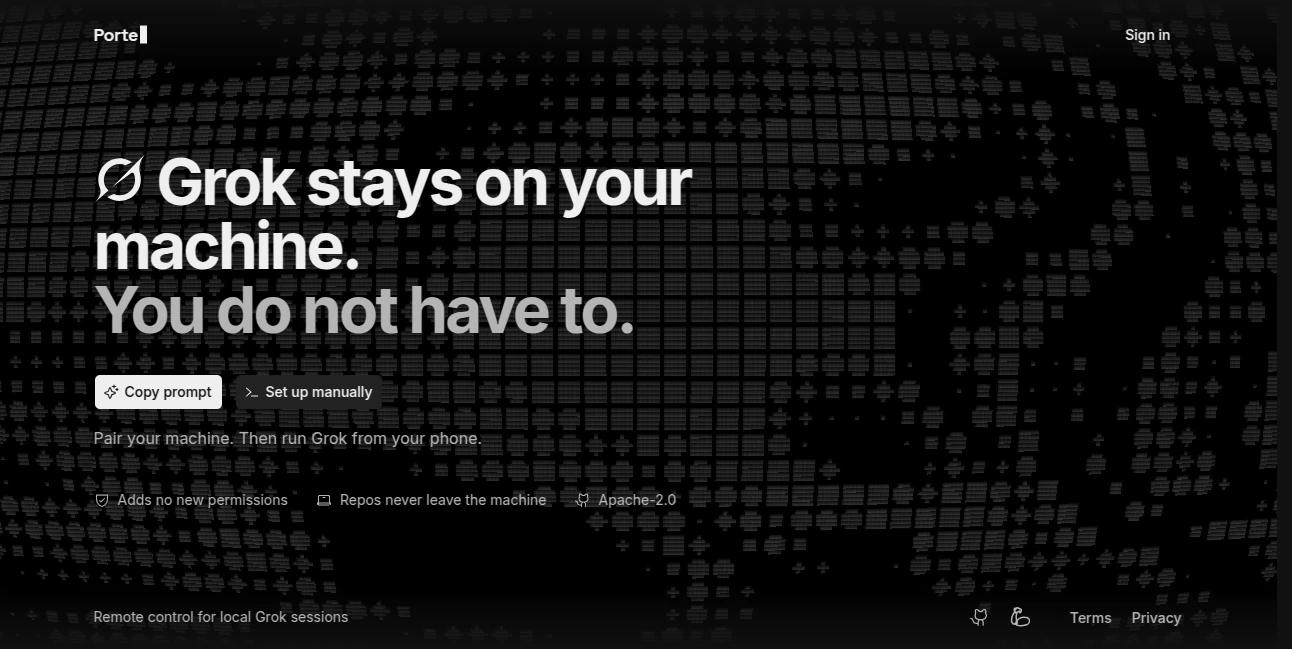
Porte is an open-source remote control that lets developers interact with their local Grok sessions from a phone. Instead of staying in front of the computer while an AI coding session is running, you can pair your machine with your phone and continue working remotely.
The idea is refreshingly practical. Grok remains on your own machine, along with your repositories, files, configuration, sandbox, and permission rules. Your phone becomes the control point, allowing you to read what is happening, send new prompts, review changes, and respond when the coding agent needs approval.
This makes the tool particularly interesting for developers who already use Grok as a coding agent but want more freedom around where and how they monitor their sessions.
Key Features
- Remote access to local Grok coding sessions from a phone
- Live transcript viewing, including tool calls, diffs, file output, and responses
- Ability to send prompts remotely
- File attachments from the phone
- Support for Grok slash commands
- Ability to stop an active turn
- Permission request approval and denial
- Access to existing conversations on the paired machine
- Ability to start conversations in known local repositories
- Git diff viewing for reviewing coding changes
- Open-source Apache-2.0 licensing
User Interface
The experience is centered around a simple pairing process rather than another complicated development dashboard. After installing the plugin and starting remote control from Grok, the developer pairs the phone with the machine.
From there, the phone provides a practical view into the active session. You can follow the conversation, inspect generated output, send another instruction, attach a file, or intervene when the agent requests permission. For developers who regularly move away from their workstation while a task is running, this can be a surprisingly useful workflow.
Accuracy & Performance
Performance depends heavily on the underlying local Grok session and the connection between the phone and paired machine, but the architecture keeps the actual coding environment on the developer's computer. The remote interface is designed to expose the state and controls of that local session rather than replacing it with a separate cloud development environment.
The current CLI documentation also describes an optional instant remote-control hook that can make remote-control responses available in under a second, although it changes how the response is presented by Grok.
Capabilities
The strongest part of the product is the amount of control it exposes without requiring the developer to move the project itself to another environment. A developer can open an existing conversation, begin work in a known repository, inspect Git changes, provide additional prompts, and handle permission requests directly from a phone.
For example, imagine asking Grok to refactor a component before leaving your desk. Instead of returning to the computer every few minutes, you can check the live transcript from your phone. If the agent asks for permission to perform an action, you can review the request and approve or deny it remotely.
This approach makes the tool feel less like a mobile IDE and more like a remote control for an AI development session—which is exactly where its value lies.
Security & Privacy
Privacy is an important part of the architecture. The local Grok environment and repository files remain on the developer's machine. The service is designed to preserve the machine's existing directory, configuration, sandbox, and permission rules rather than introducing broad new access permissions.
The project also states that it adds no new permissions and that repositories never leave the machine. The software is released under the Apache-2.0 license, allowing developers to inspect and work with the open-source project.
As with any remote-control system, users should still review the permissions and pairing configuration of their own environment and understand what information is made available through the remote session.
Use Cases
Remote coding sessions: Developers can monitor and control an AI coding session while away from their main workstation.
Long-running development tasks: When an agent is working through a repository, the phone provides a convenient way to check progress without constantly returning to the desktop.
Permission management: Developers can respond to permission requests remotely instead of leaving an active session waiting.
Code review on the go: Git diffs can be viewed remotely, making it easier to check what the coding agent has changed before deciding what to do next.
Mobile prompt management: A developer can send additional instructions or attach files from a phone when an existing task needs clarification.
Pros and Cons
- Pros: Open source, free to use, designed specifically around local Grok sessions, remote phone control, live transcripts, Git diff visibility, permission controls, and local repository preservation.
- Cons: It is tightly focused on Grok rather than being a general remote-control layer for every AI coding agent. It also requires a local Grok setup and a paired machine, so it is not intended to replace a standalone cloud development environment.
Pricing Plans
The project is currently available free of charge and is open source under the Apache-2.0 license. There is no conventional paid subscription structure presented for the core remote-control software.
This makes it particularly appealing to developers who want to experiment with mobile access to their local AI coding workflow without adding another recurring software expense.
How to Use Porte
Getting started is straightforward for developers who already have Grok running locally. First, install the project as a Grok plugin. The current setup requires Node.js 22 or newer.
Once the plugin is installed, run the remote-control command inside Grok and pair the machine with your phone. After pairing, the phone can be used to open existing conversations or start a session in a known local repository.
From the remote interface, you can read the live transcript, send prompts, attach files, run supported slash commands, stop an active turn, and respond to permission requests. You can also inspect Git changes when reviewing the work performed by the coding agent.
Comparison with Similar Tools
Many AI coding products focus on providing a complete cloud IDE or a browser-based development environment. This approach is different. Instead of moving the development workflow into a new environment, it keeps the existing local Grok setup on the developer's machine and adds a remote control layer.
That distinction matters. Developers who already have repositories, configuration files, local tools, and permissions set up may not want to rebuild their workflow somewhere else. A phone-based control layer can be a much lighter solution when the main requirement is simply being able to monitor and interact with an existing coding session remotely.
It is therefore best suited to people who value local development and already use Grok as their coding agent, rather than users searching for a complete mobile development environment.
Conclusion
Remote control for AI coding agents is a small idea with a very practical benefit: you do not always need to be sitting at your computer to stay involved in your development work.
By keeping Grok and the repository on the local machine while putting useful controls on a phone, this project creates a convenient bridge between desktop development and mobile access. Live transcripts, prompts, file attachments, permission handling, and Git diff inspection give developers meaningful control without turning the phone into a full development workstation.
For developers already working with local Grok sessions, it is a focused, lightweight, and genuinely useful addition to the workflow—especially when stepping away from the desk does not mean stepping away from the project.
Frequently Asked Questions (FAQ)
What is this tool used for?
It provides remote control for local Grok coding sessions, allowing developers to monitor and interact with those sessions from a phone.
Does the repository leave my computer?
The project states that repositories never leave the local machine. Grok and the repository remain on the developer's computer while the phone provides remote control.
Can I send prompts from my phone?
Yes. The remote interface supports sending prompts to an active local Grok session.
Can I approve permission requests remotely?
Yes. Permission requests can be reviewed and either approved or denied through the remote interface.
Can I view Git changes?
Yes. Git diffs can be viewed remotely, which makes it easier to review changes made during an AI coding session.
Is it free?
Yes. The core project is presented as free and open source under the Apache-2.0 license.
Does it work with every AI coding agent?
No. The project is specifically designed around local Grok sessions, so it should not be treated as a universal remote-control solution for every coding agent.
Do I need Node.js?
The current CLI documentation specifies Node.js 22 or newer for the installation.
Can I start a new coding session remotely?
You can open existing conversations or start conversations in a known local repository from the paired phone interface.
Is it a mobile IDE?
Not exactly. It is better understood as a remote-control interface for a local AI coding environment rather than a complete mobile development environment.
AI Code Assistant , AI Code Generator , AI Developer Tools .
These classifications represent its core capabilities and areas of application. For related tools, explore the linked categories above.

Porte Alternatives Product
Privacy Scru…

TruthSpine

DDS Gub

Blackbox AI
Layven
Latency Atlas

ModelsLab

UPDF AI

Vibe Coding
