Video Transcribe
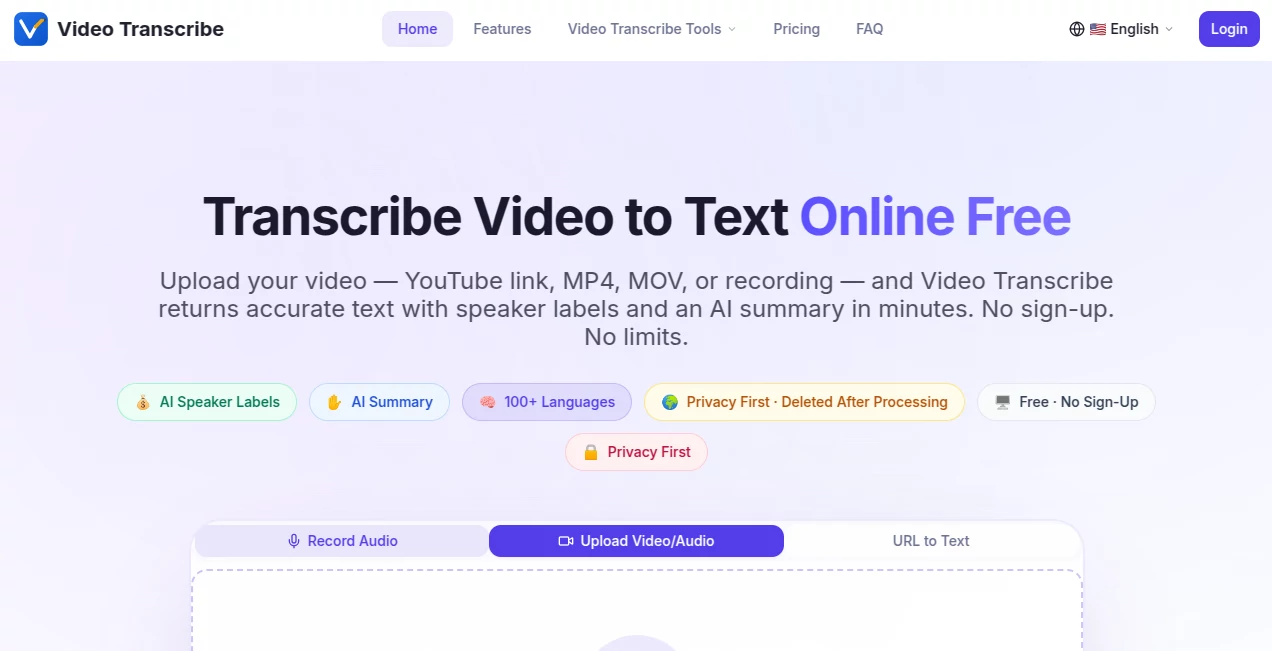
What is Video Transcribe?
There's something incredibly satisfying about uploading a long video—whether it's a Zoom recording, YouTube lecture, or podcast episode—and getting back clean, readable text with speaker labels and a smart summary in just minutes. This tool makes that happen without any hassle. No sign-up, no limits on the free plan, and no complicated setup. I’ve used it for everything from turning meeting recordings into actionable notes to pulling quotes from interviews, and the accuracy consistently impresses me. It feels like having a reliable assistant who actually listens and understands.
Introduction
Most of us have piles of video content we need to turn into something useful—notes, subtitles, blog posts, or searchable archives. Manually transcribing is painfully slow, and many paid services feel expensive or restrictive. This platform changes that. It works directly in your browser, supports a huge range of formats including YouTube links, and delivers accurate transcripts with speaker identification and AI-generated summaries. It’s built for real-world use: students reviewing lectures, professionals summarizing meetings, creators repurposing content, and journalists extracting quotes. The best part? It respects your time and privacy while delivering results you can actually trust.
Key Features
User Interface
The experience is refreshingly simple. You land on a clean page, drag in your video or paste a YouTube link, and everything happens in one flow. No accounts to create, no hidden steps. Progress is clearly shown, and once it’s done, you get a nicely formatted transcript with timestamps and speaker labels. The interface stays out of your way so you can focus on the content, not the tool. Even on mobile it feels smooth and practical.
Accuracy & Performance
It handles real-world audio well—accents, background noise, multiple speakers—and produces transcripts that need very little cleanup. Speaker labels work reliably on meetings and interviews, and the AI summary pulls out key points and action items without hallucinating. Processing speed is impressive even for longer files, and it supports over 100 languages with auto-detection. In practice, it turns what used to be hours of work into minutes of review.
Capabilities
Upload MP4, MOV, audio files, or paste YouTube links. Get full transcripts with timestamps, speaker labels, and smart AI summaries (with templates for meetings, interviews, sales calls, etc.). Export options include TXT, DOCX, PDF, SRT, VTT, and JSON. It works for Zoom, Teams, podcasts, lectures, and more. Mixed-language audio is supported, and you can process multiple files in one go.
Security & Privacy
Privacy is taken seriously here. Files are deleted after processing, no accounts are required for basic use, and nothing is stored longer than needed. For sensitive meetings or client recordings, that peace of mind makes a big difference.
Use Cases
Students transcribe hour-long lectures and get clean notes with key concepts highlighted. Sales teams turn recorded calls into searchable summaries with action items. Content creators quickly generate subtitles or blog posts from long-form videos. Researchers pull accurate quotes from interviews without manual typing. It’s the kind of tool that quietly saves hours every week once it becomes part of your workflow.
Pros and Cons
Pros:
- Completely free with no sign-up and generous usage limits.
- Excellent speaker labeling and useful AI summaries.
- Fast processing even on longer videos.
- Broad format and language support.
- Strong privacy focus—files deleted after use.
Cons:
- Very noisy or low-quality audio can reduce accuracy (same as most tools).
- Extremely long videos may need to be processed in parts on the free plan.
Pricing Plans
The free tier is genuinely useful—no sign-up, no credit card, and enough capacity for regular personal and small-team use. Paid plans add priority processing, higher limits, and extra features for heavy users. It’s priced reasonably so you only upgrade when your needs grow, making it accessible for students, freelancers, and growing teams alike.
How to Use Video Transcribe
Go to the homepage, drag your video file or paste a YouTube link into the upload area. Wait while it processes (usually fast), then review the transcript with speaker labels and the AI summary. Edit anything if needed, then export in your preferred format—TXT for notes, SRT for subtitles, or PDF for sharing. The whole process feels effortless from start to finish.
Comparison with Similar Tools
Many transcription services require sign-ups, charge per minute, or force you to install apps. This one stands out for being instantly usable, privacy-focused, and generous with the free tier. While some enterprise tools offer more advanced analytics, few match the combination of speed, accuracy, and zero-friction experience that makes this ideal for everyday use.
Conclusion
Turning video into usable text shouldn’t be complicated or expensive. This tool makes it straightforward, reliable, and even a little enjoyable. Whether you’re a student, creator, professional, or just someone with too many unwatched recordings, it gives you back your time and turns spoken words into something you can search, share, and act on. Once you start using it, you’ll wonder how you ever managed without it.
Frequently Asked Questions (FAQ)
Do I need to create an account?
No—everything works without sign-up on the free plan.
What formats are supported?
MP4, MOV, MP3, WAV, and many more—including direct YouTube links.
How accurate is the transcription?
Very high on clear audio; speaker labels and summaries add extra value.
Is my video stored anywhere?
No—files are deleted after processing for maximum privacy.
Can I transcribe long videos?
Yes, up to 2GB per file, and multiple files can be queued.
AI Documents Assistant , AI Productivity Tools , AI Transcription , AI Speech to Text .
These classifications represent its core capabilities and areas of application. For related tools, explore the linked categories above.
Video Transcribe details
Website unavailable — View Alternatives
Pricing
- Free
Apps
- Web App
Categories

Video Transcribe Alternatives Product

KoloQR

AIDeckly

NepVox

Hairstyle An…

VideoText

Medical Scri…
Video To Text

Oasis

Ovulation Ca…