

















Vofy
What is Vofy?
Creating professional visuals no longer requires a collection of separate design, editing, and animation tools. This creative platform brings image generation, video creation, advanced editing, and AI-powered effects into a single workspace, allowing creators to move from an idea to a polished result in just a few steps.
Built for marketers, designers, content creators, agencies, and businesses, it combines multiple cutting-edge AI models with an intuitive workflow. Whether you need realistic product photography, engaging social media content, artistic illustrations, animated videos, or creative marketing assets, everything can be produced without switching between different applications.
One of its biggest strengths is the constant addition of new creative effects and AI models. Instead of remaining static, the platform evolves regularly, giving users access to fresh generation techniques, improved quality, and modern visual styles that reflect current creative trends.
Key Features
User Interface
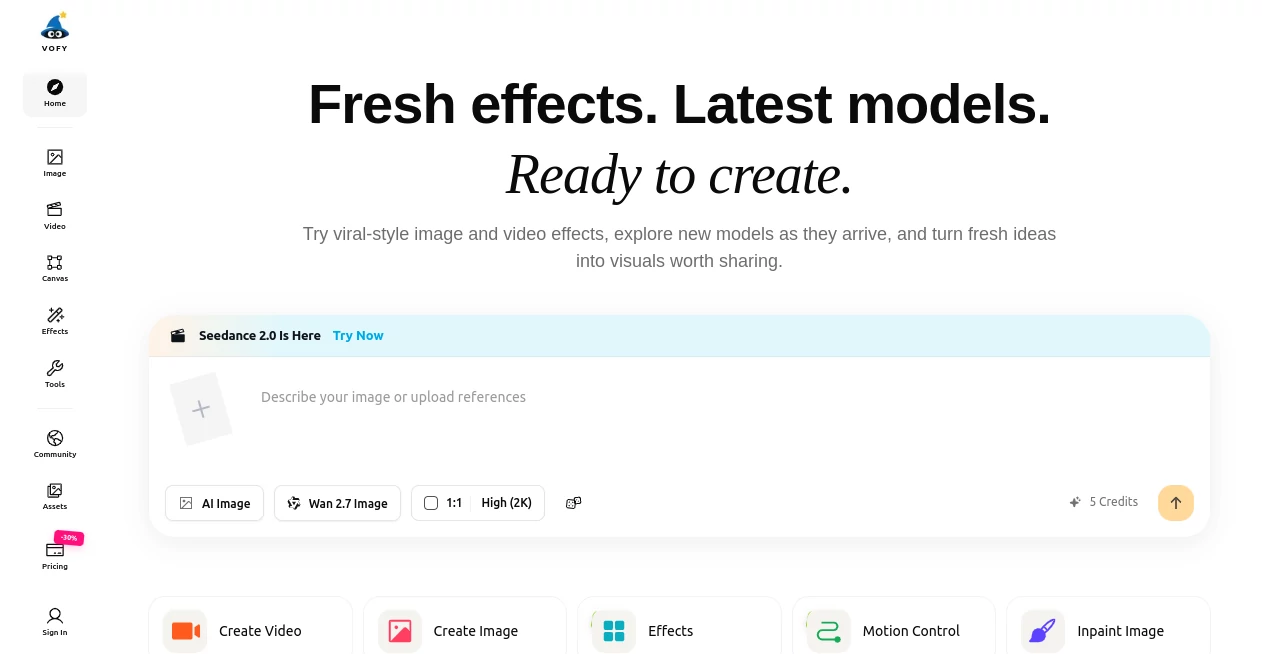
The interface is clean and beginner-friendly while offering enough flexibility for experienced creators. Projects are organized logically, allowing users to upload references, write prompts, select AI models, and generate results without unnecessary complexity. A dedicated canvas also makes it easy to organize creative ideas and build visual workflows.
Accuracy & Performance
The platform supports multiple advanced AI image and video models, enabling users to choose the engine that best matches their project. Prompt interpretation is highly detailed, image editing preserves important visual elements, and generation quality remains impressive across portraits, illustrations, product images, and cinematic scenes. High-resolution output and reference-guided editing further improve consistency.
Capabilities
- Generate images from text prompts.
- Create AI-powered videos.
- Edit existing images using natural language instructions.
- Apply creative filters and artistic effects.
- Remove backgrounds automatically.
- Upscale images while preserving detail.
- Create marketing visuals and advertising assets.
- Produce product photography concepts.
- Generate social media content.
- Transform photos into different artistic styles.
- Use reference images for consistent results.
- Organize creative workflows on an infinite visual canvas.
Security & Privacy
Private generation is available for paid subscribers, making it suitable for commercial projects and confidential creative work. Commercial licensing is included in paid plans, allowing businesses and agencies to use generated assets in professional environments with greater confidence.
Use Cases
- Design engaging social media campaigns.
- Create marketing materials and advertisements.
- Generate product images for e-commerce stores.
- Produce creative concepts before professional photo shoots.
- Create storyboards for films and video projects.
- Generate AI illustrations for blogs and websites.
- Build presentation graphics and promotional visuals.
- Create profile pictures, banners, and thumbnails.
- Design concept art for games and entertainment.
- Develop branded creative assets for clients.
Pros and Cons
Pros
- Combines image generation, video generation, and editing in one platform.
- Supports many modern AI models.
- Regularly introduces new creative effects.
- High-quality image editing with reference guidance.
- Commercial license available on paid plans.
- Professional workflow suitable for individuals and teams.
Cons
- No permanent free trial for unlimited generation.
- Credit usage varies depending on selected models.
- Advanced features may require a learning period for new users.
Pricing Plans
The service operates on a subscription and credit-based model. Paid plans include Starter, Pro, Max, and Max+, each providing monthly generation credits, commercial usage rights, watermark-free downloads, private generation, and access to all available image and video models. Higher plans increase credit limits, parallel generations, and customer support options.
How to Use Vofy
- Create an account.
- Select an image or video generation workflow.
- Choose an AI model that matches your project.
- Upload reference images if needed.
- Enter a detailed prompt.
- Adjust settings such as aspect ratio or quality.
- Generate the content.
- Edit or refine the result until satisfied.
- Download the finished asset for personal or commercial use.
Comparison with Similar Tools
Unlike many AI creative platforms that focus on only one task, this solution combines image generation, image editing, video creation, creative effects, and workflow management within a unified environment. The addition of an infinite AI canvas, multiple frontier AI models, and continuous feature updates makes it especially attractive for professionals who want flexibility without managing several different services.
Conclusion
For creators who want a complete creative workspace rather than a single-purpose AI application, this platform delivers an impressive balance of simplicity, flexibility, and professional capability. From social media graphics and product photography to cinematic videos and artistic illustrations, it offers an extensive collection of modern AI tools that continue to expand over time. Its combination of powerful models, commercial licensing, organized workflows, and high-quality output makes it a valuable choice for businesses, agencies, designers, marketers, and content creators looking to produce visual content faster while maintaining professional standards.
Frequently Asked Questions (FAQ)
Can it generate both images and videos?
Yes. The platform supports AI image generation, AI video creation, image editing, and motion-based creative workflows.
Does it support commercial use?
Paid subscriptions include commercial licensing for generated content.
Can I edit existing images?
Yes. Existing photos can be refined using natural-language instructions, reference images, and advanced editing models.
Does it provide multiple AI models?
Yes. Users can select from a growing collection of modern image and video generation models depending on their creative needs.
Who is the platform best suited for?
It is ideal for marketers, designers, agencies, content creators, e-commerce businesses, filmmakers, and anyone who regularly produces visual content.
AI Photo & Image Generator , AI Image to Video , AI Video Generator , AI Design Generator .
These classifications represent its core capabilities and areas of application. For related tools, explore the linked categories above.

Vofy Alternatives Product

Transform An…

Huebert
Wan 2.7

Kling 4.0 AI
BeadPattern
Meigen AI

Nano Banana 2
Maginary

Seedance 2.0
