


















WAWebSender
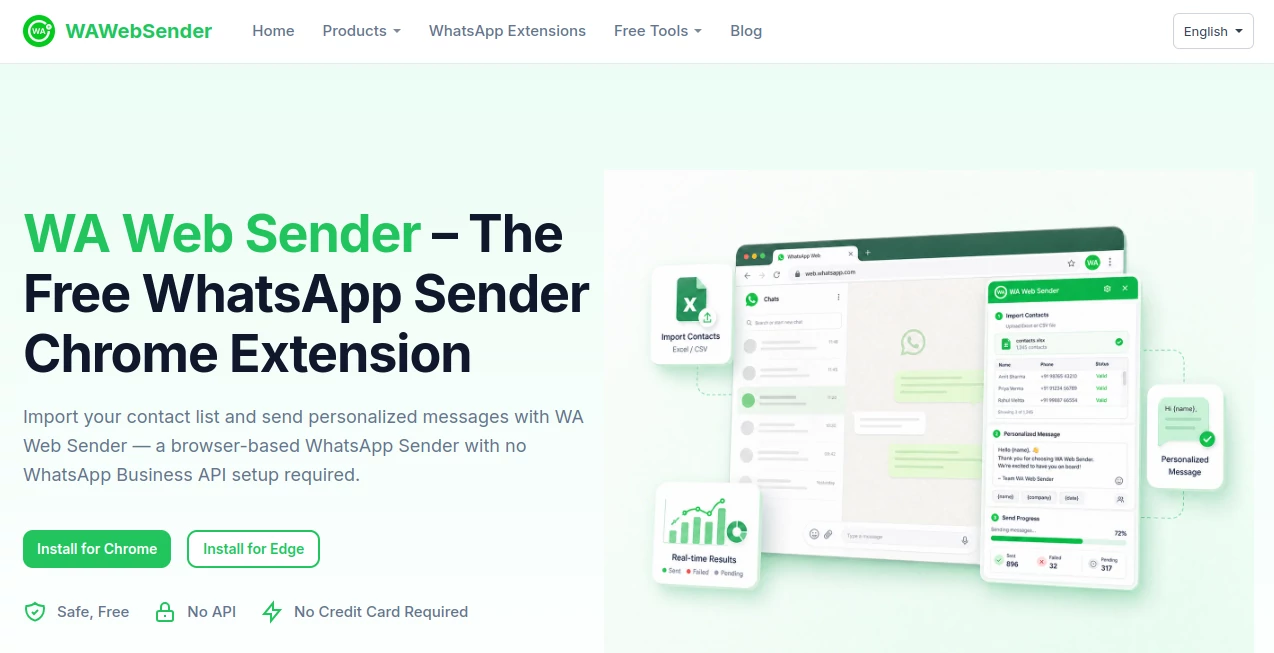
What is WAWebSender?
WA Web Sender is a browser-based WhatsApp messaging extension designed for people and small teams that need a simpler way to manage personalized outreach through WhatsApp Web. Instead of manually opening conversations and copying the same message again and again, users can import contact lists, prepare a message, personalize it with contact information, and send messages directly from their browser.
One of its biggest advantages is the straightforward setup. There is no WhatsApp Business API configuration and no complicated technical integration required. After installing the browser extension and connecting WhatsApp Web, users can begin working with their existing account. The service also offers a Free Forever plan, making it easy to test the workflow before deciding whether the additional Pro features are useful.
Key Features
- Excel contact import: Upload prepared contact lists and use the information inside your messaging workflow.
- Personalized messages: Insert contact fields such as names, companies, and other custom information into messages.
- Attachments: Pro functionality supports images, videos, documents, and contacts.
- Reusable templates: Save frequently used messages instead of recreating them for every campaign.
- Sending interval control: Control the pace between messages and organize larger sending jobs more carefully.
- Progress tracking: Monitor sending progress while messages are processed.
- Result export and retry: Review results, export sending information, and retry failed messages when appropriate.
- AI-assisted writing: AI can help create or improve message copy before it is personalized and sent.
- No API setup: The workflow operates through WhatsApp Web rather than requiring a WhatsApp Business API integration.
User Interface
The interface follows the familiar browser-extension model, which keeps the learning curve pleasantly short. After logging into WhatsApp Web, users can open the extension from the browser toolbar and work through the sending process from there. The main workflow is easy to understand: prepare contacts, write the message, configure the sending options, and start.
This approach is particularly useful for a small business owner who does not want another complicated dashboard to learn. If you already spend much of your day inside WhatsApp Web, having the messaging workflow available from the browser feels considerably more natural.
Accuracy & Performance
Performance depends partly on the user's internet connection, WhatsApp account activity, contact formatting, and the limits or policies applied by WhatsApp. The extension helps make the process more organized by providing sending intervals, progress tracking, and failed-message retry options.
Contact formatting is also important. Numbers should be entered with the appropriate country code, while imported spreadsheets should contain correctly prepared contact information. When the source list is clean, personalization becomes much less prone to the small mistakes that often occur during manual copy-and-paste work.
Capabilities
The strongest part of the platform is its combination of bulk sending and personalization. A business can prepare a spreadsheet containing phone numbers and additional fields, then use those fields inside a message. For example, instead of sending a generic greeting to every prospect, a campaign can address each person by name or reference their company.
The workflow also supports attachments and saved templates, which makes it practical for recurring communication. A recruiter could prepare interview reminders, a sales representative could follow up with prospects, or a small retailer could send a product announcement to an opted-in customer list.
There is also an AI-assisted writing feature for creating or improving message content. Users can review and edit generated text before sending it, which is a useful approach when the goal is to speed up drafting without giving up control over the final message.
Security & Privacy
The service states that user data is protected through encryption and privacy policies and that data is not shared with third parties. Because the extension works through WhatsApp Web, users should still treat contact lists and message content responsibly, particularly when handling customer information.
Responsible sending is equally important. The service itself notes that sending availability can depend on account activity, recipient responses, recipient consent, and WhatsApp platform policies. Users should avoid unsolicited spam and make sure their messaging practices comply with the rules that apply to their WhatsApp account.
Use Cases
This type of workflow fits a wide range of everyday business communication. Sales teams can follow up with leads after a product demo or enquiry without manually preparing every message. Customer service teams can send updates using consistent templates while still adding personal details. Marketing teams can organize permission-based campaigns from prepared contact lists.
It can also be useful outside traditional marketing. Event organizers can send schedule updates, recruiters can contact candidates, service providers can send appointment information, and small businesses can keep customers informed about offers or new products.
A practical example would be a local business with 150 existing customers who have agreed to receive WhatsApp updates. Rather than opening each conversation individually, the business can prepare a spreadsheet, create a short personalized announcement, configure an appropriate sending interval, and monitor the campaign as it progresses.
Pros and Cons
- Pros: Free Forever plan, simple browser-based setup, Excel contact import, message personalization, reusable templates, attachment support, sending interval controls, progress tracking, and AI-assisted message writing.
- Pros: No WhatsApp Business API setup is required, which makes the tool approachable for individuals and smaller teams.
- Cons: It depends on WhatsApp Web and therefore is not the same as a full API-based messaging platform.
- Cons: Messaging performance and availability can be affected by WhatsApp policies, account activity, recipient behavior, and contact quality.
- Cons: Advanced functionality such as attachments is associated with the Pro version rather than the basic free plan.
Pricing Plans
The service provides a Free Forever plan covering the essential bulk messaging workflow. Users can install the extension and begin sending through WhatsApp Web without a credit card or API setup.
A Pro version is also available for users who need additional capabilities, including advanced sending features and attachment support. The current website does not prominently publish a fixed price on the main product page, so users should check the active plan information inside the service before purchasing.
Subscriptions can be canceled, and the published terms explain that cancellation takes effect at the end of the paid billing period. Refund eligibility is subject to the service's refund policy.
How to Use It
- Step 1: Install the browser extension for Chrome or Edge and pin it to the browser toolbar.
- Step 2: Open WhatsApp Web and link your WhatsApp account using the normal Linked Devices process.
- Step 3: Open the extension from the browser toolbar.
- Step 4: Add phone numbers manually or import a prepared Excel contact list.
- Step 5: Write your message and insert personalization fields where appropriate.
- Step 6: If needed, select supported attachments or load a previously saved message template.
- Step 7: Configure suitable sending intervals and begin the campaign.
- Step 8: Keep WhatsApp Web open while the messages are being processed and review the progress and results afterward.
Comparison with Similar Tools
Compared with a traditional WhatsApp Business Platform API solution, this browser-based approach is much easier to start with. There is no need to configure webhooks, build an API integration, or connect a separate customer-management system simply to send messages from a prepared list.
The trade-off is flexibility. API-based platforms are generally better suited to businesses that need deep automation, system integrations, event-driven messaging, and structured delivery reporting. A browser extension is more appealing when the priority is a quick, practical workflow for list-based messaging through an existing WhatsApp Web session.
For an individual, freelancer, small sales team, or local business that mainly wants to organize repetitive WhatsApp communication without investing in a technical messaging stack, the browser-based model can be a very sensible choice.
Conclusion
For anyone who regularly sends similar WhatsApp messages to multiple contacts, the real value here is not simply sending more messages. It is removing the repetitive work around those messages. Contact imports, personalization, templates, attachments, pacing controls, and progress tracking bring structure to a task that can otherwise become surprisingly time-consuming.
The Free Forever option also lowers the barrier to entry. Users can try the basic workflow without committing to an API platform or paying before understanding whether the extension fits their needs. For small-scale and permission-based outreach, customer updates, sales follow-ups, and recurring business communication, it offers a practical balance between simplicity and useful automation.
Frequently Asked Questions (FAQ)
Is the WhatsApp sender free?
Yes. A Free Forever plan is available for essential messaging functionality. A Pro version provides additional features for users who need more advanced capabilities.
Does it require the WhatsApp Business API?
No. The browser extension works through WhatsApp Web, so users do not need to configure the WhatsApp Business API to use the core sending workflow.
Can I import contacts from Excel?
Yes. Contact lists can be imported from Excel, allowing users to organize phone numbers and personalized fields before starting a sending campaign.
Can messages be personalized?
Yes. Contact variables can be inserted into messages, making it possible to create more individualized communication while working from a larger contact list.
Can I send images and documents?
Attachment functionality is available with the Pro version, including support for supported images, videos, documents, and contacts.
Can I send messages without saving every phone number?
Yes. The extension can work with numbers imported from a prepared contact list, so users do not have to manually save every number before sending.
Does it guarantee unlimited WhatsApp messaging?
No messaging tool can guarantee unrestricted delivery. Actual sending availability depends on the account, recipient behavior, WhatsApp policies, and other platform-related factors. Users should always use appropriate sending intervals and communicate with recipients who have agreed to receive messages.
Does it work with WhatsApp Business accounts?
Yes. The published documentation states that the free sender can also be used with WhatsApp Business accounts. Users should follow the applicable Business policies and use permission-based contact lists.
Does it send messages to WhatsApp groups?
The main sender is designed primarily for individual contacts. Group messaging is handled by a separate group-sending extension from the same product family.
Is an internet connection required?
Yes. Because the workflow operates through WhatsApp Web, a stable internet connection and an active WhatsApp Web session are required while messages are being sent.
AI Sales Assistant , AI Social Media Assistant , AI Customer Service Assistant , AI Productivity Tools .
These classifications represent its core capabilities and areas of application. For related tools, explore the linked categories above.

WAWebSender Alternatives Product

Tinylawn

Overlap

Free Email V…

Oasis

Slackactivity

KarmaGuy

Video To Text

AI Entity

TrySchedule
