


















Webtwizz
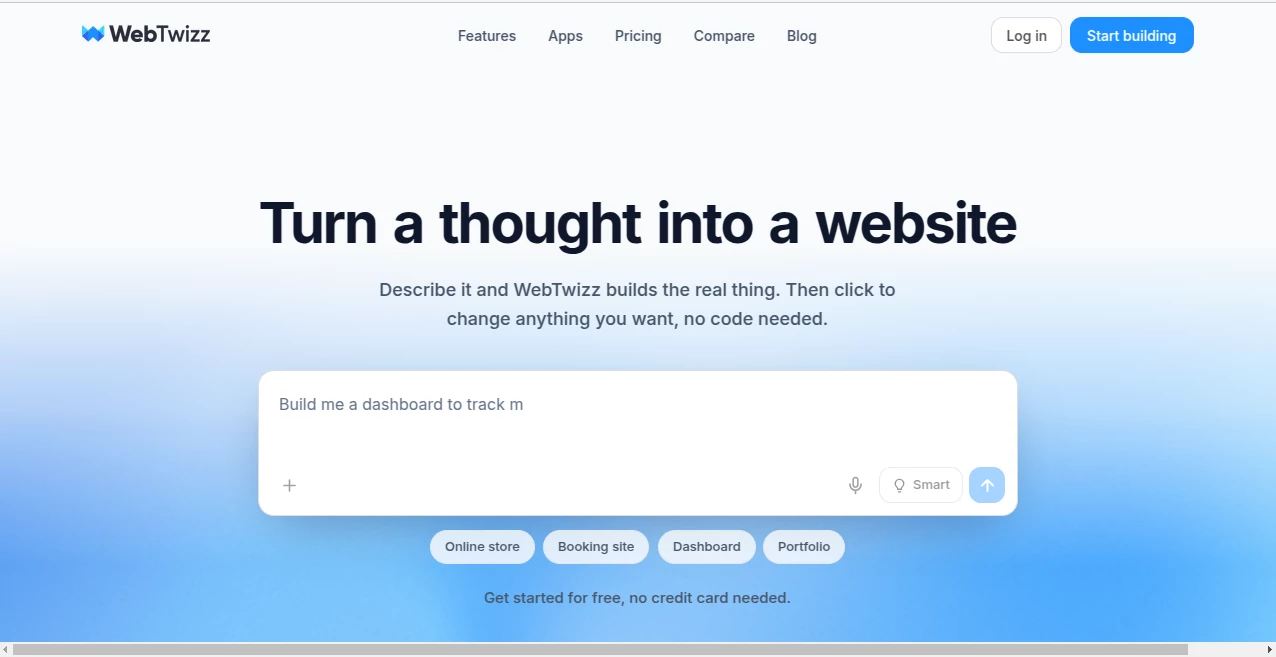
What is Webtwizz?
Turning an idea into a working web application often requires weeks of design, coding, testing, and deployment. This AI-powered platform changes that process by allowing users to describe what they want in plain language and receive a fully functional application in minutes. Instead of focusing only on page layouts, it generates complete full-stack projects with support for databases, authentication, payments, and dynamic content.
Whether you are building a startup MVP, an internal business dashboard, a portfolio, an online store, or a booking system, the platform combines AI generation with an intuitive visual editor so every part of the project can be customized without unnecessary complexity. It is an excellent solution for founders, freelancers, agencies, and anyone who wants to launch production-ready web applications much faster.
Key Features
User Interface
The interface is thoughtfully organized for both beginners and experienced creators. A conversational AI assistant handles project generation, while visual editing tools allow users to adjust typography, layouts, spacing, colors, components, and page structures with instant live previews. Drag-and-drop organization, reusable components, and page management make larger projects easy to maintain.
Accuracy & Performance
The AI produces complete applications rather than isolated code snippets. Generated projects include responsive layouts, working pages, business logic, and integrations that significantly reduce development time. Real-time editing and rapid deployment help users iterate quickly while maintaining a smooth workflow.
Capabilities
- Create complete full-stack web applications from simple prompts.
- Generate landing pages, online stores, dashboards, blogs, booking systems, and business apps.
- Support dynamic databases and content management.
- Connect payment providers for commercial applications.
- Integrate authentication systems for user accounts.
- Work with AI providers for advanced application features.
- Include analytics, email services, and monitoring integrations.
- Edit generated code and visual elements without rebuilding the project.
- Deploy websites directly with custom domain support.
- Create reusable UI components for faster development.
Security & Privacy
The platform provides secure account management while allowing creators to retain ownership of the applications and code generated through the service. Users remain responsible for reviewing production deployments, but built-in integrations with trusted infrastructure providers help simplify authentication, hosting, analytics, and application management.
Use Cases
- Launching startup MVPs without hiring a large development team.
- Creating internal dashboards for business operations.
- Building SaaS products with user authentication.
- Developing online stores with payment processing.
- Publishing portfolio and business websites.
- Creating booking and scheduling applications.
- Designing administrative panels.
- Rapid prototyping for client presentations.
- Building AI-powered business tools.
- Learning full-stack application structure through AI-generated projects.
Pros and Cons
Pros
- Generates complete full-stack applications instead of simple page templates.
- Requires little to no coding experience.
- Excellent visual customization tools.
- Supports databases, authentication, payments, email, analytics, and AI integrations.
- Fast deployment with responsive layouts.
- Suitable for both personal and commercial projects.
- Offers a generous free plan for testing ideas.
Cons
- Complex enterprise applications may still require manual refinement.
- AI credit limits apply depending on the subscription plan.
- Advanced custom functionality may require editing generated code.
Pricing Plans
- Starter: Free plan with daily AI credits and one published website.
- Standard: Includes higher monthly credits, custom domains, code editor access, and multiple published sites.
- Pro: Designed for advanced users with significantly higher AI credits, additional published projects, and priority support.
- Custom: Tailored plans for agencies, teams, and organizations requiring dedicated support and higher resource limits.
How to Use Webtwizz
Start by describing the application you want to build using natural language. The AI generates the initial project, including pages, layouts, and functionality. Review the generated result and customize colors, typography, sections, and components using the visual editor. Connect optional services such as databases, authentication providers, payment systems, analytics, or email platforms as needed. Preview the application in real time, publish it, and continue improving it through conversational AI or manual editing.
Comparison with Similar Tools
Unlike many AI website builders that primarily generate static landing pages, this platform focuses on complete full-stack application development. It combines conversational AI with visual editing, reusable components, integrated CMS functionality, database support, authentication, payment processing, deployment, and code editing in one workspace. This makes it particularly valuable for entrepreneurs and businesses looking to launch production-ready applications rather than simple websites.
Conclusion
For anyone looking to transform ideas into fully functional web applications without spending weeks on development, this platform delivers an impressive balance of automation and creative control. The combination of AI-driven generation, visual editing, powerful integrations, and rapid deployment creates an efficient workflow for founders, developers, agencies, and growing businesses. Its ability to build complete applications—not just attractive pages—makes it one of the most practical AI solutions for modern web development.
Frequently Asked Questions (FAQ)
Can beginners build applications without coding?
Yes. The platform is designed for users with little or no programming experience while still offering advanced customization for experienced developers.
Can generated applications connect to databases?
Yes. Dynamic databases, authentication systems, and content management are supported for building interactive web applications.
Is custom domain support available?
Yes. Paid plans allow projects to be published using custom domains.
Can I build commercial projects?
Yes. The platform is suitable for creating business websites, SaaS products, online stores, client projects, and internal business tools.
Does it support AI integrations?
Yes. Applications can integrate with leading AI providers alongside email, payment, analytics, and monitoring services.
AI Website Builder , AI No-Code & Low-Code , AI Developer Tools , AI App Builder .
These classifications represent its core capabilities and areas of application. For related tools, explore the linked categories above.

Webtwizz Alternatives Product
DiRe-RAPIDS

Somnio

PromptCoder

UpMocker

Mage Flow AI…

ace.me

Project Genie
Fugte

JustCopy.ai
