Whacka
What is Whacka?
I’ve lost count of how many times I’ve had a simple idea for an app — something small that would solve a problem for me or my friends — only to abandon it because building even a basic version felt overwhelming. Then I tried this platform. You type or speak your idea in plain English, and a few minutes later you have a working app with its own domain, ready for people to use. No coding, no complicated setups, no months of back and forth with developers. I’ve seen people build everything from a simple dog-walking scheduler to a bedtime story generator, and the best part is they actually ship it and share it the same day. It feels like the future finally arrived for regular people with ideas.
Introduction
Most of us have ideas for small tools or apps that could make life easier, but turning those ideas into reality has always required too much time, money, or technical skill. This platform removes those barriers entirely. You describe what you want in everyday language, and it builds a real, functional Progressive Web App (PWA) that people can use immediately on their phones or computers. It gives you a custom subdomain right away, and you can later connect your own domain. The apps come with built-in features like user accounts, notifications, chat, and admin tools — all generated automatically. It’s perfect for side projects, small businesses, teachers, creators, or anyone who wants to bring an idea to life without the usual headaches.
Key Features
User Interface
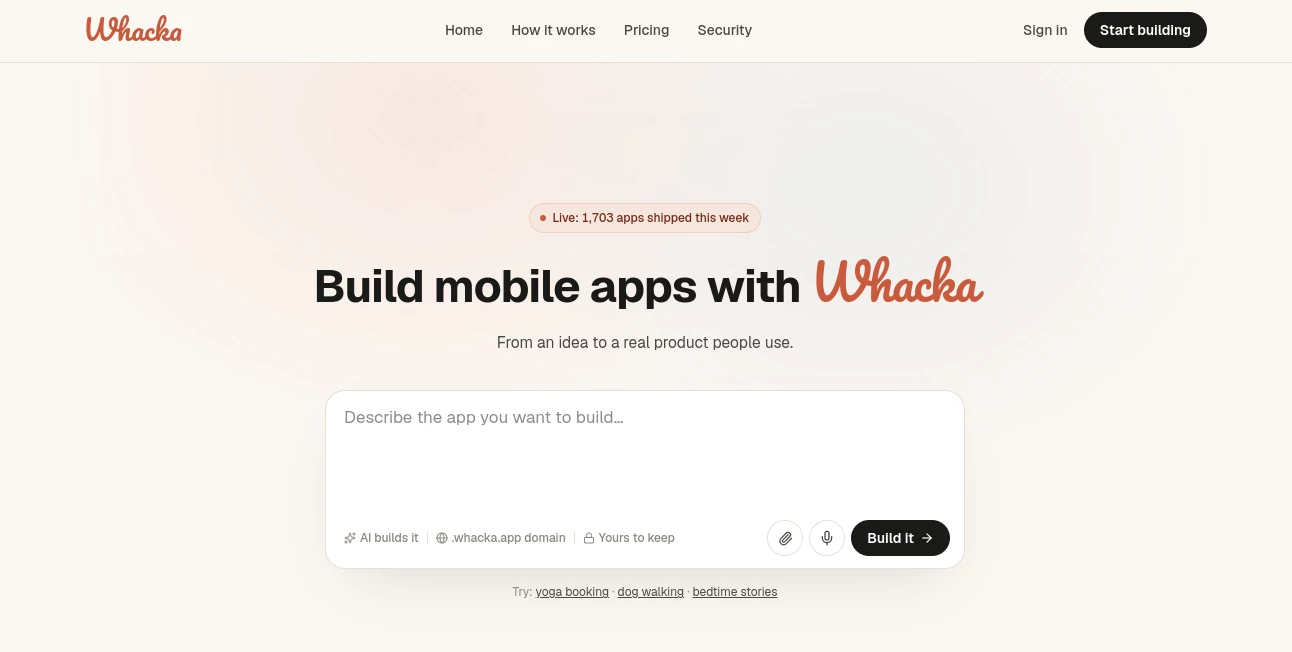
The whole process is incredibly straightforward. You land on a clean page, type or speak your idea (“a simple app for booking yoga classes” or “a tool to track my kid’s bedtime stories”), and the system starts building. The resulting app has a modern, clean interface that feels native. Managing users, sending notifications, or checking the admin panel is all intuitive. There’s no steep learning curve — even people with zero technical background can go from idea to live app in minutes.
Accuracy & Performance
It does a remarkably good job understanding your description and turning it into something that actually works. The generated apps feel solid — smooth navigation, proper user flows, and features that match what you asked for. Performance is snappy because they’re built as PWAs that install easily on phones. In real use, people report that their apps feel surprisingly complete for something created so quickly, with very few major adjustments needed after the first generation.
Capabilities
You get real, usable apps with user accounts, push notifications, chat functionality, admin dashboards, custom domains, and even built-in AI features depending on what you describe. The apps can remember users, handle bookings, track data, send messages, and more. You own what you build, and you can share the link immediately so friends, customers, or your community can start using it right away. It’s ideal for small, focused tools rather than massive enterprise software.
Security & Privacy
Your ideas and generated apps are handled securely. You keep full ownership of what you build, and the platform doesn’t lock you in. Data is managed responsibly so you can confidently create tools for personal use, clients, or small communities without worrying about hidden risks.
Use Cases
A yoga instructor builds a simple booking system for her classes in one afternoon and starts accepting reservations the same week. A parent creates a bedtime story tracker that reminds kids when it’s story time and logs their favorites. A small business owner makes a basic client management tool tailored exactly to their workflow. A teacher builds a quick flashcard game for vocabulary practice. The common thread is turning everyday problems or passions into small, practical tools that people actually use.
Pros and Cons
Pros:
- Truly no-code — just describe your idea and get a working app.
- Extremely fast turnaround from idea to live product.
- Built-in useful features like notifications, chat, and admin tools.
- You own and can customize what you build.
- Great for testing ideas quickly before investing more time or money.
Cons:
- Best suited for smaller, focused apps rather than very complex platforms.
- Advanced customizations may still need some manual tweaks.
- Free tier has limitations, as expected for full production use.
Pricing Plans
It’s free to start and try out ideas with no credit card required. Paid plans unlock more generations, custom domains, higher usage limits, and additional features for growing apps. The pricing is straightforward and scales with your needs, making it accessible for hobby projects while supporting more serious use cases as they grow.
How to Use Whacka
Go to the site, type or speak your app idea in plain language. Review the generated preview, make small adjustments to the description if needed, and let it build the full app. Once ready, share the link with users or install it on your phone. You can manage everything from the simple admin panel — add features, check usage, or tweak as you go. The entire flow is designed to keep momentum high so you don’t lose excitement before your idea is live.
Comparison with Similar Tools
Many no-code platforms still require dragging and dropping components or learning their specific logic. This one stands out by letting you start with natural language and get a complete, usable app quickly. While some tools focus on prototypes, this delivers real, shareable products with practical features built in. It’s especially strong for people who have ideas but don’t want to become developers or hire one for every small project.
Conclusion
The gap between having an idea and actually using it has never been smaller. This platform makes building small, useful apps feel approachable and even fun for regular people. Whether you want to solve a personal problem, help your community, or test a business idea, it gives you a real path forward without the usual obstacles. In a world full of complicated tools, its simplicity and speed make it genuinely refreshing.
Frequently Asked Questions (FAQ)
How long does it take to build an app?
Most ideas turn into working apps in just a few minutes.
Do I need coding skills?
Not at all — everything is done through plain language descriptions.
Can I keep and customize the app?
Yes, you own what you build and can continue improving it over time.
Is it suitable for real users?
Absolutely — the apps are functional PWAs that can be installed and used daily.
AI Workflow Management , AI App Builder , AI No-Code & Low-Code , AI Developer Tools .
These classifications represent its core capabilities and areas of application. For related tools, explore the linked categories above.

Whacka Alternatives Product

Agent Grid
Somnio
Xvibe

VoiceFlow Te…

Youfiliate
MyToolster W…

Weekly Brief

Lime Social
axiom.ai