Whisperly
What is Whisperly?
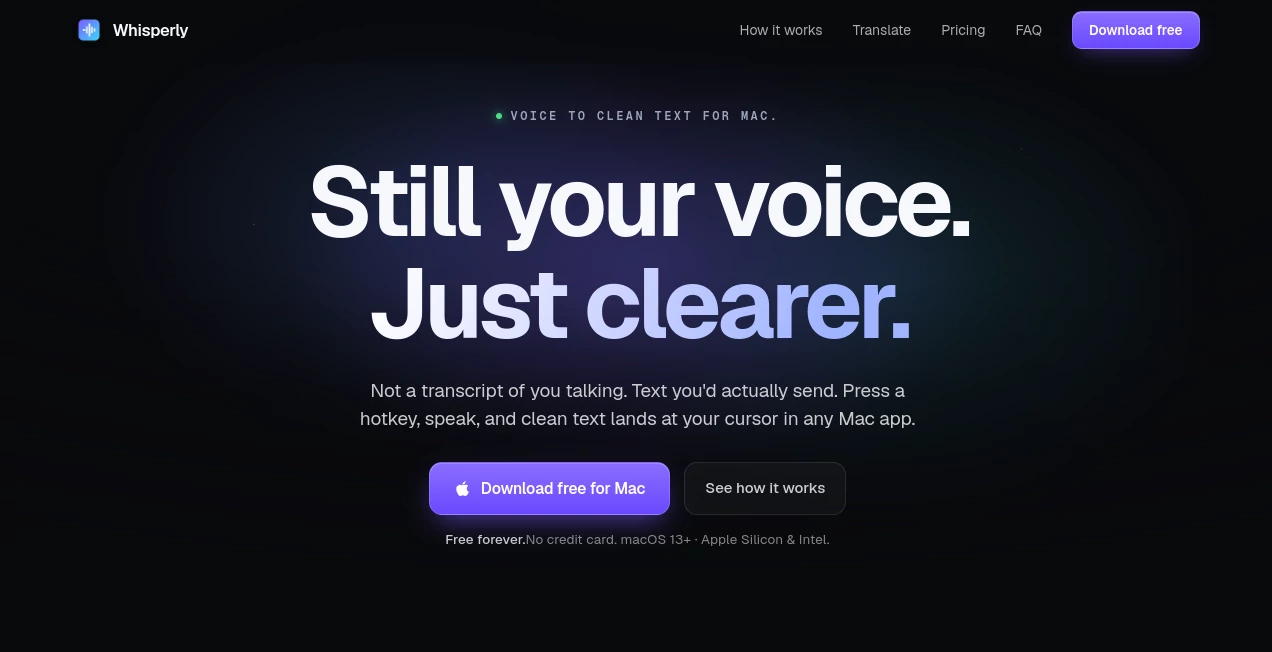
Typing can interrupt the flow of ideas, especially when inspiration arrives faster than your fingers can keep up. This voice-powered productivity solution is designed for people who prefer speaking naturally while receiving polished, ready-to-use text. Instead of producing a raw transcript filled with pauses and filler words, it intelligently transforms spoken language into clean writing that feels natural in emails, documents, chat messages, coding prompts, and notes.
Built exclusively for macOS, it lives quietly in the menu bar and can be activated with a simple keyboard shortcut. There is no complicated setup, no distracting interface, and no need to switch between applications. Users simply speak, stop recording, and within moments refined text appears exactly where the cursor is located. The experience feels effortless and quickly becomes part of a daily workflow.
Whether someone is writing documentation, responding to clients, brainstorming ideas, or communicating with teammates, the platform offers an enjoyable alternative to traditional typing while preserving the user's personal writing style.
Key Features
User Interface
The application follows a minimalist design philosophy. Running from the macOS menu bar, it stays available without cluttering the desktop. A single keyboard shortcut starts and stops dictation, making voice input feel as natural as typing. Users can switch between raw transcription, cleaned-up text, or translation modes without navigating complicated menus.
Accuracy & Performance
One of the strongest advantages is its ability to understand conversational speech and transform it into polished writing. Filler words, awkward pauses, and verbal repetitions are removed automatically while preserving the speaker's intended meaning. The result is text that often requires little to no editing before being shared.
Processing is remarkably fast, allowing users to continue working with minimal interruption. The platform also supports automatic language detection and can recognize dozens of spoken languages for multilingual workflows.
Capabilities
- Voice dictation directly into almost any macOS application.
- Automatic text cleanup after transcription.
- Translation from one spoken language into another.
- Multiple writing tones including original, casual, neutral, and formal.
- Custom vocabulary for names, brands, and industry terminology.
- Works naturally inside email clients, messaging apps, code editors, browsers, and productivity software.
- Clipboard fallback to prevent losing generated text.
- Automatic software updates in the background.
Security & Privacy
Privacy is treated as an essential part of the experience. Audio is transmitted securely for processing and discarded afterward rather than being permanently stored. According to the developer, recordings are not used to train AI models, giving professionals greater confidence when dictating work-related information. Custom vocabulary also remains stored locally on the user's Mac for additional privacy.
Use Cases
- Writing emails several times faster than typing.
- Creating meeting notes while thoughts are fresh.
- Preparing documentation and technical explanations.
- Generating prompts for AI assistants.
- Drafting social media posts and blog ideas.
- Writing issue reports inside development platforms.
- Responding quickly in messaging applications.
- Translating spoken content into another language.
Pros and Cons
Pros
- Extremely simple workflow with almost no learning curve.
- Produces polished text instead of basic transcripts.
- Excellent integration across nearly every Mac application.
- Supports multiple languages and translation.
- Custom vocabulary improves recognition accuracy.
- Free plan available.
- Clean and distraction-free interface.
Cons
- Currently available only for macOS.
- Advanced features require a Pro subscription.
- Translation is limited to paid plans.
- Requires microphone and accessibility permissions during setup.
Pricing Plans
A generous free plan includes up to 2,000 words per week, text cleanup, raw transcription mode, and a limited custom vocabulary. Users who need unlimited dictation, translation, additional writing tones, and unlimited vocabulary can upgrade to the Pro plan. A 14-day Pro trial is available without requiring a credit card, making it easy to evaluate premium features before subscribing.
How to Use Whisperly
Download and install the Mac application, grant microphone and accessibility permissions, and leave it running in the menu bar. Press the default keyboard shortcut to begin speaking, then press it again to finish. Within seconds, refined text appears automatically in the active text field. Users can personalize vocabulary, choose writing tone, or enable translation depending on their workflow.
Comparison with Similar Tools
Many speech-to-text applications focus primarily on transcription, leaving users to manually edit the output afterward. This solution takes a different approach by delivering writing that already feels polished and ready for real communication. The ability to preserve the speaker's natural voice while removing unnecessary filler words creates a much smoother writing experience. Features like tone adjustment, translation, custom vocabulary, and seamless insertion into virtually any Mac application further distinguish it from conventional dictation software.
Conclusion
For professionals who spend hours writing each day, speaking can be significantly faster than typing. This platform successfully bridges that gap by converting natural speech into clean, polished text that requires minimal editing. Its lightweight design, fast performance, thoughtful privacy practices, and intelligent text refinement make it an excellent productivity companion for writers, developers, marketers, entrepreneurs, and anyone who wants to communicate more efficiently on macOS.
Frequently Asked Questions (FAQ)
Does it work offline?
Audio is securely processed online before the final text is returned, so an internet connection is required for transcription features.
Can it translate between languages?
Yes. Premium users can dictate in one language and automatically receive polished text in another supported language.
Is there a free version?
Yes. A free plan includes weekly voice transcription with essential features for everyday use.
Can it work inside other applications?
Yes. It can insert text directly into almost any macOS application that accepts keyboard input, including editors, browsers, messaging apps, and development tools.
Is my voice data stored permanently?
The developer states that audio is securely processed and discarded after transcription. It is not stored or used for AI model training.
AI Translate , AI Productivity Tools , AI Speech to Text , AI Writing Assistants .
These classifications represent its core capabilities and areas of application. For related tools, explore the linked categories above.

Whisperly Alternatives Product

MachineTrans…

YTVidHub-you…

AllInOneTools

Simplified

nano banana …

Oasis

ToolIMG
AltHunt

Translators …