WriteSong.AI
What is WriteSong.AI?
Turning an idea into a polished song often takes hours of writing, arranging, and recording. This platform dramatically shortens that process by transforming a simple prompt, mood, or lyric draft into a complete song with vocals, melody, and professional-style production. Whether inspiration arrives in the middle of the night or during a busy workday, creators can capture it before the moment disappears.
The experience is designed for everyone, not only professional musicians. Beginners can describe a feeling or tell a short story, while experienced songwriters can upload lyrics and fine-tune style, vocals, and arrangement. Everything happens directly in the browser, eliminating complicated software installations and allowing creative work from virtually any device.
Beyond generating music, the platform includes practical production tools that make editing much easier. Songs can be extended into longer compositions, vocals can be separated from instrumentals, and individual stems can be exported for professional editing. This combination makes it useful for artists, content creators, marketers, educators, and anyone looking for custom music without the traditional production workflow.
Key Features
User Interface
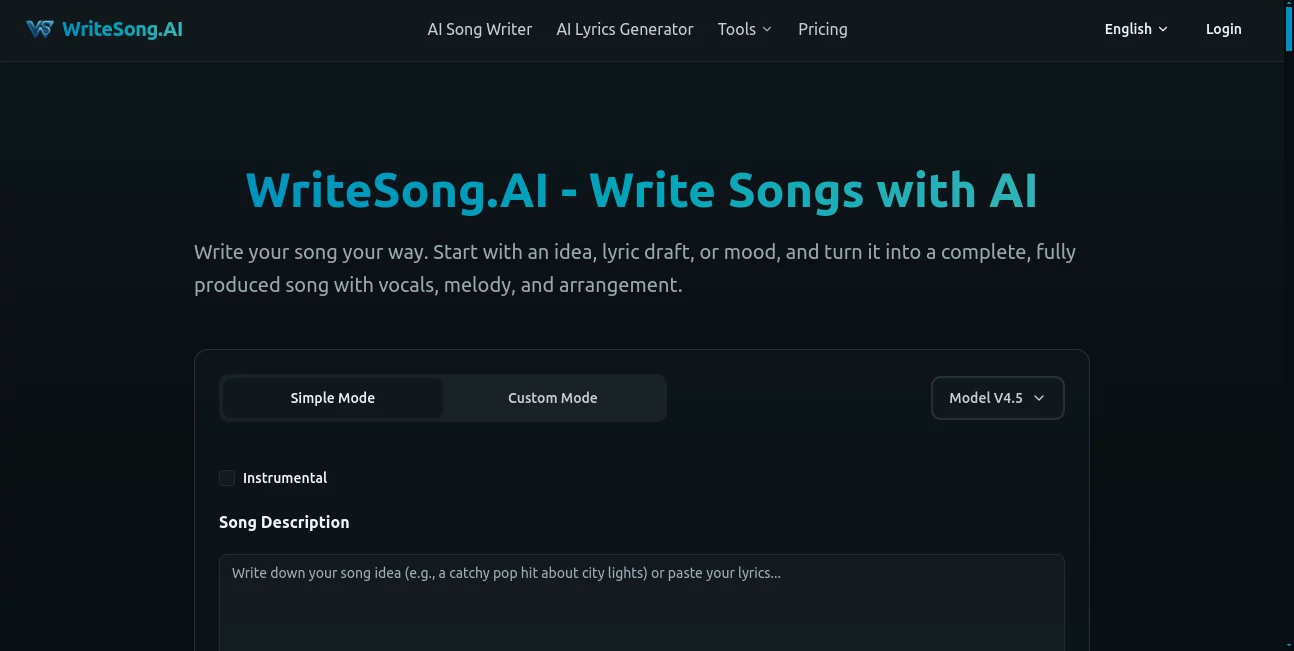
The interface is clean, approachable, and focused on creativity instead of technical complexity. Users can begin with either a quick generation mode for fast results or choose advanced controls to customize lyrics, genre, title, vocal style, and overall direction. The browser-based workflow keeps every major feature within easy reach.
Accuracy & Performance
The platform produces complete songs with impressive consistency by combining lyrics, melody, vocals, and arrangement in a single workflow. Multiple generations allow users to compare creative directions, making it easier to refine ideas until they match the desired mood and musical style.
Capabilities
- Generate complete songs from simple text prompts.
- Create original lyrics before producing the final track.
- Support multiple music genres including pop, rock, hip-hop, EDM, country, R&B, and more.
- Produce expressive AI vocals.
- Extend songs up to several minutes without starting over.
- Separate vocals and instrumentals.
- Split songs into multiple professional stems.
- Export high-quality MP3 and WAV files.
- Create instrumental music alongside vocal productions.
- Work entirely inside a web browser.
Security & Privacy
The service supports both free and paid accounts while providing private song generation for eligible subscription plans. User data is handled according to its published privacy policy, and paid plans include additional privacy controls, cloud storage, and secure account management. Commercial usage rights are available under qualifying annual subscriptions according to the platform's licensing terms.
Use Cases
- Songwriters exploring new melodies and lyrical ideas.
- Independent musicians creating demo tracks quickly.
- YouTube creators producing original background music.
- Podcast producers generating intros and transitions.
- Marketing teams creating custom campaign music.
- Teachers preparing engaging music assignments.
- Game developers producing soundtrack concepts.
- Content creators needing copyright-friendly original songs.
Pros and Cons
- Pros
- Easy enough for beginners.
- Fast browser-based workflow.
- Complete songs generated from simple descriptions.
- High-quality AI vocals across multiple genres.
- Built-in lyric generation.
- Professional audio export options.
- Vocal remover and stem splitter included in paid plans.
- No desktop software installation required.
- Cons
- Advanced editing features require a paid subscription.
- Commercial usage depends on eligible annual plans.
- Free users have daily generation limits.
- Best results depend on providing clear creative prompts.
Pricing Plans
A free plan allows new users to experiment with daily song generations and online playback. Paid Starter and Plus subscriptions unlock significantly higher generation limits, MP3 and WAV downloads, private projects, song extension, vocal removal, stem splitting, long-term cloud storage, and additional creative tools. Commercial usage rights are available for qualifying annual subscription plans according to the licensing policy.
How to Use WriteSong.AI
- Open the platform and create an account.
- Enter a prompt, mood, story, or lyric draft.
- Select either the quick workflow or advanced customization mode.
- Choose genre, vocal style, and musical direction.
- Generate one or more versions.
- Review the results and refine your favorite version.
- Extend the composition or separate vocals if needed.
- Export the finished song in the desired audio format.
Comparison with Similar Tools
Many AI music generators focus on either lyrics or instrumental creation, requiring additional software to complete production. This platform stands out by combining songwriting, vocal generation, music production, lyric drafting, song extension, vocal separation, stem exporting, and audio downloads into one integrated browser workflow. For creators who prefer speed without sacrificing flexibility, this all-in-one approach offers a smoother creative experience.
Conclusion
Creating original music no longer requires expensive studio equipment or years of production experience. By combining intelligent songwriting assistance with realistic vocals and practical editing tools, this platform helps transform ideas into complete songs within minutes. Its balance of accessibility and advanced functionality makes it valuable for beginners experimenting with music as well as professionals looking to accelerate creative workflows. The result is an enjoyable environment where inspiration can quickly become something worth sharing.
Frequently Asked Questions (FAQ)
Can beginners create songs with this platform?
Yes. No formal music training is required. Users can simply describe an idea, mood, or story to generate a complete song.
Can I upload my own lyrics?
Yes. Existing lyrics can be pasted into the editor and used as the foundation for a fully produced song.
Does it support different music genres?
Yes. It can generate songs across a wide range of musical styles including pop, rock, hip-hop, EDM, country, R&B, and more.
Can songs be downloaded?
Paid plans allow downloading songs in high-quality MP3 and WAV formats.
Is commercial use available?
Commercial usage rights are available for qualifying annual subscription plans based on the published licensing terms.
AI Text to Music , AI Lyrics Generator , AI Music Generator , AI Voice & Audio Editing .
These classifications represent its core capabilities and areas of application. For related tools, explore the linked categories above.

WriteSong.AI Alternatives Product

Goose Pod

Audio Convert
MemoTune

TyTyAi

SeedMusic 1.0

happyhorse

Klyra AI

Chatterbox T…

lyria 3