Yes Workflow
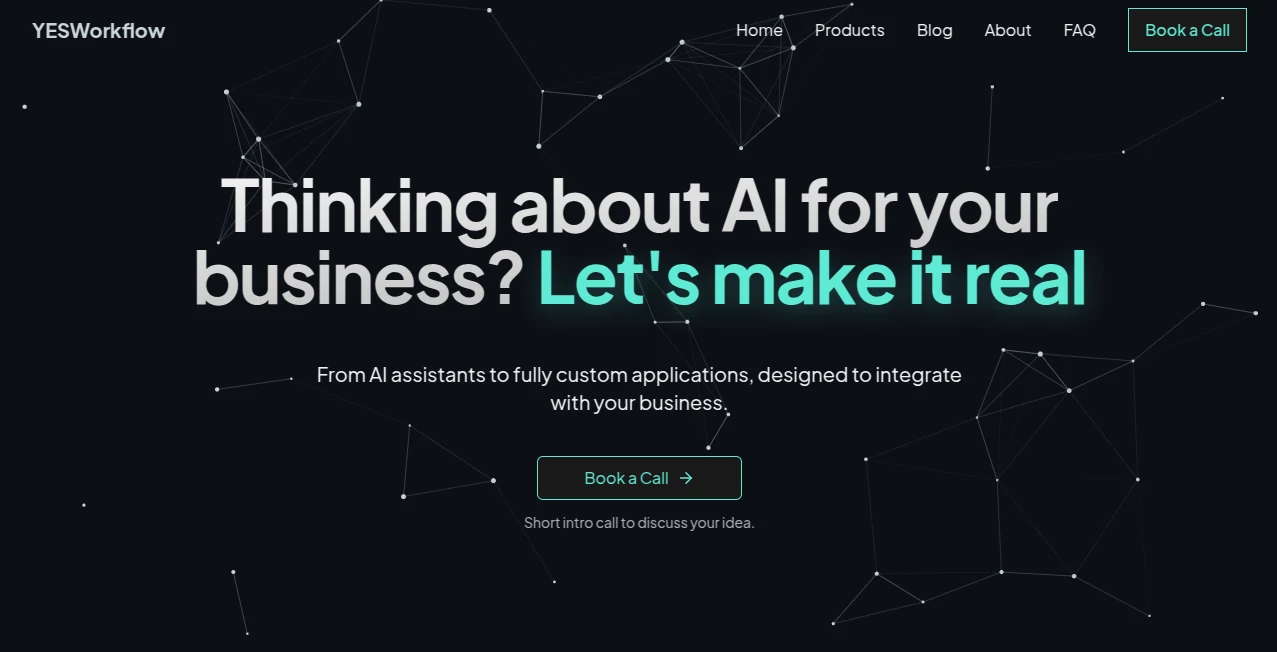
What is Yes Workflow?
Running a growing business often feels like juggling too many balls at once. Between managing customer calls, chasing leads, and keeping up with social media, something always slips through the cracks. That’s where smart automation comes in. The platform focuses on replacing outdated legacy systems with conversational AI that actually understands what your business needs. Instead of forcing teams to work harder, it helps them work smarter by cutting manual busywork by 60 to 80 percent. This isn’t about adding more software to your stack. It’s about taking the repetitive tasks off your team’s plate so they can focus on the work that actually drives growth.
Think about your call center for a moment. How many hours do your people spend answering the same questions over and over? What about lead generation? Are you still manually entering data from web forms into your CRM? These small tasks add up to massive time drains. The approach here is refreshingly practical. They’ve built AI voice agents that handle calls naturally, business process automation that connects your tools, and specific workflows for LinkedIn and lead management. I’ve seen too many businesses buy expensive software that sits unused because it’s too complicated. This one is built for real people doing real work.
Key Features
When you strip away all the tech jargon, what makes this solution different is how it fits into your existing workflow. You don’t need to overhaul everything you’re doing. You just need to automate the parts that don’t require human judgment. The platform breaks down into four main areas that cover the biggest pain points for growing companies.
User Interface
You won’t find a hundred confusing buttons or a dashboard that requires a training course to understand. The interface is built for business owners and team leads, not just developers. Setting up a new workflow takes minutes, not days. You simply map out what you want to happen, connect your existing tools like your CRM or email platform, and let the system handle the rest. For the voice agent side of things, you record a few sample responses, set your rules, and deploy. My favorite part? You can see exactly what the AI is doing at every step, so you never feel like you’ve lost control.
Accuracy & Performance
The voice agents sound natural, not robotic. Early users report that customers can’t even tell they’re talking to an AI most of the time. That’s huge for maintaining trust and professionalism. On the lead generation side, the workflows capture and route information without dropping data or creating duplicate records. In testing across different business sizes, the platform consistently reduced manual work by that 60-80% range they advertise. One small business owner told me they saved fifteen hours a week just by automating their LinkedIn outreach and follow-ups. That’s real time you can reinvest into strategy or client relationships.
Capabilities
Here’s what the system can actually do for you. The AI voice agents handle inbound and outbound calls for call centers, answering questions, scheduling appointments, and even qualifying leads. The business process automation connects all your software so data flows automatically between systems. Lead generation workflows capture web form submissions, score the leads based on your criteria, and add them to your email sequences without you lifting a finger. And the LinkedIn content automation helps you stay visible on the platform without spending hours crafting posts and engaging with comments. It’s a complete package for the growing business that’s tired of wearing too many hats.
Security & Privacy
Let’s address the elephant in the room. Business data is sensitive, and trusting an AI with your customer conversations feels scary. The platform takes this seriously. All data is encrypted, and the voice agents are designed to only access the information they need to do their job. You set the permissions. You control what the AI can see and do. For businesses in regulated industries like healthcare or finance, you can configure additional safeguards. The company doesn’t sell your data or use your conversations to train public models. Your business stays your business.
Use Cases
Different businesses will get value in different ways. A real estate agency might use the voice agents to handle after-hours calls from buyers and sellers. An ecommerce brand could automate their customer service triage so only complex issues reach a human. A B2B service provider might focus entirely on LinkedIn automation to build their personal brand and generate inbound leads. Marketing agencies use the lead gen workflows to capture and nurture prospects without manual data entry. And call centers of any size can reduce wait times and after-hours gaps by deploying voice agents as the first line of defense. The common thread is time. Every use case comes back to giving your people more hours in the day for high-value work.
Pros and Cons
Pros:
- Cuts manual work by 60-80%, which translates directly to cost savings
- Voice agents sound natural and pass for human in most conversations
- Works with the tools you already use instead of forcing you to switch
- No coding required to set up most workflows
- Transparent pricing without hidden fees for basic features
- Specifically designed for growing businesses, not just enterprise giants
Cons:
- Some advanced customizations may require help from their support team
- The LinkedIn automation works best for English-language content
- Like any AI, occasional misunderstandings happen with complex voice requests
- Smaller businesses might find certain features more than they need initially
Pricing Plans
Exact pricing details depend on your specific needs, which is actually a good thing. You don’t pay for features you won’t use. The typical setup includes a base fee for the platform access plus usage-based costs for things like call minutes or workflow executions. Most growing businesses find the investment pays for itself within the first month just from the time savings alone. A single employee’s time costs more than the monthly fee in most markets. The best approach is to book a demo and let them build a custom quote based on your actual volumes and needs. They’re transparent about costs, so you won’t get surprise bills.
How to Use the Platform
Getting started takes four simple steps. First, you book a discovery call where their team learns about your business and where you’re wasting time. Second, they help you map out your first automation workflow, whether that’s a voice agent for your call center or a lead gen process for your website. Third, you connect your existing tools through their integrations. Most CRMs, email platforms, and phone systems work out of the box. Fourth, you test and launch. The whole process from first call to live automation typically takes less than two weeks. After that, you can add new workflows whenever you want, or let their team help you find more opportunities to save time.
Comparison with Similar Tools
You’ve probably heard of Zapier or Make for workflow automation. Those tools are great for connecting apps and moving data around. But they don’t handle voice interactions at all, and they require you to build everything yourself. On the other end, you have enterprise platforms like ServiceNow or Appian that cost a fortune and require full-time administrators. This solution sits right in the sweet spot for growing businesses. You get the voice AI capabilities that Zapier lacks, but you don’t pay the enterprise premium or need the implementation headaches. Compared to building your own automations with generic AI tools like ChatGPT, you save massive time because everything is pre-built for business workflows. You’re not starting from scratch. You’re just configuring.
Conclusion
Every growing business reaches a point where you can’t just add more hours to the day. You can’t keep hiring faster. You need leverage. That’s what this platform provides. By taking over the repetitive, rule-based work that eats up your team’s energy, it frees your people to do what they do best: build relationships, solve problems, and grow the business. The voice agents handle calls professionally. The workflows connect your systems seamlessly. And the LinkedIn automation keeps your brand visible without constant effort. For business owners tired of feeling overwhelmed by busywork, this is a practical, affordable solution that delivers measurable results from day one. Stop manually doing what a machine can handle. Give your team back their time.
Frequently Asked Questions (FAQ)
Do I need technical skills to set this up? No. The platform is designed for business owners and managers. You don’t need to know how to code or manage servers.
Can I try it before committing? Yes. They offer demos and pilot programs so you can see the value before signing a long-term contract.
Will my customers know they’re talking to an AI? Most can’t tell. The voice agents are designed to sound natural and conversational.
What happens if the AI makes a mistake? You stay in control. The system can flag uncertain interactions for human review, and you can always override or correct any action.
How long does implementation take? Most businesses go from first call to live automation in under two weeks. Simple workflows can be live in days.
Does this replace my existing software? No, it works alongside what you already use. The goal is to connect your tools, not replace them.
AI Lead Generation , AI Sales Assistant , AI Workflow Management , AI Voice Assistants .
These classifications represent its core capabilities and areas of application. For related tools, explore the linked categories above.

Yes Workflow Alternatives Product
AILeadz.io

Gemini Omni …

BillEasy Inc

Referent
Gemini Omni
Yorph AI

Standard Com…

Mage Flow AI…

Plainpaper