
Yinso
What is Yinso?
Yinso AI is an AI-powered music creation platform built for people who want to turn an idea, mood, memory, or simple description into an original song. Its approach is refreshingly direct: describe what you want to hear, choose whether you want an instrumental track, and let the music take shape.
What makes the platform interesting is the range of musical directions it supports. Users can mix genres, instruments, and moods rather than being locked into a narrow collection of preset sounds. The platform also presents a growing collection of generated tracks, giving new users plenty of inspiration before they create their own.
For someone who has ever had a song idea but lacks the production skills to turn it into a finished track, this can be a particularly appealing way to experiment. You can start with something as ordinary as a quiet morning, a road trip, or a difficult week and turn that idea into a musical concept.
Key Features
- AI music generation: Create original music from natural-language descriptions and creative ideas.
- Hundreds of music styles: Explore a broad range of genres, moods, and musical directions.
- Instrumental generation: Generate music without vocals when you need a background track, soundtrack, or instrumental composition.
- Natural vocals: The platform focuses on producing songs with natural-sounding vocals and an authentic musical character.
- Genre and mood mixing: Combine different musical characteristics to create more specific results instead of relying on one fixed genre.
- Stem separation: Separate generated audio into elements such as vocals and bass for remixing, covers, or further DAW editing.
- Music prompt analysis: Upload an audio reference to analyze its musical style and create a reusable prompt for a new generation.
- Creative song discovery: Browse generated songs and musical examples for ideas before starting a new project.
User Interface
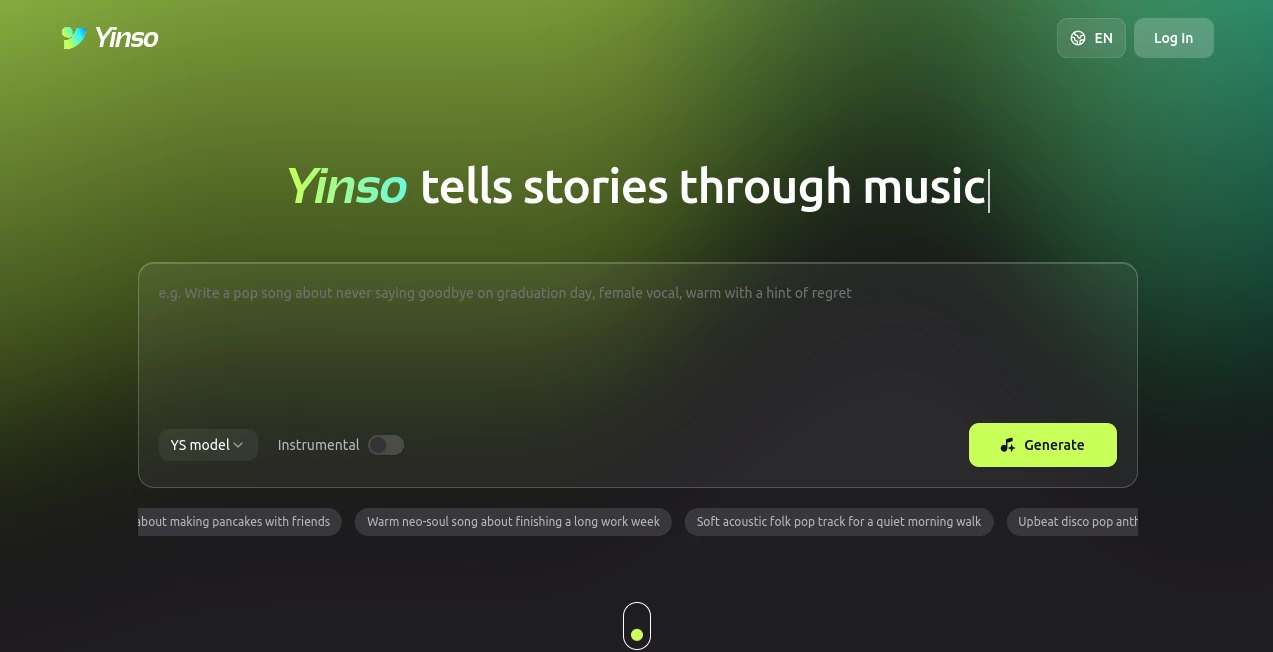
The interface keeps the creative process fairly straightforward. The main generation area places the model selection, instrumental option, prompt field, and generation action close together, so there is little unnecessary setup before making a track.
Suggested prompts are also available, which is useful when you know you want music but do not yet have the right words to describe it. A prompt such as a warm neo-soul song about finishing a long work week can be enough to get the creative process moving.
The overall experience feels closer to experimenting with a music idea than filling out a complicated production form. That simplicity should appeal to beginners, while the additional stem and audio-analysis features give more experienced creators something to explore.
Accuracy & Performance
For generative music, accuracy is less about matching a single correct answer and more about how well the output follows the creative direction. The platform is designed to interpret descriptions involving genres, instruments, moods, situations, and storytelling themes, giving users room to describe music in everyday language.
The examples available on the platform cover everything from electronic and pop-inspired tracks to jazz, folk, R&B, Afrobeats, house, punk, and other styles. This variety suggests that the system is intended for broad musical experimentation rather than one particular production style.
Results will naturally vary depending on the prompt and the musical concept. A specific description usually gives the generator more useful direction than a vague request such as “make a good song.”
Capabilities
The strongest part of the platform is the combination of generation and music-oriented utilities. A creator can begin with an idea, generate a song, and then use stem separation when the audio needs to be adapted for another project.
The music prompt analyzer adds another interesting workflow. Instead of trying to describe the sound of an existing reference track from scratch, users can upload audio and have its style analyzed into a prompt that can be reused for a new creation.
This makes the service useful not only for casual experimentation but also for creators working on videos, social content, demos, personal projects, songwriting ideas, and other forms of digital media.
Security & Privacy
As with any online creative platform, users should review the current privacy policy and terms before uploading personal or commercially sensitive audio. This is particularly important when working with unreleased music, private recordings, or reference material that belongs to someone else.
Creators should also pay attention to the platform's current licensing and usage terms before using generated music in commercial projects. These details can change over time and should be checked directly before publishing or monetizing an important release.
Use Cases
Content creators: Generate original music ideas for YouTube videos, social media posts, podcasts, presentations, and other digital content.
Songwriters: Use generated tracks as a starting point when exploring a melody, mood, arrangement, or broader musical direction.
Video producers: Create music concepts that match a particular scene, emotion, journey, or story rather than searching through generic stock libraries.
Indie artists: Experiment with genres and arrangements before deciding which musical direction is worth developing further.
Hobbyists: Turn personal experiences into songs. The platform's storytelling approach makes prompts based on memories, places, relationships, and everyday moments particularly natural.
Music producers: Use stem separation to obtain editable components for remixing, covers, and additional work inside a digital audio workstation.
Pros and Cons
- Pros: Simple text-based music creation, a wide selection of musical styles, instrumental generation, natural vocal output, stem separation, and audio-based prompt analysis.
- Pros: The storytelling approach makes it easy for non-musicians to describe the kind of song they have in mind.
- Pros: The combination of generation and post-generation audio tools provides more flexibility than a basic text-to-music generator.
- Cons: Generated results can vary from one prompt to another, so creating the right track may require several attempts.
- Cons: Users looking for detailed professional DAW controls may still need a traditional music-production application after generation.
- Cons: Commercial usage and licensing should be checked carefully for each intended use.
Pricing Plans
The platform's pricing and available usage options can change as its music-generation models and services evolve. Users should check the current pricing information inside the service before choosing it for a larger project or ongoing production workflow.
For casual creators, the most important factors to compare are the available generation limits, audio quality, commercial usage rights, and any credits or subscription requirements attached to the account.
How to Use the Tool
- Open the music creation interface and sign in if required.
- Describe the song you want to create using natural language.
- Include useful details such as genre, mood, instruments, tempo, subject, or vocal direction.
- Choose the instrumental option if you want a track without vocals.
- Generate the music and listen to the result.
- Adjust your creative direction and generate another version when the first result does not match the idea closely enough.
- Use stem separation when you need individual musical components for further editing.
- Use the music prompt analyzer when you want to study the style of an existing audio reference and turn it into a reusable creative prompt.
Comparison with Similar Tools
Many AI music platforms focus mainly on turning a text description into an audio track. This platform takes a somewhat broader approach by combining music generation with tools aimed at the next stage of the creative process.
For example, stem separation can be useful when a generated song needs to be remixed or edited, while the music prompt analyzer provides a practical bridge between reference listening and new music generation. These features make the service worth considering for creators who want more than a one-click song generator.
It is also particularly approachable for users who think in stories rather than technical music terminology. Describing a scene, memory, feeling, or situation can be enough to begin exploring a musical idea.
Conclusion
Yinso AI takes an appealingly human approach to AI music creation: start with an idea and turn it into something you can hear. Its support for numerous musical styles, natural vocals, instrumental tracks, stem separation, and reference-based prompt analysis gives it a useful range beyond basic music generation.
It is a strong option for creators who want to experiment quickly, develop musical concepts, create content soundtracks, or simply discover what an idea might sound like as a finished song. The best results will still come from thoughtful prompts and a willingness to experiment, but that is arguably part of the fun.
Frequently Asked Questions (FAQ)
What can I create with this tool?
You can create original music based on descriptions involving musical styles, moods, instruments, situations, and stories. Instrumental tracks are also supported.
Can it generate songs with vocals?
Yes. The platform states that its generated music can include natural vocals, allowing users to create complete song concepts rather than instrumental tracks only.
Does it support different music genres?
Yes. The platform showcases hundreds of musical styles and allows users to mix genres, instruments, and moods when describing what they want to hear.
Can I separate vocals from instruments?
Yes. Its stem separation feature can create separate audio stems, including vocals and bass, which can then be used for remixing, covers, or further editing.
Can I use an existing song as a reference?
The music prompt analyzer allows users to upload audio and analyze its style to generate a reusable music prompt for a new creation.
Is it suitable for beginners?
Yes. The text-based workflow makes it accessible even if you do not have formal music-production experience. More advanced users can also explore the stem and audio-analysis features.
Can I use generated music commercially?
Commercial usage depends on the platform's current terms and licensing conditions. Always review the latest usage rights before using generated music in monetized or commercial projects.
Do I need to know music theory to use it?
No. You can describe the music you want using ordinary language. Adding details about genre, mood, instruments, or the story behind the song can help guide the generation.
AI Text to Music , AI Music Generator .
These classifications represent its core capabilities and areas of application. For related tools, explore the linked categories above.

Yinso Alternatives Product

lyria 3

SongFromShort

AI Makes Song

Lyria.run

Seedance

Lyria3 AI
Musikalis AI…

happyhorse

SeedMusic 1.0