


















YouTube Transcript AI
What is YouTube Transcript AI?
Turning a long YouTube video into useful information can take far longer than the video itself. Pausing, rewinding, taking notes, and searching for one specific sentence is frustrating, especially when the content is a lecture, interview, podcast, or detailed tutorial.
YouTube Transcript AI takes a much simpler approach. Paste a YouTube link or video ID and the service extracts the video's transcript in seconds. The result can then be copied, downloaded, translated, summarized, or passed to an AI assistant for deeper analysis. There is no account creation or payment required for the core transcript generator, making it particularly convenient for quick research and everyday use.
What makes the service especially practical is that it is not limited to simply displaying text. Users can work with timestamps, select available caption languages, export subtitles, and use the transcript as a starting point for summaries, study notes, translations, and content creation.
Key Features
- Instant YouTube Transcripts: Paste a YouTube URL or video ID and retrieve the available transcript without manually opening YouTube's transcript panel.
- Free and No Sign-Up: The core transcript generator is available without creating an account, entering payment details, or dealing with a daily usage cap.
- Multiple Caption Languages: If a video contains several subtitle tracks, users can select the language they need before copying or downloading the transcript.
- AI Summaries and Q&A: Transcripts can be used with AI to identify key points, summarize long videos, or answer questions about the material.
- SRT Export: The service can produce standard SRT subtitle files with timecodes, which can be useful for video editing and caption workflows.
- Bilingual Subtitles: Translated and bilingual SRT options make the transcript useful for language learning and multilingual content.
- Timestamped Transcripts: Users can keep timestamps so they can quickly return to the relevant part of a video.
- Clean Text Export: A version without timestamps is available when the goal is simply to read, edit, or reuse the transcript.
- Browser Extension: A Chrome extension brings transcript and AI-related features directly into the YouTube viewing experience.
User Interface
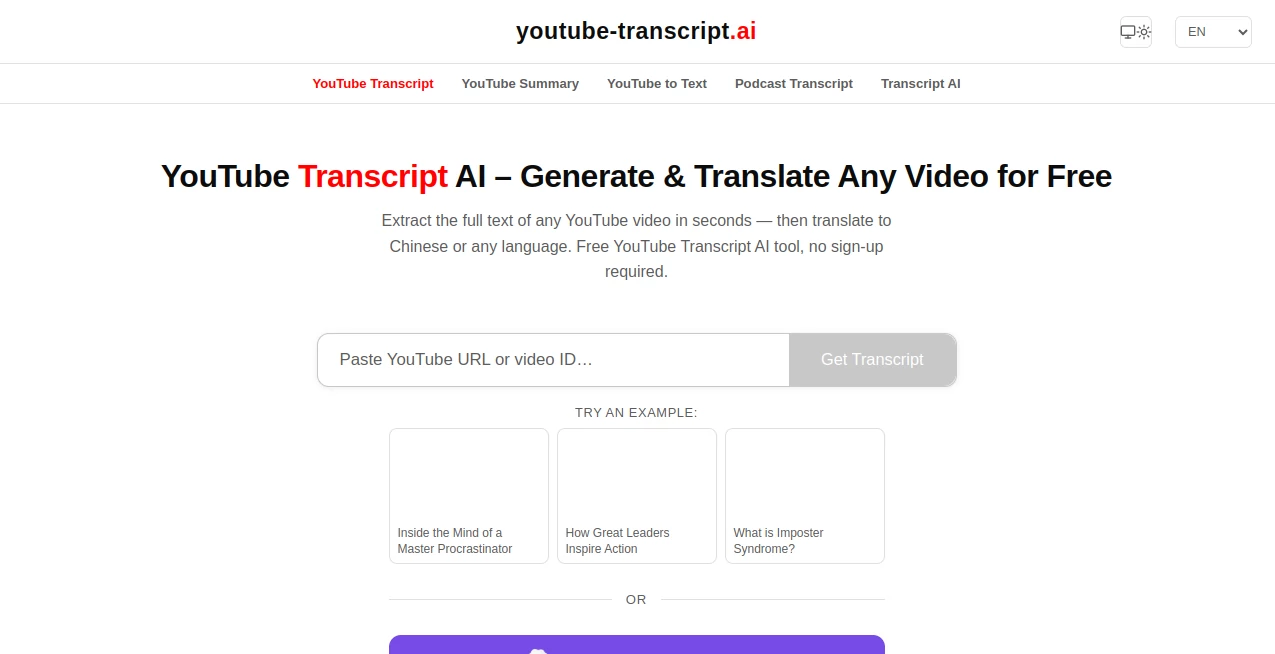
The interface is intentionally straightforward. The main workflow starts with a single input field where a YouTube URL or video ID can be entered. After submitting it, the transcript appears in a clean reading format rather than forcing users to navigate through multiple menus.
This simplicity is one of its strongest points. Someone researching a subject does not need to learn a complicated dashboard before getting useful results. Copying the transcript, working with timestamps, or opening the available download options is quick and easy.
Accuracy & Performance
For videos that already contain captions, the service extracts the available caption data rather than unnecessarily retranscribing the entire video. This approach helps explain why transcripts can appear quickly, even for lengthy content.
The service supports both creator-provided captions and YouTube's automatically generated captions. For videos without usable captions, its AI transcription capabilities can be used to generate text from the video's audio. Speaker detection is also available for workflows where distinguishing between different speakers matters.
As with any automated transcription system, the quality of the final text depends on the original audio, pronunciation, background noise, language, and source captions. For important research or publication work, checking the transcript against the original video is still a sensible final step.
Capabilities
The biggest advantage is the number of things that can happen after the transcript has been created. A transcript can become the foundation for a much broader workflow instead of being the final output.
For example, a student can extract a lecture transcript and use AI to create revision notes or flashcards. A researcher can search through a long interview for specific statements. A content creator can transform a podcast transcript into a blog outline, newsletter, or social media content. Someone learning another language can work with translated or bilingual subtitles.
The service also works with different types of YouTube content, including Shorts, lectures, podcasts, interviews, conference presentations, and long-form educational videos.
Security & Privacy
No account is required for the basic transcript workflow, which reduces the amount of information users need to provide before using the service. The core experience is designed around submitting a YouTube video and receiving its transcript rather than maintaining a complicated user profile.
Users should still avoid treating any online transcription service as a place to submit confidential material without first reviewing its current privacy terms. This is particularly important when dealing with private recordings, sensitive interviews, or proprietary information.
Use Cases
- Students: Convert lectures and educational videos into searchable notes, summaries, study guides, and flashcards.
- Researchers: Search long interviews, talks, and presentations for specific information without watching every minute.
- Content Creators: Repurpose spoken content into articles, newsletters, social posts, show notes, and other formats.
- Language Learners: Use transcripts, translations, and bilingual subtitles to study vocabulary and understand spoken content.
- Journalists: Quickly review interviews and public presentations while retaining timestamps for reference.
- Marketers: Analyze competitor videos, educational content, podcasts, and industry discussions to identify useful ideas.
- Professionals: Extract information from webinars, conferences, tutorials, and expert discussions without repeatedly replaying sections.
- AI Users: Feed transcript text into ChatGPT, Claude, Gemini, or another AI assistant for summarization, analysis, translation, and question answering.
Pros and Cons
Pros
- Free core transcript generation.
- No sign-up required for the basic workflow.
- Fast transcript retrieval.
- Supports YouTube URLs and video IDs.
- Works with manually created and automatically generated captions.
- Offers timestamped and clean transcript formats.
- Supports SRT and bilingual subtitle workflows.
- Useful for research, education, content creation, and language learning.
- AI-powered summaries and question answering add value beyond basic transcription.
Cons
- Transcript quality can depend on the quality of the source captions or audio.
- Some videos may have limited functionality when captions are unavailable or inaccessible.
- Users working with sensitive content should review the privacy terms before submitting material.
- Advanced AI workflows may be more useful to users who already have experience working with AI assistants.
Pricing Plans
The core transcript generator is available for free. According to the service's current information, users can generate transcripts without signing up, entering a credit card, or dealing with a daily limit.
This pricing model is particularly attractive for occasional users. Someone who needs the transcript of a single lecture, podcast, interview, or tutorial does not have to subscribe to a monthly plan just to complete a simple task.
Additional experiences, such as browser-based AI assistance and related workflow features, may be offered separately, so users interested in advanced functionality should check the current service options before relying on a particular feature.
How to Use It
- Copy the URL of the YouTube video you want to process.
- Paste the URL or video ID into the transcript input field.
- Start the transcript generation process.
- Read the resulting transcript and select the available caption language if the video contains multiple tracks.
- Copy the text directly or choose an available download format.
- Keep timestamps if you need to return to specific moments in the video, or use the clean version when you only need readable text.
- Send the transcript to an AI assistant when you want a summary, translation, key points, study notes, or answers to questions about the video.
Comparison with Similar Tools
Traditional transcription platforms often focus on uploading an audio or video file and waiting for a transcription job to finish. That workflow can be useful for original recordings, but it is not always convenient when the source is already published on YouTube.
This service takes a more direct route for YouTube content. Instead of downloading a video, uploading a large file, and waiting for processing, users can start with the existing YouTube link. For videos with available captions, this can make the process considerably faster.
Compared with YouTube's built-in transcript panel, the advantage is flexibility. The extracted text can be copied, cleaned, downloaded, translated, or used as input for other AI workflows. SRT exports and timestamp options also make the result more practical for creators and editors.
Paid transcription platforms can still be preferable when users need advanced team collaboration, extensive audio-file management, sophisticated editing environments, or enterprise-oriented workflows. For straightforward YouTube-to-text tasks, however, the simpler approach can be more appealing.
Conclusion
For anyone who regularly works with YouTube content, having a fast way to turn video into usable text can save a surprising amount of time. The service combines a simple transcript workflow with practical extras such as timestamps, subtitle downloads, translation options, AI summaries, and question answering.
Its strongest quality is probably its accessibility. There is no complicated setup for the basic task: paste a YouTube link, get the transcript, and decide what to do with the text next. Whether the goal is studying a two-hour lecture, researching an interview, translating subtitles, or turning a podcast into written content, the workflow feels focused on getting useful information out of video quickly.
Frequently Asked Questions (FAQ)
Is it free to generate YouTube transcripts?
Yes. The core transcript generator is currently offered free of charge and does not require an account or payment information.
Do I need to create an account?
No. The basic workflow can be used without signing up.
Can I transcribe a long YouTube video?
Yes. The service is designed to handle both short videos and long-form content such as lectures, podcasts, interviews, and conference presentations.
Can I download the transcript?
Yes. Available options include clean text and timestamped formats, as well as SRT subtitle files.
Can I download subtitles as an SRT file?
Yes. SRT export includes timecodes and can be useful for video editing or subtitle workflows. Translated and bilingual SRT options are also available.
Can I translate a YouTube transcript?
Yes. You can work with available language tracks and use the extracted transcript with AI translation tools. Translated and bilingual subtitle workflows are also supported.
Can I use the transcript with ChatGPT or Claude?
Yes. The transcript can be copied and pasted into AI assistants such as ChatGPT or Claude for summarization, translation, analysis, question answering, and content generation.
Does it work when a YouTube video has no captions?
The service also provides AI transcription capabilities for videos where usable captions are not available. The quality can vary depending on the audio and speaking conditions.
Can I use it for studying?
Absolutely. A transcript can turn a lecture or tutorial into searchable study material, and AI can then help transform that material into summaries, notes, flashcards, quizzes, or questions.
Can content creators use it?
Yes. Creators can use transcripts as a starting point for blog posts, newsletters, social media content, show notes, subtitles, and other forms of repurposed content.
AI Transcriber , AI Translate , AI Transcription , AI Captions or Subtitle .
These classifications represent its core capabilities and areas of application. For related tools, explore the linked categories above.
YouTube Transcript AI details
Website unavailable — View Alternatives
Pricing
- Freemium
Apps
- Web App
Categories

YouTube Transcript AI Alternatives Product

SkipBait
Voza Transcr…

livetalktran…

AI OCR

AutoDub

YTVidHub-you…

Read

Whisper Web

EasyVC
