


















Zencoder
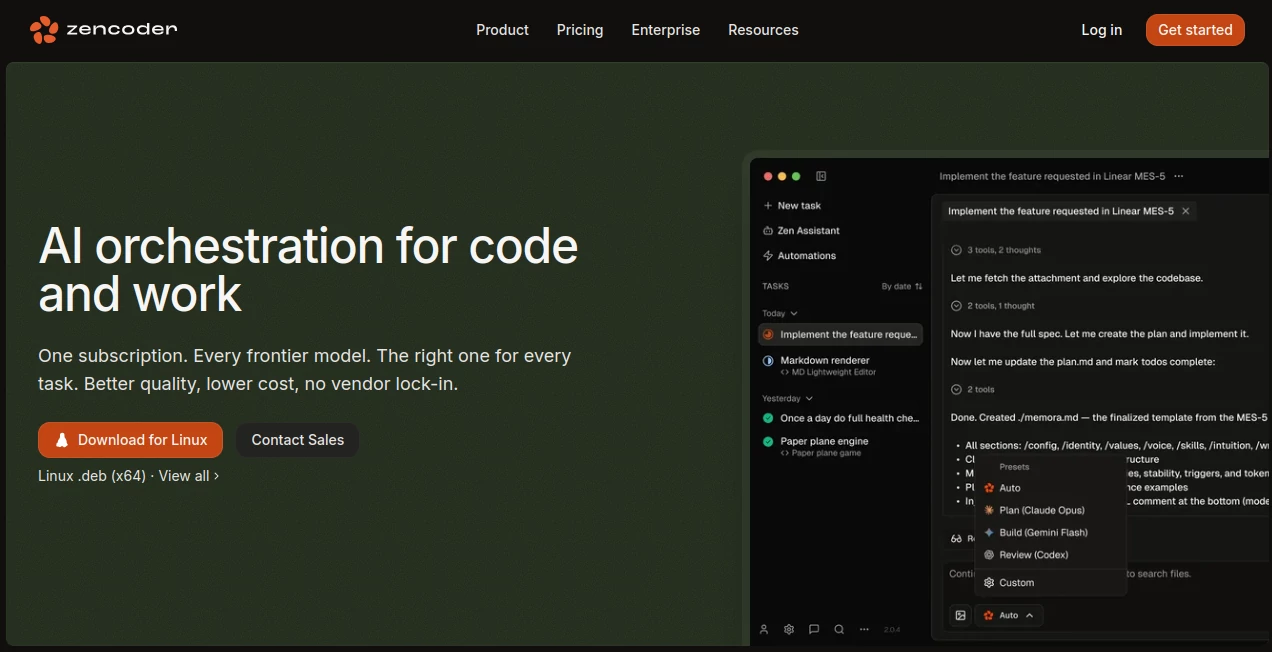
What is Zencoder?
I’ve tried my share of AI coding assistants. Most of them generate impressive-looking code that falls apart the moment you try to expand it or fix a bug. Then I started using this platform and something clicked. It doesn’t just spit out code — it plans first, builds thoughtfully, and verifies everything along the way. The difference is night and day. Features actually work when I’m done, and I spend way less time debugging AI hallucinations. For the first time, it feels like I have a smart, methodical pair programmer who understands the big picture instead of just the current file.
Introduction
Modern AI coding tools are powerful, but without structure they often create fragile results. Zencoder brings orchestration and discipline to the process. It uses different frontier models for different stages — a strong reasoning model for planning, a fast one for execution, and another for review — all working together under your control. Whether you’re a solo developer shipping side projects or part of a team building at scale, it helps you move faster while producing cleaner, more maintainable code. The experience feels closer to “set the goal, let the agents handle the details” than the usual back-and-forth prompting.
Key Features
User Interface
The interface is built for developers who want power without complexity. It integrates directly into your IDE (VS Code, JetBrains, etc.) so you stay in your familiar environment. You can chat with agents, review plans, accept changes, and steer direction without constantly switching tabs. The workflow feels natural — describe what you want, review the spec, watch agents work across files, and verify results. Everything stays transparent and under your control.
Accuracy & Performance
By separating planning, building, and reviewing across specialized models, the output quality is noticeably higher. Agents understand your full codebase context — architecture, dependencies, coding standards — so changes fit properly instead of breaking other parts. Users report fewer bugs, better test coverage, and less time fixing AI-generated mess. The orchestration layer makes the whole process more reliable than single-model tools.
Capabilities
It supports planning with strong reasoning models, fast execution, cross-agent review, multi-repo awareness, scheduled automation (bug triage, dependency updates), and integration with your existing tools (GitHub, Jira, Slack, etc.). You can run agents in parallel across files, enforce quality gates, and maintain full human oversight. It works for everything from small features to complex refactors while keeping your codebase clean and consistent.
Security & Privacy
Enterprise-grade security is built in — SOC 2, ISO certifications, no training on your code, full audit trails, and flexible deployment options (cloud, on-prem, hybrid). Your data stays protected, and you control exactly what agents can access and change. For teams handling sensitive codebases, this level of governance and transparency is a major relief.
Use Cases
A solo founder uses it to turn feature ideas into working code quickly while maintaining clean architecture. A development team automates routine tasks like dependency updates and bug triage, freeing engineers for higher-value work. A product company refactors legacy modules with confidence because agents understand the full context. Teams integrate it into their CI/CD pipeline for consistent quality gates on every change. It shines anywhere you want AI to accelerate development without sacrificing code quality or control.
Pros and Cons
Pros:
- Orchestrates multiple specialized models for better overall results.
- Deep codebase understanding leads to more coherent changes.
- Strong governance and security suitable for professional teams.
- Integrates smoothly into existing IDEs and workflows.
- Human-in-the-loop design keeps you firmly in control.
Cons:
- Best results still benefit from clear initial direction from the user.
- Full enterprise features (on-prem, advanced governance) are on higher plans.
Pricing Plans
It offers flexible options that scale with your needs. The platform provides good free or starter access to experience the difference, with paid plans unlocking higher usage, advanced orchestration, team features, and enterprise-grade deployment and compliance. Many teams find the productivity gains quickly justify the investment.
How to Use Zencoder
Install the extension in your IDE, connect your repositories, and describe the task or feature you want. Review the generated plan and acceptance criteria, then let the agents execute. Monitor progress, provide feedback or approval as needed, and verify the changes with built-in testing and review. Iterate quickly by giving new instructions. The workflow keeps you in the driver’s seat while the AI handles the heavy lifting.
Comparison with Similar Tools
Many AI coding assistants are single-model tools that generate code quickly but often lack structure and long-term maintainability. Zencoder stands out by orchestrating specialized models for planning, execution, and review while maintaining full codebase awareness and strong governance. It feels more like a thoughtful engineering partner than a simple code generator.
Conclusion
AI is transforming how we build software, but the best results come when powerful models are guided by structure and human oversight. This platform delivers exactly that balance — speed and intelligence without losing control or quality. For developers and teams who want to ship better software faster, it’s becoming an essential part of the modern workflow. The future of coding isn’t just faster — it’s smarter and more reliable too.
Frequently Asked Questions (FAQ)
Do I need to switch IDEs to use it?
No — it integrates directly into popular IDEs like VS Code and JetBrains.
Can it work with my existing codebase?
Yes — it indexes your repos and understands context across multiple files and dependencies.
Is it suitable for large teams?
Absolutely — enterprise features include governance, audit trails, and team collaboration tools.
How does it handle different models?
It intelligently routes tasks to the best model for each step (planning, building, reviewing) while giving you visibility and control.
AI Workflow Management , AI Code Assistant , AI Code Generator , AI Developer Tools .
These classifications represent its core capabilities and areas of application. For related tools, explore the linked categories above.
Zencoder details
Website unavailable — View Alternatives
Pricing
- Free
Apps
- Web App
- Linux App
Categories

Zencoder Alternatives Product

Wisegrid

Project Mela

Claude and C…

Scillus

ClearWork

Velokey

Kimi K2.5

CtrlOps

Skillselion
