


















Zorq AI
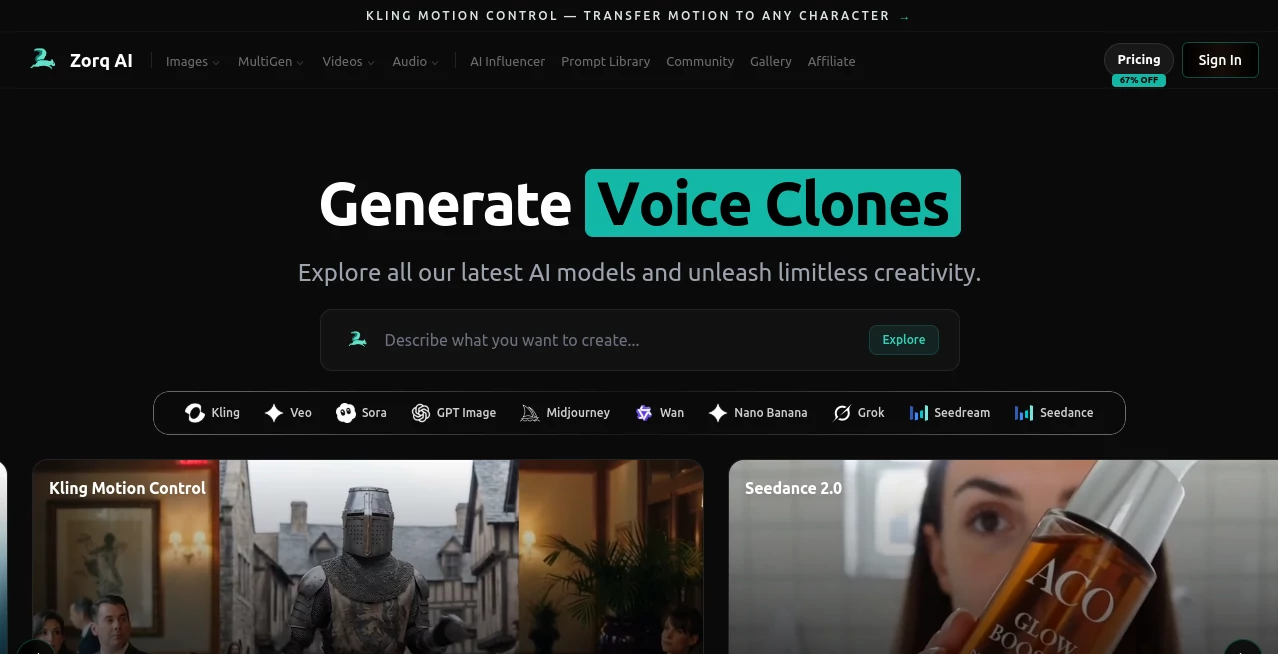
What is Zorq AI?
Creating professional-quality visual content once required advanced design skills, expensive software, and countless hours of editing. Today, modern AI has changed that workflow completely by making creative production faster, smarter, and far more accessible. This platform brings image generation, video creation, voice technologies, lip sync, and motion control together in a single workspace, allowing creators to move from concept to finished content without switching between multiple applications.
Whether the goal is producing marketing assets, social media campaigns, digital artwork, product presentations, animated content, or engaging videos, the platform offers an impressive collection of AI-powered creative tools. Instead of focusing on one specific task, it combines several advanced generation models into one streamlined experience, making it suitable for individuals, agencies, marketers, designers, educators, and creative teams.
The workflow feels intuitive even for beginners while still providing enough flexibility for experienced creators who want greater control over the final result. Fast rendering, impressive image quality, and multiple creative options make it a practical solution for everyday content production.
Key Features
User Interface
The interface is clean, modern, and designed around productivity. Navigation is straightforward, allowing users to switch between image generation, video creation, voice tools, and animation features without confusion. Most creative tasks require only a few prompts or uploads, making the learning curve surprisingly short.
Accuracy & Performance
Generation speed is one of the strongest advantages. High-quality images and videos can be produced within seconds while maintaining detailed compositions, realistic lighting, and visually appealing outputs. AI processing remains responsive even when handling more advanced creative workflows such as motion control or lip synchronization.
Capabilities
- AI image generation from text prompts
- AI video generation
- Image-to-video transformation
- Voice cloning technology
- AI lip sync generation
- Motion control for animated content
- High-quality visual rendering
- Creative asset generation for commercial projects
- Fast AI processing
- Support for multiple creative workflows within one platform
Security & Privacy
User-generated content is processed through secure online infrastructure with encrypted connections. Since creative projects may include proprietary business ideas or original artwork, secure access and protected user accounts help maintain confidence while working on commercial or personal projects.
Use Cases
- Creating social media visuals
- Marketing campaign production
- Advertising creatives
- Product showcase videos
- YouTube content creation
- Short-form video production
- Digital art generation
- Game concept artwork
- Presentation graphics
- Educational content creation
- Brand storytelling
- Creative agency workflows
Pros and Cons
Pros
- Combines image, video, voice, and animation tools in one platform.
- Produces visually impressive results with minimal effort.
- Simple interface suitable for beginners.
- Fast content generation saves significant production time.
- Supports commercial creative workflows.
- Multiple AI-powered creation options reduce the need for separate software.
Cons
- Advanced creative projects may still require manual refinement.
- Output quality depends on the clarity of user prompts.
- Internet access is required for AI processing.
Pricing Plans
The platform offers multiple pricing options designed for different types of users. Individuals can begin with entry-level access, while professionals and businesses can upgrade to larger plans that provide additional generation capacity, premium features, and higher creative limits. Pricing may change over time, so checking the official website before subscribing is recommended.
How to Use Zorq AI
Start by creating an account and selecting the creative tool that matches your project. Enter a detailed prompt or upload an existing image when appropriate. Adjust available generation settings, then allow the AI to create the initial result. Review the output, refine the prompt if necessary, and regenerate until the desired quality is achieved. Once satisfied, export the finished image or video for publishing or further editing.
Comparison with Similar Tools
Many AI creative platforms specialize in either image generation or video creation, requiring users to subscribe to several different services. This platform stands out by integrating multiple creative technologies—including image generation, AI video creation, voice cloning, lip synchronization, and motion control—inside one environment. That unified workflow helps creators complete projects faster while maintaining consistency across different types of content.
Conclusion
For anyone looking to accelerate visual content production without sacrificing quality, this platform delivers a well-rounded creative experience. Its combination of powerful AI models, intuitive workflow, and broad feature set makes it valuable for marketers, designers, creators, educators, and businesses alike. Instead of replacing creativity, it removes repetitive production work and allows users to focus on developing better ideas and more engaging visual stories.
Frequently Asked Questions (FAQ)
Can beginners use this platform?
Yes. The interface is designed to be user-friendly, making it accessible even for users without professional design experience.
Can it generate both images and videos?
Yes. It supports AI image generation, AI video creation, and image-to-video workflows within the same platform.
Does it include voice features?
Yes. Voice cloning and lip sync capabilities are available for creating more realistic multimedia content.
Is it suitable for commercial projects?
Yes. The platform is built to support creators, agencies, businesses, and marketing professionals producing commercial visual content.
Who benefits most from this platform?
Content creators, digital marketers, graphic designers, video producers, educators, startups, and creative agencies can all benefit from its AI-powered production tools.
AI Photo & Image Generator , AI Image to Video , AI Voice Cloning , AI Video Generator .
These classifications represent its core capabilities and areas of application. For related tools, explore the linked categories above.

Zorq AI Alternatives Product

MiniMax H3

See dance 2.…

Krea 2

ImgVid

Use Nano Ban…

Undertale Te…

bratgenerator

Runway Gen-4…

KlingVideo
