Spark Robin
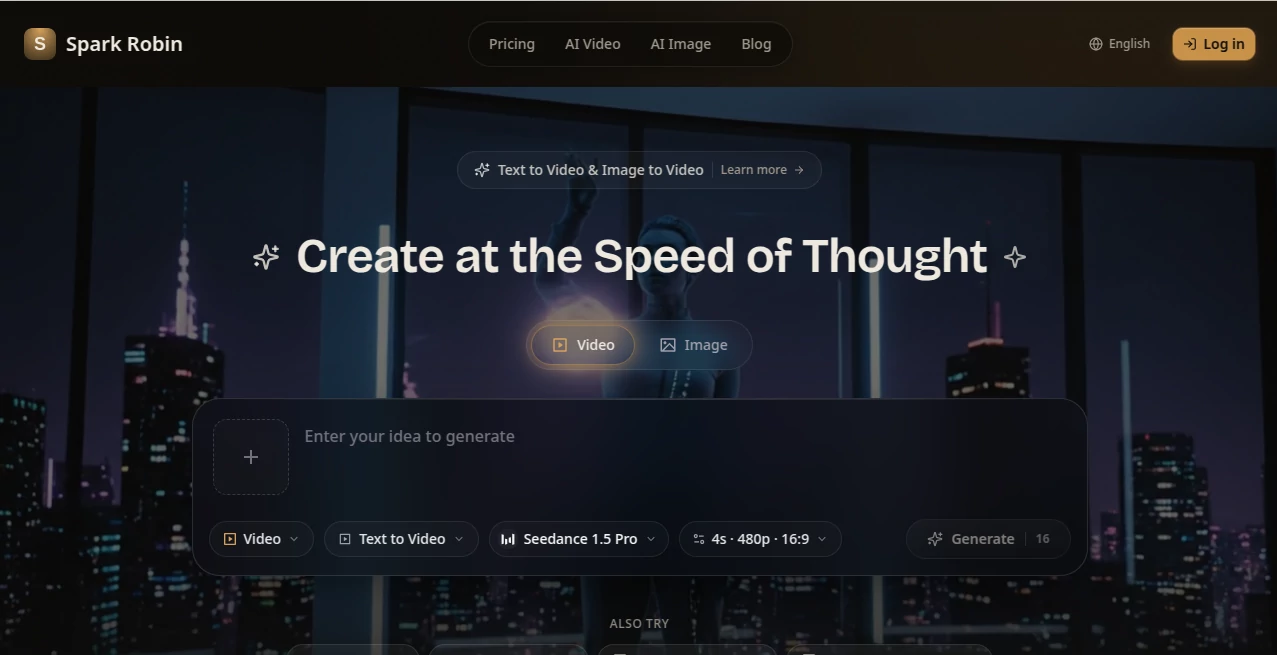
What is Spark Robin?
Spark Robin is a visual AI experience designed to help users interact with images, ideas, and creative concepts in a more natural way. Instead of relying only on text-based answers, it focuses on richer visual responses that help people understand, explore, and transform visual information into useful insights.
For designers, marketers, educators, researchers, and creative professionals, working with visual content often requires more than simple descriptions. This tool brings a more interactive approach by combining image understanding, multimodal interaction, and creative guidance to make visual workflows smoother and more productive.
Key Features
- Rich visual responses that provide deeper explanations of image-based information
- Multimodal interaction combining text prompts with visual context
- Image-aware understanding for creative and analytical workflows
- Support for visual brainstorming and concept development
- Enhanced responses for design, marketing, education, and research tasks
- Fast interaction for exploring visual ideas with less friction
User Interface
The interface is designed around simplicity and creativity. Users can provide visual references, describe their goals, and receive responses that focus on the meaning and structure behind the content. The workflow feels natural for anyone who works with images regularly, whether they are reviewing designs, developing concepts, or explaining visual ideas to others.
The clean interaction model helps users spend less time learning complicated features and more time creating useful results. It works well for both individual creators and teams that need a practical visual assistant.
Accuracy & Performance
Visual understanding is one of the most important parts of modern AI workflows. This platform focuses on interpreting image details, layouts, relationships, and context to provide responses that are more meaningful than traditional text-only interactions.
Its fast response workflow makes it suitable for situations where users need quick feedback during creative projects, product reviews, visual analysis, or brainstorming sessions.
Capabilities
The platform can support a wide range of visual tasks, from explaining images and reviewing creative concepts to helping teams communicate ideas more clearly. It is especially useful when visual context plays an important role in decision-making.
- Visual concept exploration
- Design feedback and review
- Product image analysis
- Creative campaign planning
- Educational visual explanations
- Storyboard and content development
Security & Privacy
Responsible AI usage is an important part of modern creative tools. Users should always review the privacy practices and usage policies before uploading sensitive information or confidential materials. The platform provides guidelines designed to encourage safe and responsible content creation.
Use Cases
Creative teams can use this technology to review campaign visuals, improve product communication, and explore new design directions. A marketing team, for example, can analyze different visual concepts and receive structured feedback before launching a campaign.
Designers may find it useful when reviewing screenshots, exploring interface ideas, or explaining visual decisions to clients. Educators and researchers can also benefit from using visual explanations to make complex information easier to understand.
- Marketing and advertising concepts
- UI and product design reviews
- Creative storytelling and visual planning
- Learning materials and educational content
- Research based on visual information
Pros and Cons
Pros
- Strong focus on visual understanding and multimodal interaction
- Useful for creative professionals and visual thinkers
- Helps turn images into actionable insights
- Supports different creative workflows
- Provides a more engaging alternative to text-only AI assistants
Cons
- May not replace specialized professional design software
- Results can depend on the quality of prompts and visual inputs
- Users should avoid sharing confidential images without checking policies
Pricing Plans
Pricing availability may vary depending on the current offering and access options. Users should check the official platform for the latest information about free access, subscription plans, or available usage limits.
How to Use Spark Robin
- Create a prompt describing the visual task or question you want to explore.
- Add an image, reference, or visual context when needed.
- Review the generated response and refine your request for better results.
- Apply the insights to your creative, business, educational, or research workflow.
Comparison with Similar Tools
Many AI platforms can generate text responses, but visual AI assistants focus on understanding the relationship between images, context, and user intent. This approach makes them especially valuable for users who work with creative assets, product visuals, or image-based information.
Compared with traditional image tools that mainly focus on editing or generation, this solution emphasizes interaction and understanding. It helps users think through visual problems rather than simply producing an output.
Conclusion
Modern creative work increasingly depends on the ability to understand and communicate visual ideas. By combining multimodal interaction with richer visual responses, this platform provides a practical way for creators, teams, and professionals to explore images more effectively.
Whether you are reviewing designs, planning campaigns, teaching concepts, or analyzing visual information, this type of AI assistant can become a valuable addition to your workflow.
Frequently Asked Questions (FAQ)
What is Spark Robin?
It is a visual AI platform focused on multimodal interaction, image understanding, and richer AI-generated visual responses.
Who can benefit from using this tool?
Designers, marketers, educators, researchers, product teams, and creative professionals can use it to improve visual workflows.
Can it understand images?
Yes, it is designed to work with visual context and provide responses based on image-related information.
Is it useful for creative projects?
Yes, it can support brainstorming, design reviews, visual planning, and creative exploration.
Can businesses use it?
Businesses can use visual AI workflows for product communication, marketing ideas, presentations, and internal collaboration.
AI Photo & Image Generator , AI Image Recognition , AI Design Assistant , AI Image to Image .
These classifications represent its core capabilities and areas of application. For related tools, explore the linked categories above.

Spark Robin Alternatives Product

Banana Promp…

Banana Prompt

SparkIconAI

Gemini AI Ph…
Change-BG

RoomStaging

GPT Image 2 …

SwapAnything
Roomagic