VocalAI
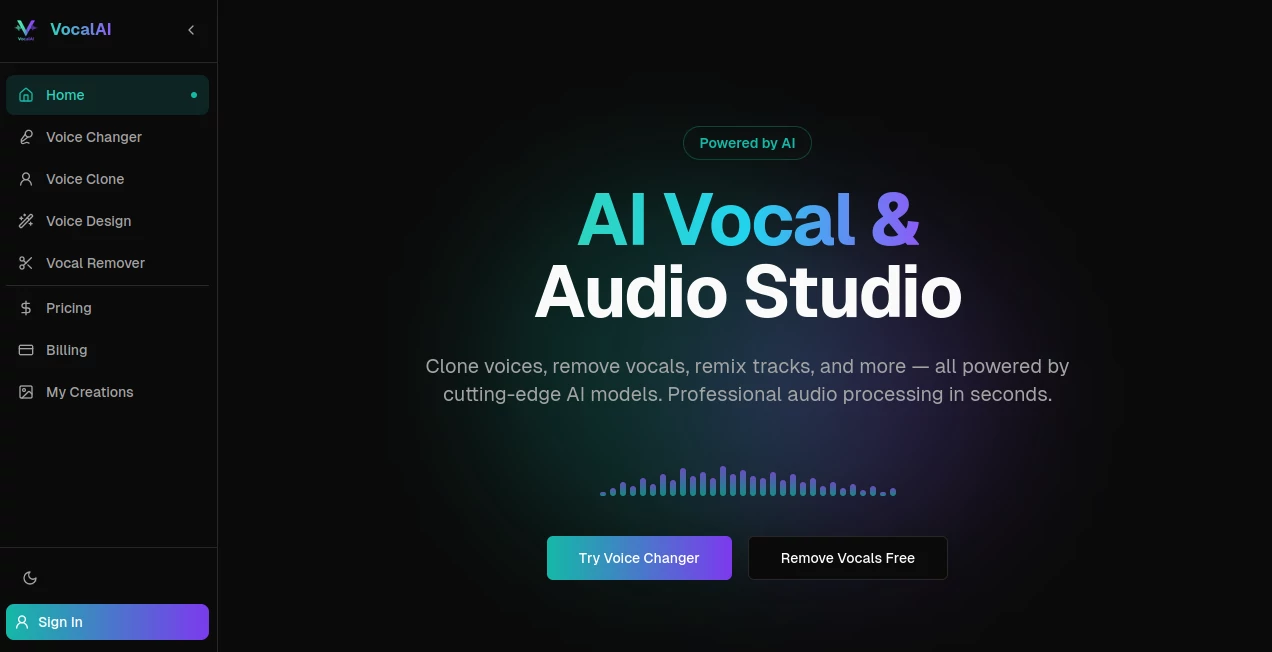
What is VocalAI?
Creating professional-quality audio used to require advanced editing software, expensive plugins, and years of experience. Today, that process is much simpler thanks to an AI-powered platform that combines multiple audio tools into one intuitive workspace. Whether you want to isolate vocals, create karaoke tracks, clone a voice, or transform speech into a completely different style, everything can be done in just a few clicks.
The platform is designed for musicians, content creators, podcasters, developers, and anyone who works with audio. Instead of switching between several applications, users can upload an audio file, choose the desired AI feature, and receive studio-quality results within seconds. The workflow feels smooth and accessible even for beginners, while still delivering enough flexibility for experienced professionals.
One of the biggest strengths is its ability to handle common audio formats while producing clean, high-quality output. From removing vocals for remixing to designing entirely new AI voices, the service brings together powerful machine learning models in a browser-based environment that requires no complicated installation.
Key Features
User Interface
The interface is refreshingly straightforward. Uploading files is as easy as dragging and dropping them into the browser. Every tool follows the same simple workflow, making it easy to move from voice cloning to vocal removal without learning a new interface each time. Even first-time users can start processing audio almost immediately.
Accuracy & Performance
The AI models deliver impressive separation quality and natural voice transformations. Audio processing is optimized to finish within seconds for most projects, allowing creators to test different ideas quickly. The platform preserves speech clarity while maintaining realistic tone and expression during voice conversion.
Capabilities
- Remove vocals from songs for karaoke or remix projects.
- Separate instrumentals from music tracks.
- Clone voices using short reference recordings.
- Create completely new synthetic voices from text descriptions.
- Change voice characteristics while preserving speech content.
- Support popular audio formats including MP3, WAV, FLAC, and OGG.
- Download processed audio directly from the browser.
- Fast cloud-based AI processing with no software installation.
Security & Privacy
Audio files are processed securely through cloud infrastructure, and uploaded content is not shared with third parties. This makes the platform suitable for creators and professionals who value privacy while working with recordings or commercial audio projects.
Use Cases
- Create karaoke versions of popular songs.
- Extract vocals for music production and remixing.
- Generate custom AI voices for videos and podcasts.
- Build unique character voices for games.
- Produce narration without hiring voice actors.
- Create demo tracks for musicians.
- Develop audio content for social media.
- Experiment with creative voice transformations.
Pros and Cons
Pros
- Multiple AI audio tools available in one platform.
- High-quality voice cloning and vocal separation.
- Very easy to use for beginners.
- Supports several popular audio formats.
- Fast processing with browser-based access.
- Free credits available for new users.
- Commercial use is supported for generated audio.
Cons
- Advanced usage depends on available credits.
- Internet connection is required.
- Longer audio files may require additional processing time.
Pricing Plans
A free plan allows new users to explore every audio tool with complimentary credits, making it easy to test the platform before upgrading. Paid subscriptions provide monthly credits, priority support, and early access to new features. Higher-tier plans are designed for creators and professionals who process audio on a regular basis.
How to Use VocalAI
Start by uploading an audio file in a supported format. Choose the AI feature you want to use, such as vocal removal, voice cloning, voice changing, or custom voice generation. Configure the available settings based on your project, then let the AI process the file. Once the task is complete, preview the output directly in the browser and download the finished result with a single click.
Comparison with Similar Tools
Unlike many online vocal removers that focus on only one feature, this platform combines several professional AI audio technologies into a single workspace. Users can remove vocals, clone voices, design entirely new voices, and modify speech without switching between different services. This all-in-one approach saves time while giving creators greater flexibility for music production, podcast editing, content creation, and multimedia projects.
Conclusion
For anyone looking to simplify audio production without sacrificing quality, this platform offers an impressive combination of speed, convenience, and intelligent AI processing. Its collection of voice and music tools makes it useful for beginners experimenting with creative projects as well as professionals producing commercial content. The clean interface, reliable performance, and expanding feature set make it one of the most practical browser-based AI audio studios available today.
Frequently Asked Questions (FAQ)
Can I remove vocals from any song?
Yes. The platform can separate vocals from instrumentals for most common audio files, making it suitable for karaoke tracks, remixes, and music production.
Does it support commercial projects?
Yes. Generated audio can be used commercially according to the platform's terms of service.
Which audio formats are supported?
Common formats including MP3, WAV, FLAC, OGG, and several other popular audio formats are supported.
Is there a free version?
Yes. New users receive free credits that allow them to test all available AI audio tools before subscribing.
Who is this platform best suited for?
It is an excellent choice for musicians, podcasters, YouTubers, video editors, content creators, developers, and anyone who needs fast, AI-powered audio processing.
AI Voice Changer , AI Voice Cloning , AI Voice & Audio Editing .
These classifications represent its core capabilities and areas of application. For related tools, explore the linked categories above.

VocalAI Alternatives Product

SAM Audio

Betula AI

VoiceAILabs
Voicemod

AIMusicFlow

MP3toMIDI

AI Voice Clo…
Seed Audio

sam tts