Superdesign
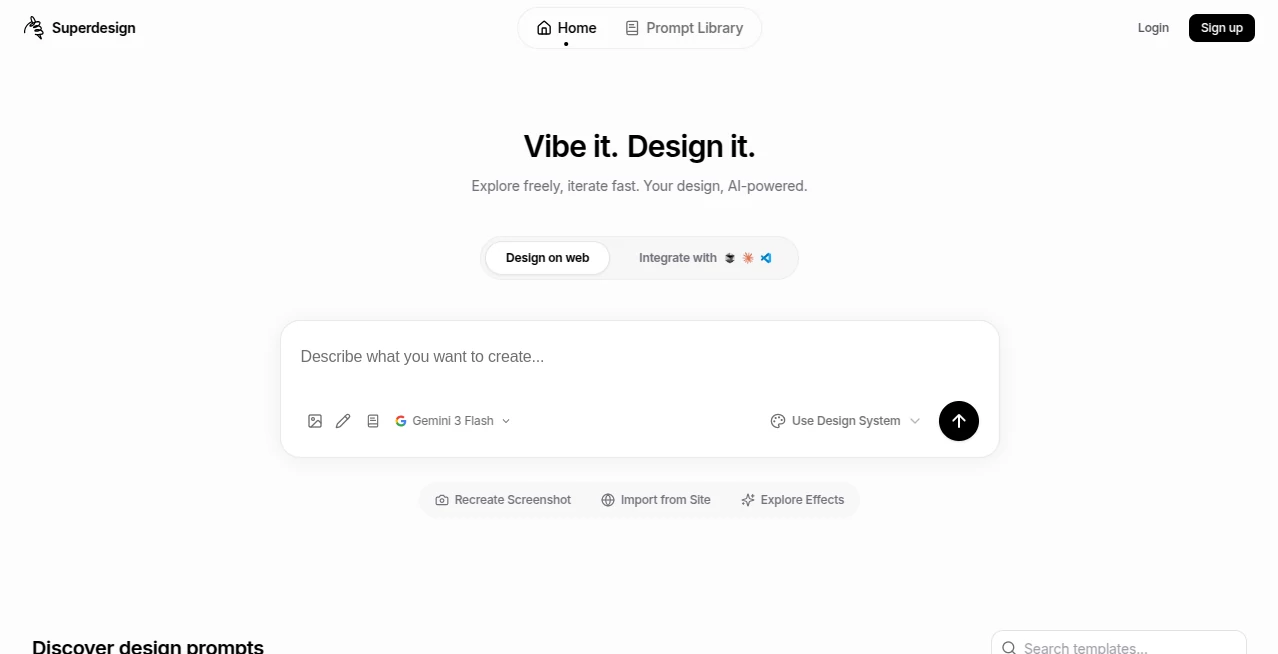
What is Superdesign?
Designing digital products today is no longer just about aesthetics; it is about speed, clarity, and collaboration. This tool is built with that mindset, helping teams move from rough ideas to structured, visually coherent interfaces in a fraction of the time it would normally take.
Instead of starting from a blank canvas, users are guided through an intelligent workflow that understands product intent and translates it into usable design directions. The result is a smoother creative process where designers and non-designers can work together without friction.
Key Features
User Interface
The interface is clean and minimal, allowing users to focus on creativity rather than navigating complex menus. Everything feels intentional, from layout suggestions to component organization, making it accessible even for beginners while still powerful for professionals.
Accuracy & Performance
Design outputs are generated with strong structural awareness. The system tends to respect spacing, hierarchy, and usability principles, which reduces the need for constant manual adjustments. Performance remains stable even when working on larger multi-screen projects.
Capabilities
- Rapid generation of UI concepts based on prompts
- Support for multi-screen product flows
- Component-based design suggestions
- Collaboration-friendly workflow for teams
- Iteration support for refining existing ideas
Security & Privacy
User projects are handled with a focus on privacy and workspace isolation. Design data is kept within the user environment, making it suitable for startups and teams working on confidential product ideas.
Use Cases
- Building early-stage SaaS product interfaces
- Creating landing page mockups for marketing campaigns
- Rapid prototyping for mobile and web applications
- Design exploration for UX/UI teams
- Pitch deck and product concept visualization
Pros and Cons
Pros
- Speeds up early design exploration significantly
- Easy to use even for non-designers
- Good structure and layout consistency
- Useful for rapid prototyping and ideation
Cons
- Advanced customization may still require manual refinement
- Output style can feel similar across multiple projects
- May not replace fully handcrafted high-end design workflows
Pricing Plans
The platform typically follows a flexible pricing model, offering access tiers for individuals, teams, and possibly larger organizations. A free or entry-level option is often available for exploring core features, while advanced capabilities are reserved for premium plans.
How to Use the Tool
Getting started is straightforward. Users begin by describing their product idea or selecting a starting template. From there, the system generates a structured interface draft. Users can then refine layouts, adjust components, and iterate until the design matches their vision.
The workflow is designed to feel conversational rather than technical, reducing the barrier between idea and execution.
Comparison with Similar Tools
Compared to traditional design software, this tool focuses more on automation and guided creation rather than manual pixel-level editing. While standard design platforms offer full control, this solution prioritizes speed and ideation.
In contrast to other AI-based design tools, it leans heavily into structured product thinking, making it especially useful for startups and product managers who need clarity more than complexity.
Conclusion
This tool represents a shift in how digital products are designed. Instead of replacing designers, it enhances their workflow by removing repetitive early-stage tasks. It is best suited for teams that value speed, experimentation, and collaborative creation without losing structural design quality.
Frequently Asked Questions (FAQ)
Is this tool suitable for beginners?
Yes, the interface is designed to be intuitive, making it accessible even for users without prior design experience.
Can it replace professional designers?
It is not meant to fully replace designers but to support them by accelerating early-stage ideation and layout creation.
Does it support team collaboration?
Yes, it is well-suited for collaborative workflows where multiple stakeholders contribute to product design.
What types of projects work best with it?
It works best for SaaS products, mobile apps, landing pages, and early-stage prototypes.
Is coding required?
No coding is required for using the core features, making it accessible to non-technical users.
AI Landing Page Builder , AI Graphic Design , AI Design Assistant , AI Website Designer .
These classifications represent its core capabilities and areas of application. For related tools, explore the linked categories above.

Superdesign Alternatives Product

FigForm

GPT Image 2 …

AppScreens

WebsitePubli…

SparkIconAI
GPT Image 2 …
Huebert

Lovable

Seed3D 2.0