

















Audio Transcription
What is Audio Transcription?
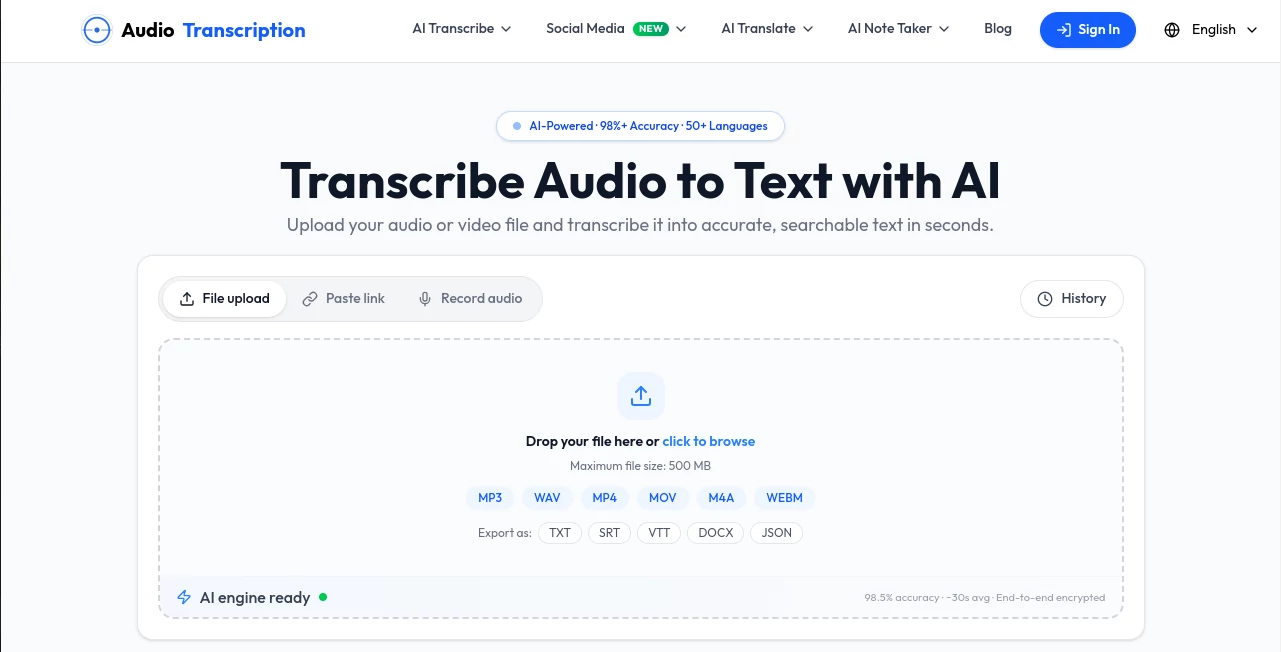
AudioTranscription.io is a practical AI transcription service built for people who need to turn spoken content into usable text without spending hours typing or replaying recordings. It works with both audio and video files, while also allowing users to paste a link or record audio directly. The workflow is refreshingly simple: provide the source, let the AI process the speech, then review and export the result.
For a journalist working through interviews, a student reviewing lectures, a creator preparing podcast content, or a team documenting meetings, the real advantage is the time saved between recording and having a searchable transcript. The service supports more than 30 languages and offers features such as timestamps, speaker labels, punctuation, editing, and multiple export formats.
Key Features
- AI-powered audio and video transcription
- Support for MP3, WAV, M4A, FLAC, MP4, MOV, AVI, and MKV files
- YouTube transcription through a pasted link
- Automatic language detection across 30+ languages
- Speaker detection and speaker labels
- Timestamps and editable transcripts
- TXT, SRT, VTT, DOCX, CSV, and JSON export options depending on the plan
- Large file support for premium users, with uploads up to 5 GB
- Multiple concurrent transcription tasks on premium plans
- No registration required for basic transcription access
User Interface
The interface focuses on getting users from recording to transcript with as little friction as possible. The main workspace supports file uploads, pasted links, and audio recording, so users do not have to learn a complicated editing environment before starting.
Once the transcript is ready, it can be reviewed in an interactive editor. Clicking a timestamp lets users return to the corresponding part of the recording, which is particularly useful when checking names, technical terminology, or a quote before publishing it.
Accuracy & Performance
The service states an accuracy level of up to 98.5%, although real-world results naturally depend on recording quality, background noise, accents, overlapping speakers, and terminology. Its transcription engine is designed for natural conversations and different speaking speeds.
Speed is another strong point. The website reports that a typical 30-minute recording can be processed in under a minute in suitable conditions, while its workflow documentation gives a broader estimate of roughly 30 to 90 seconds for a 30-minute file. Premium users can also run up to five transcription tasks simultaneously and receive priority processing.
Capabilities
The platform goes beyond simple audio-to-text conversion. It can handle video files by extracting their audio automatically, making it useful for interviews, webinars, lectures, podcasts, social media videos, and recorded meetings.
Creators can turn transcripts into subtitles, show notes, articles, social posts, or other written material. Students can search through lecture transcripts instead of listening to an entire recording again. Researchers and journalists can use timestamps and searchable text to locate important sections quickly.
For subtitle workflows, SRT and VTT exports are especially useful because they can be moved directly into compatible video editing and publishing software.
Security & Privacy
Privacy is an important part of the service's workflow. The website states that uploaded recordings are encrypted in transit, processed securely, and automatically deleted after transcription is complete. It also states that uploaded files are used only for transcription and are not shared with third parties.
For paid transactions, payments are processed through Stripe, and the service states that payment information is not stored on its own servers. Users working with confidential interviews or internal recordings should still review the current privacy policy and terms before uploading sensitive material.
Use Cases
Podcasters: Podcast episodes can be converted into searchable text and then reused for show notes, articles, captions, newsletters, or social media content.
Journalists and researchers: Interviews and recorded discussions become much easier to search. Timestamps and speaker labels also make it simpler to verify quotations against the original recording.
Students and educators: Recorded lectures can be transformed into written study material. Instead of taking notes while trying to follow a lecture, students can return to the transcript later and search for specific subjects.
Businesses and teams: Meeting recordings can be converted into written records that are easier to review, share, and archive.
Content creators: Video and audio transcripts can become the starting point for subtitles, blog articles, short-form content, and other formats.
Everyday users: Voice memos and personal recordings can be turned into searchable notes without manually typing every sentence.
Pros and Cons
Pros:
- Simple upload-and-transcribe workflow
- Supports both audio and video
- More than 30 languages are supported
- Useful timestamp and speaker-label features
- Multiple transcript export formats
- No account is required to start basic transcription
- Free access is available for testing the service
- Premium users can process multiple tasks concurrently
- Large files are supported on premium plans
Cons:
- Transcription quality can vary with poor audio, heavy background noise, or overlapping speakers
- Some advanced export formats are restricted to premium access
- Free usage has daily limits
- Heavy users may need a subscription or credit pack
Pricing Plans
The service currently offers guest access, a free registered tier, one-time credit purchases, and subscription-based premium access. Guest users can transcribe up to three YouTube videos with subtitles per day, while registered free users receive daily credits and can upload files within the free limits.
The Pro annual subscription is listed at $9.90 per month when billed annually, representing a 45% saving compared with the $18 monthly price. The annual plan costs $118.80 for the year and includes unlimited transcription subject to a fair-use limit of 500 hours per month, YouTube and file uploads, five concurrent tasks, priority processing, and additional export formats.
For people who transcribe only occasionally, one-time credit packs can make more sense because purchased credits do not expire. Subscription access is more suitable for users who regularly process recordings and prefer unlimited transcription within the applicable fair-use policy.
How to Use It
Start by uploading an audio or video recording, pasting a supported YouTube link, or using the recording option. The service accepts common formats such as MP3, WAV, M4A, FLAC, MP4, MOV, AVI, and MKV. Free users have smaller limits, while premium users can upload files up to 5 GB.
After the upload, the AI analyzes the speech and produces a transcript with punctuation and formatting. It can detect speaker changes and automatically identify the language in supported recordings.
Finally, review the transcript in the editor. Check important names, numbers, and quotations, make any corrections you need, and export the finished transcript in the format that fits your workflow, such as TXT, DOCX, SRT, VTT, or JSON depending on your access level.
Comparison with Similar Tools
Many transcription services focus primarily on converting an uploaded recording into text. This platform takes a broader approach by combining standard audio transcription with video transcription, YouTube transcription, subtitle exports, speaker labels, timestamps, and related tools for podcasts and meetings.
Its no-sign-up entry point is also useful for occasional users who simply want to test transcription before creating an account. On the other hand, users who need highly specialized features such as advanced enterprise collaboration, extensive integrations, or sophisticated editing environments may find that dedicated professional platforms offer a deeper feature set.
For straightforward audio-to-text work, however, the combination of a simple interface, free access, multiple formats, and flexible premium options makes it a compelling choice for creators, students, professionals, and small teams.
Conclusion
Turning a recording into useful written content should not require hours of manual transcription. This service makes that process considerably easier by combining AI speech recognition with an accessible editor, timestamps, speaker labels, and practical export options.
Its strongest appeal is its flexibility. Someone with a five-minute voice memo can use the same workflow as a creator processing a podcast or a professional working through long meeting recordings. Free access makes it easy to test, while one-time credits and unlimited premium access provide options for heavier workloads.
For anyone who regularly works with spoken content and wants a fast route from audio or video to editable text, it is a solid transcription solution worth trying.
Frequently Asked Questions (FAQ)
What can I transcribe?
You can transcribe audio and video recordings, including common formats such as MP3, WAV, M4A, FLAC, MP4, MOV, AVI, and MKV. You can also transcribe supported YouTube content by pasting its link.
How accurate is the transcription?
The service advertises accuracy of up to 98.5%. Actual accuracy depends on factors such as recording quality, accents, background noise, speaking speed, and the amount of overlap between speakers.
Does it support multiple languages?
Yes. Automatic language detection is available across more than 30 languages according to the service's current documentation.
Can I transcribe a video file?
Yes. Video files can be uploaded directly, and the audio track is processed for transcription without requiring separate audio extraction first.
Can I transcribe YouTube videos?
Yes. You can paste a supported YouTube link and generate a transcript. The available limits and credit consumption depend on the account and plan.
Can I export subtitles?
Yes. Premium access includes SRT and VTT exports, which are useful for adding timed captions to videos.
Do I need to create an account?
No. The service allows users to start basic transcription without registration. Registered free users receive additional daily capabilities.
Are uploaded recordings kept permanently?
The website states that uploaded recordings are processed securely and automatically deleted after transcription is complete.
Is there a free plan?
Yes. Guest and registered free access are available with daily usage limits. Users who need more capacity can choose one-time credits or a premium subscription.
What is the maximum file size?
Free access has a 500 MB upload limit, while premium users can upload files up to 5 GB.
Which export formats are available?
Depending on the plan, transcripts can be exported in formats including TXT, SRT, VTT, DOCX, CSV, and JSON.
Can I process several recordings at once?
Premium users can run up to five transcription tasks concurrently, which is useful when processing several recordings or longer projects.