
BritishAccent
What is BritishAccent?
Getting a convincing British delivery is not simply about changing a few sounds. British English covers a wide range of regional identities, from Received Pronunciation to Scottish, Welsh, and Northern Irish speech. This tool makes that variety much easier to explore, giving creators a practical way to turn written scripts into natural UK English audio.
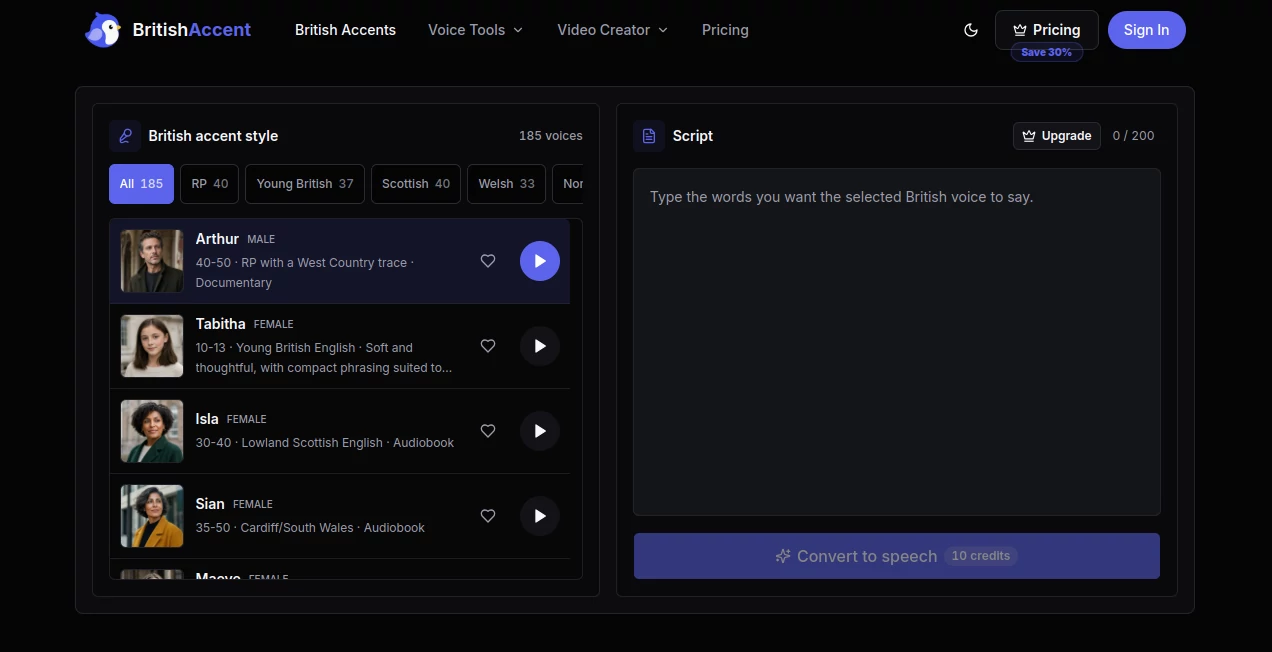
The platform brings 148 individually profiled voices into one workspace, with 40 RP voices, 40 Scottish voices, 33 Welsh voices, and 35 Northern Irish voices. Users can preview different speakers, choose the style that suits their project, enter a script, and generate downloadable audio directly in the browser.
That makes it useful for more than simple text-to-speech experiments. A teacher can prepare listening material, a video creator can test narration, and a business can create a polished voiceover for training or product content without arranging a recording session.
Key Features
- 148 British English voice profiles
- 40 RP voices with modern, traditional, and regional delivery styles
- 40 Scottish English voices
- 33 Welsh English voices
- 35 Northern Irish English voices
- 70 male and 78 female speaker profiles
- Voice previews before generation
- British text-to-speech generation
- Audio downloads
- Voice Clone functionality
- Voice Design functionality
- Voice Effects
- Audio transcription
- AI Lip Sync
User Interface
The interface is built around a straightforward workflow. Instead of making users navigate through a complicated collection of settings, the main experience starts with the voice library. You can browse the available profiles, listen to samples, select a speaker, and then add your script.
The voice profiles also provide useful context. They identify characteristics such as age range, gender, region, and intended style. For example, some voices are positioned for education, while others suit documentaries, audiobooks, corporate narration, or meditation.
This is a thoughtful approach because the right voice is often about context rather than simply choosing “male” or “female.” A voice that works beautifully for an audiobook may not be the best choice for a product demonstration.
Accuracy & Performance
The platform is designed specifically around British English delivery rather than treating every UK accent as the same thing. Its library separates RP, Scottish, Welsh, and Northern Irish voices, making regional selection much more precise.
The speech workflow also allows users to review the generated result in the browser before keeping the final take. This is especially useful when working with names, places, numbers, pronunciation-sensitive phrases, or dialogue where pacing matters.
Free users can enter up to 200 characters per generation, while paid plans support considerably longer scripts. The Starter plan increases the limit to 3,000 characters, Lite to 10,000, and Premier to 15,000 characters per generation.
Capabilities
Text-to-speech is the central feature, but the surrounding tools make the platform more versatile. Users can work with British voices for narration, educational content, podcasts, advertisements, product demonstrations, internal training, and social videos.
The service also includes voice cloning and voice design. This opens the door to more personalised audio workflows where a specific voice direction matters. Audio transcription and AI lip sync are available as additional capabilities, while Voice Effects provide another way to shape generated audio.
One particularly useful detail is the range of regional British speech. Someone creating a documentary about Wales, for example, can look specifically at Welsh voices rather than settling for a generic British narrator. The same principle applies to Scottish and Northern Irish projects.
Security & Privacy
Because voice generation can involve scripts and, in some workflows, reference recordings, privacy is an important consideration. The service provides dedicated privacy policy and terms pages, allowing users to review its legal and data-handling information before using the platform for sensitive projects.
For professional work, it is sensible to review those policies carefully before uploading confidential scripts or personal voice recordings. This is particularly relevant when using voice cloning, where the source recording itself can be valuable and sensitive.
Use Cases
There are plenty of situations where a specialised British voice generator can save time.
- Video narration: Create voiceovers for explainers, product videos, advertisements, Shorts, and social media content.
- English education: Prepare listening exercises, pronunciation examples, classroom narration, and UK English learning material.
- Audiobooks: Test different voices and delivery styles before settling on a narrator for longer-form storytelling.
- Podcasts: Create narration drafts, introductions, announcements, or supporting audio.
- Business training: Produce onboarding material, internal presentations, product walkthroughs, and training narration.
- Marketing: Add British voiceovers to advertisements, promotional videos, and product demonstrations.
- Pronunciation practice: Compare how words, names, numbers, and complete sentences sound with different British speakers.
- Creative projects: Experiment with regional UK voices for characters, stories, documentaries, and dialogue.
Pros and Cons
Pros
- Large selection of 148 British voice profiles
- Clear separation between RP, Scottish, Welsh, and Northern Irish voices
- Voice samples can be previewed before generation
- Useful for both professional and educational projects
- Audio downloads are available
- Voice Clone and Voice Design add flexibility
- Free access is available without a monthly subscription
Cons
- The free plan has a relatively short 200-character generation limit
- Free usage is restricted by daily credits
- Higher-volume projects require a paid plan
- Users working with very long scripts may need to split their content depending on their plan
Pricing Plans
The service uses a credit-based pricing system. Text-to-speech, transcription, and AI Lip Sync draw from the same credit balance, so the credits are not separate allowances for each feature.
- Free: $0 per month, with 10 credits refreshed daily, 200 characters per generation, approximately 15 seconds of TTS per day, audio downloads, all British voices, and five Voice Effects per day.
- Starter: $7 per month when billed yearly, with 1,500 monthly credits and generation limits of up to 3,000 characters.
- Lite: $14 per month when billed yearly, with 4,000 monthly credits, up to 10,000 characters per generation, and unlimited Voice Clone and Voice Design.
- Premier: $42 per month when billed yearly, with 20,000 monthly credits and up to 15,000 characters per generation.
The annual prices shown on the pricing page represent a 30% saving compared with the corresponding monthly pricing. The Starter, Lite, and Premier plans are aimed at progressively higher production volumes.
How to Use It
Start by browsing the available British voices and previewing several options. Pay attention to the regional description and intended use rather than choosing the first voice that sounds good.
Next, paste your script into the text area. This could be a video narration, lesson, advertisement, dialogue, announcement, or another piece of spoken content. Then generate the audio using the selected voice.
Listen to the result in the browser. If the pacing or delivery does not fit the project, adjust the wording or try another speaker. Once you are happy with the result, download the audio and use it in your project.
For a more personalised workflow, users can also explore Voice Clone or Voice Design when their project calls for a particular voice direction.
Comparison with Similar Tools
Many text-to-speech services offer a selection of English voices, but this platform takes a narrower and more specialised approach. Instead of placing British English alongside a huge catalogue of unrelated languages, it focuses heavily on the different varieties found across the UK.
That distinction is valuable when accent choice is part of the creative brief. A generic “British” option may be enough for a short social clip, but a documentary, educational course, audiobook, or regional campaign can benefit from being able to compare RP, Scottish, Welsh, and Northern Irish speakers.
The inclusion of voice cloning, voice design, transcription, and lip sync also means the service can fit into broader audio and video workflows rather than being limited to one-off text conversion.
Conclusion
For anyone who specifically needs British English audio, the biggest strength here is choice. With 148 profiled voices spanning RP, Scottish, Welsh, and Northern Irish English, users have considerably more room to find a delivery that actually fits their content.
The workflow remains simple enough for beginners, while features such as Voice Clone, Voice Design, transcription, and AI Lip Sync give experienced creators more options to explore. The free plan is also a convenient way to test different voices before deciding whether a larger credit allowance is worthwhile.
Whether the goal is a polished narration, an English-learning exercise, a podcast draft, a product video, or a regional creative project, this is a practical option for turning written scripts into distinctly British audio.
Frequently Asked Questions (FAQ)
What is a British accent generator?
It is a text-to-speech tool that converts written text into spoken audio using voices designed to represent British English accents and regional varieties.
Which British accents are available?
The voice library includes RP, Scottish, Welsh, and Northern Irish English. There are 40 RP voices, 40 Scottish voices, 33 Welsh voices, and 35 Northern Irish voices.
Can I preview a voice before generating audio?
Yes. Users can browse the voice library and listen to speaker samples before selecting a voice for their script.
Can I download the generated audio?
Yes. Audio downloads are included with the free plan as well as the paid plans.
Does it support voice cloning?
Yes. Voice Clone is available as part of the platform. The limits depend on the selected plan, with unlimited Voice Clone available on the Lite and Premier plans.
Is there a free plan?
Yes. The free plan costs $0 per month and provides 10 credits each day, a 200-character generation limit, access to all British voices, audio downloads, and five Voice Effects per day.
AI Voice Cloning , AI Text to Speech , AI Speech Synthesis , AI Voice & Audio Editing .
These classifications represent its core capabilities and areas of application. For related tools, explore the linked categories above.

BritishAccent Alternatives Product

Gandr

Maestra

VoiceAILabs

Chatterbox T…

Gpt Realtime

Voice Art
sam tts
Sonicker

Krisp