Cinematic Slideshow Studio
What is Cinematic Slideshow Studio?
Cinematic Slideshow Studio turns a collection of photos and videos into a polished visual story without requiring the user to spend hours learning a complicated editor. Instead of treating every image as a separate slide, the platform looks at the story behind the media and helps arrange scenes, timing, transitions, music, and narration into a cohesive presentation.
The idea is particularly appealing for moments that deserve more than a basic photo montage. Weddings, memorials, birthdays, anniversaries, travel memories, family stories, real estate presentations, and business pitches can all benefit from a more deliberate visual flow. Users can upload between 20 and 200 photos and videos in formats such as JPG, PNG, HEIC, and MP4, then let the AI handle much of the initial composition.
What makes the experience interesting is the balance between automation and control. Someone who simply wants a finished film can rely on the AI composer, while users who enjoy editing can work with the browser-based timeline, scene inspector, asset library, effects, borders, music, and narration controls.
Key Features
- AI-powered scene composition based on an optional script
- AI photo analysis with face-aware cropping
- Automatic organization of photos by topic, mood, and emotional beat
- AI-generated voice narration from a written script
- Automatic music selection and audio ducking beneath narration
- Multi-track timeline and real-time preview
- Manual and automatic editing modes
- Cinematic transitions, borders, stickers, and visual effects
- Ken Burns motion and face-aware smart cropping
- Browser-based editing with no desktop installation
- Cloud saving with automatic project saves
- Up to 4K video export on the Pro plan
User Interface
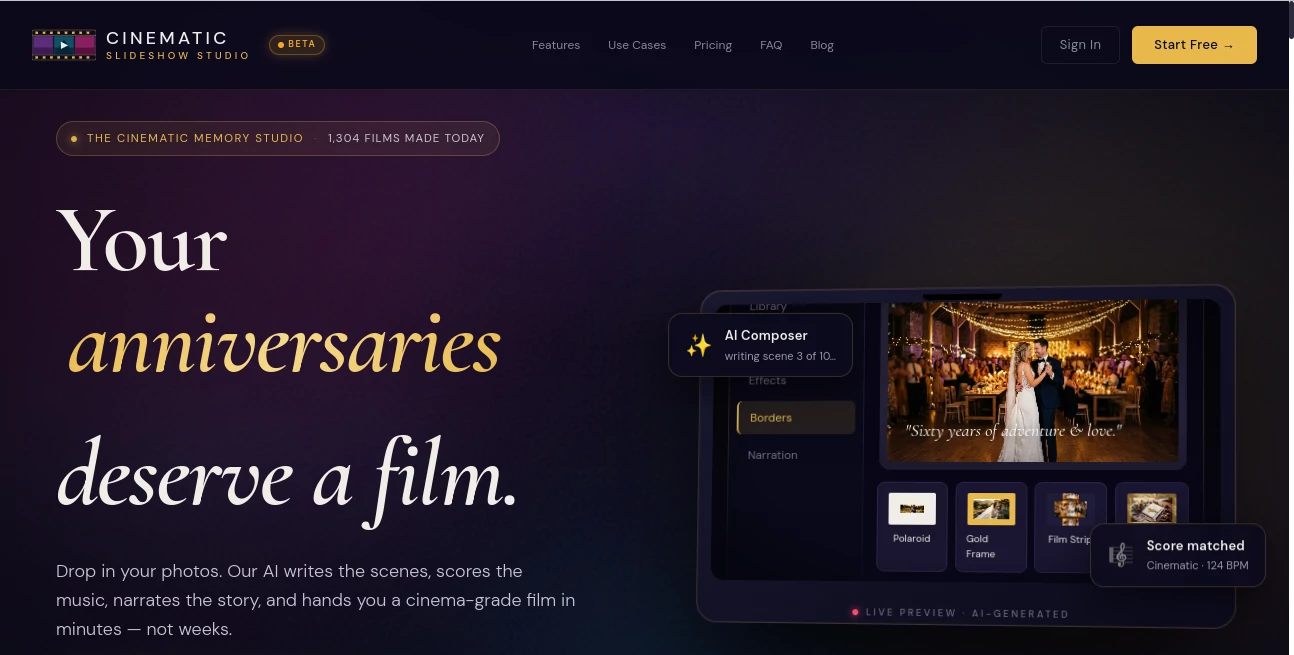
The interface is designed around a familiar editing workflow without overwhelming the user with technical controls. Projects can be created directly in the browser, media can be added through drag and drop, and the editor brings together the library, music, effects, borders, narration, timeline, and preview in one workspace.
The real-time preview is especially useful when experimenting with timing or effects. Users can also switch between AI-assisted and manual modes, which means the platform does not force every project into the same automated template.
For someone making a wedding film for the first time, this simplicity can make a big difference. You can start with the photos and let the system establish a structure before deciding which scenes deserve further attention.
Accuracy & Performance
The platform's AI features are focused less on generating completely new media and more on understanding and arranging the media a user already has. Its vision-based photo analysis identifies subjects and faces to improve cropping, while script analysis looks for topics, tone, and potential story structure.
The composition system uses topic scenes for important story moments and filler scenes to maintain rhythm between them. This approach is useful when a project contains a large number of photos but only a handful of images are central to the story.
The service states that a project can move from upload to export in under ten minutes, depending on the workflow. Export options range from 720p on the free plan to 1080p and 4K on Pro, with frame rates of up to 60 fps available on the paid tier.
Capabilities
One of the strongest aspects of the platform is the way several normally separate editing tasks are connected. A user can provide a story, have the system analyze it, arrange relevant scenes, select suitable pacing, create narration, and synchronize the resulting presentation with music.
The AI voice narration feature can turn a written script into spoken audio, making it practical for wedding vows, memorial tributes, travel stories, and personal documentaries. Music can also be selected automatically, while audio ducking lowers the background track when narration begins.
Creative controls remain available for users who want more personality. Cinematic typography, custom backgrounds, stickers, chroma-key elements, fairy-dust particles, borders, Polaroid-style frames, and Ken Burns motion can be combined to give a project a distinct visual character.
The platform also supports cloud-authoritative saving and a 50-step undo and redo history, giving users room to experiment without worrying about permanently losing earlier edits.
Security & Privacy
Privacy is particularly important for a service designed around personal photographs and videos. The service states in its terms that users retain rights to the photos, videos, music, and scripts they upload. It also explains that uploaded content is processed and stored for the purpose of providing the slideshow service.
Users should still make sure they have the necessary rights to any photographs, music, or other media they upload, particularly when a project includes identifiable people or copyrighted material. This is worth checking before creating a slideshow intended for public distribution.
Use Cases
Wedding films: Wedding photographs can be turned into a structured story covering preparation, ceremony, reception, and memorable moments. AI narration and music matching can add a more personal atmosphere.
Memorial presentations: A collection of family photographs can become a gentle tribute with carefully paced scenes, music, and narration. The ability to organize images by emotional beats is particularly suitable for this type of project.
Birthday and anniversary videos: Instead of sending dozens of disconnected photographs, users can create a chronological or thematic highlight film covering years of memories.
Travel reels: Vacation photos and videos can be organized into a visual journey, with smart cropping, music synchronization, and cinematic motion helping the final result feel more like a finished travel film.
Real estate: Property photographs can be arranged into a clean presentation that moves from one area to another, making the format useful for agents and property marketers.
Business presentations: Story-driven slideshows can be used for proposals, pitch presentations, keynotes, or internal presentations where a visual narrative is more engaging than a collection of static slides.
Pros and Cons
Pros
- Strong AI assistance for scene composition and photo organization
- Face-aware cropping helps keep important subjects positioned correctly
- AI narration can turn a written story into voiceover
- Works directly in the browser without requiring desktop software
- Offers both AI-assisted and manual editing modes
- Includes a useful collection of cinematic effects and borders
- Free plan available without a credit card
- 4K export is available with the Pro plan
Cons
- The free plan limits exports to three per month
- Free exports include a watermark
- Free storage is limited to 1 GB
- Advanced export quality and premium assets require the Pro plan
- Users looking for a traditional professional video editor may want deeper manual controls
Pricing Plans
The platform currently offers a straightforward Free and Pro structure. The Free plan is designed to let users create projects without a trial expiration or credit card requirement.
Free – $0
- Unlimited projects
- 1 GB cloud storage
- 720p export at 30 fps
- No length cap
- Three exports per month with watermark
- Full editor with stickers and effects
- AI Compose Wizard
- Short AI script generation
- 10 standard voices
Pro – $14/month
- Unlimited exports
- No watermark
- 10 GB cloud storage
- 1080p and 4K export up to 60 fps
- 40+ cinematic borders, frames, and premium transitions
- Medium and long AI scripts
- 8 premium ElevenLabs voices
- Access to Pexels, Unsplash, and ElevenLabs libraries
The Pro option makes the most sense for users who regularly create polished videos or need higher-resolution exports without watermarks. Casual users may find the free tier sufficient for occasional personal projects.
How to Use It
Start by creating a new project and selecting the type of story you want to make, such as a wedding, memorial, birthday, travel project, or business presentation. Add your photos and videos, then decide whether you want the AI to compose the project or prefer to work manually.
If you have a story or script, add it to the project. The AI can analyze the text, identify themes and tone, and suggest a scene structure. It can then match relevant photographs to the important moments while using additional images to maintain a natural rhythm.
Next, choose your music or allow the system to select music for the project. If narration is needed, provide a script and select a suitable voice. The system can generate the narration and synchronize it with the visual sequence.
Finally, review the project in the editor. Adjust scenes, timing, effects, borders, backgrounds, or audio where necessary. When everything looks right, preview the complete film and export it at the resolution available on your plan.
Comparison with Similar Tools
Traditional video editors generally provide extensive manual control, but they can require considerably more time to arrange photographs, determine scene durations, create transitions, and synchronize audio. The main advantage of this platform is that many of those decisions can be handled automatically before the user begins fine-tuning the result.
Compared with simpler online slideshow makers, the combination of AI script analysis, photo understanding, face-aware cropping, automatic scene composition, narration, and cinematic effects gives it a more story-oriented workflow.
It is not necessarily the ideal choice for every professional editing task. Someone producing a complex commercial video with extensive frame-by-frame editing may still prefer a dedicated professional editor. For memory-driven slideshows and photo-based storytelling, however, the automated approach can save a considerable amount of time.
Conclusion
Cinematic Slideshow Studio takes a sensible approach to an often tedious editing task: instead of asking users to manually decide what every photograph should do, it uses AI to establish the visual story and then leaves room for human judgment.
Its combination of AI scene composition, photo analysis, smart cropping, narration, music synchronization, cinematic effects, and browser-based editing makes it particularly appealing for personal storytelling. A wedding film, family tribute, birthday presentation, or travel recap can begin as nothing more than a folder of photographs and gradually become something that feels much more intentional.
The free plan also lowers the barrier to trying the workflow, while the Pro plan adds the higher-resolution exports, unlimited exporting, premium assets, and additional voice options that frequent creators are likely to appreciate. For anyone who wants the emotional feel of a short film without spending hours inside a complicated editor, it is a compelling option.
Frequently Asked Questions (FAQ)
Is there a free plan?
Yes. The Free plan costs $0, has no expiration, and does not require a credit card. It includes unlimited projects, 1 GB of cloud storage, 720p exports, and access to the core editor and AI features.
Can I create a slideshow with music?
Yes. Users can allow the AI to select music or upload their own audio, provided they have the necessary rights to use it.
Can the AI create scenes from a script?
Yes. The AI can analyze a written story, identify topics and tone, suggest a structure, and arrange scenes around important moments in the script.
Does it support voice narration?
Yes. A written script can be converted into voice narration, with the generated audio synchronized with the slideshow.
Can I export videos in 4K?
Yes. 4K export is available on the Pro plan, alongside 1080p export and frame rates of up to 60 fps.
How many photos can I upload?
The workflow supports projects containing approximately 20 to 200 photos and videos, with supported formats including JPG, PNG, HEIC, and MP4.
Do I need to install software?
No. The editor runs in the browser, allowing users to create and edit projects without installing desktop video-editing software.
Is manual editing available?
Yes. Users can switch between AI-assisted composition and manual controls, then adjust scenes, timing, effects, audio, borders, and other elements themselves.
AI Video Generator , AI Image to Video , AI Personalized Video Generator , AI Video Editor .
These classifications represent its core capabilities and areas of application. For related tools, explore the linked categories above.
Cinematic Slideshow Studio details
Website unavailable — View Alternatives
Pricing
- Freemium
Apps
- Web App
Categories

Cinematic Slideshow Studio Alternatives Product

Gemini Omni

Omnigen Stud…

Wan AI
Whisper Thun…

Vidtool AI
FreeWanVideo

Seedance 2.5…

Logo Animati…

ViraFlow