
CodexSkin
What is CodexSkin?
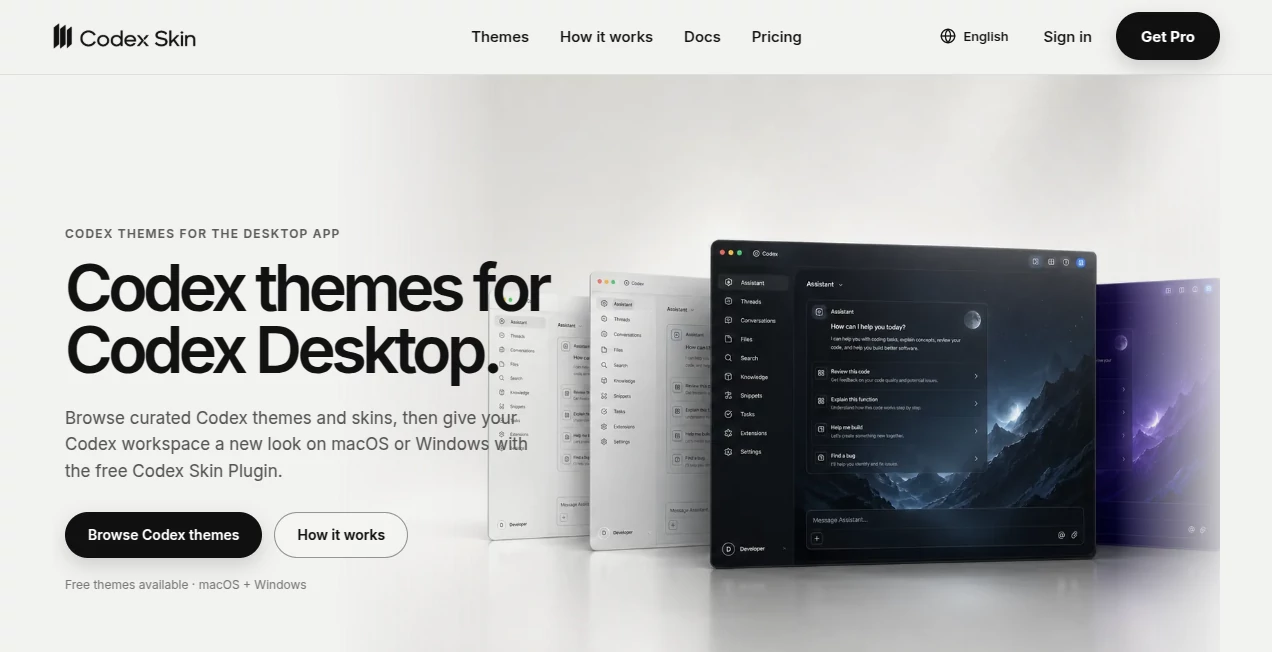
CodexSkin is a theme and skin platform designed for the Codex desktop app, giving developers a simple way to personalize the visual side of their coding workspace. Instead of working with the same appearance every day, users can browse curated themes, preview different visual styles, and apply a preferred look through the free Codex Skin Plugin.
The platform supports both macOS and Windows and offers a mixture of free and Pro themes. The collection ranges from quiet, minimal interfaces to darker OLED-inspired designs and more expressive visual styles. The focus is not on changing how Codex works, but on making the workspace more comfortable and personal while keeping a clear path back to the official appearance.
Key Features
- Curated themes created specifically for the Codex desktop environment.
- Free themes available alongside a larger Pro library.
- Support for both macOS and Windows.
- Six-digit public theme IDs for selecting themes through the plugin.
- A free, open-source Codex Skin Plugin for applying themes.
- Data-only themes containing structured data and images rather than arbitrary theme code.
- Compatibility checks before applying a new theme.
- Offline restoration of the official Codex appearance.
- Automatic rollback behavior when a theme application fails.
User Interface
The website is organized around a visual theme gallery, which makes browsing particularly straightforward. Each theme has its own presentation and description, so users can quickly understand the intended atmosphere before applying anything. Examples include warm sculpted landscapes, deep teal environments, bright editorial layouts, graphite-inspired workspaces, and low-emission dark interfaces.
This gallery-first approach is useful for developers who care about their working environment but do not want to spend time manually building a theme from scratch. The distinction between Free and Pro options is also clearly presented, making it easy to understand what is available before choosing a theme.
Accuracy & Performance
The platform takes a practical approach to theme installation. A theme is selected using its stable public ID, while the plugin handles the application process inside Codex. Compatibility is checked before a new theme is applied, which helps reduce the risk of replacing a working configuration with an incompatible one.
Another useful detail is the recovery mechanism. If an application attempt fails, the previous theme can remain in place or the official appearance can be restored. This makes experimentation less intimidating, especially for developers who want to try several visual styles during their normal workday.
Capabilities
The main capability is visual customization rather than development assistance. Users can discover different desktop themes, install the plugin, authorize their device when required, and switch between supported themes. The experience is designed around changing the appearance of the Codex workspace without turning the customization into a modification of the official application installation.
The available styles also make the platform useful for different working preferences. Someone who spends hours reading code may prefer a restrained graphite or warm-paper environment, while another developer might choose a high-contrast design for stronger visual separation.
Security & Privacy
Security is one of the more clearly documented aspects of the platform. Themes are described as data-only packages containing structured data and images rather than arbitrary theme code. The official application package and signed system files are not replaced or modified.
The restoration process is another strong point. Users can return to the official Codex interface even without website login, active Pro access, a plugin cache, or a network connection. This gives the customization process a useful safety boundary: users can experiment with the appearance while retaining a straightforward way back to the default interface.
Use Cases
The most obvious use case is personalizing a daily coding environment. Developers who spend many hours inside Codex can choose an appearance that feels calmer, brighter, darker, or more distinctive without changing their actual development workflow.
It can also be useful for developers working in different environments. A subdued theme may be preferable during long programming sessions, while a high-contrast design can make interface boundaries easier to recognize. Teams or individual developers who enjoy customizing their tools can also use the theme gallery as a source of visual inspiration.
For example, a developer who normally works late at night might choose an OLED-style theme with a near-black workspace, while someone who spends more time reading documentation could prefer a lighter, editorial-inspired appearance.
Pros and Cons
- Pros: Curated theme collection, free options, macOS and Windows support, simple plugin-based workflow, stable theme IDs, compatibility checks, data-only themes, and offline restoration.
- Cons: The product is focused specifically on visual customization for Codex rather than broader developer productivity. Some of the more specialized themes require a Pro subscription.
Pricing Plans
The Free plan costs $0 and provides access to the free theme library, plugin access, and offline restoration of the official interface.
The Pro plan is currently advertised at US$9 per year during the launch sale, compared with a regular price of US$19.90 per year. Pro includes the full Pro theme library, new Pro releases, compatible updates, theme switching during the active subscription, and offline restoration. The subscription renews annually unless canceled.
The pricing model is straightforward for users who only want occasional customization: the free library can be used without paying, while the annual Pro option is aimed at people who want access to the broader collection and future releases.
How to Use the Tool
- Open the theme gallery and choose a visual style that suits your workspace.
- Install the free Codex Skin Plugin using the documented installation process.
- Copy the six-digit ID associated with the selected theme.
- Continue inside Codex and authorize the device when prompted.
- Apply the selected theme through the plugin.
- Switch to another compatible theme whenever you want a different appearance.
- Use the offline Restore option whenever you want to return to the official Codex interface.
Comparison with Similar Tools
Traditional desktop customization tools often focus on manually changing colors, fonts, or individual interface settings. This approach is different because it combines a curated gallery with a dedicated plugin workflow. Instead of starting with a blank configuration, users can choose from ready-made visual concepts and apply them through a defined process.
It also differs from tools that modify application files directly. The documented workflow is designed around data-only themes, compatibility checks, and a restoration path rather than replacing the official application package. For Codex users who want personalization without turning customization into a complicated technical project, that distinction is valuable.
Conclusion
For developers who enjoy making their workspace feel more personal, this is a focused and appealing customization solution. Its strongest qualities are the curated theme collection, support for both major desktop platforms, straightforward plugin workflow, and emphasis on reversibility.
The free library makes it easy to try without committing to a subscription, while Pro provides access to a larger collection and continuing releases. Most importantly, the platform treats appearance customization as a separate layer from the underlying development environment. That makes it a practical choice for anyone who wants Codex to look different without sacrificing the ability to return to the official interface.
Frequently Asked Questions (FAQ)
Does it work on both macOS and Windows?
Yes. The platform currently supports Codex in the ChatGPT desktop app on both macOS and Windows, with platform-specific checks performed before a theme is applied.
Does it modify the official Codex installation?
No. The documented system does not replace the official application package or modify signed system files.
Are there free themes?
Yes. The Free plan provides access to the free theme library, along with plugin access and offline restoration.
What does the Pro plan provide?
Pro provides access to the complete Pro theme library, new Pro releases, compatible updates, theme switching during the active subscription, and offline restoration.
Can I return to the original Codex appearance?
Yes. An offline Restore option is available for returning to the official appearance, even without website login, active Pro access, the plugin cache, or a network connection.
Are the themes executable code?
The platform describes its themes as data-only packages containing structured data and images rather than arbitrary theme code.
AI Design Assistant , AI Productivity Tools , AI Developer Tools , Other .
These classifications represent its core capabilities and areas of application. For related tools, explore the linked categories above.
CodexSkin details
Website unavailable — View Alternatives
Pricing
- Freemium
Apps
- Windows App
- Mac App
Categories

CodexSkin Alternatives Product

TonesMatch

VercelAPP

Blackbox AI

DDS Gub

Scillus

Claude and C…

Ptero

Firefox

wigoo