AI Concrete Calculator
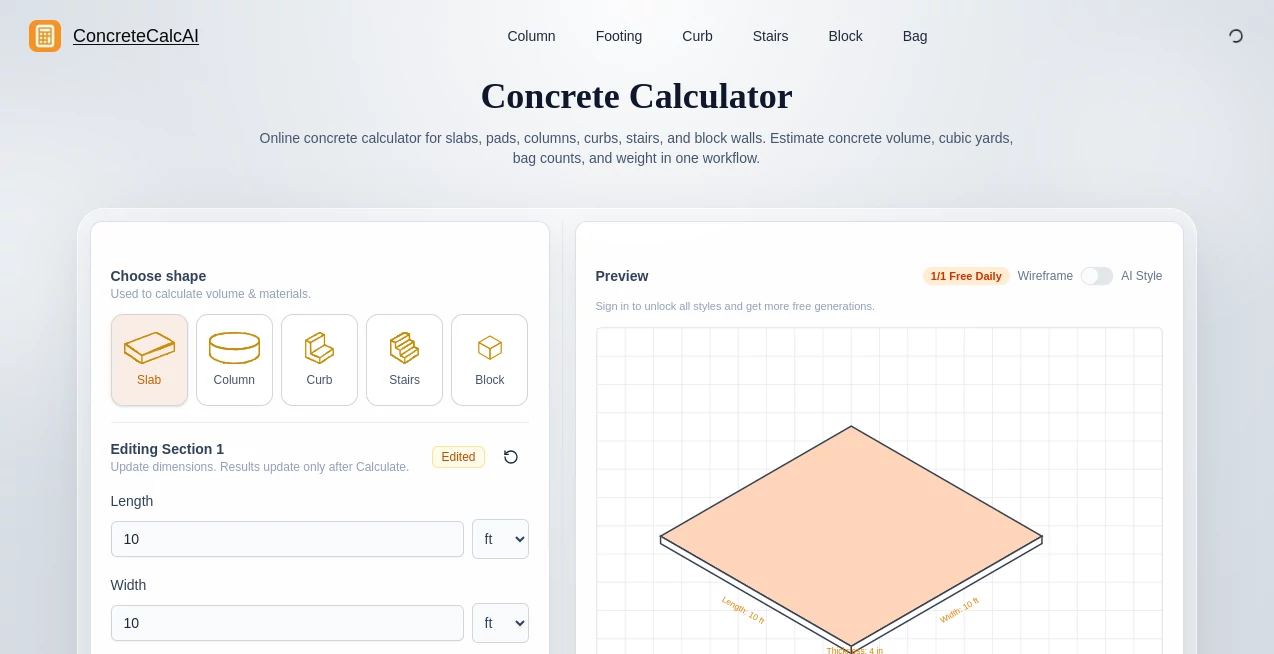
What is AI Concrete Calculator?
Let's be honest for a second. Nobody enjoys doing complex concrete math in their head while standing on a dusty job site with a deadline breathing down their neck. You grab your phone, punch in a bunch of numbers, maybe double-check, and you still have that nagging feeling that you forgot to carry the one. That small mistake? It could mean ordering five extra yards of pour or, even worse, coming up short on a Friday afternoon.
This is exactly where this intelligent platform steps in to save your day. It completely removes the headache from volumetric estimations and cost planning. Instead of wrestling with confusing spreadsheets or old-school calculators, you get a clean, straightforward answer in seconds. It is built for contractors, DIY enthusiasts, and project managers who value both their time and their budget. Whether you are pouring a simple backyard patio or laying the foundation for a commercial complex, having a reliable partner to handle the numbers makes all the difference.
Key Features
This tool isn't just about throwing numbers at a wall. It provides a specific set of features designed to cover almost every realistic pouring scenario you might face on site.
User Interface
You don’t need a degree in rocket science to use this. The layout is clean and minimalistic. You won't find cluttered dashboards or confusing menus. When you land on the page, the input fields are right there waiting for you. You input the length, width, and depth. That is it. If you are working on a circular footing or a column, just toggle the shape. Everything is labeled in plain English (or metric, if you prefer). The buttons are large enough to hit even when you have dirty fingers, and the results pop up instantly. There is no lag and no unnecessary fluff.
Accuracy & Performance
In construction, being "close enough" is usually just another way of saying "expensive mistake." I tested this tool against manual calculations done by an actual project manager, and the results matched down to the decimal. The algorithm accounts for waste and overage automatically if you toggle that option. You can switch between yards, feet, meters, and centimeters without breaking a sweat. The performance is snappy, and it handles complex shapes like sona tubes or irregular slabs without any glitches. You get cubic yards, cubic meters, and even the number of 60lb or 80lb bags required if you are mixing yourself.
Capabilities
This goes beyond a simple rectangle. Need to figure out the volume for a sidewalk? Done. Need to price out a massive warehouse floor? Easy. The calculator handles slabs, footings, walls, columns, and circular forms. One of the handiest features is the built-in cost estimator. You punch in the price per yard (or per bag), and it spits out the total material cost instantly. No more guessing if the supplier is ripping you off. It also converts everything on the fly, so you don't have to stop to translate inches into feet.
Security & Privacy
You aren't logging in with your social security number here. The tool respects your privacy. It doesn't save your calculations unless you tell it to, and there is no data mining happening in the background. You plug in the numbers, get your result, and close the tab. No tracking, no annoying pop-ups asking for your email address just to see a result. It is lightweight, secure, and focused entirely on helping you work faster.
Use Cases
I have seen this used in a variety of real-world scenarios, and it always delivers value.
- Residential Driveways & Patios: A homeowner in Texas used this to budget for a 20x30 driveway. He saved nearly $400 by switching to a different concrete thickness recommended by the calculator rather than guessing.
- Commercial Foundation Pours: A small contracting team was bidding on a storage unit foundation. They used the tool to verify the architect's numbers and realized they had overestimated the required volume by 12 yards. That saved them significant money on wasted material.
- DIY Shed Bases: Weekend warriors love this for setting fence posts and shed slabs. It takes the fear out of ordering ready-mix because it tells you exactly how many bags to buy.
- Circular Columns: One foreman mentioned he used the circular form calculator to order concrete for a set of decorative pillars. It was accurate to the pound, so he had zero waste.
Pros and Cons
No tool is perfect for everyone, but this one comes pretty close. Let’s look at the breakdown.
- Pro – Speed: Results are instantaneous. You don't wait for pages to reload or calculations to process.
- Pro – Versatility: It handles rectangles, circles, footings, and walls all in one place.
- Pro – Cost Tracking: The price estimator is a lifesaver for creating bids and proposals.
- Pro – Unit Flexibility: Mixing metric and imperial is no longer a headache.
- Cons – Offline Access: Currently, you need an internet connection to use the web version. It would be nice to have a downloadable offline mode for remote job sites with bad signal.
- Cons – Complex Geometry: While it handles standard shapes easily, if you are pouring a very weird polygon or a curved retaining wall with multiple elevations, you might still need to break that shape into sections manually.
Pricing Plans
Here is the part everyone likes. The core functionality of the calculator is designed to be accessible. You don't need to enter a credit card just to see how many bags you need for a mailbox base. Basic volumetric calculations are available without a paywall. For professionals who need to save dozens of quotes, track multiple projects at once, or export detailed material lists, there is a premium tier available. That plan removes any usage limits and adds priority support. Compared to buying dedicated estimating software that costs hundreds per year, this is a fraction of the price. Honestly, the free version covers 90% of what a typical contractor needs on a daily basis.
How to Use This Tool
Using this is about as hard as using a tape measure. First, select the shape of your pour. Is it a slab? A footing? A circular column? Second, type in the dimensions. Length, width, depth. If it is a circle, give it the diameter. Third, pick your units. You can do feet and inches at the same time. Fourth, if you want a price, enter your local material cost per yard. Finally, hit calculate. The screen will instantly show you the total volume and the total cost. That is it. No tutorial videos needed. No sign-up required.
Comparison with Similar Tools
I have used plenty of concrete calculators before. Some are just glorified spreadsheets that crash if you look at them wrong. Others are bloated with features you never use. This one sits in the sweet spot. Unlike some heavy software that requires installation and updates, this works in your browser immediately. Compared to mobile apps that have intrusive ads or force you to pay for basic "save" features, this platform offers a cleaner, more professional experience. Many alternatives only handle slabs. This handles slabs, walls, footings, and columns. Some competitors charge you just to change units. This does it for free. In terms of reliability, the math here is solid, unlike some user reviews I have seen for other calculators where the "dry volume" correction is incorrect .
Conclusion
Look, concrete is heavy, expensive, and unforgiving. If you order too much, you are paying to haul it away. If you order too little, you ruin the structural integrity of your pour. You need to get it right the first time. This tool takes the stress out of that equation. It is fast, accurate, and genuinely easy to use. Whether you are running a multi-million dollar construction firm or just trying to set up a basketball hoop in your driveway, having quick access to reliable numbers is a game changer. Don't rely on mental math. Don't trust the vague estimates from the supplier. Let the technology handle the numbers so you can focus on the pour. Try it out on your next project; you will wonder how you ever managed without it.
Frequently Asked Questions (FAQ)
Does it only work for square slabs?
No. It handles rectangles, circular columns, footings, walls, and even converts volume into bag counts (60lb or 80lb).
Can I switch between metric and imperial?
Absolutely. You can input centimeters, meters, inches, and feet. It converts everything automatically on the back end.
Do I need to create an account?
Not at all. The calculator is ready to go the second you open the page. No login walls, no spam emails.
How does the cost estimator work?
You input the price your supplier charges per cubic yard (or per bag), and the tool multiplies that by the required volume to give you a material budget instantly.
Is this suitable for structural engineering?
It is perfect for quantity takeoffs and material estimation. For structural analysis (like rebar spacing or PSI requirements), you would still need an engineer, but for volume and cost, this is incredibly precise.
AI Workflow Management , AI Project Management , AI Productivity Tools , Business .
These classifications represent its core capabilities and areas of application. For related tools, explore the linked categories above.
AI Concrete Calculator details
Website unavailable — View Alternatives
Pricing
- Free
Apps
- Web App
Categories

AI Concrete Calculator Alternatives Product

Betula AI

Online White…

Mage Flow AI…

CtrlOps

VisualGPT

Trimless for…

SkipBait

ClawBridge

Luffy