
Contextli
What is Contextli?
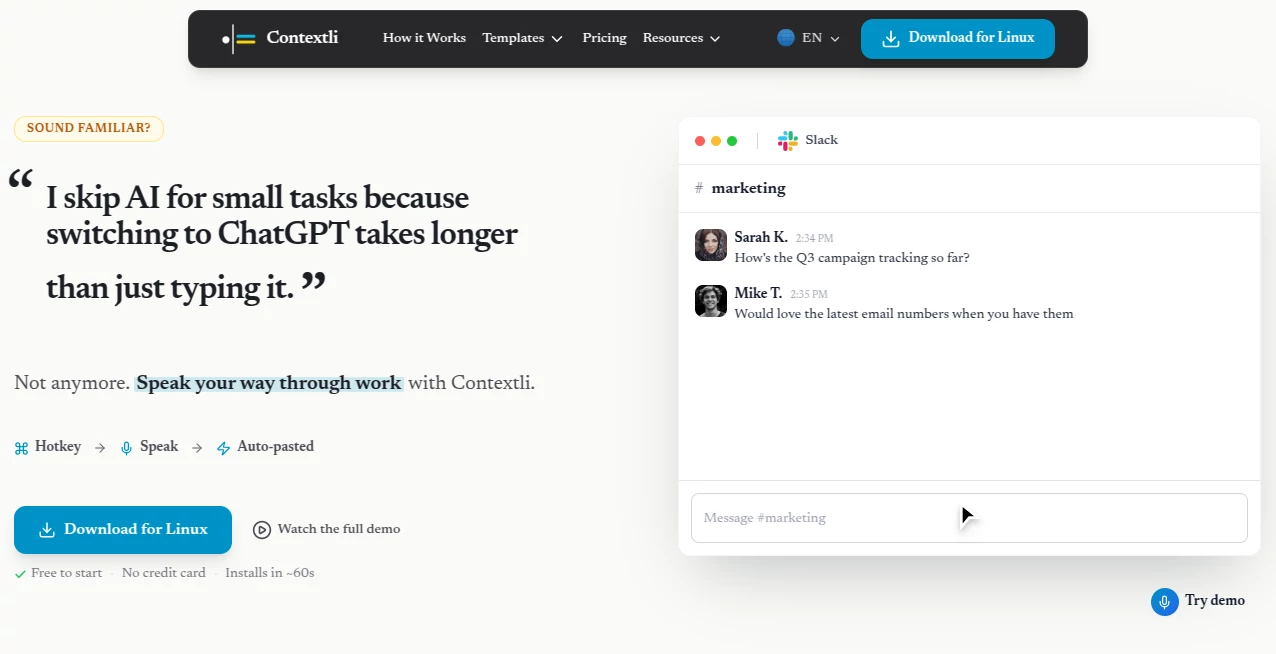
Typing is no longer the fastest way to communicate. Modern professionals often move between emails, project management platforms, documentation, messaging apps, and reports throughout the day. This intelligent voice-powered assistant transforms natural speech into polished, context-aware writing that matches the application you are currently using. Instead of producing raw transcripts, it understands the purpose of your writing and delivers content that is ready to send with minimal editing.
Whether you are replying to customers, documenting meetings, drafting project updates, or creating technical notes, the platform adapts the tone, formatting, and structure automatically. The result is a workflow that feels effortless while maintaining a professional writing style. The floating interface, global hotkeys, and automatic text insertion make it feel like a natural extension of your operating system rather than another browser tab.
Designed for professionals who spend hours writing every day, this solution helps reduce repetitive typing while keeping communication consistent across multiple platforms. From short Slack messages to detailed reports, every output is optimized for its intended destination.
Key Features
User Interface
The interface is intentionally lightweight and distraction-free. A floating context bar remains available across applications, allowing users to start recording instantly with a keyboard shortcut. Once speech processing is complete, the formatted text is automatically inserted into the active text field, eliminating unnecessary copy-and-paste steps.
Accuracy & Performance
Rather than offering simple speech-to-text conversion, the platform combines transcription with AI-powered formatting. It removes filler words, restructures ideas, creates paragraphs or bullet lists when appropriate, and adjusts tone based on the selected writing context. This significantly reduces editing time while maintaining excellent transcription quality.
Capabilities
- Context-aware voice dictation for different writing scenarios.
- Automatic formatting for emails, documents, notes, support tickets, and messaging platforms.
- Custom writing contexts for specialized workflows.
- System-wide hotkeys for instant activation.
- Automatic text insertion into virtually any application.
- Support for cloud processing, local processing, and Bring Your Own API Key (BYOK).
- Works across Windows, macOS, and supported Linux environments.
- Supports dozens of languages for transcription.
Security & Privacy
Privacy is one of the strongest aspects of the platform. Users can choose between secure cloud processing, complete offline processing, or connecting their own AI providers through personal API keys. Voice recordings are not used to train AI models, and offline mode allows sensitive information to remain entirely on the local device. This flexibility makes it suitable for professionals working with confidential business, legal, healthcare, or financial information.
Use Cases
- Writing professional emails in seconds.
- Creating meeting summaries and structured notes.
- Preparing customer support responses.
- Generating project documentation.
- Drafting marketing content.
- Writing CRM updates.
- Creating technical documentation.
- Producing legal or business documents with consistent formatting.
- Capturing ideas while multitasking.
- Improving productivity for remote teams.
Pros and Cons
- Pros
- Transforms speech into polished, context-aware writing instead of raw transcripts.
- Very fast workflow with global shortcuts.
- Offline processing available for maximum privacy.
- Supports custom writing contexts.
- Works with nearly any application that accepts text input.
- Multiple privacy options including BYOK.
- Available on multiple desktop platforms.
- Cons
- Advanced AI capabilities require paid plans.
- Offline AI processing benefits from modern hardware.
- Some advanced customization requires initial setup.
Pricing Plans
A generous free plan allows new users to experience the workflow with monthly usage credits. Paid subscriptions expand transcription capacity, unlock premium AI models, enable advanced offline processing, and provide additional productivity features such as cloud synchronization and priority support. Higher-tier plans are designed for professionals and teams with heavier daily workloads.
How to Use Contextli
- Download and install the desktop application.
- Grant microphone permissions.
- Select a built-in writing context or create a custom one.
- Press the global hotkey.
- Speak naturally without worrying about formatting.
- Stop recording.
- Review the generated output if needed.
- The formatted text is automatically inserted into your current application.
Comparison with Similar Tools
Traditional dictation software focuses primarily on converting spoken words into text, leaving users to organize formatting, improve grammar, and adjust tone manually. Many AI assistants also require switching between browser tabs, copying prompts, and pasting generated responses into another application.
This platform streamlines the entire workflow by understanding the destination before generating text. Emails sound professional, chat messages feel conversational, meeting notes become structured summaries, and documentation follows a logical format automatically. This context-aware approach makes daily communication faster while reducing repetitive editing work.
Conclusion
For professionals who spend a significant portion of their day writing, this platform offers an impressive productivity upgrade. Its combination of intelligent voice dictation, context-aware formatting, privacy-focused architecture, and seamless desktop integration creates a writing experience that feels remarkably natural. Instead of simply replacing the keyboard, it improves the entire communication workflow, helping users produce polished content faster while maintaining consistency across every application they use.
Frequently Asked Questions (FAQ)
Does it only convert speech into text?
No. It also formats, restructures, and rewrites speech based on the selected writing context.
Can it work offline?
Yes. Users can choose fully local processing for improved privacy and security.
Does it support custom workflows?
Yes. Custom contexts allow users to create specialized prompts and formatting rules for different tasks.
Is it suitable for business professionals?
Yes. It is designed for people who frequently write emails, reports, support tickets, documentation, and other professional content.
Can it work with different applications?
Yes. Since it operates at the system level, it can insert formatted text into almost any application that accepts keyboard input.
AI Writing Assistants , AI Speech to Text , AI Voice Assistants , AI Productivity Tools .
These classifications represent its core capabilities and areas of application. For related tools, explore the linked categories above.
Contextli details
Website unavailable — View Alternatives
Pricing
- Free
Apps
- Web App
- Linux App
Categories

Contextli Alternatives Product

TClaw AI Hum…

Free Email V…

DocReplacer

Treeova
RewriteBar

ResumeFreePro

Notion

Elispeak
Unix Timesta…