
Csong
What is Csong?
I’ve tried my share of AI music tools, but the moment I generated my first track on this platform, I felt something different. You type a prompt or paste lyrics, hit generate, and suddenly you have two complete songs to compare — same idea, different vibes. One might have a stronger hook, the other a more emotional delivery. That simple choice makes the whole process feel collaborative instead of random. It’s fast, the quality is impressive, and it keeps the creative momentum going instead of leaving you stuck with one mediocre take.
Introduction
Making music with AI has come a long way, but many tools still feel like a lucky dip — one generation, take it or leave it. Csong changes that by giving you two full versions every time, so you can instantly compare styles, vocals, structure, and energy. Whether you start with a simple text prompt, your own lyrics, or a vague mood, it turns the idea into complete songs with vocals and instrumentation. The workflow is designed for real creators: generate, compare, refine, export, and keep building with connected tools like vocal remover or music extension. It’s practical, fun, and focused on helping you finish tracks rather than just experiment.
Key Features
User Interface
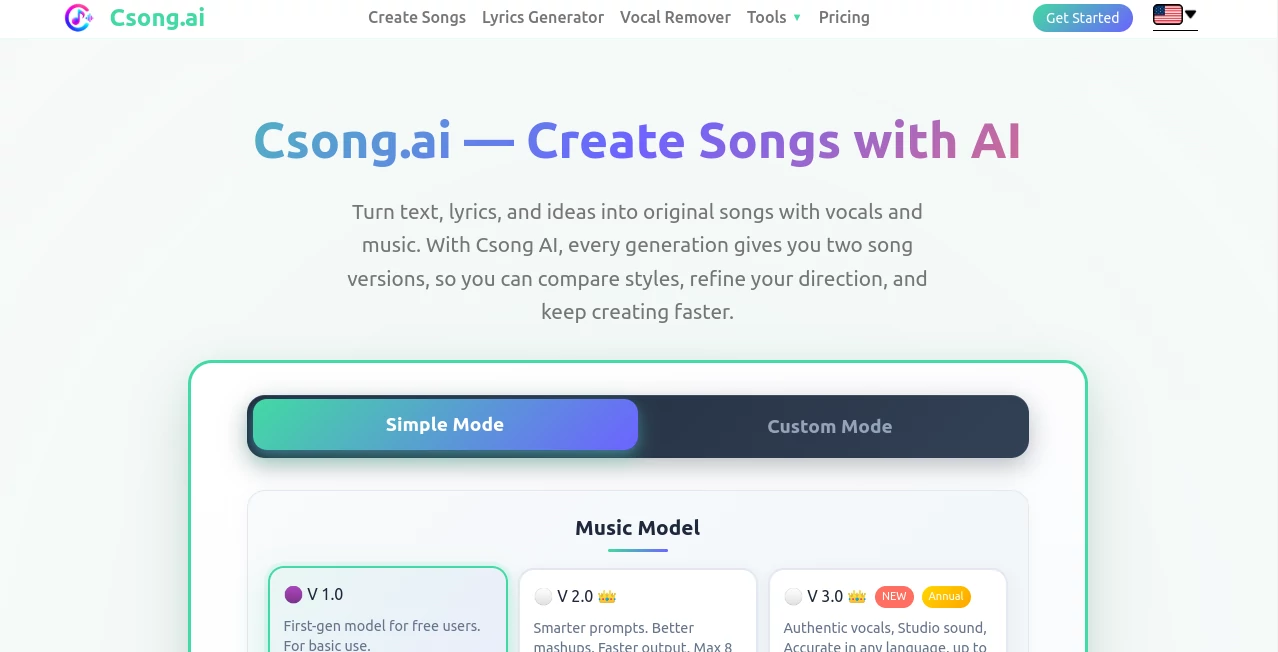
The dashboard is clean and inviting. You have two main modes — Simple for quick ideas and Custom for more control over lyrics, genre, mood, tempo, and voice style. A big prompt box, smart toggles, and a prominent generate button make it easy to jump in. After generation, the two versions appear side by side so you can listen and compare immediately. Everything stays intuitive, whether you’re making your first song or your hundredth.
Accuracy & Performance
The model captures your intent remarkably well. Give it a mood and style, and both versions feel like they belong to the same creative direction while offering meaningful differences. Vocals are natural, instrumentals sit nicely in the mix, and the overall production quality is high enough for demos, social content, or even commercial use on annual plans. Generation is fast, and each run gives you genuine options instead of slight variations of the same thing.
Capabilities
You can create songs from text prompts or your own lyrics, generate instrumentals only, extend existing tracks, remove vocals, convert audio to MIDI, and even turn songs into music videos. The platform includes a built-in lyrics generator and supports sharing public links. Downloads come in MP3 for quick sharing and WAV for higher-quality production work. It’s a full creative loop in one place rather than a single-purpose generator.
Security & Privacy
Your prompts and generated songs stay under your control. The platform doesn’t train on user content without permission, and commercial licensing is available for those who need it. For creators who want to experiment freely before sharing or publishing, the privacy approach feels respectful and secure.
Use Cases
A songwriter struggling with a chorus generates two versions and instantly hears which melody works better. A content creator needs background music for a video and quickly gets an instrumental that perfectly matches the vibe. A musician turns rough lyrics into a polished demo to send to collaborators. An educator creates custom songs to help students remember concepts. The flexibility makes it useful for hobbyists, professionals, and everyone in between who wants to turn ideas into audible music fast.
Pros and Cons
Pros:
- Two song versions per generation — real creative choice instead of one lucky dip.
- Strong vocal quality and coherent instrumentals that feel produced.
- Connected tools (extend, vocal remover, MIDI, video) keep you in the same workflow.
- Clear MP3 and WAV exports for easy sharing and further editing.
- Fast enough to maintain creative flow without long waits.
Cons:
- Free tier has limited generations, which is understandable for quality output.
- Very experimental or highly specific prompts can still need refinement.
- Some advanced features like commercial licensing are on annual plans.
Pricing Plans
Free access lets you try the platform and generate several songs to feel the quality. Paid plans unlock more generations, higher-quality models, WAV downloads, commercial use rights on annual subscriptions, and access to connected tools without restrictions. The pricing is straightforward and scales with how seriously you want to use it, with lifetime credit options available for flexible creators.
How to Use Csong
Go to the main generator, choose Simple mode for quick experiments or Custom mode if you have lyrics or specific direction. Write your prompt or paste lyrics, select style/mood if desired, and hit generate. Listen to both versions side by side, pick your favorite, and download in MP3 or WAV. From there you can extend the track, remove vocals, create a music video, or start a new variation. The whole process stays fast and enjoyable, letting you focus on creativity rather than technical hurdles.
Comparison with Similar Tools
Many AI song generators give you one output and leave you hoping it works. Csong’s two-version approach gives immediate options and better iteration. While some tools focus only on quick fun, this one supports a fuller creative workflow with exports, extensions, and connected tools. It feels more like a practical music companion than a novelty generator, especially for creators who want usable results they can build on.
Conclusion
Making music should feel exciting, not frustrating. This platform removes many of the usual barriers and gives you real creative choice from the very first generation. Whether you’re writing songs for fun, content, demos, or commercial projects, it delivers quality, speed, and flexibility that keeps the joy of music-making alive. If you’ve ever wished you could hear your ideas come to life faster, this is worth trying — it might just become your new favorite creative tool.
Frequently Asked Questions (FAQ)
How many songs do I get per generation?
Every generation gives you two complete song versions to compare.
Can I use my own lyrics?
Yes — Custom mode lets you paste lyrics and guide the style and mood.
Do I get MP3 and WAV downloads?
Yes — MP3 for quick sharing and WAV for higher-quality production (on paid plans).
Is commercial use allowed?
Annual plans include commercial licensing for your generated songs.
Can I extend or edit the songs later?
Yes — built-in tools let you extend tracks, remove vocals, create videos, and more.
AI Text to Music , AI Lyrics Generator , AI Music Generator , AI Voice & Audio Editing .
These classifications represent its core capabilities and areas of application. For related tools, explore the linked categories above.

Csong Alternatives Product

Flow Song

Mp3ToMidi
sam tts
Qwen3 TTS
PureMIDI

Audio Convert

MakeBPM

Seedance 2.0…

MusicGPT AI