

















Echoryte
What is Echoryte?
Echoryte is an AI-powered transcription platform designed to turn audio and video recordings into clean, searchable text without making users wrestle with complicated workflows. Upload a recording and the service produces a transcript with word-level timestamps, speaker separation, and tools for reviewing the original audio alongside the text.
What makes the approach particularly useful is that transcription is treated as the beginning rather than the end of the process. Once a recording has been converted, users can edit the text, create subtitles, translate it, generate summaries, extract action items, or export the finished material for another workflow. The platform supports more than 40 languages and provides 400 one-time credits to verified new accounts without requiring a payment card.
Key Features
- Word-level timestamps that connect individual words to their exact position in the recording.
- Automatic speaker separation for interviews, meetings, conversations, and other multi-person recordings.
- AI-generated summaries, chapters, and action items based on the transcribed recording.
- Translation with the original and translated text kept synchronized with the audio.
- Subtitle creation in SRT and WebVTT formats.
- Exports to Word, PDF, TXT, subtitles, CSV, and JSON.
- Support for common audio and video formats including MP3, WAV, M4A, AAC, FLAC, OGG, MP4, MOV, MKV, WEBM, and AVI.
- Automatic language detection in most recordings, with manual language selection available when working with noisy or mixed-language audio.
User Interface
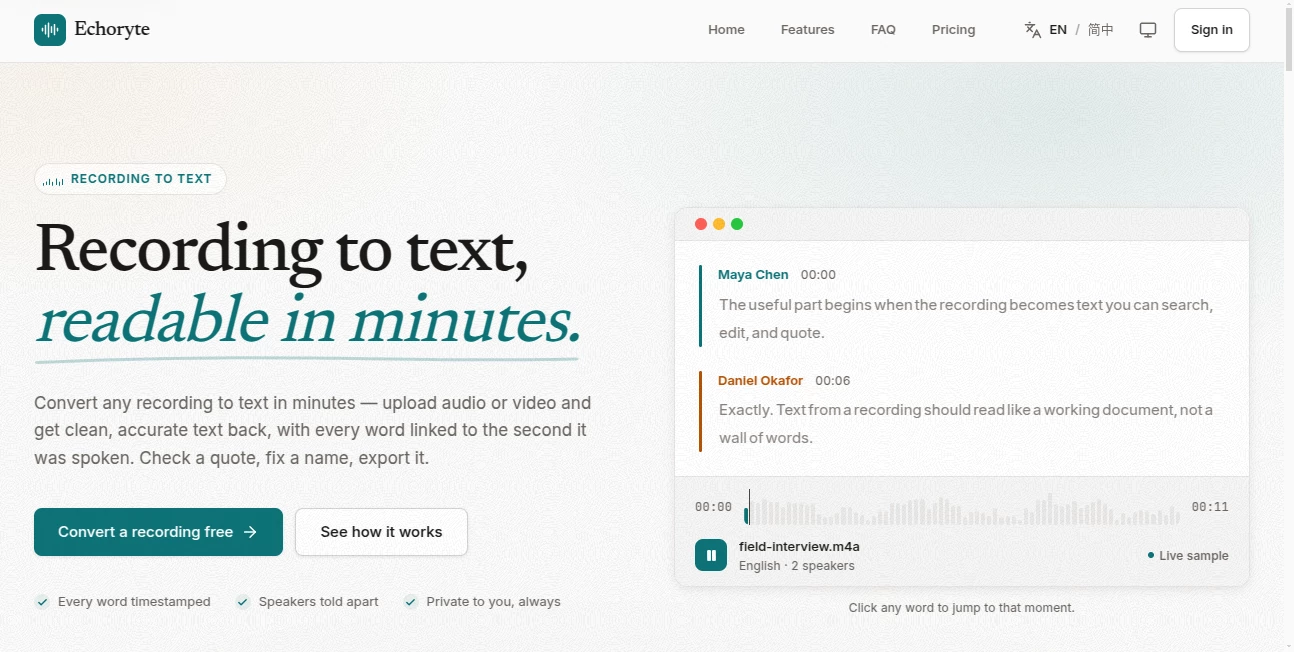
The interface is built around a practical transcription editor rather than a complicated collection of menus. After uploading a file, the recording and its transcript can be reviewed together, making it easy to check names, quotes, terminology, or individual sections.
A particularly handy touch is the ability to click a word and jump directly to that moment in the recording. For journalists checking a quotation or a student revisiting a lecture, this can save a surprising amount of time.
Accuracy & Performance
Clear recordings are where the transcription system performs best, producing readable text while retaining timing information and speaker distinctions. The platform states that a one-hour recording typically takes only a few minutes to process, while shorter files can be completed in seconds.
As with any automatic transcription system, difficult audio can reduce accuracy. Background noise, overlapping conversations, and heavy music can make recognition harder. Instead of pretending this problem does not exist, the platform's timestamp-based workflow gives users a straightforward way to verify questionable passages against the source recording.
Capabilities
The platform goes well beyond basic speech-to-text conversion. A single recording can become a transcript, subtitle file, translated document, summary, set of action items, or collection of chapters without requiring the recording to be uploaded repeatedly.
For content creators, this means one podcast or video can provide material for captions, articles, show notes, and social content. Researchers can search through field recordings, while educators can turn lectures into study material. Meeting participants can also use the generated text to review decisions and identify follow-up tasks.
Security & Privacy
Privacy is presented as a core part of the service. Recordings and their transcripts are private by default and are not published, shared, or used to train models. Trial recordings are tied to the user's browser rather than exposed through public links and are automatically removed after 24 hours.
Users can also delete individual recordings or their entire account. Deleted saved recordings remain in the trash for 30 days before permanent removal, giving users a short recovery window if something is deleted accidentally.
Use Cases
- Journalism: Convert interviews into searchable transcripts and quickly verify quotations by jumping back to the exact audio moment.
- Meetings: Create readable records of calls and discussions, then identify decisions and action items.
- Education: Turn lectures and seminars into searchable study documents that can be reviewed at the user's own pace.
- Podcasts: Transform episodes into transcripts, subtitles, summaries, and additional written content.
- Video Creation: Generate subtitle files and reuse spoken content across different formats.
- Research: Analyze interviews and field recordings while maintaining a direct connection between findings and the original recording.
- Accessibility: Provide text and captions for people who prefer reading rather than listening.
Pros and Cons
Pros:
- Word-level timestamps make transcript verification quick.
- Speaker separation is useful for conversations and interviews.
- Supports more than 40 languages.
- Includes transcription, summaries, translation, and subtitles in one workflow.
- Large selection of export formats.
- 400 free welcome credits are available after account verification.
- No payment card is required to start.
- Recordings are private by default.
Cons:
- Very noisy recordings and heavy speaker overlap can affect transcription quality.
- The free credits are a one-time allowance rather than a recurring monthly quota.
- Users working with particularly long or frequent recordings may need a paid plan.
Pricing Plans
The service offers a free starting option with 400 one-time credits for verified accounts. These credits can be used across transcription, AI notes, and translation, with no credit card required.
The Pro plan costs $15 per month and includes 1,500 credits, equivalent to approximately 5.5 hours of audio. It supports files up to 10 hours, allows up to 50 files at a time, and adds precision accuracy and queue-free processing. A yearly subscription is available for $144, representing a 20% saving compared with paying monthly for a year.
Another useful aspect of the pricing model is that processing is charged according to the seconds actually processed rather than rounding recordings up to an entire hour. When the credit balance runs out, processing pauses rather than quietly generating an unexpected charge.
How to Use Echoryte
- Create an account and verify your email to receive the 400 welcome credits.
- Upload an audio or video recording in a supported format.
- Let the service process the recording and generate the transcript.
- Review the transcript while listening to the original recording.
- Click individual words to jump directly to their position in the audio when verification is needed.
- Correct names, terminology, or other details in the transcript.
- Generate subtitles, summaries, chapters, action items, or translations when needed.
- Export the finished material in the format required for your next workflow.
Comparison with Similar Tools
Many transcription products focus primarily on converting speech into text. This platform takes a more verification-focused approach by connecting the transcript closely to the source recording. Word-level timestamps and clickable audio references are especially useful when the exact wording matters.
It also combines several tasks that are often handled by separate services. Transcription, speaker identification, translation, summaries, action items, and subtitle creation can all be handled from the same recording. For users who regularly move from raw recordings to finished written content, that consolidated workflow can be more convenient than switching between multiple applications.
Conclusion
For anyone who regularly works with recordings, the real value here is not simply getting a transcript. It is having a working document that remains connected to the original audio or video. That makes checking quotations, correcting names, finding important moments, and reusing spoken content considerably easier.
The combination of word-level timestamps, speaker separation, multilingual transcription, subtitles, translation, and AI-assisted summaries gives the platform a broad range of practical uses. The generous one-time free allowance also makes it easy to test the workflow on real recordings before deciding whether a paid plan is worthwhile.
Frequently Asked Questions (FAQ)
What audio and video formats are supported?
Supported formats include MP3, WAV, M4A, AAC, FLAC, and OGG for audio, as well as MP4, MOV, MKV, WEBM, and AVI for video.
How long does transcription take?
A one-hour recording usually takes only a few minutes to process, while shorter recordings can be completed in seconds. Longer files can continue processing in the background.
Does it identify different speakers?
Yes. The transcription system can separate multiple speakers so conversations are easier to read. Speaker labels can also be renamed within the transcript.
Does it support multiple languages?
Yes. More than 40 languages are supported, with automatic language detection available in most situations. Users can manually select a language for noisy or mixed-language recordings.
Can I create subtitles?
Yes. Transcripts can be converted into SRT and WebVTT subtitle files, with timing information retained from the original recording.
Can the transcript be translated?
Yes. Translation is available directly from the transcript, with the original and translated versions kept synchronized with the recording.
Is there a free option?
Yes. Verified new accounts receive 400 one-time credits without requiring a credit card. The credits can be used for transcription, AI features, and translation.
Are recordings private?
Recordings are private by default and are not published, shared, or used to train models. Users can export or delete their recordings whenever they choose.
AI Translate , AI Summarizer , AI Transcription , AI Speech to Text .
These classifications represent its core capabilities and areas of application. For related tools, explore the linked categories above.

Echoryte Alternatives Product
YT Video Sum…
SubtitleGene…

SlideStorm AI

Chrome Sidek…

Seedance 2.5

AutoDub

Fine Voice
Voza Transcr…

SkipBait
