
EIMG AI
What is EIMG AI?
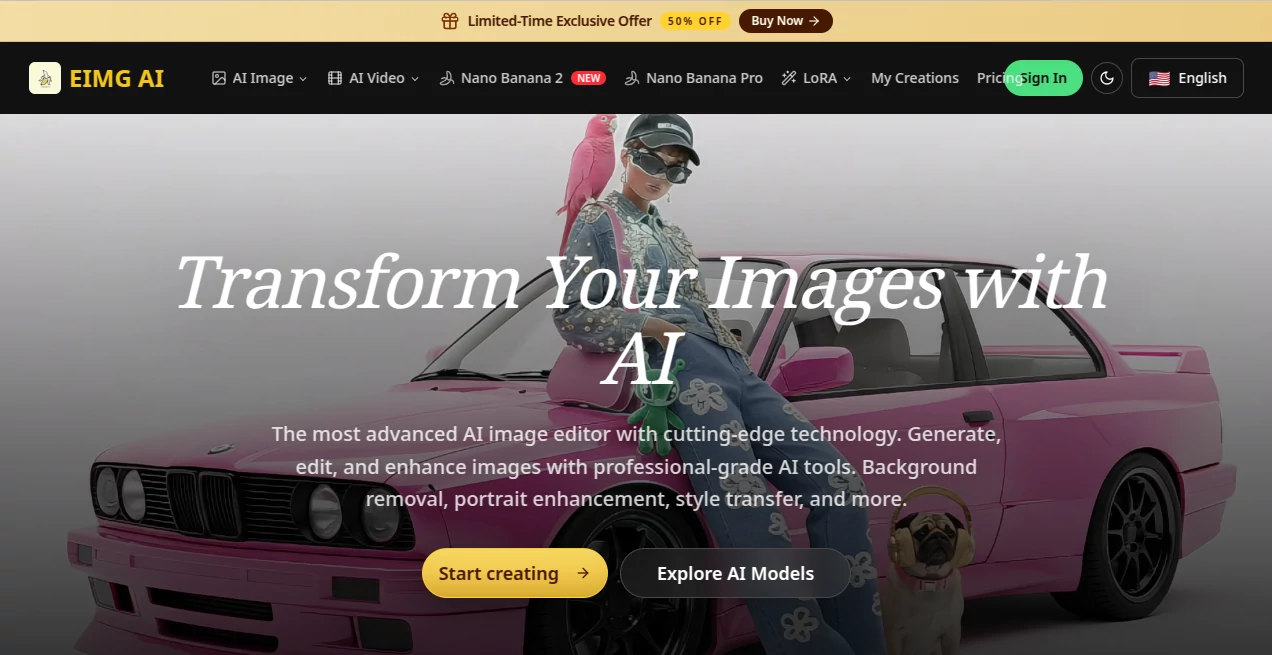
Creating impressive visuals no longer requires years of design experience or complicated editing software. This platform combines AI-powered image generation, intelligent editing, enhancement, and creative transformation in a single online workspace. Whether you want to generate artwork from text, improve portraits, replace backgrounds, or redesign existing images, everything happens in just a few clicks.
One of its biggest strengths is how naturally it fits different creative workflows. Designers can produce concept art faster, marketers can create campaign visuals without hiring a full production team, online sellers can improve product photography, and content creators can experiment with unique artistic styles. Instead of forcing users to switch between multiple applications, the platform offers a unified environment where every editing task feels connected.
The service also focuses on speed without sacrificing quality. Images are generated within seconds while preserving fine details, realistic lighting, and consistent compositions. Combined with support for multiple AI models and commercial usage options, it becomes a practical solution for both personal creativity and professional production.
Key Features
User Interface
The interface is clean and beginner-friendly. Text prompts, image uploads, editing tools, and generation history are organized logically, making it easy to start creating immediately. Everything runs directly in the browser, so there is no software installation or complicated setup process.
- Browser-based image generation and editing.
- Simple prompt-driven workflow.
- Supports image upload for editing.
- Generation history for easy project management.
- Multiple AI models available from one dashboard.
Accuracy & Performance
The platform delivers high-resolution results with impressive consistency. Character details, lighting, textures, and composition remain stable across many creative tasks. Fast processing makes experimentation enjoyable because users can quickly generate several variations before selecting the final version.
- Fast AI image generation.
- Professional-quality outputs.
- Stable scene consistency.
- High-detail image enhancement.
- Supports various image formats and aspect ratios.
Capabilities
The collection of creative tools covers far more than simple text-to-image generation. Users can edit existing images, restore damaged photos, apply artistic styles, create anime avatars, improve portraits, remove backgrounds, modify objects, and even prepare professional product photography for e-commerce stores.
- Text-to-image generation.
- Image-to-image editing.
- Background removal and replacement.
- Portrait enhancement.
- Style transfer.
- Object editing.
- Image restoration.
- Anime avatar generation.
- Virtual try-on experiences.
- E-commerce product photo enhancement.
Security & Privacy
The service includes private generation options for eligible plans and publishes clear policies regarding user content, subscriptions, refunds, and responsible AI usage. It also enforces restrictions against harmful or misleading content while allowing users to create images for commercial purposes under supported plans.
Use Cases
- Design marketing graphics for advertising campaigns.
- Create unique social media visuals.
- Generate concept art for creative projects.
- Improve product photos for online stores.
- Restore old or damaged photographs.
- Create professional profile pictures.
- Produce custom anime avatars.
- Design promotional banners and posters.
- Generate illustrations for presentations and blogs.
- Create visual assets for business branding.
Pros and Cons
- Pros
- Very easy for beginners.
- Multiple AI image tools in one platform.
- Fast processing speed.
- Professional image quality.
- Commercial usage supported on eligible plans.
- No installation required.
- Supports image editing and generation together.
- Cons
- Some advanced features require paid credits.
- Heavy users may consume credits quickly.
- Internet connection is required because all processing is online.
Pricing Plans
A free experience is available for exploring the platform, while paid subscription plans provide larger credit allowances, private generation, commercial usage rights, watermark removal, and access to additional AI capabilities. Pricing scales from individual creators to professionals with higher production needs.
How to Use EIMG AI
Start by creating an account and selecting either image generation or image editing. Enter a detailed text prompt or upload an existing picture. Choose the desired AI model, adjust any available settings, and generate the result. If needed, continue refining the image with editing tools until it matches your creative vision. Once satisfied, download the finished image for personal or commercial use according to your plan.
Comparison with Similar Tools
Compared with many online AI image editors, this platform stands out by combining image generation, enhancement, restoration, style transfer, background editing, portrait improvement, and specialized creative workflows inside one environment. Instead of focusing on a single feature, it offers a broader toolkit that reduces the need to switch between different services. Its responsive interface, fast rendering speed, and wide range of editing capabilities make it particularly attractive for creators who regularly produce visual content.
Conclusion
Finding an AI image platform that balances quality, speed, and simplicity can be challenging, but this solution manages to deliver all three. Its combination of intelligent editing, creative generation, professional enhancement tools, and browser-based accessibility makes it suitable for creators of every skill level. Whether building marketing assets, improving product photography, designing artwork, or experimenting with creative ideas, it provides a reliable workspace that helps turn imagination into polished visuals within minutes.
Frequently Asked Questions (FAQ)
Can beginners use this platform?
Yes. The interface is designed for users with little or no editing experience.
Can I generate images from text prompts?
Yes. Text-to-image generation is one of its primary capabilities.
Does it support editing existing images?
Yes. Users can upload images for enhancement, background replacement, restoration, style transfer, and object modification.
Can generated images be used commercially?
Commercial usage rights are available on supported subscription plans.
Does it work without downloading software?
Yes. Everything operates directly in a modern web browser.
AI Photo & Image Generator , Photo & Image Editor , AI Background Remover , AI Image to Image .
These classifications represent its core capabilities and areas of application. For related tools, explore the linked categories above.

EIMG AI Alternatives Product
Pixfy AI

Gualele
Blur & Unblu…
gemini water…
Change-BG

Banana Pro

NanoEditor

Nano Banana …

Muse Image