


















Fish Audio
What is Fish Audio?
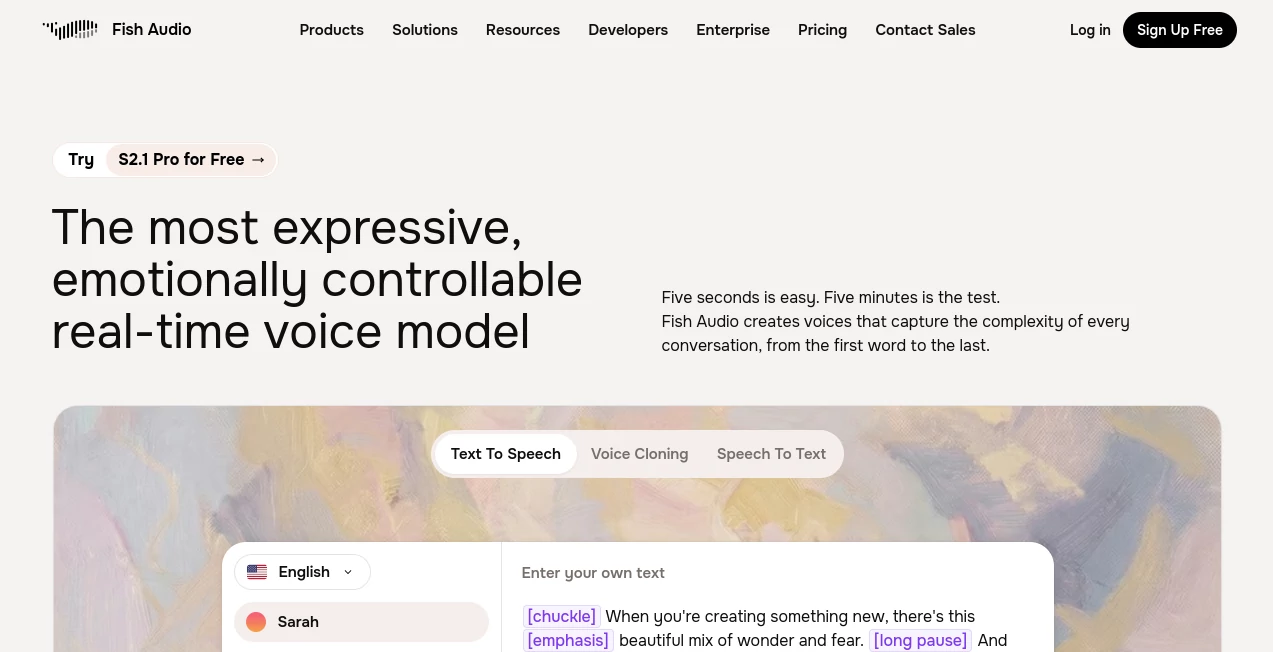
Fish Audio is a modern voice AI platform built for people who want generated speech to sound expressive rather than flat or mechanical. It brings together text-to-speech, voice cloning, speech-to-text, voice changing, audio translation, and other audio-focused tools in one place.
What makes the platform particularly interesting is the amount of control it gives users over how a voice sounds. Instead of simply entering text and accepting a generic reading, users can guide delivery with emotion and performance tags such as whispering, excited, sad, angry, laughing, sighing, or pausing. This makes it much more practical for storytelling, character work, video narration, and conversational applications.
The voice library is another major attraction. The platform currently lists more than two million voices, giving creators a large selection of styles and personalities to explore. For someone producing several types of content, that variety can make it much easier to find a voice that fits the project rather than forcing every video, audiobook, or advertisement into the same sound.
Key Features
- Natural-sounding text-to-speech generation for content and applications.
- AI voice cloning from a short reference recording.
- Voice generation with emotional and performance controls.
- More than two million voices available through its voice library.
- Support for more than 30 languages with voice generation.
- Speech-to-text capabilities for transcription workflows.
- Voice changing for transforming recorded speech.
- Real-time voice streaming for interactive applications.
- Voice APIs for developers building products and agents.
- Python and TypeScript SDK support for development workflows.
- Audio translation and audio separation tools.
- Story-focused tools for longer-form narration and audiobook production.
User Interface
The interface is designed around a straightforward workflow: choose a voice, enter text, adjust the desired delivery, and generate audio. The live generation area makes experimenting with different voices and expressions relatively simple, while the voice library gives users a practical way to browse existing options.
The controls are especially useful for creators who care about delivery. Emotion tags and special performance instructions can be inserted into scripts, allowing the same sentence to feel calm, dramatic, excited, hesitant, or conversational. That small layer of control can make a noticeable difference when producing narration.
Accuracy & Performance
Speech quality is one of the strongest parts of the platform. Its current voice technology is designed to preserve natural pacing, tone, and expressive detail instead of producing speech that sounds like a basic automated reader.
Voice cloning is also designed to work with relatively short recordings. The platform states that a short sample can be enough to create a voice clone, while its newer voice technology is designed for low-latency and real-time applications. Its developer documentation also supports streaming through WebSocket connections, making it suitable for applications where waiting for a complete audio file is inconvenient.
For developers, the API supports both speech generation and voice cloning, with audio output available in formats such as WAV, MP3, and Opus. The available controls also make it possible to build applications where voice characteristics are part of the user experience rather than simply an output format.
Capabilities
The platform covers a surprisingly broad range of voice-related tasks. A YouTube creator can turn a finished script into narration, while an audiobook producer can generate longer passages with controlled pacing and emotion. Game developers can create character voices, and companies can use natural speech in conversational agents and customer-support systems.
Its multilingual functionality is another useful capability. A single voice can be used across supported languages, which is particularly valuable for creators who publish the same material for international audiences. The combination of cloning, multilingual generation, and expressive controls opens up possibilities for localization without recording every version from scratch.
Developers can also integrate the technology directly into their own applications. REST endpoints, SDKs, and real-time streaming options make it possible to use generated voices inside websites, apps, voice agents, and automated production pipelines.
Security & Privacy
Voice cloning deserves careful consideration because a voice can be personally identifiable. Users should only clone voices they have the necessary permission to use and should consider applicable laws, disclosure requirements, and the rights of the person whose voice is being reproduced.
For organizations with stricter operational requirements, the enterprise offering includes features such as zero data retention and on-premise deployment. This can be important for teams handling sensitive material or operating under specific data-residency and compliance requirements.
Use Cases
- YouTube and video narration: Turn written scripts into polished voiceovers without arranging recording sessions.
- Audiobooks: Create long-form narration with different voices, pacing, and expressive delivery.
- Podcasts: Produce narration, introductions, character segments, or supplementary audio.
- Games: Develop distinctive character voices for interactive experiences.
- Animation: Experiment with character performances before committing to professional recording.
- Advertising: Produce voiceovers for advertisements, explainers, and promotional campaigns.
- Voice agents: Add natural speech to customer-support bots and conversational applications.
- Education: Convert written learning material into spoken lessons and accessible audio content.
- Localization: Create versions of content in multiple supported languages.
- Software development: Add speech generation and voice interaction directly to applications through APIs.
Pros and Cons
Pros
- Strong focus on expressive and natural-sounding speech.
- Large library of available voices.
- Short audio samples can be used for voice cloning.
- Useful emotion and performance controls.
- Supports multilingual voice generation.
- Offers both a web-based workflow and developer APIs.
- Real-time streaming is available for interactive applications.
- Free access is available for users who want to test the technology.
Cons
- Commercial usage rights depend on the selected plan and voice.
- Voice cloning requires users to pay close attention to consent and usage rights.
- Large production workloads can require a paid subscription or API budget.
- The number of available controls may take some experimentation for first-time users.
Pricing Plans
A free tier is available at no monthly cost and currently includes 8,000 monthly credits, generation of up to seven minutes, and up to 500 characters per generation. The free tier does not require a credit card, making it useful for testing the service before committing to a paid plan.
The Plus plan is listed at $15 per month on monthly billing, with a lower effective price when billed annually. It includes 250,000 monthly credits, up to 200 minutes of generation, longer input limits, additional voice slots, priority generation, and commercial usage.
The Pro plan is listed at $100 per month on monthly billing, or a lower effective annual price. It provides two million monthly credits, up to 1,620 minutes of generation, three team seats, longer generation limits, unlimited voice slots, and additional professional voice slots.
For larger production teams, the Max plan is listed at $999 per month on monthly billing and includes 25 million monthly credits, up to 6,250 minutes of generation, ten team seats, and additional professional voice slots. Enterprise pricing is customized and can include organization-level controls, zero data retention, on-premise deployment, and compliance-oriented options.
Developers can also use a separate pay-as-you-go API. Current documentation lists TTS pricing at $15 per one million UTF-8 bytes for the S2 Pro and S1 models, while speech recognition is priced at $0.36 per processed audio hour. API concurrency increases with prepaid spending thresholds, with enterprise limits available for larger workloads.
How to Use the Tool
- Create an account and open the voice generation workspace.
- Select an existing voice from the library or create a voice clone using an appropriate reference recording.
- Enter the script you want to convert into speech.
- Use emotion or performance tags when you want a specific delivery.
- Generate the audio and listen to the result.
- Adjust the script, voice, or performance instructions if the delivery does not match your intended style.
- Download the finished audio or integrate generation into your application through the API.
Comparison with Similar Tools
There are several strong AI voice platforms available today, but this solution has a particular advantage for users who want expressive control alongside voice cloning and developer access. Some competing services focus heavily on straightforward text-to-speech, while others are primarily designed around voice agents or professional dubbing.
The combination of a large community voice library, short-sample cloning, multilingual generation, emotion tags, real-time streaming, and API access gives it a broad target audience. A creator who only needs occasional narration may find the free tier sufficient for experimentation, while developers can move toward API-based workflows as their requirements grow.
The best choice ultimately depends on the project. Someone looking for a simple narration tool may prioritize ease of use and pricing, whereas a developer building an interactive voice application may care more about latency, SDKs, streaming, and API controls. For creators who want all of these elements under one platform, this is a particularly compelling option.
Conclusion
AI voice generation has moved well beyond simply reading text aloud, and this platform is a good example of that shift. Its combination of expressive speech, voice cloning, multilingual generation, a large voice library, and developer tools makes it useful across content creation and software development.
The strongest reason to try it is the level of control available to creators. A voice can be selected for a specific personality, adjusted for emotional delivery, and reused across different projects. Developers can take the same underlying capabilities further by integrating speech into their own applications and conversational systems.
For anyone producing videos, audiobooks, games, podcasts, educational content, advertisements, or voice-powered software, it offers a practical way to experiment with professional-style synthetic voices without building an entire audio production workflow from scratch.
Frequently Asked Questions (FAQ)
What is this AI voice platform used for?
It can be used for text-to-speech, voice cloning, speech-to-text, voice changing, narration, audiobooks, character voices, advertisements, conversational agents, and other audio production tasks.
Can I clone a voice with a short recording?
Yes. The service is designed to create voice clones from short reference recordings. Its voice cloning materials state that around ten seconds of clean speech can be enough for the process, although better recordings can help when a highly expressive voice needs to be reproduced.
Does it support multiple languages?
Yes. The platform supports more than 30 languages for voice generation, and its voice technology is designed for multilingual use, allowing creators to produce localized content without recording every language manually.
Is there a free plan?
Yes. The free tier currently provides 8,000 monthly credits, up to seven minutes of generation, and up to 500 characters per generation. It is intended for testing and personal, non-commercial use.
Can developers integrate the voice technology into an app?
Yes. Developers can use REST APIs, Python and TypeScript SDKs, and WebSocket streaming to integrate speech generation and voice capabilities into applications, voice agents, and other software products.
AI Voice Changer , AI Voice Cloning , AI Speech Recognition , AI Speech Synthesis .
These classifications represent its core capabilities and areas of application. For related tools, explore the linked categories above.

Fish Audio Alternatives Product

AI Voice Clo…

Maestra
SpeechGen AI

Gpt Realtime…

SeedMusic 1.0

Whisper Web

Fish Voice

VideoDubber
Voicemod
