
FlowSpeech
What is FlowSpeech?
Creating natural-sounding voiceovers has traditionally required professional recording equipment, experienced voice actors, and hours of editing. Modern AI voice technology has changed that process dramatically, making high-quality audio production accessible to creators, educators, marketers, and businesses of all sizes.
This platform stands out by focusing on context rather than simple text reading. Instead of producing flat and robotic narration, it analyzes the meaning, tone, and emotional intent behind a script to generate speech that feels remarkably authentic. The result is audio that sounds engaging, expressive, and suitable for professional projects ranging from audiobooks to marketing campaigns.
Whether you need a single narrator, multiple speakers for conversations, or quick voice generation for content production, the platform offers a streamlined workflow designed to save time while maintaining excellent audio quality.
Key Features
User Interface
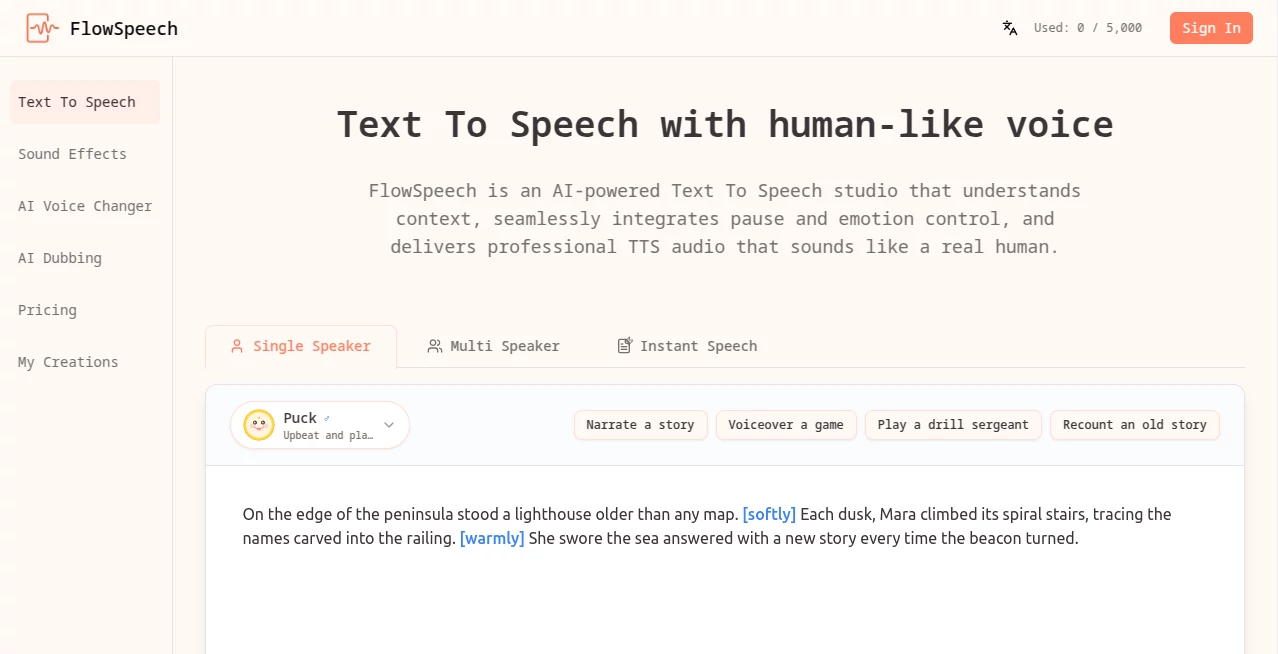
The interface is clean and approachable, allowing users to start generating audio with minimal learning time. Scripts can be entered directly into the editor or imported from documents and supported file formats. Navigation is straightforward, making it suitable for beginners while still providing advanced controls for experienced creators.
Voice selection, speech customization, emotion controls, and export options are organized logically, reducing the complexity often associated with professional audio tools.
Accuracy & Performance
One of the strongest aspects of the platform is its context-aware speech generation. Instead of reading text word by word, the system interprets sentence structure, emotional cues, and pacing requirements to deliver more natural results.
The platform supports long-form content generation with large character limits, making it practical for extensive projects such as audiobooks, training materials, educational courses, and serialized content.
Audio generation is fast, and the quality remains consistent across short announcements, lengthy narrations, and multi-speaker conversations.
Capabilities
- Human-like AI voice generation
- Context-aware emotion delivery
- Custom emotion and accent controls
- Precise pause management for timing adjustments
- Single-speaker and multi-speaker modes
- Support for more than 70 languages
- Over 30 voice options across multiple styles
- Document and image text extraction for voice conversion
- Audiobook narration capabilities
- Video voiceover production
- Podcast and storytelling support
Security & Privacy
Security and privacy remain important considerations for creators handling business documents, educational materials, or proprietary content. The platform is designed to process uploaded text and files efficiently while providing a secure environment for audio generation.
Organizations working with sensitive scripts can benefit from a cloud-based workflow that eliminates the need to share content across multiple editing tools and external production services.
Use Cases
- Creating professional video voiceovers for YouTube and social media content
- Producing audiobooks from novels, articles, and educational materials
- Generating multilingual marketing content for international audiences
- Developing podcast episodes with multiple speakers
- Building training and e-learning materials
- Creating narration for presentations and corporate communications
- Producing character dialogue for storytelling projects
- Converting written content into accessible audio formats
A content creator, for example, can upload a script, assign different voices to dialogue sections, add emotional cues where needed, and generate production-ready narration without opening a separate audio editing application.
Pros and Cons
Pros
- Highly natural and expressive voice generation
- Advanced emotion and pause controls
- Support for numerous languages
- Multiple voice styles for different content types
- Multi-speaker conversation support
- Handles long-form projects efficiently
- Accepts various document formats and image uploads
- User-friendly workflow suitable for beginners and professionals
Cons
- Premium features require a paid subscription
- Voice customization options may be more extensive than some users initially need
- Internet access is required for cloud-based processing
Pricing Plans
The platform offers a flexible pricing structure that accommodates different user needs.
- Free Plan: Includes monthly usage credits for testing and occasional projects.
- Basic Plan: Suitable for creators producing regular voice content.
- Pro Plan: Designed for professionals and growing teams with larger production requirements.
- Scale Plan: Intended for businesses and high-volume content operations.
The availability of a free tier makes it easy for new users to explore the technology before committing to a subscription.
How to Use FlowSpeech
Getting started is straightforward and requires only a few steps.
- Select a generation mode based on your project.
- Paste text or upload a supported document.
- Choose a voice that matches your desired style.
- Add optional emotion tags, accents, or pause controls.
- Generate the audio.
- Review the result and make refinements if necessary.
- Export the finished voiceover for use in your project.
This workflow allows users to move from written content to polished audio in a matter of minutes.
Comparison with Similar Tools
Many text-to-speech platforms focus primarily on voice generation speed. What makes this solution particularly compelling is its emphasis on contextual understanding and emotional delivery.
While standard TTS systems often require significant editing to achieve natural pacing, this platform includes built-in controls for pauses, accents, and emotional expression. The combination of multi-speaker automation, extensive language support, and document-based workflows creates a more complete production environment than many basic voice generation tools.
For creators who value realism and storytelling quality, these features can significantly reduce post-production work while improving listener engagement.
Conclusion
High-quality voice production no longer requires a recording studio or extensive technical expertise. By combining context-aware speech generation, expressive voice controls, multilingual support, and flexible content workflows, this platform offers a practical solution for modern audio creation.
Its ability to generate lifelike narration, manage multiple speakers, and process long-form content makes it an excellent choice for educators, marketers, podcasters, publishers, and content creators seeking professional results with minimal effort.
For anyone looking to transform written content into compelling audio, this platform delivers an impressive balance of quality, control, and ease of use.
Frequently Asked Questions (FAQ)
What makes the generated voices sound natural?
The system analyzes context, tone, sentiment, and pacing to create speech that resembles human narration rather than simple text reading.
Can it create conversations with multiple speakers?
Yes. Multi-speaker functionality automatically identifies dialogue and assigns suitable voices to different speakers.
How many languages are supported?
The platform supports more than 70 languages, making it suitable for international content creation.
Can documents be converted directly into audio?
Yes. Users can upload supported document formats and convert their contents into spoken audio without manual transcription.
Is it suitable for commercial projects?
It is designed for professional use cases including marketing, education, publishing, content creation, and business communications.
AI Text to Speech , AI Voice & Audio Editing , AI Speech Synthesis , AI Voice Assistants .
These classifications represent its core capabilities and areas of application. For related tools, explore the linked categories above.

FlowSpeech Alternatives Product

Chatterbox T…

Free GPT IMG

PolyBuzz

HappyHorse

Seedance 2.5

Gpt Realtime

Seed Audio

Elispeak

Gpt Realtime…