Flux 3
What is Flux 3?
Creating professional visuals no longer requires advanced design skills or expensive software. This AI-powered image generation platform makes it possible to transform simple text prompts or reference images into detailed, high-resolution artwork within seconds. Whether you're designing marketing graphics, social media content, concept art, product images, or creative illustrations, the experience is designed to be fast, intuitive, and enjoyable.
The platform combines powerful image generation with intelligent editing capabilities. Instead of manually selecting layers or masking objects, users simply describe the changes they want in natural language. The system understands context, preserves important visual elements, and delivers polished results with impressive consistency. Beginners can start creating immediately, while experienced designers benefit from advanced controls and high-quality exports suitable for commercial work.
Key Features
- Generate high-resolution AI images from text prompts.
- Transform existing images with natural language instructions.
- Create images up to 4K resolution.
- Support for multiple aspect ratios.
- Image-to-image editing workflow.
- Photo restoration and enhancement tools.
- AI-powered image upscaling.
- Style transfer for creative artwork.
- Batch editing for multiple images.
- Commercial usage support for generated content.
- Cloud-based platform with no installation required.
User Interface
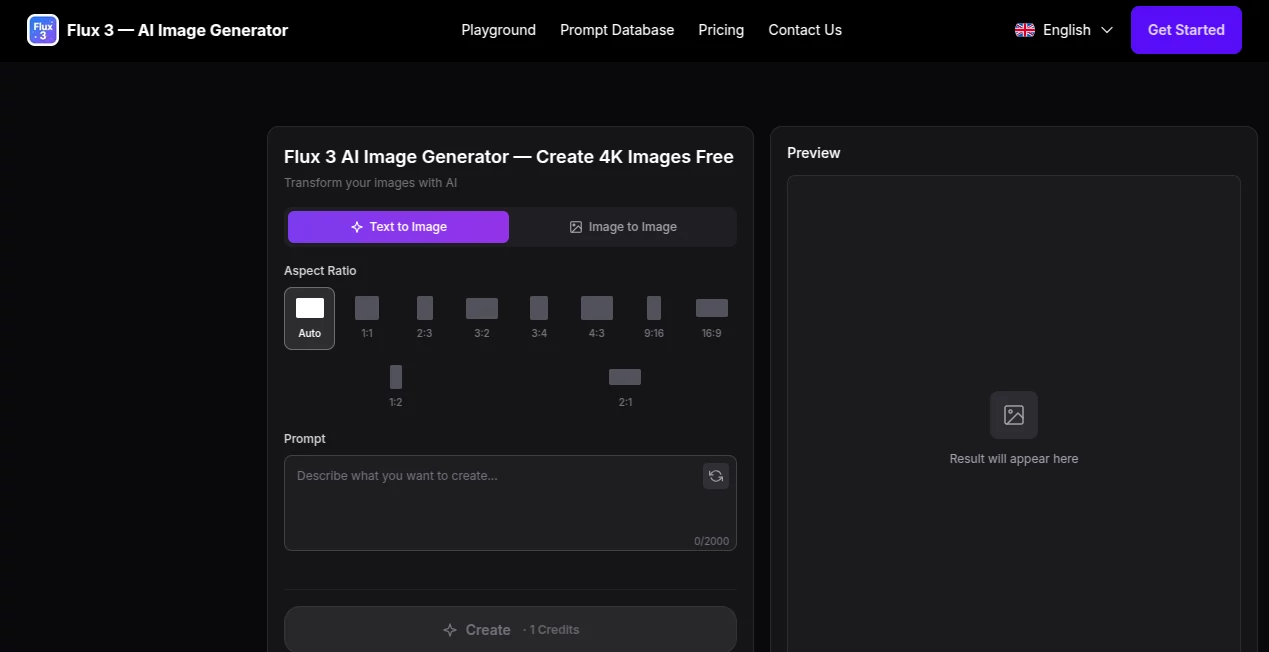
The interface focuses on simplicity without sacrificing flexibility. Users can either upload an image or enter a prompt directly from the homepage, choose an aspect ratio, and generate artwork in only a few clicks. The layout is clean, making navigation effortless even for first-time visitors. Helpful prompt examples and visual demonstrations make it easier to discover creative possibilities without feeling overwhelmed.
Accuracy & Performance
The rendering engine produces detailed visuals while maintaining strong prompt adherence. It understands scene composition, lighting, textures, and object relationships surprisingly well, allowing complex instructions to translate into convincing results. Generation is fast, and the editing workflow preserves important details instead of replacing the entire image, making revisions significantly more efficient.
Capabilities
This platform supports far more than basic text-to-image generation. Users can restore damaged photos, upscale low-resolution images, replace backgrounds, apply artistic styles, improve image quality, create realistic portraits, generate product visuals, and experiment with creative concepts. These capabilities make it useful for designers, marketers, photographers, entrepreneurs, educators, and digital artists alike.
Security & Privacy
Since everything runs in the browser, there is no software installation or local configuration required. Uploaded content is processed through cloud infrastructure, providing a convenient workflow across desktop and mobile devices. Commercial licensing for downloaded images makes the platform suitable for business projects, advertising campaigns, presentations, and digital products.
Use Cases
- Create marketing banners and promotional graphics.
- Generate social media content.
- Produce product images for e-commerce stores.
- Create concept art for games and films.
- Restore and colorize historical photographs.
- Upscale low-quality images.
- Design book covers and posters.
- Create profile pictures and avatars.
- Generate illustrations for blogs and websites.
- Develop visual assets for presentations and business materials.
Pros and Cons
Pros
- Very easy to learn.
- Produces detailed 4K-quality images.
- Natural language image editing saves significant time.
- Supports both image creation and enhancement.
- Commercial usage is available.
- Runs entirely in the browser.
Cons
- Advanced features require a paid subscription.
- Free usage includes limited credits.
- Complex prompts may require several iterations for perfect results.
Pricing Plans
A free plan allows new users to experiment with image generation using starter credits. Paid subscriptions provide larger monthly credit allocations, faster generation speeds, higher image limits, advanced editing features, commercial licensing, priority processing, and access to premium capabilities designed for creators and professional teams.
How to Use Flux 3
- Open the online image generator in your browser.
- Type a detailed prompt or upload a reference image.
- Select your preferred aspect ratio.
- Generate the image.
- Refine the result using text-based editing instructions if needed.
- Download the finished image in high resolution.
Comparison with Similar Tools
Compared with many AI image generators, this platform emphasizes both creation and editing in a single workflow. Instead of requiring complicated editing software after generation, users can continue improving their artwork through conversational instructions. The combination of prompt accuracy, realistic rendering, high-resolution output, image restoration, and enhancement features makes it particularly attractive for creators who want an efficient all-in-one solution rather than switching between multiple applications.
Conclusion
For anyone looking to generate impressive visuals without investing hours in traditional graphic design software, this platform offers a compelling solution. It balances speed, image quality, ease of use, and creative flexibility remarkably well. Whether you're producing marketing assets, personal artwork, product photography, or social media content, it delivers a streamlined creative workflow that helps transform ideas into polished visuals within minutes.
Frequently Asked Questions (FAQ)
Can beginners use this platform?
Yes. Its straightforward interface and natural language prompts make it suitable for users with little or no design experience.
Can I upload my own images?
Yes. Existing images can be uploaded for editing, enhancement, restoration, or style transformation.
Does it support commercial projects?
Yes. Commercial usage is available for generated images according to the platform's licensing terms.
Does it require software installation?
No. Everything operates directly from a modern web browser.
Can it improve old or low-quality photos?
Yes. Built-in restoration, enhancement, and upscaling features help improve image quality while preserving important details.
AI Photo & Image Generator , Photo & Image Editor , AI Photo Enhancer , AI Text to Image .
These classifications represent its core capabilities and areas of application. For related tools, explore the linked categories above.

Flux 3 Alternatives Product

GPT Imagine

tryon.ink
![FLUX.2 [max] Image Generator - AI image generator with prompt gallery and production-ready editing workflows.](/media_submitaitools/telegram/flux2max.app-favicon.webp)
FLUX.2 [max]…

PhotoEditorAI

AI Interior …

Z-Image Free

SeeDream 4.5

BatchRemover

SuperAI