Glif
What is Glif?
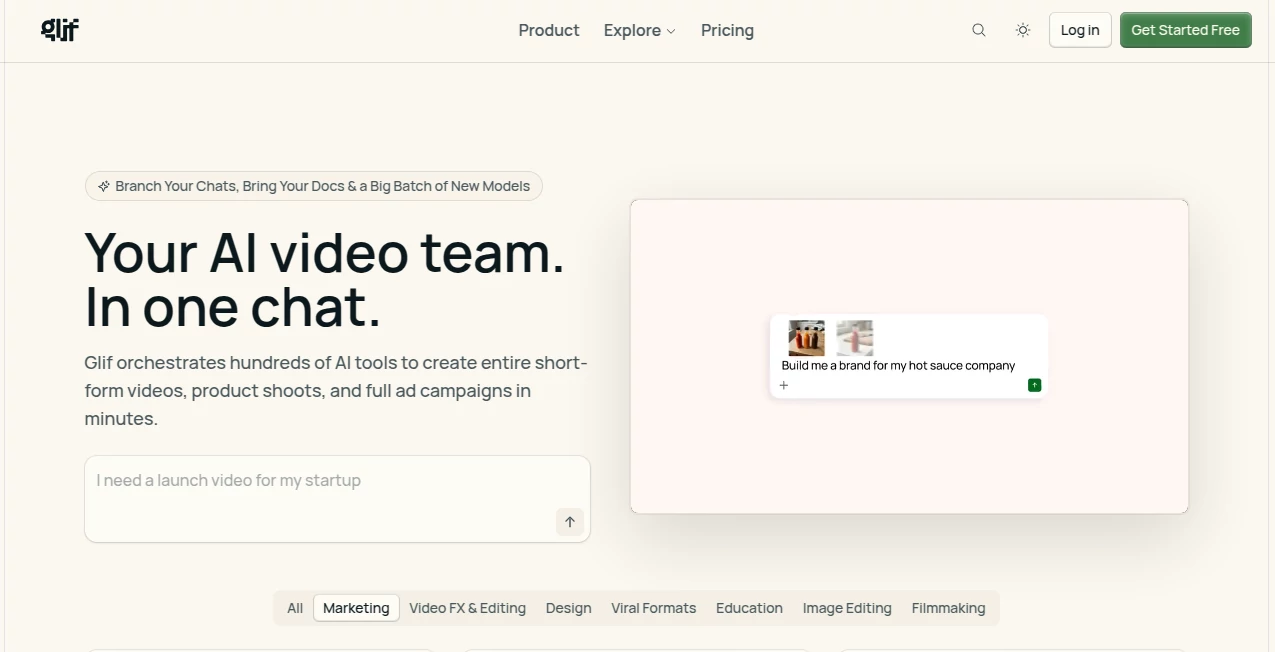
Glif is a creative AI platform that allows users to build, share, and explore AI-powered mini applications through simple visual workflows. Designed for creators, designers, developers, and curious experimenters, it turns ideas into interactive AI experiences without requiring traditional programming skills.
The platform focuses on making AI creation accessible and playful. Users can combine different AI models, prompts, images, text, and automation steps to create unique tools for personal projects, content creation, experimentation, and digital storytelling. Whether someone wants to generate creative visuals, build a custom assistant, or prototype an AI concept, this platform provides a flexible environment to bring those ideas to life.
Instead of forcing users into complicated development processes, it offers a more approachable way to work with artificial intelligence. Many creators use it as a creative playground where they can quickly test concepts, improve workflows, and discover new possibilities with generative technology.
Key Features
User Interface
The interface is built around simplicity and creativity. Users can create AI workflows by connecting different components together, making the experience feel closer to designing a visual project rather than writing code.
The clean workflow system helps beginners understand how AI applications are structured while still giving experienced users enough flexibility to experiment with advanced ideas. The community-driven approach also makes discovering new creations easier, as users can explore projects built by others and adapt concepts for their own needs.
Accuracy & Performance
The platform is designed to deliver fast results by combining modern AI models with customizable workflows. Performance depends on the selected models and the complexity of each project, but users can adjust prompts and settings to improve output quality.
Creators benefit from the ability to test multiple approaches quickly. Instead of spending hours building a traditional prototype, they can refine an idea through rapid experimentation and iteration.
Capabilities
This platform supports a wide range of creative AI applications. Users can create image generators, text-based tools, interactive experiments, content assistants, and other custom AI experiences.
- Create custom AI-powered mini applications
- Build workflows using visual components
- Experiment with generative image and text models
- Develop creative prototypes without coding
- Share and discover community-made AI projects
- Customize prompts and AI behaviors
- Explore new ways to combine AI tools
Security & Privacy
Privacy and security depend on how users create and share their projects. Users should review available settings when handling sensitive information and avoid adding confidential data into public workflows.
The platform encourages responsible experimentation by giving creators control over their projects and how they interact with the wider community.
Use Cases
The flexibility of this platform makes it useful for many different types of users. Content creators can build custom tools for generating ideas, visuals, or marketing materials. Designers can experiment with new creative concepts, while developers can use it as a fast prototyping environment.
- Creating AI-powered creative tools
- Building prototypes before full development
- Generating marketing and social media content
- Exploring AI art and visual experiments
- Designing personalized productivity workflows
- Learning how AI applications work
- Creating interactive experiences for audiences
Pros and Cons
Pros
- Easy way to experiment with AI without programming knowledge
- Supports creative and unusual AI projects
- Encourages rapid prototyping and testing
- Community-driven discovery of new ideas
- Flexible workflow creation system
Cons
- Advanced projects may require understanding of AI concepts
- Output quality can vary depending on selected models and prompts
- Users handling sensitive information need to manage privacy carefully
Pricing Plans
The platform offers access options designed for different types of users, from casual creators exploring AI experiments to advanced users building more complex projects. Available features and usage limits may vary depending on the selected plan.
Users interested in exploring AI creation can start with available free options and upgrade when they need additional capabilities, higher usage limits, or expanded functionality.
How to Use Glif
Getting started is simple. Users can create an account, explore existing community projects, or begin building their own AI workflow from scratch. The visual creation process allows users to combine different steps, adjust instructions, test results, and improve their projects over time.
- Create an account and access the creation environment
- Choose a workflow idea or explore existing projects
- Add AI components and customize instructions
- Test generated results and refine settings
- Share creations or continue improving them
Comparison with Similar Tools
Compared with traditional AI platforms that focus on a single function, this solution provides a broader creative environment where users can design their own AI experiences. Many similar tools offer ready-made features, but this approach gives creators more freedom to combine ideas and build customized solutions.
It is especially appealing for users who enjoy experimentation and want more control over how AI tools are created rather than simply using existing applications.
Conclusion
For anyone interested in exploring the creative side of artificial intelligence, this platform provides an exciting way to transform ideas into working AI experiences. Its combination of visual building, community inspiration, and flexible experimentation makes it a valuable option for creators, innovators, and anyone curious about the future of AI-powered tools.
Whether you are developing a new concept, creating digital content, or simply exploring what AI can do, this platform offers a practical and enjoyable environment for turning imagination into interactive projects.
Frequently Asked Questions (FAQ)
What can users create with this platform?
Users can create AI-powered mini applications, creative workflows, image and text generation tools, and experimental AI projects.
Do I need coding experience to use it?
No. The platform is designed to help users create AI experiences through visual workflows, making it accessible for beginners as well as experienced creators.
Is it useful for professional creators?
Yes. Designers, marketers, developers, and content creators can use it for rapid prototyping, creative exploration, and workflow experimentation.
Can users share their AI creations?
Yes. Community sharing allows creators to showcase projects, discover new ideas, and learn from other users.
What category does this tool belong to?
This platform fits into AI creative development, image generation, AI application building, and AI workflow categories.
AI Photo & Image Generator , AI App Builder , AI Art Generator , AI Developer Tools .
These classifications represent its core capabilities and areas of application. For related tools, explore the linked categories above.

Glif Alternatives Product

Image2

volume shade…

Nano Banana 2

FLUX 2

Just Christm…
Designmd.fun
VexImg

Nano Banana …

claude image