GPT-IMG
What is GPT-IMG?
I’ve tried quite a few AI image tools, and most of them feel like toys — fun for five minutes until the results start looking generic or the credits run out. This one is different. It gives you serious creative power without making you jump through hoops or pay upfront just to experiment. You type a prompt, optionally drop in a reference photo, choose from strong models like GPT Image 2 or Nano Banana, and get production-ready images that actually look polished. I’ve used it to create social visuals, product mockups, and concept art, and the consistency across generations keeps surprising me in the best way.
Introduction
Creating high-quality images used to mean hiring a photographer, learning complex software, or settling for stock photos that never quite fit. GPT-IMG removes those barriers. It’s a focused, free-first AI image generator that lets you work with top models in one clean workflow. Whether you need clean product shots for an online store, artistic portraits, or creative visuals for a campaign, it delivers fast while giving you real control over style, composition, and quality. What makes it stand out is how practical it feels — no overwhelming options, just reliable results that you can actually use in real projects.
Key Features
User Interface
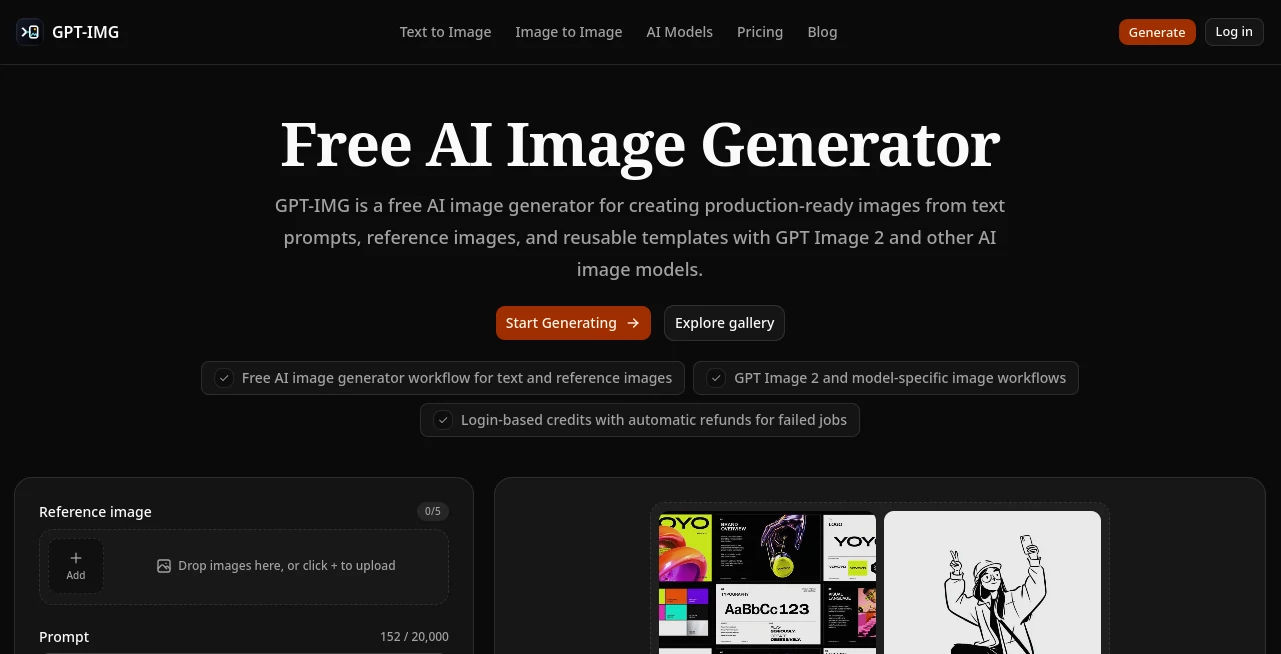
The interface is clean and purpose-built. A prominent prompt box sits front and center, with easy access to reference image upload, aspect ratio choices, and model selection. You don’t get lost in menus — everything you need is visible without feeling cluttered. Previews load quickly so you can iterate fast, and the history section lets you revisit or build on previous generations. It feels like a thoughtful workspace rather than a flashy demo.
Accuracy & Performance
The results are impressively consistent. GPT Image 2 handles detailed prompts and text rendering very well, while Nano Banana variants shine at fast iterations and reference-based edits. Images come out sharp even at higher resolutions, and the AI understands composition, lighting, and subject details without common artifacts. Generation speed stays snappy, so you can create multiple variations in one sitting and pick the strongest one.
Capabilities
You can generate from text prompts, use reference images for style transfer or controlled edits, work with reusable templates, and choose between different models depending on the job. It supports various aspect ratios and quality tiers, making it suitable for social media, e-commerce, presentations, and creative concepts. The workflow supports both quick experiments and more deliberate production work, with credit visibility so you always know the cost before generating.
Security & Privacy
Your generations and uploaded references are handled responsibly. The platform focuses on delivering great images without unnecessary data retention or sharing. Login-based credits and job history add convenience while keeping things secure for regular users.
Use Cases
A small business owner creates consistent product photos for their store without hiring a photographer. A content creator generates eye-catching thumbnails and social visuals in minutes instead of hours. A designer explores multiple concepts for a client project by rapidly iterating with different references and models. Someone making personalized gifts turns family photos into artistic portraits. It fits anywhere you need high-quality, custom visuals without the traditional time and cost barriers.
Pros and Cons
Pros:
- Access to strong models like GPT Image 2 in a clean, unified workflow.
- Excellent support for reference images and controlled edits.
- Fast generation with good consistency and detail.
- Generous free tier that lets you create real work.
- Practical features like job history and credit visibility.
Cons:
- Heavy daily use benefits from paid credits for unlimited work.
- Very complex or highly specific artistic visions may need prompt refinement.
Pricing Plans
The free tier gives you meaningful access with login-based credits and automatic refunds for failed jobs. Paid top-ups provide more flexibility and higher volume for regular users. The model is fair and transparent — you only pay for what you actually generate, making it accessible for both casual creators and professionals who rely on it regularly.
How to Use GPT-IMG
Start by typing a detailed prompt describing the image you want. Optionally upload a reference photo for style or composition guidance. Choose your preferred model, aspect ratio, and quality level. Review the credit cost, then generate. Use the history to revisit or build on previous results. Download the ones you like and iterate as needed. The workflow is fast and forgiving, encouraging experimentation while delivering usable results.
Comparison with Similar Tools
Many free image generators limit quality or add watermarks, while others hide strong models behind complicated interfaces. This platform stands out by combining accessibility, strong model choices, and practical workflow features in one place. It’s less about gimmicks and more about helping creators get reliable, production-ready images without frustration.
Conclusion
Good visuals can make or break a project, but creating them shouldn’t slow you down. This tool makes high-quality AI image generation approachable, fast, and genuinely useful for real work. Whether you’re building a brand, creating content, or just bringing ideas to life, it gives you the creative freedom and reliability that turns good ideas into polished results. If you’ve been looking for an image generator that actually feels helpful instead of experimental, this one is worth trying.
Frequently Asked Questions (FAQ)
Is it really free to use?
Yes — there’s a generous free tier with credits, and failed generations are often refunded.
Which models are available?
It includes GPT Image 2, Nano Banana variants, and other strong options for different needs.
Can I use reference images?
Absolutely — reference support is one of its strongest features for controlled results.
Are the images high resolution?
Yes, it supports up to 4K depending on the model and chosen settings.
Can I use the images commercially?
Check the specific model terms, but many outputs are suitable for commercial projects.
AI Photo & Image Generator , AI Design Generator , AI Image to Image , AI Text to Image .
These classifications represent its core capabilities and areas of application. For related tools, explore the linked categories above.

GPT-IMG Alternatives Product

imagine 2.0

Flux 2 Cloud
AI Consisten…
imagen 5

Z-Image
BootstrapKing

MuseCraft.AI

Stylize Image
AniFlow AI